
golang 查询数据库操作
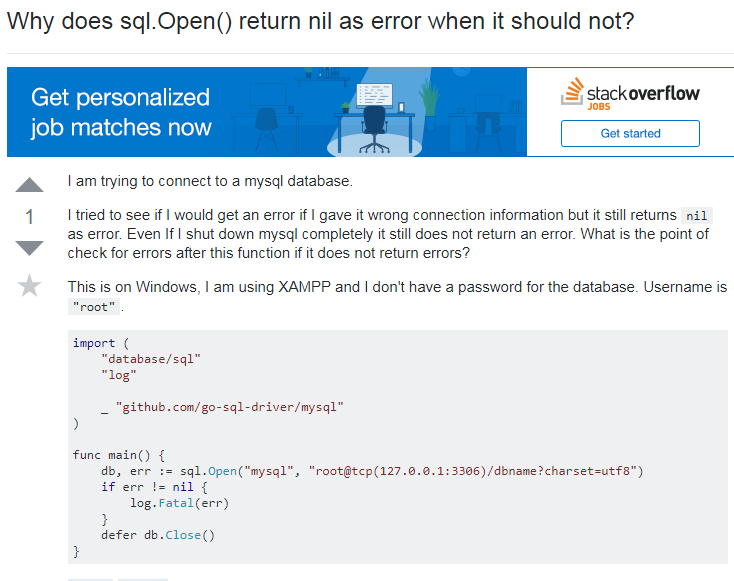
SQL.Open only creates the DB object, but dies not open any connections to the database. If you want to test your connections you have to execute a query to force opening a connection. The common way for this is to call Ping() on your DB object.
See http://golang.org/pkg/database/sql/#Open and http://golang.org/pkg/database/sql/#DB.Ping
Quoting from the doc of sql.Open():
Open may just validate its arguments without creating a connection to the database. To verify that the data source name is valid, call Ping.
As stated, Open() may not open any physical connection to the database server, but it will validate its arguments. That being said if arguments are valid, it may return nil error even if the database server is not reachable, or even if the host denoted by dataSourceName does not exist.
To answer your other question:
What is the point of check for errors after this function if it does not return errors?
You have to check returned errors because it can return errors. For example if the specified driverName is invalid, a non-nil error will be returned (see below).
To test if the database server is reachable, use DB.Ping(). But you can only use this if the returned error is nil, else the returned DB might also be nil (and thus calling the Ping()method on it may result in run-time panic):
if db, err := sql.Open("nonexistingdriver", "somesource"); err != nil {

    fmt.Println("Error creating DB:", err)

    fmt.Println("To verify, db is:", db)

} else {

    err = db.Ping()

    if err != nil {

        fmt.Println("db.Ping failed:", err)

    }

}
Output (try it on the Go Playground):
Error creating DB: sql: unknown driver "nonexistingdriver" (forgotten import?)

To verify, db is: <nil>
sql.open("postgres", "postgres://postgres:postgres/xxxx")连接数据库出错的时候,也不会报错, 很奇怪,那这种错误是怎么处理的呢?
package main

import (

	"database/sql"

	"fmt"

	_ "github.com/lib/pq"

	"log"

)

var db *sql.DB

func main() {

	defer func() {

		fmt.Println(recover())

	}()

	var ss string

	var err error

	// var err error

	if db != nil {

		db.Close()

	} else {

		db, err = sql.Open("postgres", "postgres://postgres:postgres@127.0.0.1/xinyi?sslmode=disable")

		if err != nil {

			log.Println("Can't connect to postgresql database")

		} else {

			err = db.Ping()

			if err != nil {

				fmt.Println("db.Ping failed:", err)

			}

		}

		err = db.QueryRow("select value from configs where key =$1", "line1_batch").Scan(&ss)

		if err != nil {

			log.Println("query error")

		}

		fmt.Println(ss)

	}

}
-----------------------------------------------------------------------------------------------------
https://medium.com/namely-labs/postgres-in-go-cf794adc4c52
SQL Drivers
Go’s standard library was not built to include any specific database drivers. Here is a list of available third party SQL drivers http://golang.org/s/sqldrivers .
Setup
First we will need to import the packages that our program will use.
import (
  “database/sql”
  _ “github.com/lib/pq”
)
Here, we import the “database/sql” library which provides a generic interface for working with SQL databases. The second import, _”github.com/lib/pq”, is the actual postgresql driver. The underscore before the library means that we import pq without side effects. Basically, it means Go will only import the library for its initialization. For pq, the initialization registers pq as a driver for the SQL interface.
Open
Next we will need to open the database. It is important to note that calling “Open” does not open a connection to the database. The return from “Open” is a DB type and an error. The DB type represents a pool of connections which the sql package manages for you.
db, err := sql.Open(“postgres”,”user=Arnold dbname=TotalRecall sslmode=disable”)
“Open” returns an error which validates the arguments of a database open
if err != nil {
  log.Fatal(“Error: The data source arguments are not valid”)
}
Ping
Since the error returned from “Open” does not check if the datasource is valid calling Ping on the database is required
err = db.Ping()
if err != nil {
  log.Fatal(“Error: Could not establish a connection with the database”)
}
Prepare
Once the DB has been set up, we can start safely preparing query statements. “Prepare” does not execute the statement.
queryStmt, err := db.Prepare(“SELECT name FROM users WHERE id=$1”)
if err != nil {
  log.Fatal(err)
}
QueryRow
We can now “QueryRow” off of the prepared statement and store the returned row’s first column into the “name string”. “QueryRow” only queries for one row.
var name string
err = queryStmt.QueryRow(15).Scan(&name)
In addition, a common error check is for “No Rows”. Some programs handle “No Rows” differently from other scanning errors. Errors like this are specific to the library, not Go in general.
if err == sql.ErrNoRows {
  log.Fatal(“No Results Found”)
}
if err != nil {
  log.Fatal(err)
}
You can also skip explicitly preparing your Query statements.
var lastName string
err = db.QueryRow(“SELECT last_name FROM users WHERE id=$1”, 15).Scan(&lastName)
if err == sql.ErrNoRows {
  log.Fatal(“No Results Found”)
}
if err != nil {
  log.Fatal(err)
}
Query
We can also handle a Query that returns multiple rows and stores the result into a “names” slice. In the code below you will see “rows.Next”, which moves the cursor to the next result row. If there is no next row or error preparing the next row, a false will be returned.
var names []string
rows, err := queryStmt.Query(15)
defer rows.Close()
for rows.Next() {
  var name string
  if err := rows.Scan(&name); err != nil {
    log.Fatal(err)
  }
  names = append(names, name)
}
This next check is for any errors encountered during the iteration.
err = rows.Err()
if err != nil {
  log.Fatal(err)
}
Conclusion
Golang’s standard sql package is extremely simple, yet powerful. This post covers the basics of the sql package. If you would like to learn more, visit the official docs at: http://golang.org/pkg/database/sql. Feel free to leave any comments or questions.
golang 查询数据库操作的更多相关文章
- 关于怎么C#控制台窗口中怎么创建连接查询数据库操作
首先需要新建一张表,为了测试随建了一张学生表 新建号一张表之后就可以对数据库进行操作了 列举了常用的增删改查 操作 static void Main(string[] args) { s ...
- 【转载】QT MySQL数据库操作总结
转载自http://blog.chinaunix.net/uid-28194872-id-3631462.html #include <QtSql> QT += sqlQSqlDataba ...
- Spring框架针对dao层的jdbcTemplate操作crud之query查询数据操作
查询目标是完成3个功能: (1)查询表,返回某一个值.例如查询表中记录的条数,返回一个int类型数据 (2)查询表,返回结果为某一个对象. (3)查询表,返回结果为某一个泛型的list集合. 一.查询 ...
- golang学习笔记16 beego orm 数据库操作
golang学习笔记16 beego orm 数据库操作 beego ORM 是一个强大的 Go 语言 ORM 框架.她的灵感主要来自 Django ORM 和 SQLAlchemy. 目前该框架仍处 ...
- Golang原生sql操作Mysql数据库增删改查
Golang要操作mysql数据库,首先需要在当期系统配置GOPATH,因为需要使用go get命令把驱动包下载到GOPATH下使用. 首先配置好你的GOPATH,执行以下命令,下载安装mysql驱动 ...
- SQL 2005 中查询或执行另外的数据库操作的方法
原文:SQL 2005 中查询或执行另外的数据库操作的方法 摘要: 如果,你想在一台数据库服务器上,查询另一个台数据服务器的数据该如何做呢?如果,你想在同一台数据服务器上,在不同的数据库之间查询数据, ...
- ThinkPhp框架的数据库操作(查询)
TP框架有一套自己的数据库操作的代码,包括数据库的增.删.改.查.本文主要讲解TP框架的数据库查询操作. 找到入口文件的控制器: 我这里的入口文件是Show文件夹下的控制器. 打开Login控制器. ...
- CI数据库操作_查询构造器类
=================数据库操作======================1.数据库配置: config/database.php 用户名 密码 数据库 2 加载数据库类:$this-& ...
- ThinkPHP 数据库操作(三) : 查询方法、查询语法、链式操作
查询方法 条件查询方法 where 方法 可以使用 where 方法进行 AND 条件查询: Db::table('think_user') ->where('name','like','%th ...
随机推荐
- 使用Win7 64位旗舰版光盘映像安装Windows Home basic 64位操作系统
工作当中需要安装Windows home basic 64位操作系统,苦于手头没有该版本的安装光盘,也没时间下载其安装映像.因此,在现有资源“cn_windows_7_ultimate_with_sp ...
- 数据分析师入门|Python安装MAC版
最近在学数据分析师入门课,看了大纲,感觉终于不再慌乱踩坑了,开始存档最粗暴版学习笔记,遇到停止的地方按照下文红字直接输入就OK,方便和我一样的小伙伴参考呀,老师讲的很适合我这种初学者,PUSH了很多资 ...
- scrapy增加爬取效率
增加并发: 默认scrapy开启的并发线程为32个,可以适当进行增加.在settings配置文件中修改CONCURRENT_REQUESTS = 100值为100,并发设置成了为100. 降低日志级别 ...
- cuda输出
cuda的输出就是printf 可以在屏幕上显示出来,但你修改之后一定要make编译,不然只是修改了源代码,但生成的可执行文件还是之前编译的
- 【计算机网络】2.2 Web和HTTP
第二章第二节 Web和HTTP 这一章中,我们需要讨论5种重要的应用:Web.文件传输.电子邮件.目录服务.P2P:这一节中,我们将讨论Web和它的应用层协议HTTP. Outline Web简介 H ...
- Java中List集合的遍历
一.对List的遍历有三种方式 List<String> list = new ArrayList<String>(); list.add("testone" ...
- SqlSever锁及存储过程优化
SqlSever锁及存储过程优化 SQL server的所有活动都会产生锁.锁定的单元越小,就越能提高并发处理能力,但是管理锁的开销越大.如何找到平衡点,使并发性和性能都可接受是SQL Server的 ...
- Spring Data Redis入门示例:基于Jedis及底层API (二)
使用底层API:RedisConnectionFactory和RedisConnection可以直接操作Redis,下面是一个简单的例子: ### Maven依赖 <properties> ...
- buf.swap16()
buf.swap16() 返回:{Buffer} 将 Buffer 解释执行为一个16位的无符号整数数组并以字节顺序交换到位.如果 Buffer 的长度不是16位的倍数,则抛出一个 RangeErro ...
- Python之面向对象封装
Python之面向对象封装 封装不是单纯意义的隐藏 什么是封装: 将数据放在一个设定好的盒子里,并标出数据可以实现的功能,将功能按钮外露,而隐藏其功能的工作原理,就是封装. 要怎么封装: 你余额宝有多 ...