
laravel notification
mail篇
 public function via($notifiable)

{

    return ['mail'];

}
1.新建notification类
php artisan make:notification PostNotification
2.设置路由
//notification 注意默认发送到user模型中的email邮箱账号 所以要确认user邮箱可用

Route::get('/notification',function(){

    $user = \App\User::find(1);

    $post = \App\Post::find(2);

    $user->notify(new \App\Notifications\PostNotification($post));

});
3.访问/notification 收到邮件
4.常用设置方法 PostNotification.php
 public function toMail($notifiable)

{

    return (new MailMessage)

        ->subject('A post published'.$this->post->title) //自定义主体

        ->success()  //定义按钮颜色

                ->line('The introduction to the notification.')

                ->action('Notification Action', url('/'))

                ->line('Thank you for using our application!');

}
database篇 将通知都存储在数据库里
1.修改PostNotification.php
public function via($notifiable)

{

    //return ['mail'];

    return ['database'];

}
2.创建notification迁移文件
 php artisan notifications:table

 php artisan migrate
3.PostNotification.php 中可添加 toDatabase方法 如果没写的话默认用的是toArray方法
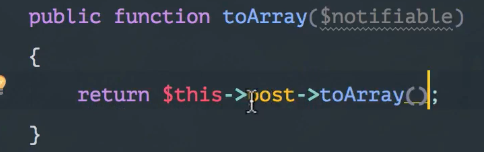
4.修改web.php
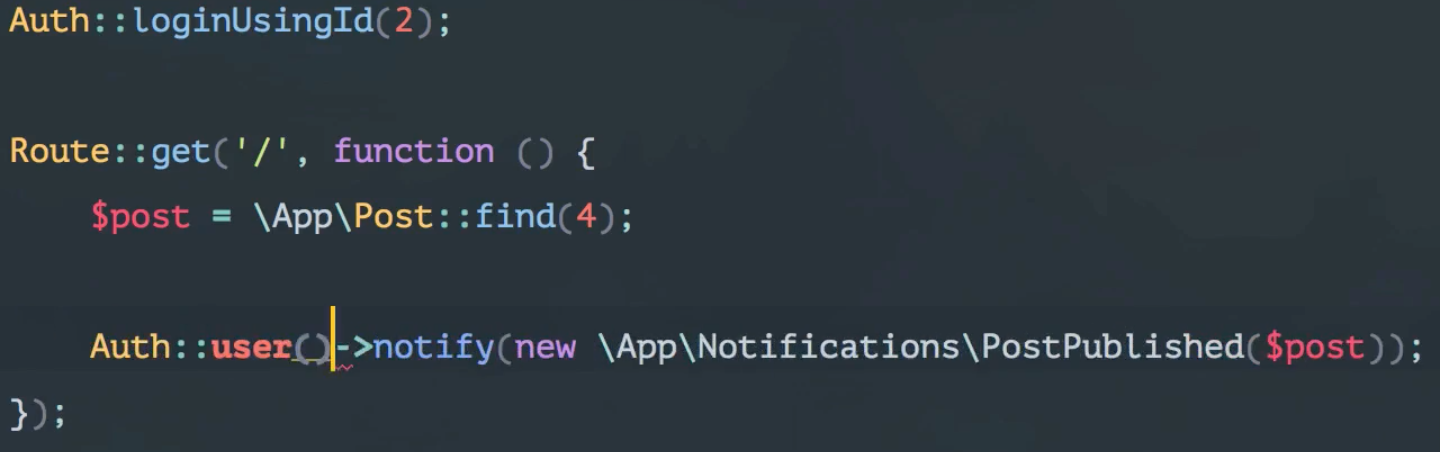
5.查看当前用户下的notifications
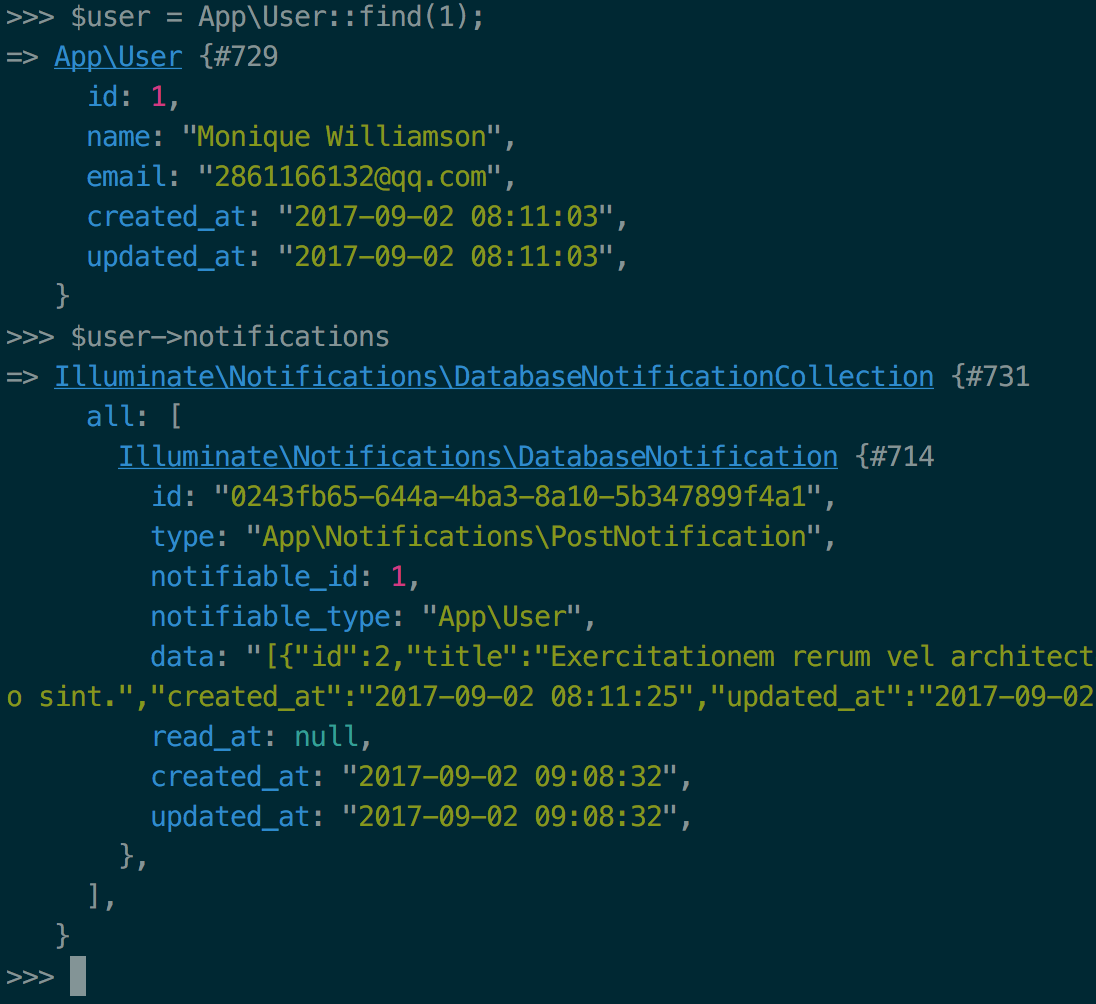
6.新建一个notification
php artisan make:notification UserSubscribe
7.UserSubscribe.php 修改如下
public function via($notifiable)

{

    return ['database'];

}

/**

 * Get the array representation of the notification.

 *

 * @param  mixed  $notifiable

 * @return array

 */

public function toArray($notifiable)

{

    return [

        'subscribed_at' => Carbon::now()

    ];

}
8.修改web.php
//notification

Route::get('/notification', function () {

    $user = \App\User::find(1);

    $post = \App\Post::find(2);

    //$user->notify(new \App\Notifications\PostNotification($post));

    $user->notify(new \App\Notifications\UserSubscribe());

});
9.再次查看当前用户的notifications
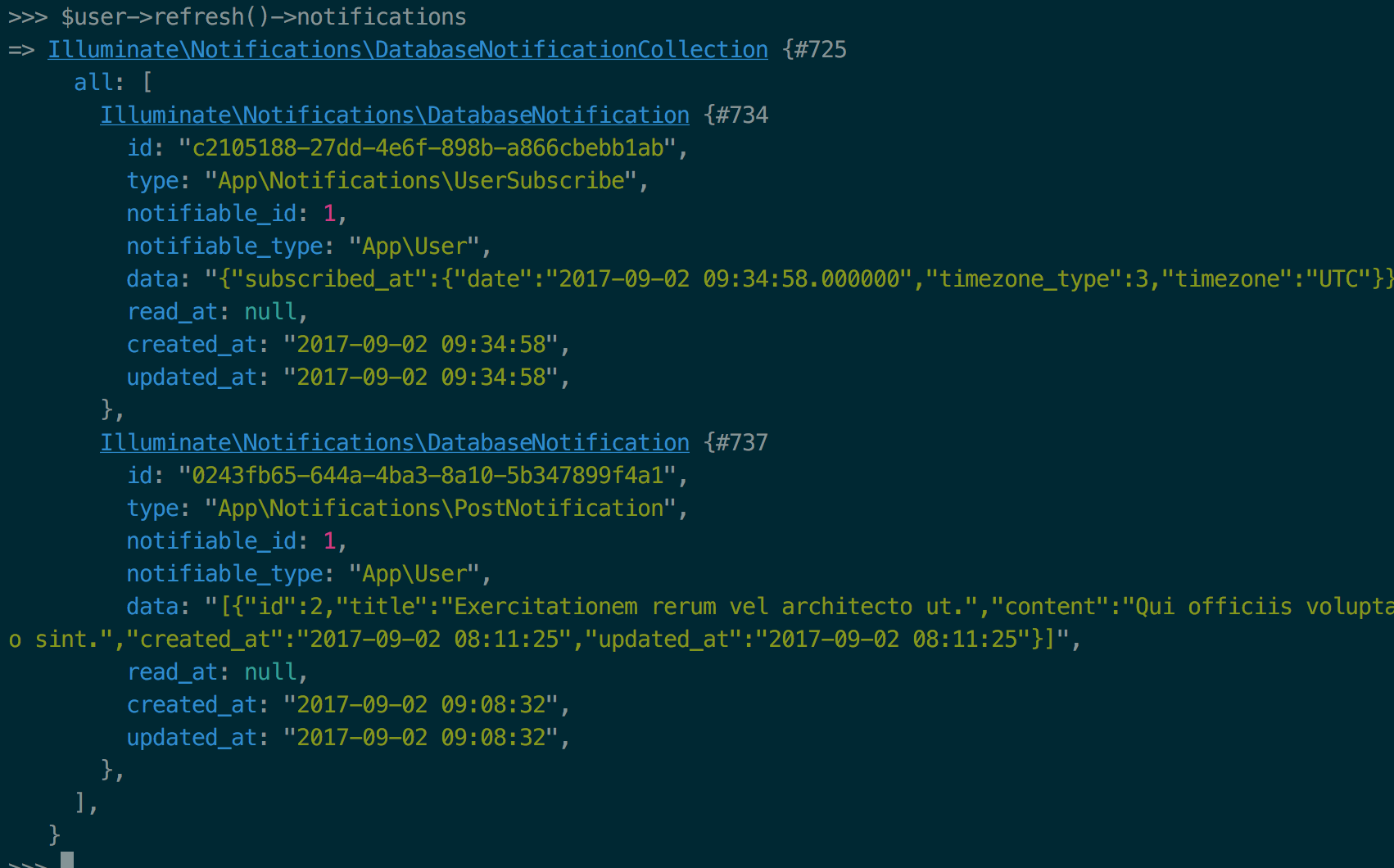
10.列出未读notifications并标识为已读
web.php
//notification

Route::get('/show-notification', function () {

    return view('notifications.index');

});

//标识未读

Route::delete('user/notification',function (){

    Auth::user()->unreadNotifications->markAsRead();

    return redirect()->back();

});
notifications.index.blade
@extends('app')

@section('content')

    <h1>我的通知:</h1>

    <ul>

    @foreach(Auth::user()->unreadNotifications as $notification)

        @include('notifications/'.snake_case( class_basename($notification->type) ))

    @endforeach

    </ul>

    <form action="/user/notification" method="POST">

        {{csrf_field()}}

        {{method_field('DELETE')}}

        <input type="submit" value="标识已读">

    </form>

@stop
user_subscribe.blade.php
<h2>user</h2>

{{$notification->data['subscribed_at']['date']}}
post_notification.blade.php
<h2>post</h2>

<li>{{$notification->data['title']}}</li>
标识某条已读
$user->refresh()->unreadNotifications->where('id','57bb0e0e-8d35-4da8-850b-121a5317c9b9')->first()->markAsRead();
总结:
database
- php artisan make:notification someNotification
- 对于需要传入的参数做修改 例如依赖模式 Post $post
- php artisan notification:table
- 获取notification $user->notifications
- 标识已读 所有的 $user->unreadNotifications->markAsRead()
单条标识:$user->refresh()->unreadNotifications->where('id','57bb0e0e-8d35-4da8-850b-121a5317c9b9')->first()->markAsRead();
laravel notification的更多相关文章
- laravel 自带消息notification通知
原文地址:https://blog.csdn.net/zhangxh1013/article/details/53130490
- [php]laravel框架容器管理的一些要点
本文面向php语言的laravel框架的用户,介绍一些laravel框架里面容器管理方面的使用要点.文章很长,但是内容应该很有用,希望有需要的朋友能看到.php经验有限,不到位的地方,欢迎帮忙指正. ...
- Laravel系列 目录结构
Where Is The Models Directory? app directory by default 其中 app:,core code of your application, almos ...
- 【转】下载量最高的 100 个 Laravel 扩展包推荐
说明 Laravel 另一个令人喜欢的地方,是拥有活跃的开发者社区,而活跃的开发者社区带来的,是繁华的扩展包生态. 本文对 Packagist 上打了 Laravel 标签 的扩展包进行整理,截止到现 ...
- get started with laravel
Browsing the API (http://laravel.com/api) can be somewhat intimidating at first.But it is often the ...
- laravel扩展包开发步骤总结
1. 创建包 php artisan workbench vendor/package --resources 注: vendor:开发商名 package:包名 2.修改下包里co ...
- 【社交系统研发日记】如何在 Laravel 中 “规范” 的开发验证码发送功能
顺便发个小通知:7月15日ThinkSNS+开源版发布,同时非开源的APP也走出内测阶段,体验二维码也全面发布体验. 什么是ThinkSNS ? ThinkSNS(简称TS),一款全平台综合性社交系统 ...
- Laravel 和 Spring Boot 两个框架比较创业篇(一:开发效率)
我个人是比较不喜欢去正儿八经的比较两个框架的,这样没有意义,不过欲善其事先利其器! 技术是相通的,但是在某个特定的领域的某个阶段肯定有相对最适合的一个工具! 这里比较不是从技术角度比较,而是从公司技术 ...
- [ Laravel 5.5 文档 ] 快速入门 —— 目录结构篇
简介 Laravel 默认的目录结构试图为不管是大型应用还是小型应用提供一个良好的起点.当然,你也可以按照自己的喜好重新组织应用的目录结构,因为 Laravel 对于指定类在何处被加载没有任何限制 — ...
随机推荐
- iOS地图----MapKit框架
1.MapKit框架使用前提 ①导入框架 ②导入主头文件 #import <MapKit/MapKit.h> ③MapKit框架使用须知 MapKit框架中所有数据类型的前缀都是MK Ma ...
- asterisk-java ami4 一些基本功能的例子
比如:挂机,拨号,拨外线,保留通话,示闲,示忙等等.... 在api中可以获得这些方法说明 /** * 给分机挂机 * @param Extension 要挂机的分机号 * @return * ...
- 4K屏选购秘诀
最近我买了一台三星4K 27.7吋显示器,经试用,虽然达到4K标准,但感觉像素精细度不够.明显达不到我的苹果笔记本视网膜屏的精细程度,事后总结一下原因:因为4K屏总的像素是3840×2160,屏越大像 ...
- Python的前世今生
放弃 拾起 放弃 拾起 最终决定好好的编写一次Python的学习笔记 人生苦短,我用Python --------------Life is short, you need Python 再不抓紧,就 ...
- 关键字搜索高亮jQuery插件
// textSearch.js v1.0 文字,关键字的页面纯客户端搜索// 2010-06-23 修复多字母检索标签破碎的问题// 2010-06-29 修复页面注释显示的问题// 2013-05 ...
- java IO流 内容整理
在java中,对数据的输入和输出操作以流的方式进行.(注:对文件的操作用io.File类,但不能对文件中的内容进行操作) 一.IO流的分类: 按数据流的方向不同,可以分为输入流和输出流: 按处理数据的 ...
- Python 函数对象-函数嵌套-名称空间与作用域-闭包函数
今日内容: 1. 函数对象 函数是第一类对象: 指的是函数名指向的值可以被当中数据去使用 1.可以被引用 2.可以当做参数传给另一个函数 3.可以当做一个函数的返回值 4.可以当做容器类型的元素 2. ...
- windows系统查看目录树
进入到需要查看的目录后,按住shift键,然后单击鼠标右键,选择“在此处打开命令窗口”,然后命令行窗口界面. 1.若是只查看该目录下有哪些目录,输入tree即可 2.若是显示该目录及其子目录下的所有目 ...
- jupyter 教程
官网: http://jupyter.org/
- 将一个list中的元素的某一属性取出来单独放到一个list里面
有很多时候我们会遇到这样的场景,就是要将一个list中的某一个元素中的某一属性单独拿出来放在一个新的list里面,这中时候,我们就可以用以下的方法来进行实现: List<DTO> item ...