
超详细 Spring @RequestMapping 注解使用技巧 (转)
@RequestMapping 是 Spring Web 应用程序中最常被用到的注解之一。这个注解会将 HTTP 请求映射到 MVC 和 REST 控制器的处理方法上。
在这篇文章中,你将会看到 @RequestMapping 注解在被用来进行 Spring MVC 控制器方法的映射可以如何发挥其多才多艺的功能的。
Request Mapping 基础用法
在 Spring MVC 应用程序中,RequestDispatcher (在 Front Controller 之下) 这个 servlet 负责将进入的 HTTP 请求路由到控制器的处理方法。
在对 Spring MVC 进行的配置的时候, 你需要指定请求与处理方法之间的映射关系。
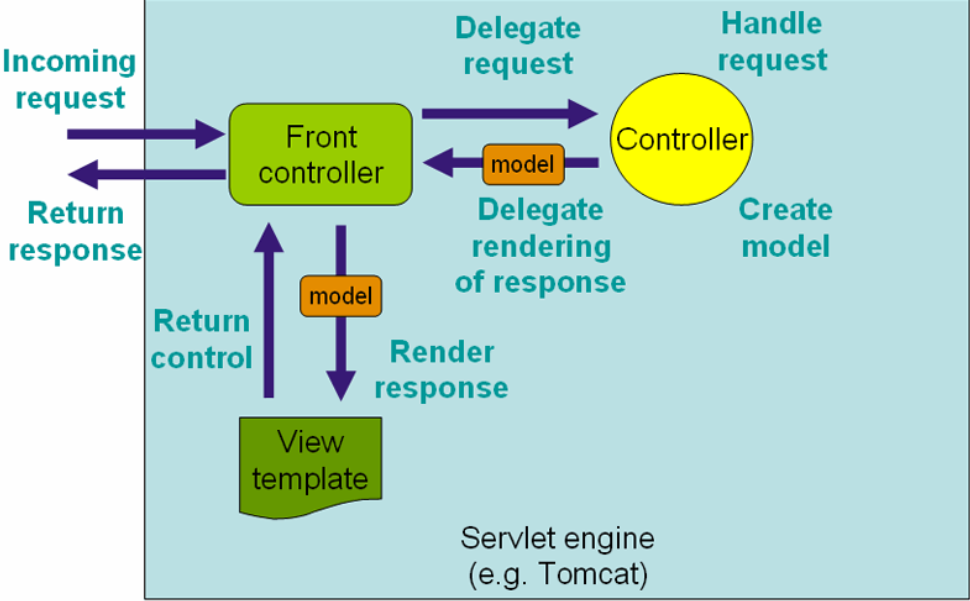
要配置 Web 请求的映射,就需要你用上 @RequestMapping 注解。
@RequestMapping 注解可以在控制器类的级别和/或其中的方法的级别上使用。
在类的级别上的注解会将一个特定请求或者请求模式映射到一个控制器之上。之后你还可以另外添加方法级别的注解来进一步指定到处理方法的映射关系。
下面是一个同时在类和方法上应用了 @RequestMapping 注解的示例:
代码
    @RestController

    @RequestMapping("/home")

    public class IndexController {

        @RequestMapping("/")

        String get() {

            //mapped to hostname:port/home/

            return "Hello from get";

        }

        @RequestMapping("/index")

        String index() {

            //mapped to hostname:port/home/index/

            return "Hello from index";

        }

    }
如上述代码所示,到 /home 的请求会由 get() 方法来处理,而到 /home/index 的请求会由 index() 来处理。
@RequestMapping 来处理多个 URI
你可以将多个请求映射到一个方法上去,只需要添加一个带有请求路径值列表的 @RequestMapping 注解就行了。
代码
    @RestController

    @RequestMapping("/home")

    public class IndexController {

        @RequestMapping(value = {

            "",

            "/page",

            "page*",

            "view/*,**/msg"

        })

        String indexMultipleMapping() {

            return "Hello from index multiple mapping.";

        }

    }
如你在这段代码中所看到的,@RequestMapping 支持统配符以及ANT风格的路径。前面这段代码中,如下的这些 URL 都会由 indexMultipleMapping() 来处理:
- localhost:8080/home
- localhost:8080/home/
- localhost:8080/home/page
- localhost:8080/home/pageabc
- localhost:8080/home/view/
- localhost:8080/home/view/view
带有 @RequestParam 的 @RequestMapping
@RequestParam 注解配合 @RequestMapping 一起使用,可以将请求的参数同处理方法的参数绑定在一起。
@RequestParam 注解使用的时候可以有一个值,也可以没有值。这个值指定了需要被映射到处理方法参数的请求参数, 代码如下所示:
代码
    @RestController

    @RequestMapping("/home")

    public class IndexController {

        @RequestMapping(value = "/id")

        String getIdByValue(@RequestParam("id") String personId) {

            System.out.println("ID is " + personId);

            return "Get ID from query string of URL with value element";

        }

        @RequestMapping(value = "/personId")

        String getId(@RequestParam String personId) {

            System.out.println("ID is " + personId);

            return "Get ID from query string of URL without value element";

        }

    }
在代码的第6行,id 这个请求参数被映射到了 thegetIdByValue() 这个处理方法的参数 personId 上。
如果请求参数和处理方法参数的名称一样的话,@RequestParam 注解的 value 这个参数就可省掉了, 如代码的第11行所示。
@RequestParam 注解的 required 这个参数定义了参数值是否是必须要传的。
代码
    @RestController

    @RequestMapping("/home")

    public class IndexController {

        @RequestMapping(value = "/name")

        String getName(@RequestParam(value = "person", required = false) String personName) {

            return "Required element of request param";

        }

    }
在这段代码中,因为 required 被指定为 false,所以 getName() 处理方法对于如下两个 URL 都会进行处理:
- /home/name?person=xyz
- /home/name
@RequestParam 的 defaultValue 取值就是用来给取值为空的请求参数提供一个默认值的。
代码
    @RestController

    @RequestMapping("/home")

    public class IndexController {

        @RequestMapping(value = "/name")

        String getName(@RequestParam(value = "person", defaultValue = "John") String personName) {

            return "Required element of request param";

        }

    }
在这段代码中,如果 person 这个请求参数为空,那么 getName() 处理方法就会接收 John 这个默认值作为其参数。
用 @RequestMapping 处理 HTTP 的各种方法
Spring MVC 的 @RequestMapping 注解能够处理 HTTP 请求的方法, 比如 GET, PUT, POST, DELETE 以及 PATCH。
所有的请求默认都会是 HTTP GET 类型的。
为了能降一个请求映射到一个特定的 HTTP 方法,你需要在 @RequestMapping 中使用 method 来声明 HTTP 请求所使用的方法类型,如下所示:
代码
    @RestController

    @RequestMapping("/home")

    public class IndexController {

        @RequestMapping(method = RequestMethod.GET)

        String get() {

            return "Hello from get";

        }

        @RequestMapping(method = RequestMethod.DELETE)

        String delete() {

            return "Hello from delete";

        }

        @RequestMapping(method = RequestMethod.POST)

        String post() {

            return "Hello from post";

        }

        @RequestMapping(method = RequestMethod.PUT)

        String put() {

            return "Hello from put";

        }

        @RequestMapping(method = RequestMethod.PATCH)

        String patch() {

            return "Hello from patch";

        }

    }
在上述这段代码中, @RequestMapping 注解中的 method 元素声明了 HTTP 请求的 HTTP 方法的类型。
所有的处理处理方法会处理从这同一个 URL( /home)进来的请求, 但要看指定的 HTTP 方法是什么来决定用哪个方法来处理。
例如,一个 POST 类型的请求 /home 会交给 post() 方法来处理,而一个 DELETE 类型的请求 /home 则会由 delete() 方法来处理。
你会看到 Spring MVC 将使用这样相同的逻辑来映射其它的方法。
用 @RequestMapping 来处理生产和消费对象
可以使用 @RequestMapping 注解的 produces 和 consumes 这两个元素来缩小请求映射类型的范围。
为了能用请求的媒体类型来产生对象, 你要用到 @RequestMapping 的 produces 元素再结合着 @ResponseBody 注解。
你也可以利用 @RequestMapping 的 comsumes 元素再结合着 @RequestBody 注解用请求的媒体类型来消费对象。
下面这段代码就用到的 @RequestMapping 的生产和消费对象元素:
代码
    @RestController

    @RequestMapping("/home")

    public class IndexController {

        @RequestMapping(value = "/prod", produces = {

            "application/JSON"

        })

        @ResponseBody

        String getProduces() {

            return "Produces attribute";

        }

        @RequestMapping(value = "/cons", consumes = {

            "application/JSON",

            "application/XML"

        })

        String getConsumes() {

            return "Consumes attribute";

        }

    }
在这段代码中, getProduces() 处理方法会产生一个 JSON 响应, getConsumes() 处理方法可以同时处理请求中的 JSON 和 XML 内容。
使用 @RequestMapping 来处理消息头
@RequestMapping 注解提供了一个 header 元素来根据请求中的消息头内容缩小请求映射的范围。
在可以指定 header 元素的值,用 myHeader = myValue 这样的格式:
代码
    @RestController

    @RequestMapping("/home")

    public class IndexController {

        @RequestMapping(value = "/head", headers = {

            "content-type=text/plain"

        })

        String post() {

            return "Mapping applied along with headers";

        }

    }
在上面这段代码中, @RequestMapping 注解的 headers 属性将映射范围缩小到了 post() 方法。有了这个,post() 方法就只会处理到 /home/head 并且 content-typeheader 被指定为 text/plain 这个值的请求。
你也可以像下面这样指定多个消息头:
代码
    @RestController

    @RequestMapping("/home")

    public class IndexController {

        @RequestMapping(value = "/head", headers = {

            "content-type=text/plain",

            "content-type=text/html"

        }) String post() {

            return "Mapping applied along with headers";

        }

    }
这样, post() 方法就能同时接受 text/plain 还有 text/html 的请求了。
使用 @RequestMapping 来处理请求参数
@RequestMapping 直接的 params 元素可以进一步帮助我们缩小请求映射的定位范围。使用 params 元素,你可以让多个处理方法处理到同一个URL 的请求, 而这些请求的参数是不一样的。
你可以用 myParams = myValue 这种格式来定义参数,也可以使用通配符来指定特定的参数值在请求中是不受支持的。
代码
    @RestController

    @RequestMapping("/home")

    public class IndexController {

        @RequestMapping(value = "/fetch", params = {

            "personId=10"

        })

        String getParams(@RequestParam("personId") String id) {

            return "Fetched parameter using params attribute = " + id;

        }

        @RequestMapping(value = "/fetch", params = {

            "personId=20"

        })

        String getParamsDifferent(@RequestParam("personId") String id) {

            return "Fetched parameter using params attribute = " + id;

        }

    }
在这段代码中,getParams() 和 getParamsDifferent() 两个方法都能处理相同的一个 URL (/home/fetch) ,但是会根据 params 元素的配置不同而决定具体来执行哪一个方法。
例如,当 URL 是 /home/fetch?id=10 的时候, getParams() 会执行,因为 id 的值是10,。对于
localhost:8080/home/fetch?personId=20 这个URL, getParamsDifferent()
处理方法会得到执行,因为 id 值是 20。
使用 @RequestMapping 处理动态 URI
@RequestMapping 注解可以同 @PathVaraible 注解一起使用,用来处理动态的 URI,URI 的值可以作为控制器中处理方法的参数。你也可以使用正则表达式来只处理可以匹配到正则表达式的动态 URI。
代码
    @RestController

    @RequestMapping("/home")

    public class IndexController {

        @RequestMapping(value = "/fetch/{id}", method = RequestMethod.GET)

        String getDynamicUriValue(@PathVariable String id) {

            System.out.println("ID is " + id);

            return "Dynamic URI parameter fetched";

        }

        @RequestMapping(value = "/fetch/{id:[a-z]+}/{name}", method = RequestMethod.GET)

        String getDynamicUriValueRegex(@PathVariable("name") String name) {

            System.out.println("Name is " + name);

            return "Dynamic URI parameter fetched using regex";

        }

    }
在这段代码中,方法 getDynamicUriValue() 会在发起到 localhost:8080/home/fetch/10 的请求时执行。这里 getDynamicUriValue() 方法 id 参数也会动态地被填充为 10 这个值。
方法 getDynamicUriValueRegex() 会在发起到
localhost:8080/home/fetch/category/shirt 的请求时执行。不过,如果发起的请求是
/home/fetch/10/shirt 的话,会抛出异常,因为这个URI并不能匹配正则表达式。
@PathVariable 同 @RequestParam的运行方式不同。你使用 @PathVariable 是为了从 URI 里取到查询参数值。换言之,你使用 @RequestParam 是为了从 URI 模板中获取参数值。
@RequestMapping 默认的处理方法
在控制器类中,你可以有一个默认的处理方法,它可以在有一个向默认 URI 发起的请求时被执行。
下面是默认处理方法的示例:
代码
    @RestController

    @RequestMapping("/home")

    public class IndexController {

        @RequestMapping()

        String

        default () {

            return "This is a default method for the class";

        }

    }
在这段代码中,向 /home 发起的一个请求将会由 default() 来处理,因为注解并没有指定任何值。
@RequestMapping 快捷方式
Spring 4.3 引入了方法级注解的变体,也被叫做 @RequestMapping 的组合注解。组合注解可以更好的表达被注解方法的语义。它们所扮演的角色就是针对 @RequestMapping 的封装,而且成了定义端点的标准方法。
例如,@GetMapping 是一个组合注解,它所扮演的是 @RequestMapping(method =RequestMethod.GET) 的一个快捷方式。
方法级别的注解变体有如下几个:
- @GetMapping
- @PostMapping
- @PutMapping
- @DeleteMapping
- @PatchMapping
如下代码展示了如何使用组合注解:
代码
    @RestController

    @RequestMapping("/home")

    public class IndexController {

        @GetMapping("/person")

        public @ResponseBody ResponseEntity < String > getPerson() {

            return new ResponseEntity < String > ("Response from GET", HttpStatus.OK);

        }

        @GetMapping("/person/{id}")

        public @ResponseBody ResponseEntity < String > getPersonById(@PathVariable String id) {

            return new ResponseEntity < String > ("Response from GET with id " + id, HttpStatus.OK);

        }

        @PostMapping("/person")

        public @ResponseBody ResponseEntity < String > postPerson() {

            return new ResponseEntity < String > ("Response from POST method", HttpStatus.OK);

        }

        @PutMapping("/person")

        public @ResponseBody ResponseEntity < String > putPerson() {

            return new ResponseEntity < String > ("Response from PUT method", HttpStatus.OK);

        }

        @DeleteMapping("/person")

        public @ResponseBody ResponseEntity < String > deletePerson() {

            return new ResponseEntity < String > ("Response from DELETE method", HttpStatus.OK);

        }

        @PatchMapping("/person")

        public @ResponseBody ResponseEntity < String > patchPerson() {

            return new ResponseEntity < String > ("Response from PATCH method", HttpStatus.OK);

        }

    }
在这段代码中,每一个处理方法都使用 @RequestMapping 的组合变体进行了注解。尽管每个变体都可以使用带有方法属性的 @RequestMapping 注解来互换实现, 但组合变体仍然是一种最佳的实践 — 这主要是因为组合注解减少了在应用程序上要配置的元数据,并且代码也更易读。
@RequestMapping 总结
如你在本文中所看到的,@RequestMapping 注解是非常灵活的。你可以使用该注解配置 Spring MVC 来处理大量的场景用例。它可以被用来在 Spring MVC 中配置传统的网页请求,也可以是 REST 风格的 Web 服务。
英文原文:Using the Spring @RequestMapping Annotation
超详细 Spring @RequestMapping 注解使用技巧 (转)的更多相关文章
- 超详细 Spring @RequestMapping 注解使用技巧
@RequestMapping 是 Spring Web 应用程序中最常被用到的注解之一.这个注解会将 HTTP 请求映射到 MVC 和 REST 控制器的处理方法上. 在这篇文章中,你将会看到 @R ...
- 超详细 SpringMVC @RequestMapping 注解使用技巧
@RequestMapping 是 Spring Web 应用程序中最常被用到的注解之一.这个注解会将 HTTP 请求映射到 MVC 和 REST 控制器的处理方法上. 在这篇文章中,你将会看到 @R ...
- Spring @RequestMapping 注解使用技巧
@RequestMapping 是 Spring Web 应用程序中最常被用到的注解之一.这个注解会将 HTTP 请求映射到 MVC 和 REST 控制器的处理方法上. 在这篇文章中,你将会看到 @R ...
- spring @RequestMapping注解技巧
@RequestMapping 是 Spring Web 应用程序中最常被用到的注解之一.这个注解会将 HTTP 请求映射到 MVC 和 REST 控制器的处理方法上. 下面我们看看,@Request ...
- Spring MVC中@RequestMapping注解使用技巧(转)
@RequestMapping是Spring Web应用程序中最常被用到的注解之一.这个注解会将HTTP请求映射到MVC和REST控制器的处理方法上. 在这篇文章中,你将会看到@RequestMapp ...
- spring: @RequestMapping注解
处理GET/POST请求方法 1.常用的: import org.springframework.web.bind.annotation.RequestMapping; @Controller pub ...
- (转)SpringMVC学习(六)——SpringMVC高级参数绑定与@RequestMapping注解
http://blog.csdn.net/yerenyuan_pku/article/details/72511749 高级参数绑定 现在进入SpringMVC高级参数绑定的学习,本文所有案例代码的编 ...
- spring mvc 注解@Controller @RequestMapping @Resource的详细例子
现在主流的Web MVC框架除了Struts这个主力 外,其次就是Spring MVC了,因此这也是作为一名程序员需要掌握的主流框架,框架选择多了,应对多变的需求和业务时,可实行的方案自然就多了.不过 ...
- Spring Boot-日志配置(超详细)
Spring Boot-日志配置(超详细) 更新日志: 20170810 更新通过 application.yml传递参数到 logback 中. Spring Boot-日志配置超详细 默认日志 L ...
随机推荐
- jQuery控制checkbox选中状态但是不显示选中
问题描述:使用jQuery来控制checkbox的选中状态,但是第一次点击出现选中样式,之后点击可以看到checked的属性增加成功但是并没有选 中状态. 问题代码: function chooseA ...
- the age of the TCP connection TCP Slow Start
w防止网络过载和拥塞 HTTP The Definitive Guide The performance of TCP data transfer also depends on the age of ...
- Yii2 里使用Redis扩展
Redis是个很不错的Nosql数据库,比Memcached的好处是能持久化数据. Yii2里使用Redis ,首先要扩展Redis.可以在composer.json 里添加 redis " ...
- 【JVM】程序调优
现实企业级Java开发中,有时候我们会碰到下面这些问题: OutOfMemoryError,内存不足 内存泄露 线程死锁 锁争用(Lock Contention) Java进程消耗CPU过高 .... ...
- openresty环境搭建问题记录
第一次在mac安装遇到如下问题: 截图: 具体code如下: Sonofelice:bch-flowrouter baidu$ brew install openresty/brew/openrest ...
- goland激活
http://blog.csdn.net/benben_2015/article/details/78725467 http://blog.csdn.net/john_f_lau/article/de ...
- bat批处理异备文件、压缩文件
1.压缩本地文件,并把压缩后的文件复制到其他机器 net use Z: \\192.168.135.1\share_linux a123456! /user:chaoqun.guo set bath= ...
- mysql 约束条件 auto_increment 自动增长 修改自增字段起始值
创建一张表 t20 mysql) ); Query OK, rows affected (0.01 sec) mysql> desc t20; +-------+----------+----- ...
- MyEclipse安装主题(Color Theme)
前段时间发现同学开发使用IDE界面相当炫酷(Mac版的IntelliJ IDEA),个人也比较喜欢那种风格的界面,想想自己MyEclipse IDE界面简直是屌丝啊~~~~ 今天上CSDN看见一篇介绍 ...
- 005-maven坐标和依赖
1.何为Maven坐标 groupId.artifactId.version.packaging.classifier 中央仓库:http://repol.maven.org/maven22.坐标详解 ...