
Selenium-Grid2 配置RemoteWebDriver
为什么要使用Selenium Grid ?
- 分布式运行大规模的Test
- 能够通过一个中央点,很容易的运行不同OS上的不同browser
- 最小化对Grid的维护时间,并能充分利用虚拟设备
Selenium Grid 部署与启动
Hub :总控节点,连接调用Node。
Node: 负责执行Tests,调用浏览器。
下面以selenium-server-standalone-2.27.0.jar版本为例:
使用这样3台机器:
- 10.81.14.170
- 10.81.14.180
- 10.81.14.190
启动Hub(10.81.14.180):
java -jar selenium-server-standalone-2.27.0.jar -role hub
在浏览器内打开:http://10.81.14.180:4444/grid/console可以查看Hub状态。也就是说Grid默认启动端口是4444,如果想切换为其他端口,则加-port参数。比如要切换为8888:
java -jar selenium-server-standalone-2.27.0.jar -role hub -port 8888
启动Node(10.81.14.170):
java -jar selenium-server-standalone-2.27.0.jar -role node -hub http://10.81.14.180:8888/grid/register
同样的,也可以使用-port切换node端口,默认端口是5555.
此处的node节点,也可以作为一个单机的远程节点存在,并同时支持RC,WebDriver。浏览器输入http://10.81.14.180:8877/wd/hub可以看到session信息。
然后,同样的启动10.81.14.180、10.81.14.190上的Node节点。
打开浏览器http://10.81.14.180:8888/grid/console,可以看到如下的界面:
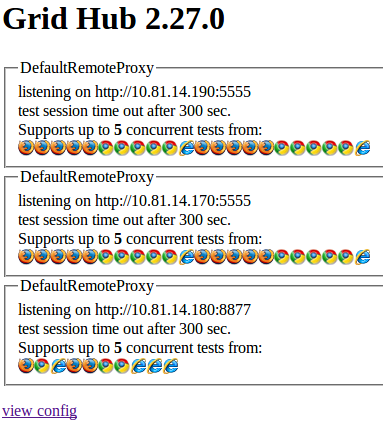
至此,Selenium Grid2已经配置成功了。
使用Grid运行Tests
Selenium Grid2是向后兼容的,同时支持RC,WebDriver。如果使用RC,即Selenium1,使用以下的方法:
Selenium selenium = new DefaultSelenium(“10.81.14.180”, 8888, “*firefox”, “http://www.baidu.com”);
使用WebDriver的话,使用以下的方法:
DesiredCapabilities capability = DesiredCapabilities.firefox();

WebDriver driver = new RemoteWebDriver(new URL("http://10.81.14.180:8888/wd/hub"), capability);
可以看出所有的请求都发给了Hub,然后由Hub分配给匹配的节点来执行。
那么,Hub是如何来分配的呢?往下看
Node配置
默认,Node会启动11个浏览器实例:5 Firefox,5 Chrome, 1 Internet Explorer. 从Grid Console界面看出来,为什么每个机器上有22个实例呢?是这样的,Node为了同时支持RC与WebDriver两种协议,所以就是2*11了。把鼠标放到各个浏览器图标上,就可以看出里面的配置区别了。
内容类似:
{

      "browserName": "*firefox",

      "maxInstances": 5,

      "seleniumProtocol": "Selenium"

    }
或者
 {

      "browserName": "firefox",

      "maxInstances": 5,

      "seleniumProtocol": "WebDriver"

    }
其中,seleniumProtocol就是定义的不同协议了。
如何修改Driver配置呢?可以从启动参数里操作。
-browser browserName=firefox,version=3.6,maxInstances=5,platform=LINUX
那Node默认启动的配置是什么呢?
由于如果从启动参数里,配置这个多东西,很难写的。因此,官方很人性化的提供了JSON文件来配置。也就是说默认启动的配置如下:
http://code.google.com/p/selenium/source/browse/trunk/java/server/src/org/openqa/grid/common/defaults/DefaultNode.json
如果想自定义配置,直接对json文件修改,启动时,指定配置文件就可以了。
java -jar selenium-server-standalone.jar -role hub -hubConfig hubconfig.json
仅仅就这样就行了?从博文http://www.shenyanchao.cn/blog/2012/10/12/selenium-multiple-browser-support/知道,浏览器的启动是要制定一些driver位置的,否则Node不知道怎么启动浏览器实例。因此需要进行指定:
java -jar selenium-server-standalone-2.27.0.jar -port 8877 -role node -hub http://10.81.14.180:8888/grid/register -nodeConfig nodeconfig.json -Dwebdriver.chrome.driver="E:/selenium/chromedriver.exe" -Dwebdriver.ie.driver="E:/selenium/IEDriverServer.exe"
参考文档:
http://code.google.com/p/selenium/wiki/Grid2
客户端书写测试用例
package seleniumdemo;

import java.net.MalformedURLException;

import java.net.URL;

import org.openqa.selenium.JavascriptExecutor;

import org.openqa.selenium.WebDriver;

import org.openqa.selenium.remote.DesiredCapabilities;

import org.openqa.selenium.remote.RemoteWebDriver;

public class EDemo2 {

     public static void main(String[] args) throws MalformedURLException, InterruptedException {

          // RemoteWebDriver的基本使用

          //第一个参数:表示服务器的地址。第二个参数:表示预期的执行对象,其他的浏览器都可以以此类推

          WebDriver driver = new RemoteWebDriver(new URL("http://127.0.0.1:4444/wd/hub/"), DesiredCapabilities.chrome());

          driver.manage().window().maximize();

          driver.get("http://www.baidu.com");

          Thread.sleep(2000);

          JavascriptExecutor js = (JavascriptExecutor)driver;

          js.executeScript("alert('我现在在服务器')");

          Thread.sleep(2000);

          driver.quit();

     }

}
执行脚本
其实脚本是在服务器端执行的,客户端用于发送命令。执行过程中可以看到服务器端的chrome别调用,同时cmd打印出相关的运行信息,如下

Selenium-Grid2 配置RemoteWebDriver的更多相关文章
- Selenium Grid2
简介 使用selenium-grid可以远程执行测试的代码,核心步骤:grid --> server-->chromedriver驱动 -->chrome浏览器 利用Selenium ...
- Python+selenium之selenium Grid2
利用selenium grid2 keyi可以在不同的主机上建立主节点(hub)和分支节点(node),可以使主节点上的测试用例在不同的分支节点上运行.对不同的节点来说,可以搭建不同的测试环境(操作系 ...
- 9、Selenium grid2
P228--Selenium Grid2 P233--Selenium Grid 工作原理 P236--Remote 应用 P246--WebDriver 驱动 driver = webdriver. ...
- C# selenium环境配置
1.下载C#selenium selenium官网: http://www.seleniumhq.org/download/ 下载后解压: 打开net35后,将里面的dll文件添 ...
- selenium Grid2环境搭建和基本使用
Selenium Grid简介 利用Selenium Grid可以使主节点(hub)的测试用例在不同主机即分支点(node)运行.可以使一份测试用例在不同环境下(操作系统.浏览器)执行自动化测试.Se ...
- Selenium+python 配置
1. 安装python, www.python.org. 下载最新的python,应该是32位的.注意配置环境变量. 2. 安装PIP(pip是一个以Python计算机程序语言写成的软件包管理系统). ...
- Python+Selenium 环境配置之Firefox,IE,Chrome几种浏览器运行
Selenium(Webdriver)支持Firefox,IE,Chrome等多个浏览器.很多人可能装环境时遇到很多问题,下面简单聊聊如何配置测试这几个浏览器以及相关通过简单的实例来测试. 1.Fir ...
- 【Selenium】idea的selenium环境配置
1.maven配置 下载地址:http://maven.apache.org/download.cgi# 下载内容:apache-maven-3.5.0-bin.zip 环境变量:M2_HOME:E: ...
- Selenium chrome配置代理Python版
环境: windows 7 + Python 3.5.2 + Selenium 3.4.2 + Chrome Driver 2.29 + Chrome 58.0.3029.110 (64-bit) S ...
随机推荐
- 人脸验证算法Joint Bayesian详解及实现(Matlab)
python http://blog.csdn.net/cyh_24/article/details/49059475 github https://github.com/johnnyconstant ...
- java----监听器的作用
Web监听器导图详解 监听器是JAVA Web开发中很重要的内容,其中涉及到的知识,可以参考下面导图: Web监听器 1 什么是web监听器? web监听器是一种Servlet中的特殊的类,它们能 ...
- Maven实战(三)——多模块项目的POM重构
在本专栏的上一篇文章POM重构之增还是删中.我们讨论了一些简单有用的POM重构技巧,包含重构的前提--持续集成,以及怎样通过加入或者删除内容来提高POM的可读性和构建的稳定性.但在实际的项目中,这些技 ...
- Oracle的优化器的RBO和CBO方式
1.基于规则的优化方式(Rule-Based Optimization,简称为RBO) 优化器在分析SQL语句时,所遵循的是Oracle内部预定的一些规则,对数据是不敏感的.它只借助少 ...
- 剑指 offer set 15 第一个只出现一次的字符
题目描述: 在一个字符串(1<=字符串长度<=10000,全部由大写字母组成)中找到第一个只出现一次的字符 思路: 1. 给定的题目约束比较多, 因此可以自定义哈希函数 2. 字符是一个长 ...
- Mac 安装Bower
1.安装bower,得首先安装node: 1 brew install npm //npm是nodejs的程序包管理器,如果安装过nodejs,可忽略此步. 2.安装Git(因为需要从Git仓库获取 ...
- 如何通过Keil将程序正确的下载进flash中
前面介绍了一些创建工程和调试的基本步骤,在这里准备介绍一下如何正确的将Keil程序在仿真调试中下载到flash.这里再次涉及到了debug的窗口. 工具/原料 Keil uVision 4/5 ...
- Eclipse常用快捷键(转载)
编辑相关快捷键 Eclipse的编辑功能非常强大,掌握了Eclipse快捷键功能,能够大大提高开发效率.Eclipse中有如下一些和编辑相关的快捷键. 1. [ALT+/] 此快捷键为用户编辑的好帮手 ...
- 测试csscss层叠顺序
<!Doctype html><html lang="zh-CN"><head><meta charset="utf-8&quo ...
- /proc/iomem和/proc/ioports对应的fops
/proc/iomem和/proc/ioports对应的fops static int __init ioresources_init(void) { struct proc_dir_entr ...