
本地tomcat调用远程接口报错:java.lang.reflect.InvocationTargetException
今天碰到一个奇怪的问题,本地Eclipse起了一个tomcat通过http去调一个外部接口,结果竟然报了一个反射的异常,先看下完整日志:
四月 ,  :: 下午 org.apache.catalina.startup.Catalina start

信息: Server startup in  ms

[-- ::] DEBUG EnvironmentInterceptor: - EnvironmentInterceptor.preHandle requesturl:http://127.0.0.1:8080/ms-search-war/ms.search.searchService/getSearchRank

[-- ::] DEBUG EnvironmentInterceptor: - RequestHeads,User-Agent=Apache-HttpClient/4.1. (java 1.5),X-Identity-ID=,X-Auth-Token=,X-Login-Type=

[-- ::] DEBUG MsCommonAspect: - Enter into UrlAdviser.setUrlParam request param = {"paramMap": [{"key": "pluginCode","value": "search_rank"},{"key": "title","value": ""},{"key": "rankType","value": ""},{"key": "rankDateType","value": ""},{"key": "pageNo","value": ""},{"key": "pageSize","value": ""},{"key": "isMarginTop","value": ""},{"key": "isMarginBottom","value": ""},{"key": "isPaddingTop","value": ""},{"key": "isShowLine","value": ""},{"key": "isAjax","value": ""},{"key": "nodeId","value": ""},{"key": "book_id_list","value": ""},{"key": "listen_book_id_list","value": ""},{"key": "magzine_id_list","value": ""},{"key": "kw","value": "+++++"},{"key": "itemType","value": ""},{"key": "source","value": ""}]},identityId =

[-- ::] INFO  PerformanceMonitorComponent: - [15ms] - interface:[ IGaiaClient ],method:[ get ]USER_SESSION_KEY::cm

[-- ::] DEBUG MsCommonAspect: - Exit UrlAdviser.setUrlParam success , nln= null ,cm = M801005I ,identityId =

[-- ::] DEBUG GetSearchRankMethodImpl: - Enter GetSearchRankMethodImpl.getSearchRank ,identityId: ComponentRequest :{"paramMap": [{"key": "pluginCode","value": "search_rank"},{"key": "title","value": ""},{"key": "rankType","value": ""},{"key": "rankDateType","value": ""},{"key": "pageNo","value": ""},{"key": "pageSize","value": ""},{"key": "isMarginTop","value": ""},{"key": "isMarginBottom","value": ""},{"key": "isPaddingTop","value": ""},{"key": "isShowLine","value": ""},{"key": "isAjax","value": ""},{"key": "nodeId","value": ""},{"key": "book_id_list","value": ""},{"key": "listen_book_id_list","value": ""},{"key": "magzine_id_list","value": ""},{"key": "kw","value": "+++++"},{"key": "itemType","value": ""},{"key": "source","value": ""}]}

[-- ::] DEBUG CampaignEngine: - enter CampaignEngine.getAppMiguSearch request:{"bookType":"","categoryType":"","chargeMode":"","ct":"","isContinue":"","isNeedCorrect":"","pageIndex":,"pageNum":,"phoneNumber":"","queryWord":"+++++","searchType":"","sorter":"","wordCount":""}

[-- ::] DEBUG ResourceLeakDetectorFactory: - Loaded default ResourceLeakDetector: io.netty.util.ResourceLeakDetector@62c3bb38

[-- ::] ERROR ServiceMethodImpl: - invoke failed, request_id = 601424C46E1591BD5BC9D9590C8EB793, sc={ rpc: { cname: ms.search.searchService:1.0..dev, method: getSearchRank, operation: ms.search.searchService:1.0..dev/getSearchRank}, implVersion: , complete: false, canceled: false}, ex=java.lang.reflect.InvocationTargetException

[-- ::] DEBUG MsCommonAspect: - Enter setActionCdrParamAspect,identityId:

[-- ::] DEBUG MsCommonAspect: - Exit setActionCdrParamAspect,identityId:,ActionCdrParams:

[-- ::] INFO  MethodInvoker: - call: ms.search.searchService/getSearchRank, request_id=601424C46E1591BD5BC9D9590C8EB793, expected= , version=, code=, rt=

[-- ::] DEBUG EnvironmentInterceptor: - EnvironmentInterceptor completed, requesturl= http://127.0.0.1:8080/ms-search-war/ms.search.searchService/getSearchRank and server delayTime = 34008

[-- ::] DEBUG AbstractPool: - server removed, node=ZJHZ-CMREAD-TEST213:, server={ node: ZJHZ-CMREAD-TEST213:, hostname: ZJHZ-CMREAD-TEST213, port: , status: , weight: , capacity: , breaker: { state :CLOSED, working: , delay: , failureThreshold: [/, 0.8], successThreshold: [/, 0.75]}, version:  }

[-- ::] DEBUG AbstractPool: - server updated, node=ZJHZ-CMREAD-TEST213:, server={ node: ZJHZ-CMREAD-TEST213:, hostname: ZJHZ-CMREAD-TEST213, port: , status: , weight: , capacity: , breaker: { state :CLOSED, working: , delay: , failureThreshold: [/, 0.8], successThreshold: [/, 0.75]}, version:  }
从日志里其实看不出啥来,通过eclipse调试才发现,进入这一行代码后发生了诡异的事情:
String response = HttpTools.getDataFromFirstSerach(uri.toString(), jsonData);
诡异的事情就是直接跳入异常了
    /**

     * Constructs a InvocationTargetException with a target exception.

     *

     * @param target the target exception

     */

    public InvocationTargetException(Throwable target) {

        super((Throwable)null);  // Disallow initCause

        this.target = target;

    }
从异常看,是程序找不到调用代码了,但是eclipse里面是可以找到HttpTools类和getDataFromFirstSerach方法的。想了一下,应该是编译出问题了,class文件里没有对应的代码。直接到eclipse部署的本地tomcat路径下找class:打开Servers窗口 -> 找到Server Locations,看Server path和Deploy path,这里就是本地eclipse部署路径:
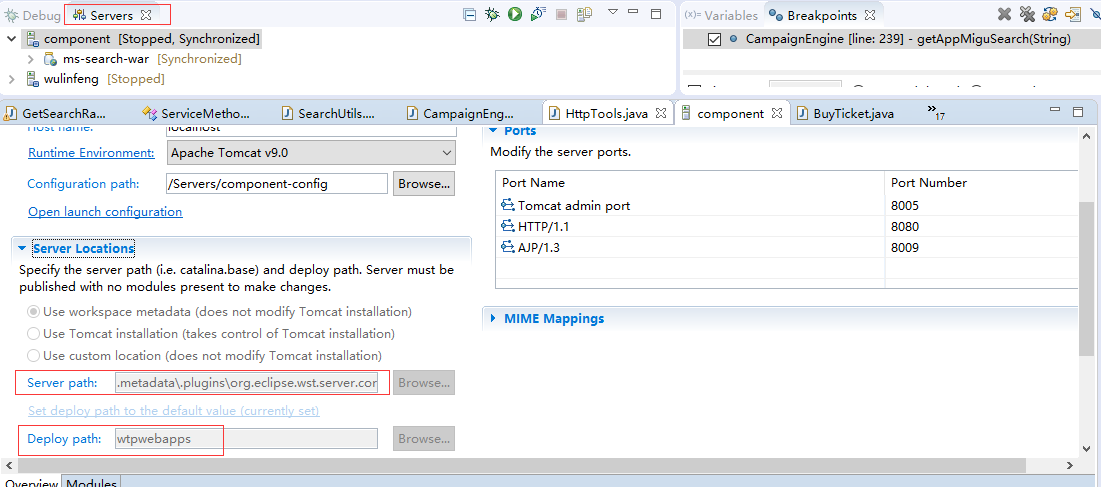
进入本地部署路径:
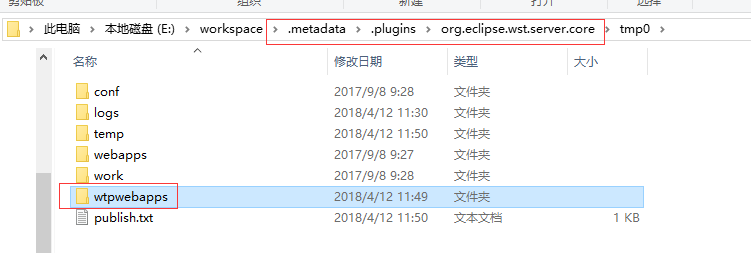
进入wtpwebapps -> 进入war包 -> 找到引用的jar -> 打开jar包,根据包路径找类,果然没有HttpTools这个类。估计是之前引用的jar包编译出了问题,没编译完。
解决办法:重新编译问题jar包,刷新引用jar包的工程,最后clean一下tomcat,再次进入到tomcat本地部署路径E:\workspace\.metadata\.plugins\org.eclipse.wst.server.core\tmp0\wtpwebapps,发现HttpTools类出现了,重新启动tomcat,问题依然存在。这就奇怪了,重新调试,发现另一个问题:
java.lang.NoSuchMethodError: io.netty.handler.ssl.SslContextBuilder.protocols([Ljava/lang/String;)Lio/netty/handler/ssl/SslContextBuilder;
有点摸不着头脑,代码调试时流程没变,直接跳入异常,但异常显示的是上面的问题,找不到SslContextBuilder.protocols这个方法。
问题定位:仔细看了下HttpTools这个类:
import java.io.IOException;

import java.nio.charset.Charset;

import java.util.Date;

import javax.servlet.http.HttpServletRequest;

import org.apache.http.HttpEntity;

import org.apache.http.client.config.RequestConfig;

import org.apache.http.client.methods.CloseableHttpResponse;

import org.apache.http.client.methods.HttpPost;

import org.apache.http.entity.StringEntity;

import org.apache.http.impl.client.CloseableHttpClient;

import org.apache.http.impl.client.HttpClients;

import org.apache.http.util.EntityUtils;

import org.apache.logging.log4j.LogManager;

import org.apache.logging.log4j.Logger;

import org.asynchttpclient.AsyncHttpClient;

import org.asynchttpclient.AsyncHttpClientConfig;

import org.asynchttpclient.BoundRequestBuilder;

import org.asynchttpclient.DefaultAsyncHttpClient;

import org.asynchttpclient.DefaultAsyncHttpClientConfig;

import org.asynchttpclient.Response;

import org.springframework.http.HttpStatus;/**

 * 基础的http方法 此类包含了通过HTTP协议的请求响应等方法。 此类属于公共方法,负责提供接口给业务调用。 目前请求支持4种请求方式: 1 xml请求报文通过POST方法请求URL,返回响应报文 2

 * xml请求报文通过PUT方法请求URL,返回响应报文 3 无参数的请求通过GET方法请求URL,返回响应报文 4 无参数的请求通过DELETE方法请求URL,返回操作结果 使用方法: 先得到HttpUtil的实例(

 * 使用连接池方式),通过HttpUtil.getInstance().getHttpClient()返回HttpClient对象 然后调用指定的方法即可

 *

 */

public class HttpTools

{/**

     * HttpUtil类构造函数

     */

    public HttpTools()

    {

    }

    /**

     * 单例模式返回唯一的HttpUtil的实例 在创建HttpUtil实例的时候创建HttpClient对象,并且设置HttpClient超时的属性。

     * 创建HttpClient实例,默认是SimpleHttpConnectionManager创建的,不支持多线程。 使用多线程技术就是说,client可以在多个线程中被用来执行多个方法。

     * 每次调用HttpClient.executeMethod() 方法,都会去链接管理器申请一个连接实例, 申请成功这个链接实例被签出(checkout),随之在链接使用完后必须归还管理器。 管理器支持两个设置:

     * maxConnectionsPerHost 每个主机的最大并行链接数,默认为2 maxTotalConnections 客户端总并行链接最大数,默认为20

     *

     * @return HttpUtil

     */

    public static HttpTools getInstance()

    {

        return instance;

    }

    private static AsyncHttpClient asynHttpClient = getAsyncHttpClient();

    /**

     * 获取请求类的客户端

     *

     * @return

     */

    public static AsyncHttpClient getAsyncHttpClient()

    {

        AsyncHttpClientConfig config = new DefaultAsyncHttpClientConfig.Builder().setFollowRedirect(false)

            .setConnectTimeout(PropertiesConfig.getInt("asynHttp.connectTimeout", 500))

            .setRequestTimeout(PropertiesConfig.getInt("asynHttp.requestTimeout", 10000))

            .setReadTimeout(PropertiesConfig.getInt("asynHttp.readTimeout", 10000))

            .build();

        AsyncHttpClient client = new DefaultAsyncHttpClient(config);

        return client;

    }

     public static String getDataFromFirstSerach(String uri,String  jsonParam)

    {

        long startTime = System.currentTimeMillis();

        String responseContent = null;

        CloseableHttpResponse response = null;

        // 设置超时

        RequestConfig requestConfig = RequestConfig.custom()

            .setSocketTimeout(PropertiesConfig.getInt("timeOut", 15000))

            .setConnectTimeout(PropertiesConfig.getInt("timeOut", 15000))

            .setConnectionRequestTimeout(PropertiesConfig.getInt("timeOut", 15000))

            .build();

        // 调用一级搜索接口

        CloseableHttpClient httpClient = HttpClients.createDefault();

        try

        {

            StringEntity entity = new StringEntity(jsonParam, "utf-8");// 解决中文乱码问题

            entity.setContentEncoding("UTF-8");

            entity.setContentType("application/json");

            String timeTapms = new Date().getTime() + "";

            String mgauth = PropertiesConfig.getProperty(APPID) + PropertiesConfig.getProperty(APPKEY) + timeTapms;

            HttpPost httpPost = new HttpPost(uri);

            httpPost.setConfig(requestConfig);

            httpPost.setEntity(entity);

            httpPost.addHeader(ParamConstants.MGAUTH, CipherOperateUtil.encryptByMD5(mgauth));

            httpPost.addHeader(ParamConstants.REQTIME, timeTapms);

            response = httpClient.execute(httpPost);

            // 请求响应成功则获取响应

            if (null != response && response.getStatusLine().getStatusCode() == 200)

            {

                HttpEntity httpentity = response.getEntity();

                responseContent = EntityUtils.toString(httpentity, "UTF-8");

            }

        }

        catch (Exception e)

        {

            logger.error(" httpTools.getDataFromFirstSerach call classifySearch error message:{},request:{} ",e.getMessage(),jsonParam);

        }

        finally

        {

            try

            {

                // 关闭连接,释放资源

                if (response != null)

                {

                    response.close();

                }

                if (httpClient != null)

                {

                    httpClient.close();

                }

            }

            catch (IOException e)

            {

                logger.error(" httpTools.getDataFromFirstSerach call classifySearch error message:{},request:{} ",e.getMessage(),jsonParam);

            }

        }

        long endTime = System.currentTimeMillis();

        if (logger.isDebugEnabled())

        {

            logger.debug("=======================call getDataFromFirstSerach interface = {},spend time = {} ms",

                uri,

                endTime - startTime);

        }

        return responseContent;

    }

}
从上面看出,类一开始就通过静态方法getAsyncHttpClient得到异步请求的客户端对象asynHttpClient,所以应该在getAsyncHttpClient方法加断点,否则就直接进入异常了。异常跟踪直接看日志:
ERROR StatusLogger No log4j2 configuration file found. Using default configuration: logging only errors to the console. Set system property 'log4j2.debug' to show Log4j2 internal initialization logging.

Exception in thread "main" java.lang.NoSuchMethodError: io.netty.handler.ssl.SslContextBuilder.protocols([Ljava/lang/String;)Lio/netty/handler/ssl/SslContextBuilder;

    at org.asynchttpclient.netty.ssl.DefaultSslEngineFactory.buildSslContext(DefaultSslEngineFactory.java:45)

    at org.asynchttpclient.netty.ssl.DefaultSslEngineFactory.init(DefaultSslEngineFactory.java:69)

    at org.asynchttpclient.netty.channel.ChannelManager.<init>(ChannelManager.java:110)

    at org.asynchttpclient.DefaultAsyncHttpClient.<init>(DefaultAsyncHttpClient.java:85)

    at cn.migu.newportal.cache.util.HttpTools.getAsyncHttpClient(HttpTools.java:109)

    at cn.migu.newportal.cache.util.HttpTools.<clinit>(HttpTools.java:95)
DefaultAsyncHttpClient:
    /**

     * Create a new HTTP Asynchronous Client using the specified

     * {@link DefaultAsyncHttpClientConfig} configuration. This configuration

     * will be passed to the default {@link AsyncHttpClient} that will be

     * selected based on the classpath configuration.

     *

     * @param config a {@link DefaultAsyncHttpClientConfig}

     */

    public DefaultAsyncHttpClient(AsyncHttpClientConfig config) {

        this.config = config;

        allowStopNettyTimer = config.getNettyTimer() == null;

        nettyTimer = allowStopNettyTimer ? newNettyTimer() : config.getNettyTimer();

        channelManager = new ChannelManager(config, nettyTimer);

        requestSender = new NettyRequestSender(config, channelManager, nettyTimer, new AsyncHttpClientState(closed));

        channelManager.configureBootstraps(requestSender);

    }
ChannelManager:
    public ChannelManager(final AsyncHttpClientConfig config, Timer nettyTimer) {

        this.config = config;

        this.sslEngineFactory = config.getSslEngineFactory() != null ? config.getSslEngineFactory() : new DefaultSslEngineFactory();

        try {

            this.sslEngineFactory.init(config);

        } catch (SSLException e) {

            throw new RuntimeException("Could not initialize sslEngineFactory", e);

        }

        ChannelPool channelPool = config.getChannelPool();

        if (channelPool == null) {

            if (config.isKeepAlive()) {

                channelPool = new DefaultChannelPool(config, nettyTimer);

            } else {

                channelPool = NoopChannelPool.INSTANCE;

            }

        }

        this.channelPool = channelPool;

        tooManyConnections = unknownStackTrace(new TooManyConnectionsException(config.getMaxConnections()), ChannelManager.class, "acquireChannelLock");

        tooManyConnectionsPerHost = unknownStackTrace(new TooManyConnectionsPerHostException(config.getMaxConnectionsPerHost()), ChannelManager.class, "acquireChannelLock");

        maxTotalConnectionsEnabled = config.getMaxConnections() > 0;

        maxConnectionsPerHostEnabled = config.getMaxConnectionsPerHost() > 0;

        if (maxTotalConnectionsEnabled || maxConnectionsPerHostEnabled) {

            openChannels = new DefaultChannelGroup("asyncHttpClient", GlobalEventExecutor.INSTANCE) {

                @Override

                public boolean remove(Object o) {

                    boolean removed = super.remove(o);

                    if (removed) {

                        if (maxTotalConnectionsEnabled)

                            freeChannels.release();

                        if (maxConnectionsPerHostEnabled) {

                            Object partitionKey = channelId2PartitionKey.remove(Channel.class.cast(o));

                            if (partitionKey != null) {

                                Semaphore hostFreeChannels = freeChannelsPerHost.get(partitionKey);

                                if (hostFreeChannels != null)

                                    hostFreeChannels.release();

                            }

                        }

                    }

                    return removed;

                }

            };

            freeChannels = new Semaphore(config.getMaxConnections());

        } else {

            openChannels = new DefaultChannelGroup("asyncHttpClient", GlobalEventExecutor.INSTANCE);

            freeChannels = null;

        }

        handshakeTimeout = config.getHandshakeTimeout();

        // check if external EventLoopGroup is defined

        ThreadFactory threadFactory = config.getThreadFactory() != null ? config.getThreadFactory() : new DefaultThreadFactory(config.getThreadPoolName());

        allowReleaseEventLoopGroup = config.getEventLoopGroup() == null;

        ChannelFactory<? extends Channel> channelFactory;

        if (allowReleaseEventLoopGroup) {

            if (config.isUseNativeTransport()) {

                eventLoopGroup = newEpollEventLoopGroup(config.getIoThreadsCount(), threadFactory);

                channelFactory = getEpollSocketChannelFactory();

            } else {

                eventLoopGroup = new NioEventLoopGroup(config.getIoThreadsCount(), threadFactory);

                channelFactory = NioSocketChannelFactory.INSTANCE;

            }

        } else {

            eventLoopGroup = config.getEventLoopGroup();

            if (eventLoopGroup instanceof OioEventLoopGroup)

                throw new IllegalArgumentException("Oio is not supported");

            if (eventLoopGroup instanceof NioEventLoopGroup) {

                channelFactory = NioSocketChannelFactory.INSTANCE;

            } else {

                channelFactory = getEpollSocketChannelFactory();

            }

        }

        httpBootstrap = newBootstrap(channelFactory, eventLoopGroup, config);

        wsBootstrap = newBootstrap(channelFactory, eventLoopGroup, config);

        // for reactive streams

        httpBootstrap.option(ChannelOption.AUTO_READ, false);

    }
DefaultSslEngineFactory:
package org.asynchttpclient.netty.ssl;

import io.netty.buffer.ByteBufAllocator;

import io.netty.handler.ssl.SslContext;

import io.netty.handler.ssl.SslContextBuilder;

import io.netty.handler.ssl.SslProvider;

import io.netty.handler.ssl.util.InsecureTrustManagerFactory;

import java.util.Arrays;

import javax.net.ssl.SSLEngine;

import javax.net.ssl.SSLException;

import org.asynchttpclient.AsyncHttpClientConfig;

import org.asynchttpclient.util.MiscUtils;

public class DefaultSslEngineFactory

  extends SslEngineFactoryBase

{

  private volatile SslContext sslContext;

  private SslContext buildSslContext(AsyncHttpClientConfig config)

    throws SSLException

  {

    if (config.getSslContext() != null) {

      return config.getSslContext();

    }

    SslContextBuilder sslContextBuilder = SslContextBuilder.forClient().sslProvider(config.isUseOpenSsl() ? SslProvider.OPENSSL : SslProvider.JDK).sessionCacheSize(config.getSslSessionCacheSize()).sessionTimeout(config.getSslSessionTimeout());

    if (MiscUtils.isNonEmpty(config.getEnabledProtocols())) {

      sslContextBuilder.protocols(config.getEnabledProtocols());

    }

    if (MiscUtils.isNonEmpty(config.getEnabledCipherSuites())) {

      sslContextBuilder.ciphers(Arrays.asList(config.getEnabledCipherSuites()));

    }

    if (config.isUseInsecureTrustManager()) {

      sslContextBuilder.trustManager(InsecureTrustManagerFactory.INSTANCE);

    }

    return configureSslContextBuilder(sslContextBuilder).build();

  }

  public SSLEngine newSslEngine(AsyncHttpClientConfig config, String peerHost, int peerPort)

  {

    SSLEngine sslEngine = this.sslContext.newEngine(ByteBufAllocator.DEFAULT, peerHost, peerPort);

    configureSslEngine(sslEngine, config);

    return sslEngine;

  }

  public void init(AsyncHttpClientConfig config)

    throws SSLException

  {

    this.sslContext = buildSslContext(config);

  }

  protected SslContextBuilder configureSslContextBuilder(SslContextBuilder builder)

  {

    return builder;

  }

}
DefaultSslEngineFactory调用SslContextBuilder.protocols方法时找不到了,进入SslContextBuilder类,确实没有protocols方法。去看了下pomx.ml文件,引入的async-http-client.jar是2.1.0-alpha26版本,匹配的netty-all.jar却是4.1.8.Final版本的,而这个版本的SslContextBuilder并不存在protocols方法。
问题解决:使用2.1.0-alpha6版本async-http-client的jar包,这个包里DefaultSslEngineFactory没有调用SslContextBuilder.protocols方法:
 * Copyright (c) 2015 AsyncHttpClient Project. All rights reserved.

package org.asynchttpclient.netty.ssl;

import io.netty.buffer.ByteBufAllocator;

import io.netty.handler.ssl.SslContext;

import io.netty.handler.ssl.SslContextBuilder;

import io.netty.handler.ssl.SslProvider;

import javax.net.ssl.SSLEngine;

import javax.net.ssl.SSLException;

import org.asynchttpclient.AsyncHttpClientConfig;

public class DefaultSslEngineFactory extends SslEngineFactoryBase {

    private volatile SslContext sslContext;

    private SslContext buildSslContext(AsyncHttpClientConfig config) throws SSLException {

        if (config.getSslContext() != null)

            return config.getSslContext();

        SslContextBuilder sslContextBuilder = SslContextBuilder.forClient()//

                .sslProvider(config.isUseOpenSsl() ? SslProvider.OPENSSL : SslProvider.JDK)//

                .sessionCacheSize(config.getSslSessionCacheSize())//

                .sessionTimeout(config.getSslSessionTimeout());

        if (config.isUseInsecureTrustManager()) {

            sslContextBuilder.trustManager(InsecureTrustManagerFactory.INSTANCE);

        }

        return configureSslContextBuilder(sslContextBuilder).build();

    }

    @Override

    public SSLEngine newSslEngine(AsyncHttpClientConfig config, String peerHost, int peerPort) {

        // FIXME should be using ctx allocator

        SSLEngine sslEngine = sslContext.newEngine(ByteBufAllocator.DEFAULT, peerHost, peerPort);

        configureSslEngine(sslEngine, config);

        return sslEngine;

    }

    @Override

    public void init(AsyncHttpClientConfig config) throws SSLException {

        sslContext = buildSslContext(config);

    }

    /**

     * The last step of configuring the SslContextBuilder used to create an SslContext when no context is provided in

     * the {@link AsyncHttpClientConfig}. This defaults to no-op and is intended to be overridden as needed.

     *

     * @param builder builder with normal configuration applied

     * @return builder to be used to build context (can be the same object as the input)

     */

    protected SslContextBuilder configureSslContextBuilder(SslContextBuilder builder) {

        // default to no op

        return builder;

    }

}
重启后测试通过,问题解决。
本地tomcat调用远程接口报错:java.lang.reflect.InvocationTargetException的更多相关文章
- 在 Linux 环境下报错 java.lang.reflect.InvocationTargetException
今天开发了一个 excel 导出数据的功能,放到 linux 服务器上后发现报错. 捕获到 java.lang.reflect.InvocationTargetException 异常,这个异常不太常 ...
- Cglib学习报错 java.lang.reflect.InvocationTargetException-->null
package javacore.testForCglibProxy; import java.lang.reflect.Method; import net.sf.cglib.proxy.Enhan ...
- Hadoop中RPC协议小例子报错java.lang.reflect.UndeclaredThrowableException解决方法
最近在学习传智播客吴超老师的Hadoop视频,里面他在讲解RPC通信原理的过程中给了一个RPC的小例子,但是自己编写的过程中遇到一个小错误,整理如下: log4j:WARN No appenders ...
- Spring+Mybatis+Dubbo报错java.lang.reflect.MalformedParameterizedTypeException
原因是spring的jar文件冲突,排除spring的文件即可 <dependency> <groupId>com.alibaba</groupId> <ar ...
- 关于java.lang.reflect.InvocationTargetException(jar 包缺少或者冲突)的错误
我在合肥那边运行了的是湖北石首市的项目没有错 可是回武汉之后 运行这个项目 点击这里的时候 就报错java.lang.reflect.InvocationTargetException 不是数据库 ...
- asp.net使用wsdl文件调用接口,以及调用SSL接口报错“根据验证过程 远程证书无效”的处理
1.调用wsdl接口,首先需要将wsdl文件转换为cs文件: 进入VS 开发人员命令提示行,输入如下命令: c:/Program Files/Microsoft Visual Studio 8/VC& ...
- Spring boot Unable to start embedded Tomcat报错 java.lang.NoSuchMethodError: javax.servlet.ServletContext.getVirtualServerName()
Spring boot Unable to start embedded Tomcat 报错 java.lang.NoSuchMethodError: javax.servlet.ServletCon ...
- 【原创】大叔问题定位分享(2)spark任务一定几率报错java.lang.NoSuchFieldError: HIVE_MOVE_FILES_THREAD_COUNT
最近用yarn cluster方式提交spark任务时,有时会报错,报错几率是40%,报错如下: 18/03/15 21:50:36 116 ERROR ApplicationMaster91: Us ...
- 云笔记项目- 上传文件报错"java.lang.IllegalStateException: File has been moved - cannot be read again"
在做文件上传时,当写入上传的文件到文件时,会报错“java.lang.IllegalStateException: File has been moved - cannot be read again ...
随机推荐
- [WinForm]Dundas Chart控件学习(附源码)
1.Dundas公司简介 加拿大的一家公司,专业做图表展现的,很牛,据说现在被Microsoft收购了.官网地址:http://www.dundas.com/ 2.Chart基本要素 3.最简单的柱状 ...
- C++复习11.函数的高级特性
C++ 函数的高级特性 20131002 C++函数增加了重载(override), inline, const, virtual四种机制,重载和内联机制既可以用于全局函数,也可以用于类的成员函数.c ...
- 【LeetCode 88_数组】Merge Sorted Array
void merge(vector<int>& nums1, int m, vector<int>& nums2, int n) { ; ; ; &&a ...
- echarts-detail--柱状图
一:柱形图 1.Echarts-柱状图柱图宽度设置-----只需要设置series中的坐标系属性barWidth就可以 /** * 堆积柱状图 * @param xaxisdata x轴:标签(数组) ...
- keras系列︱seq2seq系列相关实现与案例(feedback、peek、attention类型)
之前在看<Semi-supervised Sequence Learning>这篇文章的时候对seq2seq半监督的方式做文本分类的方式产生了一定兴趣,于是开始简单研究了seq2seq.先 ...
- 使用编译时注解简单实现类似 ButterKnife 的效果
这篇文章是学习鸿洋前辈的 Android 如何编写基于编译时注解的项目 的笔记,用于记录我的学习收获. 读完本文你将了解: 什么是编译时注解 APT 编译时注解如何使用与编写 举个例子 思路 创建注解 ...
- MPAndroidChart Wiki(译文)~Part 4
16. 动画 注意:本章的动画效果只会在API 11(Android3.0.x)及以上的Android版本上生效 在低于上述的Android版本中,动画将不会被执行,并不会导致程序崩溃. 所有类型的图 ...
- strip()函数和 split()函数
一:python strip()函数介绍 函数原型:strip可以删除字符串的某些字符 声明:s为字符串,rm为要删除的字符序列 s.strip(rm) 删除s字符串中开头.结尾处,位于 ...
- 如何只更新datetime类型字段中的日期
UPDATE [dbo].[Order] SET CreateDate = STUFF(CONVERT(VARCHAR(50),CreateDate,126) ,1, 10, ' ...
- Spring之基础
Spring之目的 Spring致力于简化企业级Java开发,促进代码的松散耦合.成功的关键在于依赖注入(DI)和面向切面编程(AOP) Spring之DI DI是组装应用对象的一种方 ...