
android之merge布局
<merge />标签闪亮登场了。当LayoutInflater遇到这个标签时,它会跳过它,并将<merge />内的元素添加到<merge />的父元素里。
用<merge />来替换FrameLayout XML布局:
<merge xmlns:android="http://schemas.android.com/apk/res/android">

    <ImageView

        android:layout_width="fill_parent"

        android:layout_height="fill_parent"

        android:scaleType="center"

        android:src="@drawable/golden_gate" />

    <TextView

        android:layout_width="wrap_content"

        android:layout_height="wrap_content"

        android:layout_marginBottom="20dip"

        android:layout_gravity="center_horizontal|bottom"

        android:padding="12dip"

        android:background="#AA000000"

        android:textColor="#ffffffff"

        android:text="Golden Gate" />

</merge>
新的代码中,TextView和ImageView都直接添加到上一层的FrameLayout里。虽然视觉上看起来一样,但View的层次更加简单了:
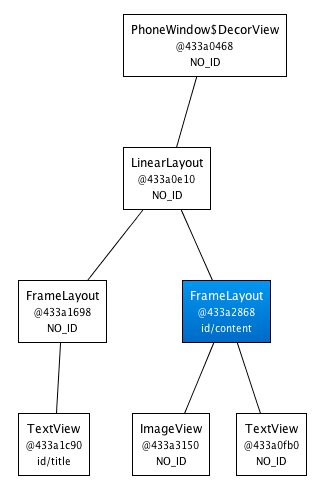
很显然,在这个场合使用<merge />是因为Activity的ContentView的父元素始终是FrameLayout。
如果你的布局使用LinearLayout作为它的根标签(举例),那么你就不能使用这个技巧。<merge />在其它的一些场合也很有用的。
例如,它与<include />标签结合起来就能表现得很完美。你还可以在创建一个自定义的组合View时使用<merge />。
让我们看一个使用<merge />创建一个新View的例子——OkCancelBar,包含两个按钮,并可以设置按钮标签。下面的XML用于在一个图片上显示自定义的View:
<merge

    xmlns:android="http://schemas.android.com/apk/res/android"    xmlns:okCancelBar="http://schemas.android.com/apk/res/com.example.android.merge">

    <ImageView

        android:layout_width="fill_parent"

        android:layout_height="fill_parent"

        android:scaleType="center"

        android:src="@drawable/golden_gate" />

    <com.example.android.merge.OkCancelBar

        android:layout_width="fill_parent"

        android:layout_height="wrap_content"

        android:layout_gravity="bottom"

        android:paddingTop="8dip"

        android:gravity="center_horizontal"

        android:background="#AA000000"

        okCancelBar:okLabel="Save"

        okCancelBar:cancelLabel="Don't save" />

</merge>
新的布局效果如下图所示:

OkCancelBar的代码很简单,因为这两个按钮在外部的XML文件中定义,通过LayoutInflate类导入。如下面的代码片段所示,R.layout.okcancelbar以OkCancelBar为父元素:
public class OkCancelBar extends LinearLayout {

    public OkCancelBar(Context context, AttributeSet attrs) {

        super(context, attrs);

        setOrientation(HORIZONTAL);

        setGravity(Gravity.CENTER);

        setWeightSum(1.0f);

        LayoutInflater.from(context).inflate(R.layout.okcancelbar, this, true);

        TypedArray array = context.obtainStyledAttributes(attrs, R.styleable.OkCancelBar, 0, 0);

        String text = array.getString(R.styleable.OkCancelBar_okLabel);

        if (text == null) text = "Ok";

        ((Button) findViewById(R.id.okcancelbar_ok)).setText(text);

        text = array.getString(R.styleable.OkCancelBar_cancelLabel);

        if (text == null) text = "Cancel";

        ((Button) findViewById(R.id.okcancelbar_cancel)).setText(text);

        array.recycle();

    }

}
两个按钮的定义如下面的XML所示。正如你所看到的,我们使用<merge />标签直接添加两个按钮到OkCancelBar。
每个按钮都是从外部相同的XML布局文件包含进来的,便于维护;我们只是简单地重写它们的id:
<merge xmlns:android="http://schemas.android.com/apk/res/android">

    <include

        layout="@layout/okcancelbar_button"

        android:id="@+id/okcancelbar_ok" />

    <include

        layout="@layout/okcancelbar_button"

        android:id="@+id/okcancelbar_cancel" />

</merge>
我们创建了一个灵活且易于维护的自定义View,它有着高效的View层次:
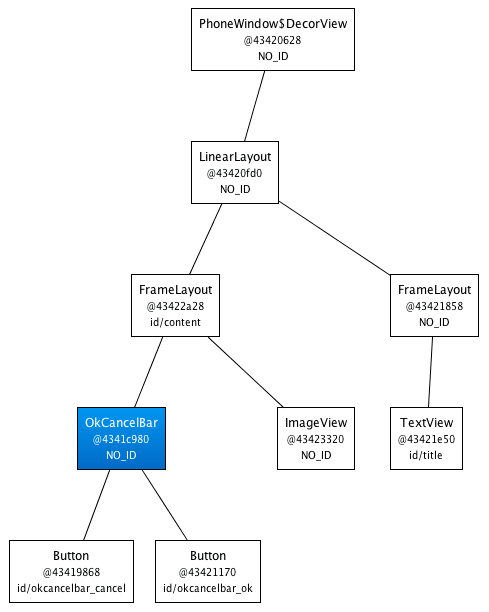
<merge />标签极其有用。然而它也有以下两个限制:
- <merge />只能作为XML布局的根标签使用
- 当Inflate以<merge />开头的布局文件时,必须指定一个父ViewGroup,并且必须设定attachToRoot为true(参看inflate(int, android.view.ViewGroup, Boolean)方法)。
android之merge布局的更多相关文章
- Android手势识别 Camera 预览界面上显示文字 布局注意事项(merge布局)
通常在Surfaceview作为预览视频帧的载体,有时需在上面显示提示文字.曾经我弄的都好好的.今天忽然发现叠加的TextView不管咋弄都出不来文字了,跟Surfaceview一起放在FrameLa ...
- Android中的布局优化方法
http://blog.csdn.net/rwecho/article/details/8951009 Android开发中的布局很重要吗?那是当然.一切的显示样式都是由这个布局决定的,你说能不重要吗 ...
- Android菜鸟成长记7 -- Android的五大布局
Android五大布局,相信android的都了解过,今天我根据自己的学习整理一下五大布局,主要介绍的是线性布局(LiearLayout),因为,其他的布局使用率不是很高. Android的五大布局 ...
- 无废话Android之常见adb指令、电话拨号器、点击事件的4种写法、短信发送器、Android 中各种布局(1)
1.Android是什么 手机设备的软件栈,包括一个完整的操作系统.中间件.关键的应用程序,底层是linux内核,安全管理.内存管理.进程管理.电源管理.硬件驱动 2.Dalvik VM 和 JVM ...
- 14.Android之Layout布局学习
Android布局主要有5种,接下来学习总结下. 1) 最常见的线性布局 LinearLayout 线性布局是Android布局中最简单的布局,也是最常用,最实用的布局. android:orient ...
- [置顶] Android系统五大布局详解Layout
我们知道Android系统应用程序一般是由多个Activity组成,而这些Activity以视图的形式展现在我们面前,视图都是由一个一个的组件构成的.组件就是我们常见的Button.TextEdit等 ...
- 个人经验 - Android的RelativeLayout布局的layout_height属性设置为wrap_content时的坑
Android的RelativeLayout布局的layout_height属性设置为wrap_content时的坑: 此坑出现的条件: 1.RelativeLayout布局的layout_heigh ...
- Android学习5—布局简介
Android界面的布局主要有四种,分别为RelativeLayout.LinearLayout.TableLayout.FrameLayout,接下来分别介绍这些布局如何使用(为了简单起见,接下来的 ...
- 【Android 复习】:Android五种布局的使用方法
---恢复内容开始--- 在Android布局中,有五种常用的布局,下面我们就来学习一下这几种布局的使用方式 1) 线性布局:LinearLayout 2) 帧布局: FrameLayout 3) ...
随机推荐
- 最大熵模型(Maximum Etropy)—— 熵,条件熵,联合熵,相对熵,互信息及其关系,最大熵模型。。
引入1:随机变量函数的分布 给定X的概率密度函数为fX(x), 若Y = aX, a是某正实数,求Y得概率密度函数fY(y). 解:令X的累积概率为FX(x), Y的累积概率为FY(y). 则 FY( ...
- centos7 安装教程
1. 在安装的时候,不要用默认的最小安装.选择GNOME Desktop 2.自动分区的时候,选择自己进行分区 2个分区,1个大小为1024M的swap分区,剩下的分配一个ext3的分区.设备类型都选 ...
- How to evaluate a transimpedance amplifier (part 2)
In my previous blog on "How to evaluate a transimpedance amplifier, part 1", we looked at ...
- [SAP ABAP开发技术总结]Form(subroutine)、Function参数传值传址
声明:原创作品,转载时请注明文章来自SAP师太技术博客( 博/客/园www.cnblogs.com):www.cnblogs.com/jiangzhengjun,并以超链接形式标明文章原始出处,否则将 ...
- SQL触发器、事务
触发器: 触发器为特殊类型的存储过程,可在执行语言事件时自动生效.SQL Server 包括三种常规类型的触发器:DML 触发器.DDL 触发器和登录触发器. 当服务器或数据库中发生数据定义语言 (D ...
- iOS常用define宏定义
1. 屏幕宽高及常用尺寸 #define SCREEN_WIDTH ([UIScreen mainScreen].bounds.size.width)#define SCREEN_HEIGHT ([U ...
- POJ 3260 多重背包+完全背包
前几天刚回到家却发现家里没网线 && 路由器都被带走了,无奈之下只好铤而走险尝试蹭隔壁家的WiFi,不试不知道,一试吓一跳,用个手机软件简简单单就连上了,然后在浏览器输入192.168 ...
- [css] line boxes
原文链接:http://www.zhangxinxu.com/wordpress/2010/01/css-float%E6%B5%AE%E5%8A%A8%E7%9A%84%E6%B7%B1%E5%85 ...
- Android 异步加载图片,使用LruCache和SD卡或手机缓存,效果非常的流畅
Android 高手进阶(21) 版权声明:本文为博主原创文章,未经博主允许不得转载. 转载请注明出处http://blog.csdn.net/xiaanming/article/details ...
- Java开发中的一些小技巧
原文:http://www.cnblogs.com/xdp-gacl/p/3490276.html 一. Java获取URL地址中传递的参数 /** * 获取URL中的参数名和参数值的Map集合 * ...