
android学习笔记34——ClipDrawable资源
ClipDrawable
ClipDrawable代表从其他位图上截取一个“图片片段”
在XML文件中定义ClipDrawable对象使用<clip.../>元素,该元素的语法为:

以上语法格式中可指定如下三个属性:
1.android:drawable:指定截取的源Drawable对象
2.android:clipOrientaton:指定截取方向,可设置水平或垂直截取
3.android:gravity:指定截取时的对齐方式
注:使用ClipDrawable对象是可调用setLevel(int levle)方法设置截取的区域大小,当level为0时,截取的图片片段为空;当level为10000时,截取整张图片。
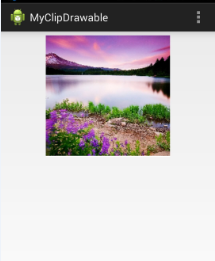
实例如下:徐徐展开的风景


注意:实际开发中,可采用该种方式完成进度显示控制。
资源文件==》drawable文件夹下

<?xml version="1.0" encoding="utf-8"?>

<clip xmlns:android="http://schemas.android.com/apk/res/android"

    android:clipOrientation="horizontal"

    android:drawable="@drawable/people"

    android:gravity="center" >

</clip>

布局文件==》

<LinearLayout xmlns:android="http://schemas.android.com/apk/res/android"

    xmlns:tools="http://schemas.android.com/tools"

    android:layout_width="match_parent"

    android:layout_height="match_parent"

    android:orientation="vertical"

    tools:context=".MainActivity" >

     <ImageView

        android:id="@+id/image"

        android:layout_width="wrap_content"

        android:layout_height="wrap_content"

        android:src="@drawable/myclip" />

</LinearLayout>

代码实现==》

package com.example.myclipdrawable;

import java.util.Timer;

import java.util.TimerTask;

import android.os.Bundle;

import android.os.Handler;

import android.os.Message;

import android.annotation.SuppressLint;

import android.app.Activity;

import android.graphics.drawable.ClipDrawable;

import android.view.Menu;

import android.widget.ImageView;

@SuppressLint("HandlerLeak")

public class MainActivity extends Activity

{

	@Override

	protected void onCreate(Bundle savedInstanceState)

	{

		super.onCreate(savedInstanceState);

		setContentView(R.layout.activity_main);

		ImageView img = (ImageView) this.findViewById(R.id.image);

		final ClipDrawable drawable = (ClipDrawable) img.getDrawable();

		final Handler hanler = new Handler()

		{

			@Override

			public void handleMessage(Message msg)

			{

				if (msg.what == 1)

				{

					int value=drawable.getLevel() + 200;

					drawable.setLevel(value);

				}

			}

		};

		final Timer timer = new Timer();

		timer.schedule(new TimerTask()

		{

			@Override

			public void run()

			{

				Message msg = new Message();

				msg.what = 1;

				hanler.sendMessage(msg);

				// 取消定时器

				if (drawable.getLevel() >= 10000)

				{

					timer.cancel();

				}

			}

		}, 0, 300);

	}

	@Override

	public boolean onCreateOptionsMenu(Menu menu)

	{

		// Inflate the menu; this adds items to the action bar if it is present.

		getMenuInflater().inflate(R.menu.main, menu);

		return true;

	}

}
运行效果:随着时间的变化,图片逐渐被截取完成


android学习笔记34——ClipDrawable资源的更多相关文章
- android学习笔记37——Menu资源
Menu菜单资源 android应用推荐使用XML来定义菜单,其可提供更好的解耦方式. 菜单资源通常位于res/menu文件夹下,其菜单根元素为<menu.../>,menu元素下可包含子 ...
- android学习笔记35——AnimationDrawable资源
AnimationDrawable资源 AnimationDrawable,代表一个动画. android既支持传统的逐帧动画(类似于电影方式,一张图片一张图片的切换),也支持通过平移.变换计算出来的 ...
- Android学习笔记36:使用SQLite方式存储数据
在Android中一共提供了5种数据存储方式,分别为: (1)Files:通过FileInputStream和FileOutputStream对文件进行操作.具体使用方法可以参阅博文<Andro ...
- 【转】Pro Android学习笔记(四):了解Android资源(下)
处理任意的XML文件 自定义的xml文件放置在res/xml/下,可以通过R.xml.file_name来获取一个XMLResourceParser对象.下面是xml文件的例子: <rootna ...
- 【转】Pro Android学习笔记(三):了解Android资源(上)
在Android开发中,资源包括文件或者值,它们和执行应用捆绑,无需在源代码中写死,因此我们可以改变或替换他们,而无需对应用重新编译. 了解资源构成 参考阅读Android学习笔记(三八):资源res ...
- Android学习笔记之Activity详解
1 理解Activity Activity就是一个包含应用程序界面的窗口,是Android四大组件之一.一个应用程序可以包含零个或多个Activity.一个Activity的生命周期是指从屏幕上显示那 ...
- Pro Android学习笔记 ActionBar(1):Home图标区
Pro Android学习笔记(四八):ActionBar(1):Home图标区 2013年03月10日 ⁄ 综合 ⁄ 共 3256字 ⁄ 字号 小 中 大 ⁄ 评论关闭 ActionBar在A ...
- 【转】 Pro Android学习笔记(七十):HTTP服务(4):SOAP/JSON/XML、异常
目录(?)[-] SOAP JSON和XMLPullParser Exception处理 文章转载只能用于非商业性质,且不能带有虚拟货币.积分.注册等附加条件,转载须注明出处:http://blog. ...
- 【转】 Pro Android学习笔记(五六):配置变化
目录(?)[-] Activity的destorycreate过程 Fragment的destorycreate过程 onSaveInstanceState saveFragmentInstanceS ...
随机推荐
- Sql 2000丢失sa 密码,重置sa密码
重置密码需要勾选一个授权 在企业管理器中-->服务器设置——>勾选“运行对系统目录直接进行修改” 勾选后就可以重置密码了. /////////////////// 详细: http://w ...
- Linux主机硬盘的主要规划
系统对于硬盘的需求跟刚刚提到的主机开放的服务有关,那么除了这点之外,还有没有其他的注意事项?当然有,那就是数据的分类与数据安全性的考虑,即当主机系统的硬件出现问题时,你的档案数据能否安全的保存. 前篇 ...
- 正则表达式中参数g、i、m的作用(share)
参数 g g 只影响于 exec.match 方法. 若不指定 g,则:每次调用 exec 都只返回第一个匹配:match 也是只返回第一个匹配. 若指定 g,则:每次调用 exec 都从上一个匹配之 ...
- 横向滚动条展示 css
<div class="shuaixuan" style="overflow:hidden;"> <div style="ov ...
- C++ Primer : 第二章:变量和基本类型(1)
变量和基本类型之第一篇:基本内置类型和变量 一. (1) C++定义了一套包括算数类型和空类型,这些类型有:布尔类型bool,字符类型char,宽字符类型wchar_t,Unicode字符char16 ...
- CentOS6.3 Hostname设定修改
今天装了个CentOS6.3恩,基本上是参照百度文库上面的文章来安装的 http://wenku.baidu.com/link?url=K0tqotryKLFHhJGicx1nC-hsgfWhL3OI ...
- Codeforces Round #149 (Div. 2)
A. Heads or Tails 枚举. B. Big Segment \(L=min(l_i),\ R=max(R_i)\) 判断是否存在区间\([L,R]\). C. King's Path 单 ...
- Android——ListView相关作业(修改版)
给GridView提供点击按钮添加新数据,单击项目修改,长按删除功能 activity_practise7的layout文件: <?xml version="1.0" enc ...
- Linux系统编程@进程管理(二)
1.创建守护进程(Deamon) 守护进程的概念与作用 后台服务程序 – 系统服务,进程名字往往以’d’结尾,生存周期比较长(系统装入时启动,关闭时候终止.系统装入两种启动方式:1从启动脚本.etc/ ...
- Android Studio 使用教程
http://www.tuicool.com/articles/amMvM3B 用 Android Studio 开发安卓 APP-使用篇 http://ask.android-studio.org/ ...