
颜色追踪块CamShift---33
原创博客:转载请标明出处:http://www.cnblogs.com/zxouxuewei/
颜色追踪块CamShift滤波器。
首先确保你的kinect驱动或者uvc相机驱动能正常启动:(如果你使用的是kinect,请运行openni驱动)
roslaunch openni_launch openni.launch
如果你没有安装kinect深度相机驱动,请看我前面的博文。
然后运行下面的launch文件:
roslaunch rbx1_vision camshift.launch
当视频出现时,通过鼠标画矩形将图像中的某个对象框住。这个矩形表示所选的区域,试着移动所选的区域。
以下是我的实验结果:
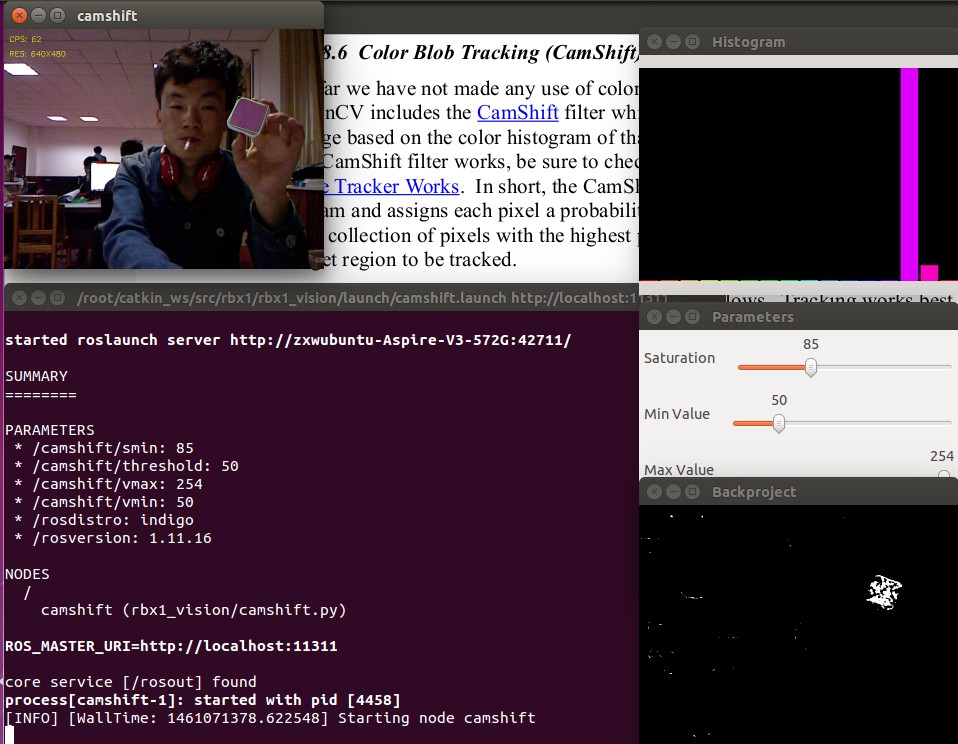

看看代码:启动文件为:camshift.launch。
#!/usr/bin/env python

""" camshift_node.py - Version 1.1 2013-12-20

    Modification of the ROS OpenCV Camshift example using cv_bridge and publishing the ROI

    coordinates to the /roi topic.

"""

import rospy

import cv2

from cv2 import cv as cv

from rbx1_vision.ros2opencv2 import ROS2OpenCV2

from std_msgs.msg import String

from sensor_msgs.msg import Image

import numpy as np

class CamShiftNode(ROS2OpenCV2):

    def __init__(self, node_name):

        ROS2OpenCV2.__init__(self, node_name)

        self.node_name = node_name

        # The minimum saturation of the tracked color in HSV space,

        # as well as the min and max value (the V in HSV) and a

        # threshold on the backprojection probability image.

        self.smin = rospy.get_param("~smin", )

        self.vmin = rospy.get_param("~vmin", )

        self.vmax = rospy.get_param("~vmax", )

        self.threshold = rospy.get_param("~threshold", )

        # Create a number of windows for displaying the histogram,

        # parameters controls, and backprojection image

        cv.NamedWindow("Histogram", cv.CV_WINDOW_NORMAL)

        cv.MoveWindow("Histogram", , )

        cv.NamedWindow("Parameters", )

        cv.MoveWindow("Parameters", , )

        cv.NamedWindow("Backproject", )

        cv.MoveWindow("Backproject", , )

        # Create the slider controls for saturation, value and threshold

        cv.CreateTrackbar("Saturation", "Parameters", self.smin, , self.set_smin)

        cv.CreateTrackbar("Min Value", "Parameters", self.vmin, , self.set_vmin)

        cv.CreateTrackbar("Max Value", "Parameters", self.vmax, , self.set_vmax)

        cv.CreateTrackbar("Threshold", "Parameters", self.threshold, , self.set_threshold)

        # Initialize a number of variables

        self.hist = None

        self.track_window = None

        self.show_backproj = False

    # These are the callbacks for the slider controls

    def set_smin(self, pos):

        self.smin = pos

    def set_vmin(self, pos):

        self.vmin = pos

    def set_vmax(self, pos):

       self.vmax = pos

    def set_threshold(self, pos):

        self.threshold = pos

    # The main processing function computes the histogram and backprojection

    def process_image(self, cv_image):

        try:

            # First blur the image

            frame = cv2.blur(cv_image, (, ))

            # Convert from RGB to HSV space

            hsv = cv2.cvtColor(frame, cv2.COLOR_BGR2HSV)

            # Create a mask using the current saturation and value parameters

            mask = cv2.inRange(hsv, np.array((., self.smin, self.vmin)), np.array((., ., self.vmax)))

            # If the user is making a selection with the mouse,

            # calculate a new histogram to track

            if self.selection is not None:

                x0, y0, w, h = self.selection

                x1 = x0 + w

                y1 = y0 + h

                self.track_window = (x0, y0, x1, y1)

                hsv_roi = hsv[y0:y1, x0:x1]

                mask_roi = mask[y0:y1, x0:x1]

                self.hist = cv2.calcHist( [hsv_roi], [], mask_roi, [], [, ] )

                cv2.normalize(self.hist, self.hist, , , cv2.NORM_MINMAX);

                self.hist = self.hist.reshape(-)

                self.show_hist()

            if self.detect_box is not None:

                self.selection = None

            # If we have a histogram, track it with CamShift

            if self.hist is not None:

                # Compute the backprojection from the histogram

                backproject = cv2.calcBackProject([hsv], [], self.hist, [, ], )

                # Mask the backprojection with the mask created earlier

                backproject &= mask

                # Threshold the backprojection

                ret, backproject = cv2.threshold(backproject, self.threshold, , cv.CV_THRESH_TOZERO)

                x, y, w, h = self.track_window

                if self.track_window is None or w <=  or h <=:

                    self.track_window = , , self.frame_width - , self.frame_height -

                # Set the criteria for the CamShift algorithm

                term_crit = ( cv2.TERM_CRITERIA_EPS | cv2.TERM_CRITERIA_COUNT, ,  )

                # Run the CamShift algorithm

                self.track_box, self.track_window = cv2.CamShift(backproject, self.track_window, term_crit)

                # Display the resulting backprojection

                cv2.imshow("Backproject", backproject)

        except:

            pass

        return cv_image

    def show_hist(self):

        bin_count = self.hist.shape[]

        bin_w =

        img = np.zeros((, bin_count*bin_w, ), np.uint8)

        for i in xrange(bin_count):

            h = int(self.hist[i])

            cv2.rectangle(img, (i*bin_w+, ), ((i+)*bin_w-, -h), (int(180.0*i/bin_count), , ), -)

        img = cv2.cvtColor(img, cv2.COLOR_HSV2BGR)

        cv2.imshow('Histogram', img)

    def hue_histogram_as_image(self, hist):

            """ Returns a nice representation of a hue histogram """

            histimg_hsv = cv.CreateImage((, ), , )

            mybins = cv.CloneMatND(hist.bins)

            cv.Log(mybins, mybins)

            (_, hi, _, _) = cv.MinMaxLoc(mybins)

            cv.ConvertScale(mybins, mybins, . / hi)

            w,h = cv.GetSize(histimg_hsv)

            hdims = cv.GetDims(mybins)[]

            for x in range(w):

                xh = ( * x) / (w - )  # hue sweeps from - across the image

                val = int(mybins[int(hdims * x / w)] * h / )

                cv2.rectangle(histimg_hsv, (x, ), (x, h-val), (xh,,), -)

                cv2.rectangle(histimg_hsv, (x, h-val), (x, h), (xh,,), -)

            histimg = cv2.cvtColor(histimg_hsv, cv.CV_HSV2BGR)

            return histimg

if __name__ == '__main__':

    try:

        node_name = "camshift"

        CamShiftNode(node_name)

        try:

            rospy.init_node(node_name)

        except:

            pass

        rospy.spin()

    except KeyboardInterrupt:

        print "Shutting down vision node."

        cv.DestroyAllWindows()
颜色追踪块CamShift---33的更多相关文章
- SPOJ 16549 - QTREE6 - Query on a tree VI 「一种维护树上颜色连通块的操作」
题意 有操作 $0$ $u$:询问有多少个节点 $v$ 满足路径 $u$ 到 $v$ 上所有节点(包括)都拥有相同的颜色$1$ $u$:翻转 $u$ 的颜色 题解 直接用一个 $LCT$ 去暴力删边连 ...
- SP16549 QTREE6 - Query on a tree VI LCT维护颜色联通块
\(\color{#0066ff}{ 题目描述 }\) 给你一棵n个点的树,编号1~n.每个点可以是黑色,可以是白色.初始时所有点都是黑色.下面有两种操作请你操作给我们看: 0 u:询问有多少个节点v ...
- bzoj2906 颜色 分块+块大小分析
题目传送门 https://lydsy.com/JudgeOnline/problem.php?id=2906 题解 如果可以离线的话,那么这个题目就是一个莫队的裸题. 看上去这个数据范围也还会一个根 ...
- OpenGL学习进程(11)第八课:颜色绘制的详解
本节是OpenGL学习的第八个课时,下面将详细介绍OpenGL的颜色模式,颜色混合以及抗锯齿. (1)颜色模式: OpenGL支持两种颜色模式:一种是RGBA,一种是颜色索引模式. R ...
- iOS 中实现随机颜色
开发中为了测试能够快速看到效果很多时候我们对颜色采用随机颜色 代码块如下 UIColor * randomColor= [UIColor colorWithRed:((float)arc4random ...
- Sass函数--颜色函数--HSL函数
HSL函数简介HSL颜色函数包括哪些具体的函数,所起的作用是什么: hsl($hue,$saturation,$lightness):通过色相(hue).饱和度(saturation)和亮度(ligh ...
- printf 字体颜色打印
为了给printf着色方便, 我们可以定义一些宏: view plain copy to clipboard print ? #define NONE "/033[m&qu ...
- 2-4 Sass的函数功能-颜色函数
RGB颜色函数-RGB()颜色函数 在 Sass 的官方文档中,列出了 Sass 的颜色函数清单,从大的方面主要分为 RGB , HSL 和 Opacity 三大函数,当然其还包括一些其他的颜色函数, ...
- python----模块知识拓展
1.hashlib ------configpraser-------- xml hashlib 模块导入:import hashlib 模块说明:用于将信息加密,明文变成密文 功能说明 MD5算法 ...
随机推荐
- [开发笔记]-jQuery获取checkbox选中项等操作及注意事项
今天在做一个项目功能时需要显示checkbox选项来让用户进行选择,由于前端不是很熟练,所以做了一个简单的Demo,其中遇到一些小问题,特记录下来,希望能帮到遇到类似问题的同学们. 1. 获取chec ...
- 数据结构-Hash表
实现: #ifndef SEPARATE_CHAINING_H #define SEPARATE_CHAINING_H #include <vector> #include <lis ...
- 13个优秀的开源UML工具介绍
本文将为您介绍12个优秀的UML工具: 1. StarUML StarUML(简称SU),是一种创建UML类图,是一种生成类图和其他类型的统一建模语言(UML)图表的工具.StarUML是一个开源项目 ...
- UML学习入门就这一篇文章
1.1 UML基础知识扫盲 UML这三个字母的全称是Unified Modeling Language,直接翻译就是统一建模语言,简单地说就是一种有特殊用途的语言. 你可能会问:这明明是一种图形,为什 ...
- [windows操作系统]windows模块
smss.exe csrss.exe Client/Server Runtime Server Subsystem
- hashmap和hashtable,arraylist和vector的区别
hashmap线程不安全,hashtable线程安全 hashmap允许使用 null 值和 null 键.(除了非同步和允许使用 null 之外,HashMap 类与 Hashtable 大致相同. ...
- 《day16_多线程细节_Eclipse使用》
多线程的一些细节: 1,面试题:sleep方法和wait方法异同点是什么? 相同点:可以让线程处于冻结状态. 不同点: 1, sleep必须指定时间. wait可以指定时间,也可以不指定时间. 2, ...
- 转:HashMap深度解析(一)
HashMap哈希码hashCodeequals 本文来自:高爽|Coder,原文地址:http://blog.csdn.net/ghsau/article/details/16843543,转载 ...
- poj2429 大数分解+dfs
//Accepted 172 KB 172 ms //该程序为随机性算法,运行时间不定 #include <cstdio> #include <cstring> #includ ...
- 配置navigation bar外观
/* 配置navigation bar外观开始 */ self.navigationBar.translucent = YES; self.navigationBar.titleTextAttribu ...