
Objective C静态代码扫描和代码质量管理 OClint + SonarQube
OClint是针对C, C++及Objective C代码的静态扫描分析工具,而SonarQube是一个开源的代码质量管理平台。本文将实现将OClint的扫描结果导入到SonarQube中,已实现对Objective C代码质量的管理。
操作系统:
Mac OS X 10.9
所需工具:
- SonarQube : sonarqube-4.4 - http://www.sonarqube.org/downloads/
- Sonar Runner : sonar-runner-dist-2.4 - http://www.sonarqube.org/downloads/
- MySQL 5.x : 5.0.90 MySQL Community Server (GPL) - http://dev.mysql.com/downloads/mysql/
- OClint : oclint-0.9.dev.5f3418c - http://oclint.org/downloads.html选择mac os x或者darwin的包
- xcodebuild: Xcode 5.x - https://developer.apple.com/xcode/downloads/
所需组件:
Sonar Plugin for Objective C
可以直接下载sonar-objective-c-plugin-0.3.2-SNAPSHOT.jar
也可以在https://github.com/octo-technology/sonar-objective-c/tree/oclint 下载源码,并执行其中的build-and-deploy.sh编译
环境搭建:
- 下载并安装MySQL;
- 创建sonar数据库及用户;

CREATE DATABASE sonar CHARACTER SET utf8 COLLATE utf8_general_ci;

CREATE USER 'sonar' IDENTIFIED BY 'sonar';

GRANT ALL ON sonar.* TO 'sonar'@'%' IDENTIFIED BY 'sonar';

GRANT ALL ON sonar.* TO 'sonar'@'localhost' IDENTIFIED BY 'sonar';

FLUSH PRIVILEGES;
3. 下载并解压SonarQube (例如:"/etc/sonarqube")
4. 将sonar-objective-c-plugin-0.3.2-SNAPSHOT.jar放到SonarQube的扩展插件目录下 (例如:"/etc/sonarqube/extensions/plugins")
5. 配置sonar.properties (例如:"/etc/sonarqube/conf")
|
1
2
3
4
5
6
7
|
# H2 embedded database server listening port, defaults to 9092#sonar.embeddedDatabase.port=9092#----- MySQL 5.x# Comment the embedded database and uncomment the following line to use MySQLsonar.jdbc.url=jdbc:mysql://localhost:3306/sonar?useUnicode=true&characterEncoding=utf8&rewriteBatchedStatements=true |
6. 启动SonarQube服务器
$ /etc/sonarqube/bin/macosx-universal-64/sonar.sh console

Running SonarQube...

wrapper  | --> Wrapper Started as Console

wrapper  | Launching a JVM...

jvm 1    | Wrapper (Version 3.2.3) http://wrapper.tanukisoftware.org

jvm 1    |   Copyright 1999-2006 Tanuki Software, Inc.  All Rights Reserved.

jvm 1    |

jvm 1    | 2014.09.06 14:45:53 INFO  Web server is started
7. 测试SonarQube
http://localhost:9000/
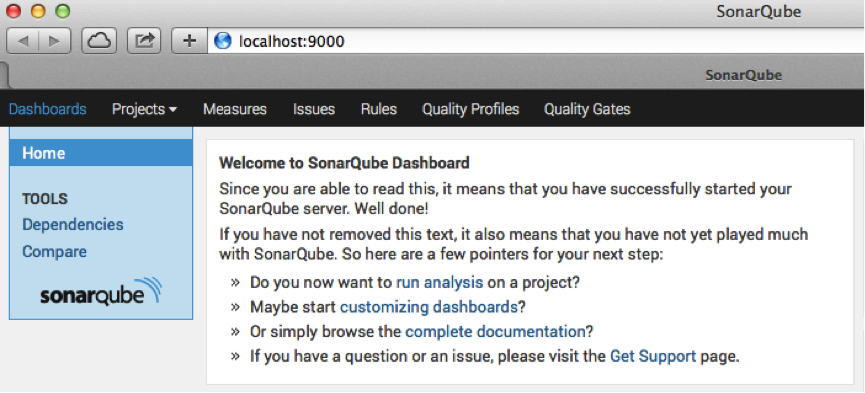
8. 下载并解压Sonar Runner (例如:"/etc/sonar-runner")
9. 配置Sonar Runner下的sonar-runner.properties (例如:"/etc/sonar-runner/conf/ sonar-runner.properties")
#----- Default SonarQube server

sonar.host.url=http://localhost:9000

#----- MySQL

sonar.jdbc.url=jdbc:mysql://localhost:3306/sonar?useUnicode=true&characterEncoding=utf8

#----- Global database settings

sonar.jdbc.username=sonar

sonar.jdbc.password=sonar
10. 下载并解压OClint(例如:"/etc/oclint")
11. 测试OClint
$ /etc/oclint/bin/oclint

oclint: Not enough positional command line arguments specified!

Must specify at least 1 positional arguments: See: oclint -help
12. 测试xcodebuild
$ xcodebuild -version

Xcode 5.0.2

Build version 5A3005
扫描代码:
- 在bash中进入代码目录(.xcodeproj文件所在目录), 执行 xcodebuild | tee xcodebuild.log
- 在bash中执行 oclint-xcodebuild xcodebuild.log
- 在bash中执行oclint-json-compilation-database -- -report-type pmd -o sonar-reports/oclint.xml。
- 将sonar-project.properties存放到代码目录中,根据具体情况编辑对应的项,需要特别注意其中的sonar.objectivec.project和sonar.objectivec.appScheme
##########################

# Required configuration #

##########################

sonar.projectKey=my-project

sonar.projectName=My project

sonar.projectVersion=1.0

sonar.language=objc

# Project description

sonar.projectDescription=Fake description

# Path to source directories

sonar.sources=srcDir1,srcDir2

# Xcode project configuration (.xcodeproj or .xcworkspace)

# -> If you have a project: configure only sonar.objectivec.project

# -> If you have a workspace: configure sonar.objectivec.workspace and sonar.objectivec.project

# and use the later to specify which project(s) to include in the analysis (comma separated list)

sonar.objectivec.project=myApplication.xcodeproj

# sonar.objectivec.workspace=myApplication.xcworkspace

# Scheme to build your application

sonar.objectivec.appScheme=myApplication

# Scheme to build and run your tests (comment following line of you don't have any tests)

sonar.objectivec.testScheme=myApplicationTests

##########################

# Optional configuration #

##########################

# Encoding of the source code

sonar.sourceEncoding=UTF-8

# JUnit report generated by run-sonar.sh is stored in sonar-reports/TEST-report.xml

# Change it only if you generate the file on your own

# The XML files have to be prefixed by TEST- otherwise they are not processed

# sonar.junit.reportsPath=sonar-reports/

# Cobertura report generated by run-sonar.sh is stored in sonar-reports/coverage.xml

# Change it only if you generate the file on your own

# sonar.objectivec.coverage.reportPattern=sonar-reports/coverage*.xml

# OCLint report generated by run-sonar.sh is stored in sonar-reports/oclint.xml

# Change it only if you generate the file on your own

# sonar.objectivec.oclint.report=sonar-reports/oclint.xml

# Paths to exclude from coverage report (tests, 3rd party libraries etc.)

# sonar.objectivec.excludedPathsFromCoverage=pattern1,pattern2

sonar.objectivec.excludedPathsFromCoverage=.*Tests.*
6. 在bash中执行Sonar Runner
/etc/sonar-runner/bin/sonar-runer.sh
7. 在SonarQube中查看结果
http://localhost:9000/

异常情况处理:
- 如果执行/etc/sonar-runner/bin/sonar-runer.sh 失败,提示错误:
RROR: Error during Sonar runner execution

ERROR: Unable to execute Sonar

ERROR: Caused by: You must install a plugin that supports the language 'objc'

ERROR:

ERROR: To see the full stack trace of the errors, re-run SonarQube Runner with the -e switch.

ERROR: Re-run SonarQube Runner using the -X switch to enable full debug logging.
说明sonar-objective-c-plugin-0.3.2-SNAPSHOT.jar没有加载到/etc/sonarqube/extensions/plugins
2. 如果执行/etc/sonar-runner/bin/sonar-runer.sh 失败,提示错误:
ERROR: Error during Sonar runner execution

ERROR: Unable to execute Sonar

ERROR: Caused by: The rule 'OCLint:switch statements don't need default when fully covered' does not exist.

ERROR:

ERROR: To see the full stack trace of the errors, re-run SonarQube Runner with the -e switch.

ERROR: Re-run SonarQube Runner using the -X switch to enable full debug logging.
错误提示 The rule ‘XXX’ does not exist说明Oclint扫描出来的问题在Sonar Plugin for Objective C(sonar-objective-c-plugin-0.3.2-SNAPSHOT.jar)的规则定义中不存在,这时候只能把规则追加到Sonar Plugin for Objective C中,并重新编译jar包。追加规则的方法为:
编辑sonar-objective-c-master/src/main/resources/org/sonar/plugins/oclint下的 profile-oclint.xml和rules.txt
例如上面的错误,将下面的代码加入profile-oclint.xml
        <rule>

            <repositoryKey>OCLint</repositoryKey>

            <key>switch statements don't need default when fully covered</key>

        </rule>
将下面的代码加入rules.txt(注意在0.3.2版本中Priority和Severity不能超过3,否则编译出来的jar包会造成SonarQube服务器无法启动)
switch statements don't need default when fully covered

----------

Summary:

Priority: 3

Severity: 3

Category: OCLint
最后需要重启SonarQube服务器
/etc/sonarqube/bin/macosx-universal-64/sonar.sh restart
3. 如果执行/etc/sonarqube/bin/macosx-universal-64/sonar.sh console失败,提示错误:
wrapper  | --> Wrapper Started as Console

wrapper  | Launching a JVM...

jvm 1    | Wrapper (Version 3.2.3) http://wrapper.tanukisoftware.org

jvm 1    |   Copyright 1999-2006 Tanuki Software, Inc.  All Rights Reserved.

jvm 1    |

wrapper  | <-- Wrapper Stopped
同时在/etc/sonarqube/bin/macosx-universal-64/中生成wrapper.log文件,并提示无法找到配置文件,则由可能是追击规则后重新编译过的sonar-objective-c-plugin-0.3.2-SNAPSHOT.jar文件出错,特别是rules.txt 中某一项的Priority和Severity超过了3
Objective C静态代码扫描和代码质量管理 OClint + SonarQube的更多相关文章
- DEVOPS技术实践_05:sonar静态代码扫描
一.SonarQube静态代码扫描平台 1.1 安装 https://www.sonarqube.org/官网 1.2 下载软件包 https://www.sonarqube.org/download ...
- 静态代码扫描工具PMD定制xml的规则(一)操作篇
0.前言 PMD作为开源的静态代码扫描工具有很强的扩展能力,可使用java或xpath定制rule.第一篇从操作上讲解如何定制一个用于扫描xml是否规范的规则.首先我们知道xml格式的文件在java工 ...
- 使用OClint进行iOS项目的静态代码扫描
使用OClint进行iOS项目的静态代码扫描 原文链接:http://blog.yourtion.com/static-code-analysis-ios-using-oclint.html 最近需要 ...
- Lint——Android SDK提供的静态代码扫描工具
Lint和FindBugs一样,都是静态代码扫描工具,区别在于它是Android SDK提供的,会检查Android项目源文件的正确性.安全性.性能.可用性等潜在的bug并优化改进. 下图简单地描述了 ...
- 【Lua篇】静态代码扫描分析(一)初步介绍
一.静态代码分析 静态代码分析是一种通过检查代码而不是执行程序来发现源代码中错误的手段.通常可以帮助我们发现常见的编码错误,例如: 语法错误 违反制定的标准编码 未定义的变量 安全性问 ...
- 【Lua篇】静态代码扫描分析(四)规则检查
一.前言 通过前面三篇文章已经初步实现了将Lua源代码文件读取解析成语法树,现在就可以通过得到的语法树进行指定规则的代码扫描检查.下图简单列举了一下单个Lua文件内部的语法关系情况(注意并非真正的类图 ...
- 【Lua篇】静态代码扫描分析(三)语法分析
一.语法分析 通过将词法分析获取的Token流按照目标语言的语法进行解析的过程,例如解析函数声明.函数调用.变量声明.各种语句等. 二.Lua语法分析 在写语法分析程序前,先需要了解Lua的语句和语法 ...
- 静态代码扫描之阿里java代码规范IDEA插件
前言 2017年2月9日,首次公布<阿里巴巴Java开发手册>; 2017年9月25日,阿里巴巴集团发布了<阿里巴巴Java开发手册>PDF终极版; 2017年10月14日,在 ...
- Java静态检测工具/Java代码规范和质量检查简单介绍(转)
静态检查: 静态测试包括代码检查.静态结构分析.代码质量度量等.它可以由人工进行,充分发挥人的逻辑思维优势,也可以借助软件工具自动进行.代码检查代码检查包括代码走查.桌面检查.代码审查等,主要检查代码 ...
随机推荐
- SPOJ ARCTAN (数论) Use of Function Arctan
详细的题解见这里. 图片转自上面的博客 假设我们已经推导出来x在处取得最小值,并且注意到这个点是位于两个整点之间的,所以从这两个整数往左右两边枚举b就能找到b+c的最小值. 其实只用往一边枚举就够了, ...
- BZOJ 4557 侦查守卫
好迷的树形dp... #include<iostream> #include<cstdio> #include<cstring> #include<algor ...
- Calculate drive total/free/available space
using System; using System.Collections.Generic; using System.IO; using System.Text; namespace Consol ...
- 当sql报错代码,不允许对表操作的原因
不允许对表 表名 执行操作,原因码为 原因码. 说明 限制对表 表名 的访问.原因基于下列原因码 原因码: 1 该表处于“设置完整性暂挂无访问”状态.未强制表的完整性并且表的内容可能是无效的.如果从属 ...
- 【转】Git连接oschina管理代码版本
原文网址:http://blog.csdn.net/liukang325/article/details/24051467 工作中一般都是用的SVN,最近好像GitHub有些火,看到开源中国上也有Gi ...
- MySQL与Oracle 差异比较之五存储过程&Function
存储过程&Function 编号 类别 ORACLE MYSQL 注释 1 创建存储过程语句不同 create or replace procedure P_ADD_FAC( id_fac ...
- DevExpress控件GridView挂下拉控件无法对上值
下拉控件使用RepositoryItemLookUpEdit,加入如下事件进行处理. repositoryItemLookUpEdit1.CustomDisplayText += new DevExp ...
- YII Framework学习教程-YII的国际化
一个web应用,发布到互联网,就是面向全球用户.用户在世界的各个角落都可以访问到你的web应用,当然要看你的网站和不和谐,不和谐的web应用在和谐社会是不让你访问的. YII提供了国际化的支持,可以让 ...
- VB6.0编程笔记——(1)篇外篇&目录
从计算机专业毕业到进入IT行业,说来也有些年头了.相比较而言算是幸运,也有很多的同学进入了其他行业,也有一些朋友又想进入这个行业.现在回想自己的一路历程,总结一下,也是一份记忆. 基于以上的原因,希望 ...
- Mountain Road
题意: n个车,过一条路,有不同的方向,路上不允许同时有两个方向的车,给出每个车的起始时间,方向,和经过路花费的时间,车最小间隔10个时间,求最后一个车通过路的最早的时间. 分析: dp[i][j][ ...