
C#中通过Selenium IWebDriver实现人人网相册备份工具
我用Selenium写了一个人人网相册备份工具,亲测通过。
需要输入你的用户名、密码、相册地址。
代码如下:
using System;

using System.Collections.Generic;

using System.Linq;

using System.Text;

using System.Threading.Tasks;

using OpenQA.Selenium;

using OpenQA.Selenium.IE;

using OpenQA.Selenium.Interactions;

using OpenQA.Selenium.Support.UI;

using System.Threading;

using System.IO;

using System.Net;

namespace RenrenBackup

{

    public class Program

    {

        static void Main(string[] args)

        {

            //Configuration.

            Program pp = new Program();

            string url = "http://www.renren.com";

            string userName = "";
            string pwd = "";

            string albumUrl = "";

            //Start backup.

            IWebDriver iw = new InternetExplorerDriver();

            iw = pp.Login(url, pwd, userName, iw);

            iw.Navigate().GoToUrl(albumUrl);

            pp.WaitUntilPageLoadedID(iw, "c-b-describe");

            List<string> photoUrls = new List<string>();

            var photos = iw.FindElements(By.ClassName("photo-box"));

            var count = iw.FindElement(By.Id("album-count")).Text;

            while (photos.Count() != Int32.Parse(count))

            {

                try

                {

                    String setScroll = "document.documentElement.scrollTop=" + ;

                    ((IJavaScriptExecutor)iw).ExecuteScript(setScroll);

                    Thread.Sleep();

                    photos = iw.FindElements(By.ClassName("photo-box"));

                }

                catch (Exception ex)

                {

                    WriteLog(ex);

                }

            }

            string value;

            for (int i = ; i < photos.Count(); i++)

            {

                value = iw.FindElements(By.XPath("//a/img[@class='p-b-item']"))[i].GetAttribute("data-viewer");

                value = value.Split(',')[].Split('"')[].Trim();

                photoUrls.Add(value);

            }

            pp.WriteToFile(photoUrls);

            string filePath;

            string folderPath = @Environment.GetFolderPath(Environment.SpecialFolder.DesktopDirectory) + @"\" + iw.FindElement(By.Id("album-name")).Text;

            if (!Directory.Exists(folderPath))

            {

                Directory.CreateDirectory(folderPath);

            }

            for (int i = ; i < photoUrls.Count(); i++)

            {

                filePath = folderPath + @"\" + i + "pic.jpg";

                WebClient myWebClient = new WebClient();

                try

                {

                    myWebClient.DownloadFile(photoUrls[i], filePath);

                }

                catch (Exception ex)

                {

                    WriteLog(ex);

                }

            }

        }

        public void WriteToFile(List<string> photoUrls)

        {

            string file = @Environment.GetFolderPath(Environment.SpecialFolder.DesktopDirectory) + @"\PhotoUrls.txt";

            if (File.Exists(file))

            {

                using (StreamWriter sw = new StreamWriter(file, true))

                {

                    foreach (string photoUrl in photoUrls)

                    {

                        sw.Write(photoUrl + "\r\n");

                        sw.Flush();

                    }

                }

            }

            else

            {

                File.Create(file).Close();

                using (StreamWriter sw = new StreamWriter(file, true))

                {

                    foreach (string photoUrl in photoUrls)

                    {

                        sw.Write(photoUrl + "\r\n");

                        sw.Flush();

                    }

                }

            }

        }

        public void WriteToFile(string v)

        {

            string file = @Environment.GetFolderPath(Environment.SpecialFolder.DesktopDirectory) + @"\PhotoUrls.txt";

            if (File.Exists(file))

            {

                using (StreamWriter sw = new StreamWriter(file, true))

                {

                    sw.Write(v + "\r\n");

                    sw.Flush();

                }

            }

            else

            {

                File.Create(file).Close();

                using (FileStream fs = new FileStream(file, FileMode.Open))

                {

                    using (StreamWriter sw = new StreamWriter(fs))

                    {

                        sw.Write(v + "\r\n");

                        sw.Flush();

                    }

                }

            }

        }

        public IWebDriver Login(string url, string pwd, string userName, IWebDriver iw)

        {

            iw.Navigate().GoToUrl(url);

            WaitUntilPageLoadedID(iw, "email");

            iw.FindElement(By.Id("email")).SendKeys(userName);

            iw.FindElement(By.Id("password")).SendKeys(pwd);

            iw.FindElement(By.Id("login")).Click();

            WaitUntilPageLoadedXPath(iw, "//span[text()='我的相册']");

            return iw;

        }

        public void WaitUntilPageLoadedID(IWebDriver iw, string id)

        {

            try

            {

                iw.FindElement(By.Id(id));

            }

            catch (Exception ex)

            {

                Console.WriteLine(ex);

                Thread.Sleep();

                WaitUntilPageLoadedID(iw, id);

            }

        }

        public void WaitUntilPageLoadedXPath(IWebDriver iw, string v)

        {

            try

            {

                iw.FindElement(By.XPath(v));

            }

            catch (Exception ex)

            {

                Console.WriteLine(ex.ToString());

                Thread.Sleep();

                WaitUntilPageLoadedXPath(iw, v);

            }

        }

        private static void WriteLog(Exception ex)

        {

            string logUrl = Environment.GetFolderPath(Environment.SpecialFolder.DesktopDirectory) + "\\DownloadLog.txt";

            if (File.Exists(@logUrl))

            {

                using (FileStream fs = new FileStream(logUrl, FileMode.Append))

                {

                    using (StreamWriter sw = new StreamWriter(fs, Encoding.Default))

                    {

                        try

                        {

                            sw.Write(ex);

                        }

                        catch (Exception ex1)

                        {

                            WriteLog(ex1);

                        }

                        finally

                        {

                            sw.Close();

                            fs.Close();

                        }

                    }

                }

            }

            else

            {

                using (FileStream fs = new FileStream(logUrl, FileMode.CreateNew))

                {

                    using (StreamWriter sw = new StreamWriter(fs, Encoding.Default))

                    {

                        try

                        {

                            sw.Write(ex);

                        }

                        catch (Exception ex1)

                        {

                            WriteLog(ex1);

                        }

                        finally

                        {

                            sw.Close();

                            fs.Close();

                        }

                    }

                }

            }

        }

    }

}
引用如下:
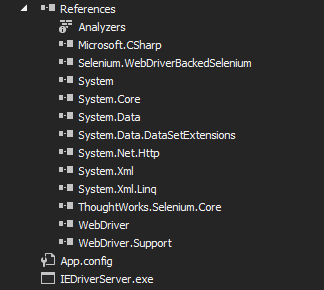
注意设置IEDriverServer.exe的属性为“Copy aLways”。
运行后会在桌面生成一个和你人人网相册同名的文件夹,下面保存的是你的相册相片。桌面还会有下载的图片的详细url列表以及如果有异常会产生的log文件。
OK,回家。
C#中通过Selenium IWebDriver实现人人网相册备份工具的更多相关文章
- eclipse中运行Selenium遇到的问题
1. java.lang.NoClassDefFoundError: 解决方法:eclipse的java工程中导入selenium-java-2.44.0\selenium-2.44.0\libs ...
- Java中通过Selenium WebDriver定位iframe中的元素
转载请注明出自天外归云的博客园:http://www.cnblogs.com/LanTianYou/ 问题:有一些元素,无论是通过id或是xpath等等,怎么都定位不到. 分析:这很可能是因为你要定位 ...
- 在Scrapy中使用selenium
在scrapy中使用selenium 在scrapy中需要获取动态加载的数据的时候,可以在下载中间件中使用selenium 编码步骤: 在爬虫文件中导入webdrvier类 在爬虫文件的爬虫类的构造方 ...
- Jenkins中配置selenium测试
Jenkins中配置selenium测试 2015/03/23 第一步在jenkins中配置selenium服务器 第二步工程配置: 第三步:执行构建: 第四步,查看报告:
- 【转】JMeter中使用Selenium进行测试
JMeter是使用非常广泛的性能测试工具,而Selenium是ThroughtWorks 公司一个强大的开源Web 功能测试工具.Jmeter和Selenium结合使用,就可以实现对网站页面的自动化性 ...
- 在linux和windows中使用selenium
在linux和windows中使用selenium 一. selenium(浏览的人你们多大呀?是AI?) selenium最初是一个自动化测试工具,而爬虫中使用它主要是为了解决requests无法 ...
- Django学习系列2:django环境中安装selenium并查看selenium版本号
在Django环境中安装selenium (django) root@ranxf-TEST:/studydisk/Python_web_TDD/superlists# conda install se ...
- 火狐中添加selenium IDE
在火狐中添加selenium IDE 1.下载selenium IDE,此处下载的是selenium-ide-2.5.0.xpi 2.在火狐中,打开菜单-->附加组件-->用户附加组件的工 ...
- scrapy中间件中使用selenium切换ip
scrapy抓取一些需要js加载页面时一般要么是通过接口直接获取数据,要么是js加载,但是我通过selenium也可以获取动态页面 但是有个问题,容易给反爬,因为在scrapy中间件mid中使用sel ...
随机推荐
- Lintcode: Topological Sorting
Given an directed graph, a topological order of the graph nodes is defined as follow: For each direc ...
- 20145207 《Java程序设计》第4周学习总结
前言 又到了大家最喜欢的前言时间,哈哈哈.我这个人啊,就是比较爱闲聊.正式在学校呆的第一天时间就在这里敲代码,自己都觉得自己伟大.不过好无聊呀....这周的内容说实话讲我还是挺感兴趣的,因为书上的例子 ...
- 关于gem包下载网站的说明
- .NET: C#: Attribute
ref: http://www.uml.org.cn/net/200810135.asp ref: http://blog.csdn.net/okvee/article/details/2610349 ...
- ofbiz进击 第二节。 control 理解与创建
首先要说的是,学习ofbiz,要去http://ofbiz.apache.org/官网里面,去看右边菜单里 Management Apps 的例子,然后找到类似的页面,去看调用的源码方法. co ...
- HTML5 Canvas arc()函数
实例 创建一个圆形: var c=document.getElementById("myCanvas"); var ctx=c.getContext("2d") ...
- IIS7.5解决应用程序池回收假死问题
使用windows server 2008 r2解决回收假死的问题. 具体做法是: 打开应用程序池 -> 高级设置 ->在“禁止重叠回收”里选择“true”,这样就有效避免了应用程序池回收 ...
- paper 28 :一些常见常用数据库的下载网站集锦
做图像处理+模式识别的童鞋怎么可以没有数据库呢? 但是,如果自己做一个数据库,费时费力费钱先不说,关键是建立的数据库的公信力一般不会高,做出的算法也别人也不好比较,所以呢,下载比较权威的公共数据库还是 ...
- visio的简单用法
visio图边缘会自动扩展 将常用工具放到收藏夹中,拖进去就可以用. 基本形状基本能够满足一般的需求. 支持自己定义形状,将定义好的形状右击组合之后,收藏到收藏夹或导出模版. 多用组合,收藏夹,调整图 ...
- 夺命雷公狗ThinkPHP项目之----企业网站23之网站前台二级分类的跳转(URL跳转到列表页或产品页)
我们现在开始做实现我们的二级菜单如何跳转到指定的列表页或者产品也呢?? 我们分享下数据库情况: 我们的数据库里提前给我们预留了一个cate_type的字段,那么我们可以让这个字段进行判断,从而遍历出指 ...