
NPOI导出word,以及对table的一些设置
参考网址:http://www.aiuxian.com/article/p-1970779.html
NPOI版本:2.1.3.1
最终效果图:
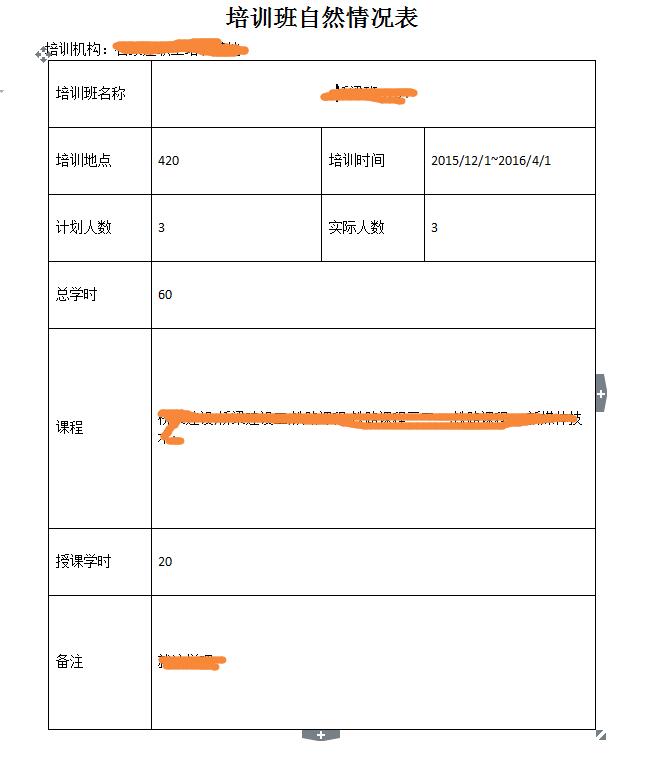
代码:
  /// <summary>

         /// 导出word培训班自然情况表

         /// </summary>

         [HttpPost]

         public void PrintWord()

         {

             int id = Int32.Parse(Request.Form["id"]);

             var query = from n in db.Nature

                         where n.NatureId == id && n.IsDelete == false

                         select new NatureInfo

                         {

                             NatureBeginTime = n.NatureBeginTime,

                             NatureEndTime = n.NatureEndTime,

                             ActualNum = n.ActualNum,

                             PlanNum = n.PlanNum,

                             NaturePlace = n.NaturePlace,

                             NatureMajor = n.NatureMajor,

                             TrainName = n.TrainName,

                             TotalHours = n.TotalHours,

                             TeachingHours = n.TeachingHours,

                             Remark = n.Remark

                         };

             DataTable dt = query.ToDataTable(rec => new object[] { query });

             #region 培训班自然情况表

             XWPFDocument doc = new XWPFDocument();//创建word文档

             MemoryStream ms = new MemoryStream();//创建流

             XWPFParagraph p0 = doc.CreateParagraph();//创建段落

             p0.Alignment = ParagraphAlignment.CENTER;//居中显示

             XWPFRun r0 = p0.CreateRun();

             //设置字体

             r0.FontFamily = "宋体";

             //设置字体大小

             r0.FontSize = ;

             //字体是否加粗,这里加粗了

             r0.SetBold(true);

             r0.SetText("培训班自然情况表");//写入文本

             XWPFParagraph p1 = doc.CreateParagraph();

             p1.Alignment = ParagraphAlignment.LEFT;

             XWPFRun r1 = p1.CreateRun();

             r1.SetText("培训机构:石家庄职工培训基地");

             XWPFTable table = doc.CreateTable(, );//创建table

             table.RemoveRow();//去掉第一行空白的

             table.SetColumnWidth(,  * );//设置列的宽度

             table.SetColumnWidth(,  * );

             table.SetColumnWidth(,  * );

             table.SetColumnWidth(,  * );

             CT_Tbl m_CTTbl = doc.Document.body.GetTblArray()[];//获得文档第一张表

             m_CTTbl.AddNewTblPr().jc = new CT_Jc();

             m_CTTbl.AddNewTblPr().jc.val = ST_Jc.center;//表在页面水平居中

             foreach (DataRow r in dt.Rows)

             {

                 CT_Row nr = new CT_Row();

                 XWPFTableRow mr = new XWPFTableRow(nr, table);//创建行

                 mr.GetCTRow().AddNewTrPr().AddNewTrHeight().val = (ulong);//设置行高

                 nr.AddNewTrPr().AddNewTrHeight().val = (ulong);//设置行高(这两行都得有)

                 table.AddRow(mr);//将行添加到table中

                 mr.CreateCell().SetText("培训班名称");

                 mr.GetCell().SetVerticalAlignment(XWPFTableCell.XWPFVertAlign.CENTER);//文字垂直居中(即上下居中)

                 XWPFTableCell c1 = mr.CreateCell();//创建单元格

                 CT_Tc ct = c1.GetCTTc();

                 CT_TcPr cp = ct.AddNewTcPr();

                 cp.gridSpan = new CT_DecimalNumber();

                 cp.gridSpan.val = ""; //合并3列

                 cp.AddNewVAlign().val = ST_VerticalJc.center;

                 ct.GetPList()[].AddNewPPr().AddNewJc().val = ST_Jc.center;//单元格内容居中显示

                 ct.GetPList()[].AddNewR().AddNewT().Value = r["TrainName"].ToString();

                 CT_Row cr1 = new CT_Row();

                 XWPFTableRow tr1 = new XWPFTableRow(cr1, table);

                 tr1.GetCTRow().AddNewTrPr().AddNewTrHeight().val = (ulong);

                 cr1.AddNewTrPr().AddNewTrHeight().val = (ulong);

                 table.AddRow(tr1);

                 tr1.CreateCell().SetText("培训地点");

                 tr1.GetCell().SetVerticalAlignment(XWPFTableCell.XWPFVertAlign.CENTER);

                 tr1.CreateCell().SetText(r["NaturePlace"].ToString());

                 tr1.GetCell().SetVerticalAlignment(XWPFTableCell.XWPFVertAlign.CENTER);

                 tr1.CreateCell().SetText("培训时间");

                 tr1.GetCell().SetVerticalAlignment(XWPFTableCell.XWPFVertAlign.CENTER);

                 tr1.CreateCell().SetText(Convert.ToDateTime(r["NatureBeginTime"].ToString()).ToShortDateString() + "~" + Convert.ToDateTime(r["NatureEndTime"].ToString()).ToShortDateString());

                 tr1.GetCell().SetVerticalAlignment(XWPFTableCell.XWPFVertAlign.CENTER);

                 CT_Row cr2 = new CT_Row();

                 XWPFTableRow tr2 = new XWPFTableRow(cr2, table);

                 tr2.GetCTRow().AddNewTrPr().AddNewTrHeight().val = (ulong);

                 cr2.AddNewTrPr().AddNewTrHeight().val = (ulong);

                 table.AddRow(tr2);

                 tr2.CreateCell().SetText("计划人数");

                 tr2.GetCell().SetVerticalAlignment(XWPFTableCell.XWPFVertAlign.CENTER);

                 tr2.CreateCell().SetText(r["PlanNum"].ToString());

                 tr2.GetCell().SetVerticalAlignment(XWPFTableCell.XWPFVertAlign.CENTER);

                 tr2.CreateCell().SetText("实际人数");

                 tr2.GetCell().SetVerticalAlignment(XWPFTableCell.XWPFVertAlign.CENTER);

                 tr2.CreateCell().SetText(r["ActualNum"].ToString());

                 tr2.GetCell().SetVerticalAlignment(XWPFTableCell.XWPFVertAlign.CENTER);

                 CT_Row cr3 = new CT_Row();

                 XWPFTableRow tr3 = new XWPFTableRow(cr3, table);//创建行

                 tr3.GetCTRow().AddNewTrPr().AddNewTrHeight().val = (ulong);

                 cr3.AddNewTrPr().AddNewTrHeight().val = (ulong);

                 table.AddRow(tr3);//将行添加到table中

                 tr3.CreateCell().SetText("总学时");

                 tr3.GetCell().SetVerticalAlignment(XWPFTableCell.XWPFVertAlign.CENTER);

                 XWPFTableCell tc3 = tr3.CreateCell();//创建单元格

                 CT_Tc ct3 = tc3.GetCTTc();

                 CT_TcPr cp3 = ct3.AddNewTcPr();

                 cp3.gridSpan = new CT_DecimalNumber();

                 cp3.gridSpan.val = ""; //合并3列

                 ct3.GetPList()[].AddNewPPr().AddNewJc().val = ST_Jc.left;//单元格内容居中显示

                 ct3.GetPList()[].AddNewR().AddNewT().Value = r["TotalHours"].ToString();

                 tr3.GetCell().SetVerticalAlignment(XWPFTableCell.XWPFVertAlign.CENTER);

                 CT_Row cr4 = new CT_Row();

                 XWPFTableRow tr4 = new XWPFTableRow(cr4, table);//创建行

                 tr4.GetCTRow().AddNewTrPr().AddNewTrHeight().val = (ulong);

                 cr4.AddNewTrPr().AddNewTrHeight().val = (ulong);

                 table.AddRow(tr4);//将行添加到table中

                 tr4.CreateCell().SetText("课程");

                 tr4.GetCell().SetVerticalAlignment(XWPFTableCell.XWPFVertAlign.CENTER);

                 XWPFTableCell tc4 = tr4.CreateCell();//创建单元格

                 CT_Tc ct4 = tc4.GetCTTc();

                 CT_TcPr cp4 = ct4.AddNewTcPr();

                 cp4.gridSpan = new CT_DecimalNumber();

                 cp4.gridSpan.val = ""; //合并3列

                 ct4.GetPList()[].AddNewPPr().AddNewJc().val = ST_Jc.left;//单元格内容居中显示

                 ct4.GetPList()[].AddNewR().AddNewT().Value = r["NatureMajor"].ToString();

                 tr4.GetCell().SetVerticalAlignment(XWPFTableCell.XWPFVertAlign.CENTER);

                 CT_Row cr5 = new CT_Row();

                 XWPFTableRow tr5 = new XWPFTableRow(cr5, table);//创建行

                 tr5.GetCTRow().AddNewTrPr().AddNewTrHeight().val = (ulong);

                 cr5.AddNewTrPr().AddNewTrHeight().val = (ulong);

                 table.AddRow(tr5);//将行添加到table中

                 tr5.CreateCell().SetText("授课学时");

                 tr5.GetCell().SetVerticalAlignment(XWPFTableCell.XWPFVertAlign.CENTER);

                 XWPFTableCell tc5 = tr5.CreateCell();//创建单元格

                 CT_Tc ct5 = tc5.GetCTTc();

                 CT_TcPr cp5 = ct5.AddNewTcPr();

                 cp5.gridSpan = new CT_DecimalNumber();

                 cp5.gridSpan.val = ""; //合并3列

                 ct5.GetPList()[].AddNewPPr().AddNewJc().val = ST_Jc.left;//单元格内容居中显示

                 ct5.GetPList()[].AddNewR().AddNewT().Value = r["TeachingHours"].ToString();

                 tr5.GetCell().SetVerticalAlignment(XWPFTableCell.XWPFVertAlign.CENTER);

                 CT_Row cr6 = new CT_Row();

                 XWPFTableRow tr6 = new XWPFTableRow(cr6, table);//创建行

                 tr6.GetCTRow().AddNewTrPr().AddNewTrHeight().val = (ulong);

                 cr6.AddNewTrPr().AddNewTrHeight().val = (ulong);

                 table.AddRow(tr6);//将行添加到table中

                 tr6.CreateCell().SetText("备注");

                 tr6.GetCell().SetVerticalAlignment(XWPFTableCell.XWPFVertAlign.CENTER);

                 XWPFTableCell tc6 = tr6.CreateCell();//创建单元格

                 CT_Tc ct6 = tc6.GetCTTc();

                 CT_TcPr cp6 = ct6.AddNewTcPr();

                 cp6.gridSpan = new CT_DecimalNumber();

                 cp6.gridSpan.val = ""; //合并3列

                 ct6.GetPList()[].AddNewPPr().AddNewJc().val = ST_Jc.left;//单元格内容居中显示

                 ct6.GetPList()[].AddNewR().AddNewT().Value = r["Remark"].ToString();

                 tr6.GetCell().SetVerticalAlignment(XWPFTableCell.XWPFVertAlign.CENTER);

             }

             #endregion

             // 写入到客户端

             doc.Write(ms);

             // 添加头信息,为"文件下载/另存为"对话框指定默认文件名

             Response.AddHeader("Content-Disposition", string.Format("attachment; filename={0}.doc", "培训班自然情况表" + System.DateTime.Now.ToString("yyyymmddhhmmssfff ")));

             Response.Charset = "UTF-8";

             Response.ContentEncoding = System.Text.Encoding.GetEncoding("UTF-8");

             // 指定返回的是一个不能被客户端读取的流,必须被下载

             Response.ContentType = "application/ms-word";

             // 把文件流发送到客户端

             Response.BinaryWrite(ms.ToArray());

             doc = null;

             ms.Close();

             ms.Dispose();

         }
NPOI导出word,以及对table的一些设置的更多相关文章
- 利用NPOI导出Word文档帮助类
/// <summary> /// NPOI操作Word /// </summary> public class NpoiWordHelper { /// <summar ...
- Html方式导出word 页头和页脚设置
<html xmlns:v="urn:schemas-microsoft-com:vml" xmlns:o="urn:schemas-microsoft-com:o ...
- .NET Core使用NPOI导出复杂Word详解
前言: 最近使用NPOI做了个导出Word文档的功能,关于使用.NET Core 导出Word文档的方式有很多.最终我为什么选择了NPOI来实现了这个功能,首先是NPOI是一个开源,免费且容易上手的第 ...
- NPOI 2.0导出word(docx格式)
大名鼎鼎的NPOI用来导出EXCEL的文章园子里面有很多,可是用来导出WORD文档的文章大都含糊不清,最近刚好完成一个导出WORD文档的需求,在此分享下. NPOI里面认为word文档的最基本的结构是 ...
- C#使用NPOI对Word文档进行导出操作的dll最新版2.5.1
Npoi导出非模板 最近使用NPOI做了个导出Word文档的功能,因为之前都是导出Excel很方便(不用模板),所以导出Word也选用了Npoi(也没有用模板,
- .net使用AsposeWord导出word table表格
本文为原创,转载请注明出处 1.前言 .net平台下导出word文件还可以使用Microsoft.Office.Interop和NPOI,但是这两者都有缺点,微软的Office.Interop组件需要 ...
- NPOI插件生成导出word文档
因为之前没有接触NPOI过这个插件,所以几乎都是自己一边百度摸索一边学习. 这个插件对于Excel的数据导入和导出,可以说是很方便了, 但是对于导出word文档,可以说是很少的,百度了很多....也不 ...
- 使用NPOI2.1.3.1版本导出word附带表格和图片
原文:http://www.cnblogs.com/afutureBoss/p/4074397.html?utm_source=tuicool&utm_medium=referral 最近项目 ...
- 【吉光片羽】MVC 导出Word的两种方式
1.直接将Html转成Word.MVC自带FileResult很好用.Html中我们也可以嵌入自己的样式. html: <div id="target"> <st ...
随机推荐
- ansible检测链路状态和切换状态
控制机 ansible.cfg callback_plugins = /usr/share/ansible/plugins/callback:/opt/ansible/plugins/callback ...
- WWF3事件类型活动<第三篇>
WWF将工作流分为两大类: 面向Human:在工作流运行时通过用户对外部应用程序的操作来影响工作流的业务流转. 面向System:应用程序控制流程. 工作流与应用程序都是可以单独存在的,因此它们之间的 ...
- web.config中sessionState节点的配置方案
web.config中sessionState节点的配置方案 web.config关于sessionState节点的配置方案,sessionState有五种模式:Custom,off,inProc,S ...
- Use BEC to do mobile phone forensics
Belkasoft Evidence Center makes me very impressed that it supports lots of evidence type. I have to ...
- DOM 中 Property 和 Attribute 的区别
原文地址:http://web.jobbole.com/83129/ property 和 attribute非常容易混淆,两个单词的中文翻译也都非常相近(property:属性,attribute: ...
- 1.2Android系统移植的主要工作
1.Android移植分为两部分:应用移植和系统移植: 2.应用移植:指将第四层的应用程序一直到某一特定硬件平台上. (1)为保证应用程序能在新的平台上正常运行,需要对源代码就行一些修改,因为硬件平台 ...
- myeclipse关闭properties文件自动转义
1.如图,源代码是这样: 2.保存后重新打开变成这样: 3.解决方法如下:
- 对于返回void类型的asyc的异步方法,如何修改,能使用await
下面是使用WebClinet 获取百度首页的html代码,一般的写法如下: private void Button_Click(object sender, RoutedEventArgs e) { ...
- jquery 获取元素坐标
不错哦! 原文地址:http://jianzhong5137.blog.163.com/blog/static/9829049201182295833503/ 绝对X,Y坐标,可以用offset()方 ...
- css中li、a、span行内强制不换行
li.a.span行内强制不换行:white-space:nowrap; 没有之前的效果 加上white-space:nowrap;后