
V-rep学习笔记:机器人逆运动学数值解法(Cyclic Coordinate Descent Method)
When performing inverse kinematics (IK) on a complicated bone chain, it can become too complex for an analytical solution. Cyclic Coordinate Descent (CCD) is an alternative that is both easy to implement and efficient to process。逆运动学问题一般采用解析法和基于Jacobian矩阵的迭代方法,前者虽然精度高而且能达到实时的效果,但是随着关节的增多,自由度随着增多,数学建模也变得很困难,甚至不可解。而后者很难达到实时的效果。
CCD 算法的思想
Cyclic Coordinate Descent (CCD) 是一个启发式的迭代搜索算法,它通过每一次只改变一个关节的参数来逐步减少位置误差和姿态误差,每个迭代过程包括一个从关节链结构的末端到基点的遍历过程。由于CCD 方法将多关节的关节链问题简化为单关节问题,可以用解析法处理,因此每一步的迭代可以相当快。当求得每个关节的参数 (转角)θ后,将其代入正向运动学方程求得末端效器和每个关节的位置。从运动链的末端开始 , 逐步改变每个关节的旋转角度。先是改变最末端的关节,末端关节到末段执行器的向量为图中蓝色线段,末端关节到目标点的向量为图中红色线段。求出 2 个向量的夹角α,让末端关节下的子链绕旋转轴转α角度,则末端执行器达到一个新位置。若没有达到目标,则继续取当前关节的上一关节,改变其旋转角度,直到选到根节点。若末端还没有达到目标位置,则又从末端关节开始新一轮运动,直到位置误差足够小或者到达了给定的循环次数。
After our first loop through the bone chain, we have moved the end effector much closer to the target position. By repeating this process, we will continue to get closer and closer. Once we have reached a tolerable distance from the target position or once we have performed too many iterations (for performance reasons), we can stop looping.下面三幅图展示了CCD算法的3次迭代过程,可以看出随着迭代的进行,末端离目标点越来越近。
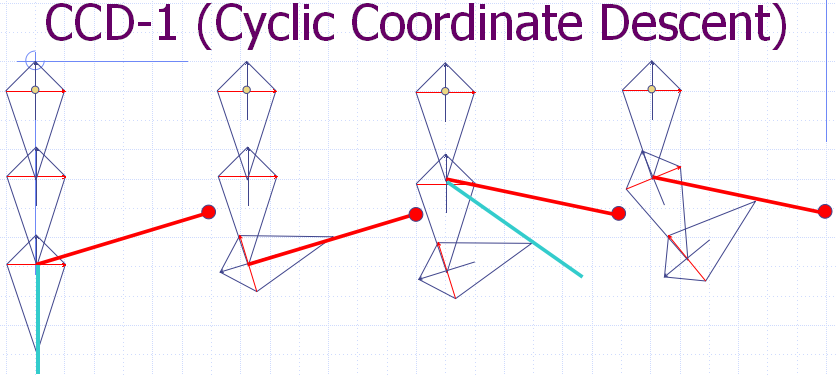
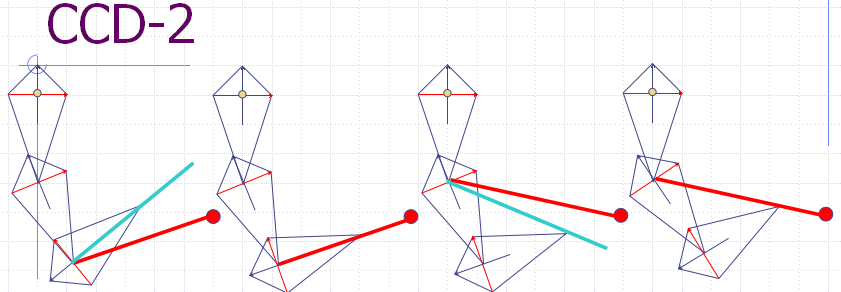
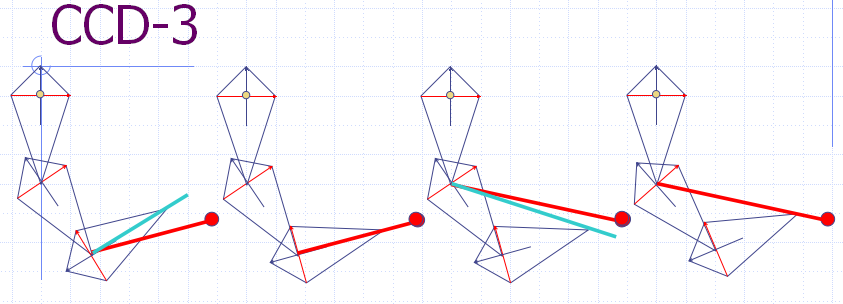
下面在V-rep中建立平面3连杆机构,各杆长均为0.5m,使用Python脚本计算运动学逆解并控制V-rep中的模型,使其达到目标位置。
# -*- coding: utf-8 -*-

import vrep             # V-rep library

import sys

import time

import math

# This function will convert an angle to the equivalent rotation in the range [-pi,pi]

def ConfineAngle(angle):

    angle = angle % (2.0 * math.pi)

    if( angle < -math.pi ):

        angle += (2.0 * math.pi)

    if( angle > math.pi ):

        angle -= (2.0 * math.pi)

    return angle

def CalcIK():

    id = linkNum - 1

    while id >= 0:

        retcode, J_pos = vrep.simxGetObjectPosition(clientID,joint_handle[id],-1,vrep.simx_opmode_oneshot_wait)

        retcode, tip = vrep.simxGetObjectPosition(clientID,tip_handle, -1, vrep.simx_opmode_oneshot_wait)

        # Get the vector from the current bone to the end effector position.

        curToEndX = tip[0] - J_pos[0]

        curToEndY = tip[1] - J_pos[1]

        curToEndMag = math.sqrt( curToEndX*curToEndX + curToEndY*curToEndY )

        # Get the vector from the current bone to the target position.

        curToTargetX = target[0] - J_pos[0];

        curToTargetY = target[1] - J_pos[1];

        curToTargetMag = math.sqrt(curToTargetX*curToTargetX+curToTargetY*curToTargetY)

        # Get rotation

        endTargetMag = curToEndMag*curToTargetMag

        if endTargetMag <= 0.0001:    # prevent division by small numbers

            cosRotAng = 1

            sinRotAng = 0

        else:

            cosRotAng = (curToEndX*curToTargetX + curToEndY*curToTargetY) / endTargetMag

            sinRotAng = (curToEndX*curToTargetY - curToEndY*curToTargetX) / endTargetMag

        # Clamp the cosine into range when computing the angle(might be out of rangedue to floating point error)

        rotAng = math.acos(max(-1, min(1,cosRotAng)))

        if  sinRotAng < 0.0:

            rotAng = -rotAng

        q[id] = q[id] + rotAng

        # Rotate the current link

        if(id == 0):

            vrep.simxSetJointPosition(clientID,joint_handle[id], ConfineAngle(q[id])+math.pi/2, vrep.simx_opmode_oneshot)

        else:

            vrep.simxSetJointPosition(clientID,joint_handle[id], ConfineAngle(q[id]), vrep.simx_opmode_oneshot)

        # Check for termination

        retcode, tip = vrep.simxGetObjectPosition(clientID,tip_handle, -1, vrep.simx_opmode_oneshot_wait)

        endToTargetX = (target[0] - tip[0])

        endToTargetY = (target[1] - tip[1])

        error = math.sqrt(endToTargetX*endToTargetX + endToTargetY*endToTargetY)

        if( error <= stol ):

            # We found a valid solution.

            return 1, error

        id = id - 1

    return 0, error  # cannot get to the target in this iteration

if __name__ == "__main__":

    # Starts a communication thread with the server

    clientID = vrep.simxStart('127.0.0.1', 20001, True, True, 5000, 5)

    # clientID: the client ID, or -1 if the connection to the server was not possible

    if clientID != -1:  #check if client connection successful

        print 'Connected to remote API server'

    else:

        print 'Connection not successful'

        sys.exit('Could not connect')    # Exit from Python

    # Retrieves an object handle based on its name.

    errorCode,tip_handle = vrep.simxGetObjectHandle(clientID,'tip',vrep.simx_opmode_oneshot_wait)

    errorCode,target_handle = vrep.simxGetObjectHandle(clientID,'target',vrep.simx_opmode_oneshot_wait)

    errorCode,consoleHandle = vrep.simxAuxiliaryConsoleOpen(clientID,'info',4,1+4,None,None,None,None,vrep.simx_opmode_oneshot_wait)

    joint_handle = [-1,-1,-1]    # store the joint handles

    for i in range(3):

        errorCode,joint_handle[i] = vrep.simxGetObjectHandle(clientID,'j'+str(i+1),vrep.simx_opmode_oneshot_wait)

    ilimit = 100    # maximum iteration

    stol = 1e-2     # tolerance

    q = [0,0,0]     # initial joint value

    linkNum = 3     # number of links

    retcode, target = vrep.simxGetObjectPosition(clientID,target_handle, -1, vrep.simx_opmode_oneshot_wait)

    retcode, tip = vrep.simxGetObjectPosition(clientID,tip_handle, -1, vrep.simx_opmode_oneshot_wait)

    count = 0

    isOK = 0

    while ( not isOK ):

        isOK,err = CalcIK()

        vrep.simxAuxiliaryConsolePrint(clientID,consoleHandle,None,vrep.simx_opmode_oneshot_wait)

        count = count + 1

        vrep.simxAuxiliaryConsolePrint(clientID,consoleHandle,str(count)+' iterations err:'+str(err),vrep.simx_opmode_oneshot_wait)

        if count > ilimit:

            vrep.simxAuxiliaryConsolePrint(clientID,consoleHandle,"Solution wouldn't converge\r\n",vrep.simx_opmode_oneshot_wait)

            break

        #time.sleep(0.1)

    # Ends the communication thread. This should be the very last remote API function called on the client side

    vrep.simxFinish(clientID)
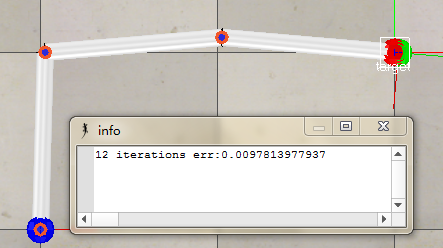
点击仿真按钮并运行Python控制脚本后,可以看到V-rep中的连杆模型不断调整其关节角,同时误差err逐渐减小。当误差减小到一定程度,就可以停止迭代。下面三幅图中目标处于不同位置,可以发现目标位置对迭代次数有较大的影响(为什么会这样?)


参考:
1.Cyclic Coordinate Descent in 2D :http://www.ryanjuckett.com/programming/cyclic-coordinate-descent-in-2d/
2. 阳小涛 ,杨克俭. CCD 算法及其在逆运动学中的应用与实现[J]. 重 庆 工 学 院 学 报 (自然科学),2008 年 5 月
V-rep学习笔记:机器人逆运动学数值解法(Cyclic Coordinate Descent Method)的更多相关文章
- V-rep学习笔记:机器人逆运动学数值解法(The Jacobian Transpose Method)
机器人运动学逆解的问题经常出现在动画仿真和工业机器人的轨迹规划中:We want to know how the upper joints of the hierarchy would rotate ...
- V-rep学习笔记:机器人逆运动学数值解法(The Pseudo Inverse Method)
There are two ways of using the Jacobian matrix to solve kinematics. One is to use the transpose of ...
- V-rep学习笔记:机器人逆运动学数值解法(Damped Least Squares / Levenberg-Marquardt Method)
The damped least squares method is also called the Levenberg-Marquardt method. Levenberg-Marquardt算法 ...
- V-rep学习笔记:机器人逆运动学解算
IK groups and IK elements VREP中使用IK groups和IK elements来进行正/逆运动学计算,一个IK group可以包含一个或者多个IK elements: I ...
- matlab学习笔记10_6 字符串与数值间的转换以及进制之间的转换
一起来学matlab-matlab学习笔记10 10_6 字符串与数值间的转换以及进制之间的转换 觉得有用的话,欢迎一起讨论相互学习~Follow Me 参考书籍 <matlab 程序设计与综合 ...
- ES6学习笔记(四)-数值扩展
PS: 前段时间转入有道云笔记,体验非常友好,所以笔记一般记录于云笔记中,每隔一段时间,会整理一下, 发在博客上与大家一起分享,交流和学习. 以下:
- python学习笔记(五)数值类型和类型转换
Python中的数值类型有: 整型,如2,520 浮点型,如3.14159,1.5e10 布尔类型 True和False e记法: e记法即对应数学中的科学记数法 >>> 1.5e1 ...
- ES6学习笔记(四)数值的扩展
1.二进制和八进制表示法 ES6 提供了二进制和八进制数值的新的写法,分别用前缀0b(或0B)和0o(或0O)表示. 0b111110111 === 503 // true 0o767 === 503 ...
- Python学习笔记(2)数值类型
进制转换 int函数任意进制转换为10进制 第一个参数传入一个字符串,任意进制的,第二个参数传入对这个字符串的解释,解释他为几进制 hex oct bin转换进制为16 8 或者2进制 例题中石油87 ...
随机推荐
- java中length,length(),size()的区别
1. java中的length属性是针对数组说的,比如说你声明了一个数组,想知道这个数组的长度则用到了length这个属性.2. java中的length()方法是针对字符串String说的,如果想看 ...
- flex mx组件和s组件的字体兼容性不一致
<?xml version="1.0" encoding="utf-8"?> <s:Application xmlns:fx="ht ...
- jQuery的Ajax的跨域请求
今天碰到一个Ajax跨域请求的问题,我把源码down下来,然后在服务器端写了一个http请求的代理(因为服务器端是不存在跨域问题的),说白了就是用BufferedReader写了个IO流,然后读取到目 ...
- eclipse 利用已有c++代码建工程,并编译执行
如果你想建一个带Makefile的c++ 工程 1. 新建一个C++空工程,工程类型是makefile project,选择Linux GCC: 2. 将源码连同makefile文件一同作为一个文件系 ...
- jQuery 遍历函数(w3school)
jQuery 遍历函数包括了用于筛选.查找和串联元素的方法. 函数 描述 .add() 将元素添加到匹配元素的集合中. .andSelf() 把堆栈中之前的元素集添加到当前集合中. .childr ...
- ALTFP_CONVERT IP使用与仿真
ALTFP_CONVERT IP使用与仿真 近期项目要使用到整型数据转浮点型数据,将16位的整数转换为单精度浮点数(32bit).本打算自己写逻辑实现的,不过考虑到本身项目时间紧,能力也有限,就没 ...
- Android内存溢出解决方案(OOM)
众所周知,每个Android应用程序在运行时都有一定的内存限制,限制大小一般为16MB或24MB(视平台而定).因此在开发应用时需要特别关注自身的内存使用量,而一般最耗内存量的资源,一般是图片.音频文 ...
- PHP最原始的上传文件函数
<?php $upload_file=$_FILES['upload_file']['tmp_name']; $upload_file_name=$_FILES['upload_file'][' ...
- ectouch第五讲 之表
Ectouch本身相关的表 17个ecs_touch_activity[touch优惠活动扩展表] 优惠活动的自增id 取值ecs_favourable_activity表cat_id,给优惠活动加b ...
- easyui设置界面的高度自适应
单独设置界面中特定region区时,高度自适应失败:设置整个界面时成功.实现代码在script块中,具体代码如下: <%@ Page Language="C#" AutoEv ...