
FTP 命令的使用
最近需要使用 ftp 工具,所以借此机会来进行整理以下具体的内容:
具体什么是ftp, ftp 能干什么?
请参考:
https://access.redhat.com/documentation/en-us/red_hat_enterprise_linux/7/html/system_administrators_guide/s1-ftp
http://cn.linux.vbird.org/linux_server/0410vsftpd.php
重点理解:主动联机 与 被动联机 两种模式中,端口的选择。
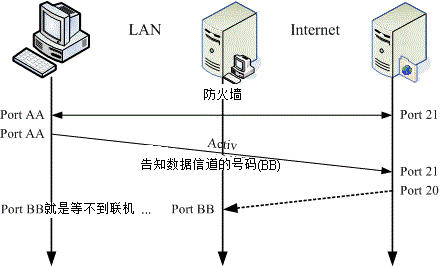
主动连接
active mode
FTP protocol for transferring data to the client application. When an active-mode data transfer is initiated by the FTP client, the server opens a connection from port 20 on the server to the IP address and a random, unprivileged port (greater than 1024) specified by the client. This arrangement means that the client machine must be allowed to accept connections over any port above 1024. With the growth of insecure networks, such as the Internet, the use of firewalls for protecting client machines is now prevalent. Because these client-side firewalls often deny incoming connections from active-mode FTP servers, passive mode was devised.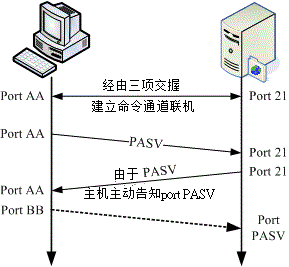
被动连接
passive mode
FTP client application. When requesting data from the server, the FTP client indicates it wants to access the data in passive mode and the server provides the IP address and a random, unprivileged port (greater than 1024) on the server. The client then connects to that port on the server to download the requested information.FTP server. This also simplifies the process of configuring firewall rules for the server.➜ Desktop yum search vsftpd
Last metadata expiration check: days, :: ago on Tue Jun :: PM CST.
================================================== Name Exactly Matched: vsftpd ==================================================
vsftpd.x86_64 : Very Secure Ftp Daemon
vsftpd 全称为: Very Secure Ftp Daemon
vsftpd 配置文件:我们可以使用 man 5 vsftpd.conf 命令,来查找vsftpd 的配置说明。
FTP 连接与命令:
1. 登录
[root@dhcp-- ~]# ftp localhost

Trying ::...

Connected to localhost (::).

 Welcome to blah FTP service.

Name (localhost:root): yaowen

 Please specify the password.

Password:

 Login successful.

Remote system type is UNIX.

Using binary mode to transfer files.

ftp> ls

 Entering Extended Passive Mode (||||)

 Here comes the directory listing.

drwxr-xr-x                    Jun  : Desktop

drwxr-xr-x                    Jun    Documents

drwxr-xr-x                    May  : Downloads

drwxrwxr-x                        Jun  : ISO

drwxr-xr-x                        Jun  : NFS4

drwxr-xr-x                    Jun    Pictures

drwxr-xr-x                    Jun    Public

drwxr-xr-x                    Jun    Templates

drwxr-xr-x                    Jun    Videos

 Directory send OK.

ftp>
2. 如果没有ftp 命令,则进行安装
[root@yaowenxu Desktop]# yum install ftp
3. ftp 支持的命令
使用 help 或者 ? 来进行查看当前服务所支持的命令
ftp> ?

Commands may be abbreviated.  Commands are:

!        debug        mdir        sendport    site

$        dir        mget        put        size

account        disconnect    mkdir        pwd        status

append        exit        mls        quit        struct

ascii        form        mode        quote        system

bell        get        modtime        recv        sunique

binary        glob        mput        reget        tenex

bye        hash        newer        rstatus        tick

case        help        nmap        rhelp        trace

cd        idle        nlist        rename        type

cdup        image        ntrans        reset        user

chmod        lcd        open        restart        umask

close        ls        prompt        rmdir        verbose

cr        macdef        passive        runique        ?

delete        mdelete        proxy        send
我们可以使用 ftp 利用交互式的方式来进行与 ftpd 服务器来进行交互。
我们 可以使用 get 下载文件,使用 put 上传文件;
使用 lcd 确定本地文件夹,使用pwd 确定服务器文件夹。
保持更新,转载请注明出处。
FTP 命令的使用的更多相关文章
- linux系统ftp命令
先来一段简单的ftp 下载脚本 ftp -i -n<<EOF open 14.2.33.211 user etl etl cd /etlfile/ftpfile lcd /etlfile/ ...
- Linux服务器ftp命令找不到
ftp commond not find 先用命令rpm -q vsftpd检查是否安装了ftp服务器 若显示vsftpd-2.2.2-11.el6_4.1.x86_64这样的信息,说明FTP服务器已 ...
- FTP命令
linux下常用FTP命令 1. 连接ftp服务器 1. 连接ftp服务器 格式:ftp [hostname| ip-address]a)在linux命令行下输入: ftp 192.168.1.1 ...
- windows下ftp命令大全
FTP Server: home4u.at.china.com User: yepanghuang Password: abc123 打开Windows的开始菜单,执行“运行”命令,在对话框中输入ft ...
- 通过FTP命令上传下载
用命令如何把自己电脑上的文件上传到被入侵的电脑上呢.方法有很多.用ftp是个不错的选择.方法如下 echo open 你的ftpip >ftp.txt echo user >>f ...
- linux ftp命令(转)
此命令需要安装ftp, yum install ftp 1. 连接ftp服务器 格式:ftp [hostname| ip-address]a)在linux命令行下输入: ftp 192.168.1.1 ...
- 详述Linux ftp命令的使用方法
转自:http://os.51cto.com/art/201003/186325.htm ftp服务器在网上较为常见,Linux ftp命令的功能是用命令的方式来控制在本地机和远程机之间传送文件,这里 ...
- 利用windows系统ftp命令编写的BAT文件上传[转]
利用windows系统ftp命令编写的BAT文件上传[转] 利用windows系统ftp命令编写的BAT文件上传[转] 在开发中往往需要将本地的程序上传到服务器,而且用惯了linux命令的人来说.在w ...
- ftp命令和scp命令
ftp命令: 服务器有安装ftp Server,另外一台linux可以使用ftp的client程序来进行文件的拷贝读取和下载. 1. 连接ftp服务器 格式:ftp [hostname| ip-ad ...
- FTP命令详解
FTP的命令行格式为:ftp -v -d -i -n -g [主机IP或者主机名],其中 -v显示远程服务器的所有响应信息: -n限制ftp的自动登录,即不使用: .n etrc文件: -d使用调试方 ...
随机推荐
- Linux系统修改防火墙配置
防火墙配置文件位置 /etc/sysconfig/iptables 需要开放端口,请在里面添加一条内容即可: 1 -A RH-Firewall-1-INPUT -m state --state NEW ...
- 各大APP注册时发送短信验证码是怎么实现的?
第一步:获得验证码:1.找到相关的表.2.用什么发送,post,get ,ajax,当然ajax首选3.post之前要js先判断是手机号码11位,并且全部都是数字,或者用正则也行.4.用ajax发送数 ...
- redhat 6 使用centos源 yum安装
1.删除redhat原有的yum源 # rpm -aq | grep yum|xargs rpm -e --nodeps 2.下载新的yum安装包 这里我们使用CentOS的yum源 # wget h ...
- java web 机试
经过近一个月的学习,我们的java web已经学习完了. 这是我们这次的机试题. 一:题目 请利用MVC设计模式,并使用JSP.Servlet.JSTL和JQuery等技术实现动态条件的分页显示查询. ...
- UIKit框架之NSObject
首先学习NSObject // // ViewController.m // localization // // Created by City--Online on 15/5/15. // Cop ...
- Quartz2D绘制路径
// 在画线的时候,方法的内部默认创建一个path.它把路径都放到了path里面去. // 1.创建路径 cgmutablepathref 调用该方法相当于创建了一个路径,这个路径用来保存绘图信息. ...
- java图片压缩(Thumbnails)
package com.hzxc.groupactivity.server.util; import java.awt.image.BufferedImage; import java.io.*; i ...
- 存储过程TYPE类型参数调试
当我们写完一段存储过程后,必然需要调试运行一下写的代码是否能成功运行,当参数是字符,数字或日期时,可以直接在测试窗口输入值.但是类型如果是定义好的TYPE,就无法简单的输入. 一.自定义TYPE TY ...
- HDU4725(KB4-P SPFA+LLL+SLF优化)
The Shortest Path in Nya Graph Time Limit: 2000/1000 MS (Java/Others) Memory Limit: 32768/32768 K ...
- 超强、超详细Redis入门教程
(1)什么是redis? Redis 是一个基于内存的高性能key-value数据库. (有空再补充,有理解错误或不足欢迎指正) (2)Reids的特点 Redis本质上是一个Key-Value类型的 ...