
【Web】Nginx配置规则
Nginx配置基本说明
以下是nginx的基本配置文件如下(编辑命令:vi /usr/local/nginx/conf/nginx.conf):
 #user  nobody;

 #nginx进程数,建议设置为等于CPU总核心数。

 worker_processes  1;

 #全局错误日志定义类型,[ debug | info | notice | warn | error | crit ]

 #error_log  logs/error.log;

 #error_log  logs/error.log  notice;

 #error_log  logs/error.log  info;

 #进程pid文件

 #pid        logs/nginx.pid;

 events {

     #单个进程最大连接数(最大连接数=连接数*进程数),一个请求的连接一般是2(静态)和4(代理)

     worker_connections  1024;

 }

 #设定http服务器,利用它的反向代理功能提供负载均衡支持

 http {

     #文件扩展名与文件类型映射表

     include       mime.types;

     #默认文件类型

     default_type  application/octet-stream;

     #日志格式设定

     #log_format  main  '$remote_addr - $remote_user [$time_local] "$request" '

     #                  '$status $body_bytes_sent "$http_referer" '

     #                  '"$http_user_agent" "$http_x_forwarded_for"';

     #access_log  logs/access.log  main;

     #开启高效文件传输模式

     sendfile        on;

     #此选项允许或禁止使用socke的TCP_CORK的选项,此选项仅在使用sendfile的时候使用

     #tcp_nopush     on;

     #长连接超时时间,单位是秒

     #keepalive_timeout  0;

     keepalive_timeout  65;

     #gzip模块设置

     #gzip  on;

     #虚拟主机的配置

     server {

         #监听端口

         listen       80;

         #域名可以有多个,用空格隔开

         server_name  localhost;

         #charset koi8-r;

         #定义本虚拟主机的访问日志

         #access_log  logs/host.access.log  main;

         #代理位置

         location / {

             root   html; //根目录

             index  index.html index.htm; //首页

         }

         #错误页

         #error_page  404              /404.html;

         #重定向错误页

         # redirect server error pages to the static page /50x.html

         #

         error_page   500 502 503 504  /50x.html;

         location = /50x.html {

             root   html;

         }

         # proxy the PHP scripts to Apache listening on 127.0.0.1:80

         #

         #location ~ \.php$ {

         #    proxy_pass   http://127.0.0.1;

         #}

         # pass the PHP scripts to FastCGI server listening on 127.0.0.1:9000

         #

         #location ~ \.php$ {

         #    root           html;

         #    fastcgi_pass   127.0.0.1:9000;

         #    fastcgi_index  index.php;

         #    fastcgi_param  SCRIPT_FILENAME  /scripts$fastcgi_script_name;

         #    include        fastcgi_params;

         #}

         # deny access to .htaccess files, if Apache's document root

         # concurs with nginx's one

         #

         #location ~ /\.ht {

         #    deny  all;

         #}

     }

     # another virtual host using mix of IP-, name-, and port-based configuration

     #

     #server {

     #    listen       8000;

     #    listen       somename:8080;

     #    server_name  somename  alias  another.alias;

     #    location / {

     #        root   html;

     #        index  index.html index.htm;

     #    }

     #}

     # HTTPS server

     #

     #server {

     #    listen       443 ssl;

     #    server_name  localhost;

     #    ssl_certificate      cert.pem;

     #    ssl_certificate_key  cert.key;

     #    ssl_session_cache    shared:SSL:1m;

     #    ssl_session_timeout  5m;

     #    ssl_ciphers  HIGH:!aNULL:!MD5;

     #    ssl_prefer_server_ciphers  on;

     #    location / {

     #        root   html;

     #        index  index.html index.htm;

     #    }

     #}

 }
检查配置文件是否正确命令:/usr/local/nginx/sbin/nginx -t -c /usr/local/nginx/conf/nginx.conf

Location配置规则
location
语法:location [=|~|~*|^~] /uri/{...}
使用范围:server中使用
这个参数根据URI的不同需求进行配置,可以使用字符串与正则表达式匹配,如果要使用正则表达式,你必须制定下列前缀:
- ~:区分大小写
- ~*:不区分大小写
- ^*:禁止表达式匹配
- =:精确匹配
例子如下:
 location = / {

     #只匹配/的查询

     [configuration A]

 }

 location / {

     #匹配任何以/开始的查询,但是正则表达式与一些长的字符串将被首先匹配

     [configuration B]

 }

 location ^- /images/ {

     #匹配任何以/images/开始的查询并且停止搜索,不检查正则表达式

     [configuration C]

 }

 location ~* \.(gif|jpg|png)$ {

     #匹配任何以gif|jpg|png结尾的文件,但是所有/images/目录的请求在configuration C处理

     [configuration D]

 }

 各请求的计算如下:

 ./ -> configuration A

 ./documents/document.html -> configuration B

 ./images/1.gif -> configuration C

 ./documents/1.jpg -> configuration D
其他功能配置
配置访问日志及错误日历
- 去掉配置文件前端的日志文件格式注释

- 在server模块中,设置访问日志地址,以及错误日志地址
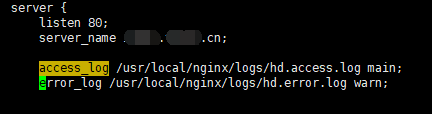
- 重启nginx,并访问server即可看到相应的日志文件中有日志。
配置错误页面
- 在server模块中,设置error_page,并且可以指定错误页面的根目录
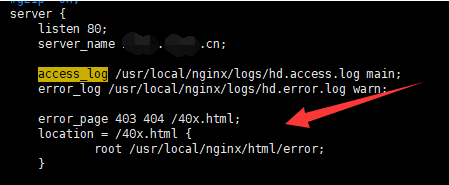
- 重启nginx,并访问server报错,即可看到制定的错误界面。
配置自动索引及别名功能
- 在server模块中,加入一个location,开启自动索引,然后在更目录下新建文件data和其他文件,如下:
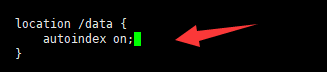
在浏览器中输入http://server/data,进行访问,如下: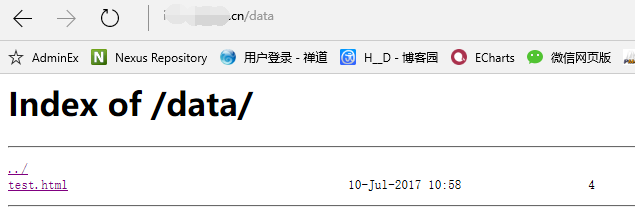
- 在server模块中,进入一个location,开启别名功能,如下:

在浏览器中输入http://server/b,进行访问,请求实际访问的地址是/usr/local/nginx/html2。
配置文件浏览器缓存
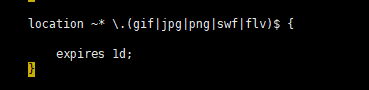
- 设置图片缓存时间为1天
配置下载限速
- nginx可对下载文件进行限制,在location中加入参数:

配置访问控制及身份验证
- 在location中加入参数如下:
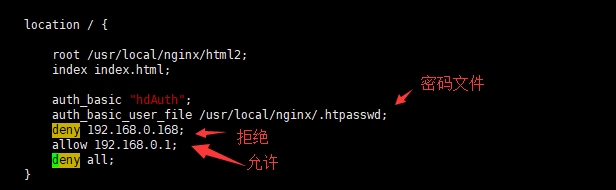
- 配置密码文件,在/usr/local/nginx目录下新建文件.htpasswd文件,并且使用命令添加用户名和密码,命令:printf "test:$(openssl passwd -crypt 123456)\n" >>/usr/local/nginx/.htpasswd

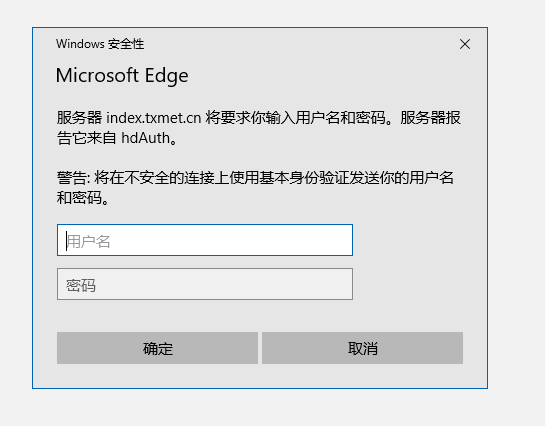
其中用户名是:test,密码是:123456 - 在浏览器中进行访问,需要密码进行登陆。如下
配置htts代理
- 需要nginx支持ssl模块
即编译nginx加入此模块(--with-http_ssl_module),命令:./configure --prefix=/data/soft/nginx --with-http_ssl_module - 配置文件配置如下
 location /https {

                 proxy_http_version 1.1;

                 proxy_pass          https://www.baidu.com;

                 proxy_set_header    X-B3-TraceId  $request_id;

                 proxy_set_header    X-Span-Name    $uri;

                 proxy_set_header    Host    www.baidu.com;

                 proxy_set_header    X-Real-IP   $remote_addr;

                 proxy_set_header    X-Forwarded-For $proxy_add_x_forwarded_for;

} - 重启nginx,即可代理https的请求
【Web】Nginx配置规则的更多相关文章
- 2-4、nginx特性及基础概念-nginx web服务配置详解
Nginx Nginx:engine X 调用了libevent:高性能的网络库 epoll():基于事件驱动event的网络库文件 Nginx的特性: 模块化设计.较好扩展性(不支持模块动态装卸载, ...
- Centos下Nginx配置WEB访问日志并结合shell脚本定时切割
在一个成熟的WEB系统里,没有日志管理是不可以的,有了日志,可以帮助你得到用户地域来源.跳转来源.使用终端.某个URL访问量等相关信息:通过错误日志,你可以得到系统某个服务或server的性能瓶颈等. ...
- nginx 静态目录配置规则,路径匹配与本地资源
经常配了nginx静态目录,死活访问不了,每次访问404.查看文档后,发现nginx配置静态目录使 用以下规则 假如nginx是在本机,静态目录也是在本机, 1.子目录匹配 如下配置 location ...
- rewrite规则写法及nginx配置location总结
rewrite只能放在server{},location{},if{}中,并且只能对域名后边的除去传递的参数外的字符串起作用. 例如http://seanlook.com/a/we/index.php ...
- codeigniter nginx rewrite规则配置【转】
转自:http://www.nginx.cn/1134.html nginx如何配置才能支持codeigniter ? 1. codeigniter的url美化去掉index.php 1 2 3 ...
- 你真的了解如何将 Nginx 配置为Web服务器吗
阅读之前,建议先阅读初识 Nginx. 之后,我们来了解一下 Nginx 配置. 抽象来说,将 Nginx 配置为 Web 服务器就是定义处理哪些 URLS 和如何处理这些URLS 对应的请求.具体来 ...
- Nginx配置location及rewrite规则
Nginx配置location及rewrite规则 示例: location = / { # 精确匹配 / ,主机名后面不能带任何字符串 [ configuration A ] } loca ...
- nginx配置location总结及rewrite规则写法【转】
转自 nginx配置location总结及rewrite规则写法 | Sean's Noteshttp://seanlook.com/2015/05/17/nginx-location-rewrite ...
- nginx 配置web 虚拟文件夹 而且codeIgniter,thinkphp 重定向url 地址
nginx 配置虚拟文件夹而且url 重定向 server { #侦听80port listen 8090; #定义使用www.xx.com訪问 server_name 127.0.0.1; #设定本 ...
随机推荐
- 第九章 词典 (d1)散列:排解冲突(1)
- ceph 文件系统(cephfs) -- 初体验
一.介绍: ceph MDS 是元数据服务器,只有ceph 文件系统(cephFS)才会需要. cephFS 在RADOS 层之上 提供一个兼容POSIX 的文件系统.他是用MDS 作为守护进程,负责 ...
- Stealth潜行风格游戏源码(Unity5x)
官方的Stealth画质看起来不错.Unity 官方说Stealth样例属于中等难度,通过学习Stealth,可以获得: Create a fully functioning level of a ...
- queue模拟
BlockingQueue:顾名思义,首先它是一个队列,并且支持阻塞的机制,阻塞的放入和得到数据.我们要实现LinkedBlockingQueue下面两个简单的方法put和take. put(anOb ...
- 浅谈CSRF
CSRF是什么? (Cross Site Request Forgery, 跨站域请求伪造)是一种网络的攻击方式,它在 2007 年曾被列为互联网 20 大安全隐患之一,也被称为“One Click ...
- Win7系统不能记忆窗口大小与位置解决方法
似在某此系统优化后,无意发现系统在注销或重启后,打开资源管理器,它以默认大小及位置显示. 对于习惯自定义操作来说,甚为不便,遍找方法未有奏效者,但总萦绕心头,时时记起. 今日再找问题解决方法,难兄难弟 ...
- PyCharm 2019 最新激活方式总结(最新最全最有效!!!
host 注册码 http://idea.lanyus.com/ https://www.cnblogs.com/yjd_hycf_space/p/9110550.html ...
- 46-wxpython 4 使用 grid 展示表格
转载:https://blog.csdn.net/soslinken/article/details/79024938#%E4%BD%BF%E7%94%A8%E6%A0%B7%E4%BE%8B wxp ...
- ubuntu 无法挂载U盘
问题描述: usb 1-1: device descriptor read/64,error 18usb 1-1: device descriptor read/64,error 18usb 1-1: ...
- asp.net core webapi 日期返回中出现字母T
全局配置 在Startup文件中修改 // This method gets called by the runtime. Use this method to add services to the ...