
WPF实现窗体中的悬浮按钮
WPF实现窗体中的悬浮按钮,按钮可拖动,吸附停靠在窗体边缘。
控件XAML代码:
<Button x:Class="SunCreate.Common.Controls.FloatButton"

             xmlns="http://schemas.microsoft.com/winfx/2006/xaml/presentation"

             xmlns:x="http://schemas.microsoft.com/winfx/2006/xaml"

             xmlns:mc="http://schemas.openxmlformats.org/markup-compatibility/2006"

             xmlns:d="http://schemas.microsoft.com/expression/blend/2008"

             mc:Ignorable="d"

             d:DesignHeight="300" d:DesignWidth="300"

             Width="50" Height="50" Margin="0"

             HorizontalAlignment="Left" VerticalAlignment="Top"

             x:Name="btn"

             Loaded="btn_Loaded" Click="btn_Click" >

    <Button.Template>

        <ControlTemplate>

            <Grid MouseLeftButtonDown="Border_MouseLeftButtonDown">

                <Border CornerRadius="25" Background="#022938" Opacity="0.2" >

                </Border>

                <Border CornerRadius="20" Width="40" Height="40" Background="#022938" Opacity="0.3" >

                </Border>

                <Border CornerRadius="14" Width="28" Height="28" Background="#b06919" Opacity="0.8" >

                </Border>

            </Grid>

        </ControlTemplate>

    </Button.Template>

</Button>
控件cs代码:
using System;

using System.Collections.Generic;

using System.Linq;

using System.Text;

using System.Threading;

using System.Threading.Tasks;

using System.Windows;

using System.Windows.Controls;

using System.Windows.Data;

using System.Windows.Documents;

using System.Windows.Input;

using System.Windows.Media;

using System.Windows.Media.Animation;

using System.Windows.Media.Imaging;

using System.Windows.Navigation;

using System.Windows.Shapes;

namespace SunCreate.Common.Controls

{

    /// <summary>

    /// 悬浮按钮

    /// </summary>

    public partial class FloatButton : Button

    {

        public event EventHandler ClickEvent;

        private bool _move = false;

        double _distance = ;

        double _distanceNew = ;

        private Point _lastPos;

        private Point _newPos;

        private Point _oldPos;

        public FloatButton()

        {

            InitializeComponent();

        }

        private void btn_Loaded(object sender, RoutedEventArgs e)

        {

            if (this.Parent != null && this.Parent is FrameworkElement)

            {

                FrameworkElement parent = this.Parent as FrameworkElement;

                double left1 = parent.ActualWidth - this.ActualWidth - this._distanceNew;

                double top1 = parent.ActualHeight - this.ActualHeight - this._distanceNew;

                this.Margin = new Thickness(left1, top1, , );

                parent.PreviewMouseMove += (s, ee) =>

                {

                    if (_move)

                    {

                        Point pos = ee.GetPosition(parent);

                        double left = this.Margin.Left + pos.X - this._lastPos.X;

                        double top = this.Margin.Top + pos.Y - this._lastPos.Y;

                        this.Margin = new Thickness(left, top, , );

                        _lastPos = ee.GetPosition(parent);

                    }

                };

                parent.PreviewMouseUp += (s, ee) =>

                {

                    if (_move)

                    {

                        _move = false;

                        Point pos = ee.GetPosition(parent);

                        _newPos = pos;

                        double left = this.Margin.Left + pos.X - this._lastPos.X;

                        double top = this.Margin.Top + pos.Y - this._lastPos.Y;

                        double right = parent.ActualWidth - left - this.ActualWidth;

                        double bottom = parent.ActualHeight - top - this.ActualHeight;

                        if (left < _distance && top < _distance) //左上

                        {

                            left = this._distanceNew;

                            top = this._distanceNew;

                        }

                        else if (left < _distance && bottom < _distance) //左下

                        {

                            left = this._distanceNew;

                            top = parent.ActualHeight - this.ActualHeight - this._distanceNew;

                        }

                        else if (right < _distance && top < _distance) //右上

                        {

                            left = parent.ActualWidth - this.ActualWidth - this._distanceNew;

                            top = this._distanceNew;

                        }

                        else if (right < _distance && bottom < _distance) //右下

                        {

                            left = parent.ActualWidth - this.ActualWidth - this._distanceNew;

                            top = parent.ActualHeight - this.ActualHeight - this._distanceNew;

                        }

                        else if (left < _distance && top > _distance && bottom > _distance) //左

                        {

                            left = this._distanceNew;

                            top = this.Margin.Top;

                        }

                        else if (right < _distance && top > _distance && bottom > _distance) //右

                        {

                            left = parent.ActualWidth - this.ActualWidth - this._distanceNew;

                            top = this.Margin.Top;

                        }

                        else if (top < _distance && left > _distance && right > _distance) //上

                        {

                            left = this.Margin.Left;

                            top = this._distanceNew;

                        }

                        else if (bottom < _distance && left > _distance && right > _distance) //下

                        {

                            left = this.Margin.Left;

                            top = parent.ActualHeight - this.ActualHeight - this._distanceNew;

                        }

                        ThicknessAnimation marginAnimation = new ThicknessAnimation();

                        marginAnimation.From = this.Margin;

                        marginAnimation.To = new Thickness(left, top, , );

                        marginAnimation.Duration = TimeSpan.FromMilliseconds();

                        Storyboard story = new Storyboard();

                        story.FillBehavior = FillBehavior.Stop;

                        story.Children.Add(marginAnimation);

                        Storyboard.SetTargetName(marginAnimation, "btn");

                        Storyboard.SetTargetProperty(marginAnimation, new PropertyPath("(0)", Border.MarginProperty));

                        story.Begin(this);

                        this.Margin = new Thickness(left, top, , );

                    }

                };

            }

        }

        private void Border_MouseLeftButtonDown(object sender, MouseButtonEventArgs e)

        {

            if (this.Parent != null && this.Parent is FrameworkElement)

            {

                FrameworkElement parent = this.Parent as FrameworkElement;

                _move = true;

                _lastPos = e.GetPosition(parent);

                _oldPos = _lastPos;

            }

        }

        private void btn_Click(object sender, RoutedEventArgs e)

        {

            if (_newPos.Equals(_oldPos))

            {

                if (ClickEvent != null)

                {

                    ClickEvent(sender, e);

                }

            }

        }

    }

}
如何使用:
<Window

        xmlns="http://schemas.microsoft.com/winfx/2006/xaml/presentation"

        xmlns:x="http://schemas.microsoft.com/winfx/2006/xaml"

        xmlns:ui="clr-namespace:SunCreate.Common.Controls;assembly=SunCreate.Common.Controls"

        xmlns:d="http://schemas.microsoft.com/expression/blend/2008" xmlns:mc="http://schemas.openxmlformats.org/markup-compatibility/2006" mc:Ignorable="d" x:Class="SunCreate.Common.Controls.Demo.MainWindow"

        Title="MainWindow"

        Height="700" Width="1200"

        Background="#ff10498c"

        WindowStartupLocation="CenterScreen">

    <Grid>

        <ui:FloatButton x:Name="floatBtn" ></ui:FloatButton>

    </Grid>

</Window>
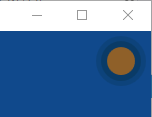
效果图:
WPF实现窗体中的悬浮按钮的更多相关文章
- 您的位置:首页 » IOS » iOS中全局悬浮按钮,类似IPhone中的AssistiveTouch iOS中全局悬浮按钮,类似IPhone中的AssistiveTouch
原文地址:http://blog.5ibc.net/p/86562.html 前提:当时看到别人写过这个类似AssistiveTouch的demo,但是有问题,第一改变不了位置.第二切换页面后无法使用 ...
- Delphi窗体中禁用最大化按钮
第一种方法是设置窗体的BorderIcons/biMaximize属性为False,这种方法仅让窗体的最大化按钮灰掉: 第二种方法是设置窗体的BorderStyle属性为bsDialog,这种方法使最 ...
- wpf 透明窗体中使用webbrowser
wpf ,PNG图形半透明窗体 ,使用webbrowser控件 附件:http://files.cnblogs.com/xe2011/WpfApplication1_webbrowser_tran ...
- WPF MVVM模式中,通过命令实现窗体拖动、跳转以及显隐控制
原文:WPF MVVM模式中,通过命令实现窗体拖动.跳转以及显隐控制 在WPF中使用MVVM模式,可以让我们的程序实现界面与功能的分离,方便开发,易于维护.但是,很多初学者会在使用MVVM的过程中遇到 ...
- WPF子窗体
效果: 1. 点击WPF主窗体上的一个按钮,弹出子窗体, 2. 窗体最小化后,在菜单栏中点击子窗体,会连带显示它所从属的主窗体. 1. 在WPF项目中,已有主窗体MainWindow,再新建子窗体Ch ...
- winfrom窗体中嵌套WPF控件
前言 本文主要介绍如何在winfrom窗体中嵌套WPF控件, 一来是自己记录一下,而来希望能对有需要的朋友提供实现思路. 如有错误请指出...下面进入正题... -1.前期准备 准备一个建立好的win ...
- 关于WinForm引用WPF窗体---在Winform窗体中使用WPF控件
项目中有个界面展示用WPF实现起来比较简单,并且能提供更酷炫的效果,但是在WinForm中使用WPF窗体出现了问题,在网上找了一下有些人说Winform不能引用WPF的窗体,我就很纳闷,Win32都能 ...
- WPF Prism MVVM 中 弹出新窗体. 放入用户控件
原文:WPF Prism MVVM 中 弹出新窗体. 放入用户控件 版权声明:本文为博主原创文章,未经博主允许不得转载. https://blog.csdn.net/qq_37214567/artic ...
- 在WPF窗体中重绘
原文:在WPF窗体中重绘 写这篇主要是为了验证任何元素自身都具备绘图功能. 在默认Window中重写OnRender方法 protected override void OnRender(Draw ...
随机推荐
- [AI]AI章2 框架比较
深度学习框架比较 神经网络一般包括:训练,测试两大阶段.训练:就是把训练数据(原料)和神经网络模型:如AlexNet.RNN等“倒进” 神经网络训练框架例如cafffe等然后用 CPU或GPU(真火) ...
- [Hbase]Hbase章2 Hbase读写过程解析
写数据 Hbase使用memstore和storefile存储对表的更新.数据在更新时首先写入hlog和memstore,memstore中的数据是排序的,当memstore累计到一定的阀值时,就会创 ...
- mongoDB(Linux)
启动 service mongod start 安装好后,输入mongo进入控制台 创建数据库 use baseName db.createCollection("game_record& ...
- 如何用xx-net上youtube
1.下载https://github.com/XX-net/XX-Net/blob/master/code/default/download.md 里面的稳定版本 2.下载chrome.百度chr ...
- linux_制作本地yum源
新建文件夹 mkdir /root/guazai 并将本地磁盘挂载到当前文件夹 mount -o loop /dev/cdrom /root/guazai/ 新建文件夹 mkdir /mnt/loca ...
- flask 知识积累
PythonWEB框架之Flask Flask快速入门,知识整理 Flask 框架
- 解决python代码中含有中文报错
python中写入中文时报错如下图所示: 依照网上解决方法:在py文件中加入:#encoding=utf-8 然后继续报错如下图所示: 解决方法: 在py文件中加入: import sysreload ...
- C++STL 迭代器
迭代器类别: 输入迭代器(只读迭代器).输出迭代器(只写迭代器).正向迭代器.双向迭代器.随机访问迭代器 逆向遍历 for(vector<int>::reverse_iterator ri ...
- rm与管道使用
一 问题初始:用通常意义的管道使用这样可以:(1)ls -l | sed -n '/~$/p' 我用显示出系统自己建立的备份文件这时,我想删除这些文件,我仍然使用了管道,并执行了以下命令(2)ls - ...
- 词袋模型(BOW, bag of words)
词集模型:单词构成的集合,每个单词只出现一次. 词袋模型:把每一个单词都进行统计,同时计算每个单词出现的次数. 在train_x中,总共有6篇文档,每一行代表一个样本即一篇文档.我们的目标是将trai ...