
Tomcat访问(access)日志配置
在tomcat的access中打印出请求的情况可以帮助我们分析问题,通常比较关注的有访问IP、线程号、访问url、返回状态码、访问时间、持续时间。
最近在跟一个图片请求超时的问题,需要在项目的access log中增加请求的响应时间参数。正好学习一下tomcat access log中参数的配置。
最好的还是官方文档,以下摘自tomcat7文档。
Introduction
The Access Log Valve creates log files in the same format as those created by standard web servers.
These logs can later be analyzed by standard log analysis tools to track page hit counts, user session activity, and so on.
This Valve uses self-contained logic to write its log files, which can be automatically rolled over at midnight each day.
(The essential requirement for access logging is to handle a large continuous stream of data with low overhead.
This Valve does not use Apache Commons Logging, thus avoiding additional overhead and potentially complex configuration).

This Valve may be associated with any Catalina container (Context, Host, or Engine), and will record ALL requests processed by that container.

Some requests may be handled by Tomcat before they are passed to a container. These include redirects from /foo to /foo/ and the rejection of invalid requests.
Where Tomcat can identify the Context that would have handled the request, the request/response will be logged in the AccessLog(s) associated Context, Host and Engine.
 Where Tomcat cannot identify the Context that would have handled the request, e.g. in cases where the URL is invalid, Tomcat will look first in the Engine,
then the default Host for the Engine and finally the ROOT (or default) Context for the default Host for an AccessLog implementation.
Tomcat will use the first AccessLog implementation found to log those requests that are rejected before they are passed to a container.

The output file will be placed in the directory given by the directory attribute. The name of the file is composed by concatenation of the configured prefix, timestamp and suffix.
The format of the timestamp in the file name can be set using the fileDateFormat attribute. This timestamp will be omitted if the file rotation is switched off by setting rotatable to false.

Warning: If multiple AccessLogValve instances are used, they should be configured to use different output files.

If sendfile is used, the response bytes will be written asynchronously in a separate thread and the access log valve will not know how many bytes were actually written.
In this case, the number of bytes that was passed to the sendfile thread for writing will be recorded in the access log valve.
Attributes
The Access Log Valve supports the following configuration attributes:
| Attribute | Description |
|---|---|
| buffered |
Flag to determine if logging will be buffered. If set to false, then access logging will be written after each request. Default value: true |
| className |
Java class name of the implementation to use. This MUST be set to org.apache.catalina.valves.AccessLogValve to use the default access log valve. |
| condition |
The same as conditionUnless. This attribute is provided for backwards compatibility. |
| conditionIf |
Turns on conditional logging. If set, requests will be logged only if ServletRequest.getAttribute() is not null. For example, if this value is set toimportant, then a particular request will only be logged if ServletRequest.getAttribute("important") != null. The use of Filters is an easy way to set/unset the attribute in the ServletRequest on many different requests. |
| conditionUnless |
Turns on conditional logging. If set, requests will be logged only if ServletRequest.getAttribute() is null. For example, if this value is set to junk, then a particular request will only be logged if ServletRequest.getAttribute("junk") == null. The use of Filters is an easy way to set/unset the attribute in the ServletRequest on many different requests. |
| directory |
Absolute or relative pathname of a directory in which log files created by this valve will be placed. If a relative path is specified, it is interpreted as relative to CATALINA_BASE. If no directory attribute is specified, the default value is "logs" (relative to CATALINA_BASE). |
| encoding |
Character set used to write the log file. An empty string means to use the system default character set. Default value: use the system default character set. |
| fileDateFormat |
Allows a customized timestamp in the access log file name. The file is rotated whenever the formatted timestamp changes. The default value is yyyy-MM-dd. If you wish to rotate every hour, then set this value to yyyy-MM-dd.HH. The date format will always be localized using the locale en_US. |
| locale |
The locale used to format timestamps in the access log lines. Any timestamps configured using an explicit SimpleDateFormat pattern (%{xxx}t) are formatted in this locale. By default the default locale of the Java process is used. Switching the locale after the AccessLogValve is initialized is not supported. Any timestamps using the common log format (CLF) are always formatted in the locale en_US. |
| maxDays |
The maximum number of days rotated access logs will be retained for before being deleted. If not specified, the default value of -1 will be used which means never delete old files. |
| pattern |
A formatting layout identifying the various information fields from the request and response to be logged, or the word common or combinedto select a standard format. See below for more information on configuring this attribute. |
| prefix |
The prefix added to the start of each log file's name. If not specified, the default value is "access_log". |
| renameOnRotate |
By default for a rotatable log the active access log file name will contain the current timestamp in fileDateFormat. During rotation the file is closed and a new file with the next timestamp in the name is created and used. When setting renameOnRotate to true, the timestamp is no longer part of the active log file name. Only during rotation the file is closed and then renamed to include the timestamp. This is similar to the behavior of most log frameworks when doing time based rotation. Default value: false |
| requestAttributesEnabled |
Set to true to check for the existence of request attributes (typically set by the RemoteIpValve and similar) that should be used to override the values returned by the request for remote address, remote host, server port and protocol. If the attributes are not set, or this attribute is set to false then the values from the request will be used. If not set, the default value of false will be used. |
| resolveHosts |
This attribute is no longer supported. Use the connector attribute enableLookups instead. If you have enableLookups on the connector set to true and want to ignore it, use %a instead of %h in the value of pattern. |
| rotatable |
Flag to determine if log rotation should occur. If set to false, then this file is never rotated and fileDateFormat is ignored. Default value: true |
| suffix |
The suffix added to the end of each log file's name. If not specified, the default value is "" (a zero-length string), meaning that no suffix will be added. |
Values for the pattern attribute are made up of literal text strings, combined with pattern identifiers prefixed by the "%" character to cause replacement by the corresponding variable value from the current request and response. The following pattern codes are supported:
%a - Remote IP address

%A - Local IP address

%b - Bytes sent, excluding HTTP headers, or '-' if zero

%B - Bytes sent, excluding HTTP headers

%h - Remote host name (or IP address if enableLookups for the connector is false)

%H - Request protocol

%l - Remote logical username from identd (always returns '-')

%m - Request method (GET, POST, etc.)

%p - Local port on which this request was received. See also %{xxx}p below.

%q - Query string (prepended with a '?' if it exists)

%r - First line of the request (method and request URI)

%s - HTTP status code of the response

%S - User session ID

%t - Date and time, in Common Log Format

%u - Remote user that was authenticated (if any), else '-'

%U - Requested URL path

%v - Local server name

%D - Time taken to process the request, in millis

%T - Time taken to process the request, in seconds

%F - Time taken to commit the response, in millis

%I - Current request thread name (can compare later with stacktraces)
There is also support to write information incoming or outgoing headers, cookies, session or request attributes and special timestamp formats. It is modeled after the Apache HTTP Server log configuration syntax. Each of them can be used multiple times with different xxx keys:
%{xxx}i write value of incoming header with name xxx

%{xxx}o write value of outgoing header with name xxx

%{xxx}c write value of cookie with name xxx

%{xxx}r write value of ServletRequest attribute with name xxx

%{xxx}s write value of HttpSession attribute with name xxx

%{xxx}p write local (server) port (xxx==local) or remote (client) port (xxx=remote)

%{xxx}t write timestamp at the end of the request formatted using the enhanced SimpleDateFormat pattern xxx
一、配置与说明
1.配置的位置
tomcat访问日志格式配置,在conf/server.xml里Host标签下加上
<Host name="localhost" appBase="webapps"
unpackWARs="true" autoDeploy="true">
<Valve className="org.apache.catalina.valves.AccessLogValve" directory="logs"
prefix="access." suffix=".log"
pattern="%a %h %l %u %t "%r" %s %b "%{Referer}i" "%{User-Agent}i" "%{QunarGlobal}c" %{X-Forwarded-For}i"
resolveHosts="false"/>
</Host>
我们在日志文件中将看到如下文本:
211.157.146.222 211.157.146.222 - - [14/Jul/2018:12:34:42 +0800] "GET /web-base/item/10 HTTP/1.1" 200 251 "-" "Mozilla/5.0 (Windows NT 6.1; Win64; x64) AppleWebKit/537.36 (KHTML, like Gecko)
Chrome/67.0.3396.99 Safari/537.36" "-" -
二、配置打印POST参数
另外%r参数能打印出请求的url和get参数。如果url指定访问方式是post,post的参数是打印不出来的。当需要打印post参数,该怎么办?
大家注意到我开篇举例Valve配置里的%{postdata}r。没错,这个combined格式的patterrn可以实现。但是只在valve里配置这个东东还不够。因为postdata使我们自定义的参数名。需要在request中设置这个值。下面附上设置postdata到request中的代码。
import java.io.IOException;

import java.util.Enumeration;

import javax.servlet.Filter;

import javax.servlet.FilterChain;

import javax.servlet.FilterConfig;

import javax.servlet.ServletException;

import javax.servlet.ServletRequest;

import javax.servlet.ServletResponse;

import org.slf4j.Logger;

import org.slf4j.LoggerFactory;

public final class PostDataDumperFilter implements Filter {

    Logger logger = LoggerFactory.getLogger(getClass());

    private FilterConfig filterConfig = null;

    public void destroy() {

        this.filterConfig = null;

    }

    public void doFilter(ServletRequest request, ServletResponse response, FilterChain chain)

            throws IOException, ServletException {

        if (filterConfig == null)

            return;

        Enumeration<String> names = request.getParameterNames();

        StringBuilder output = new StringBuilder();

        while (names.hasMoreElements()) {

            String name = (String) names.nextElement();

            output.append(name).append("=");

            String values[] = request.getParameterValues(name);

            for (int i = 0; i < values.length; i++) {

                if (i > 0) {

                    output.append("' ");

                }

                output.append(values[i]);

            }

            if (names.hasMoreElements())

                output.append("&");

        }

        request.setAttribute("postdata", output);

        logger.debug("postdata: " + output);

        chain.doFilter(request, response);

    }

    public void init(FilterConfig filterConfig) throws ServletException {

        this.filterConfig = filterConfig;

    }

}
在web.xml中添加配置该filter:
<filter>

    <filter-name>post-data-dumper-filter</filter-name>

    <filter-class>com.xiaoxiliu.PostDataDumperFilter</filter-class>

</filter>

<filter-mapping>

    <filter-name>post-data-dumper-filter</filter-name>

    <url-pattern>/*</url-pattern>

</filter-mapping>
三、查询访问最耗时的接口
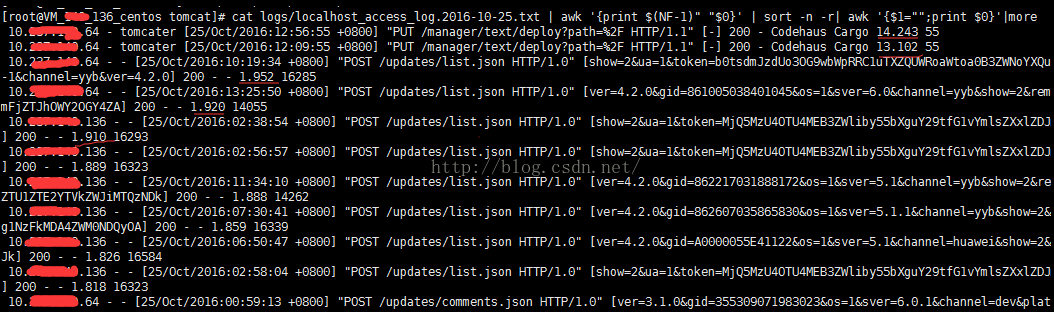
这就要用到万能的awk了 我们的日志倒数第二列显示的访问时间。
<Valve className="org.apache.catalina.valves.AccessLogValve" directory="logs"
prefix="localhost_access_log." suffix=".txt"
pattern="%h %l %u %t "%r" [%{postdata}r] %s %{Referer}i %{User-Agent}i %T %b" />
cat logs/localhost_access_log.2016-10-25.txt | awk '{print $(NF-1)" "$0}' | sort -n -r| awk '{$1="";print $0}' 按照倒数第二列由大到小显示接口以及访问时间。这样我们就能找出那些借口耗时较大,然后对其进行优化,提高用户体验。
Refer:
Tomcat访问(access)日志配置的更多相关文章
- Servlet、Tomcat访问(access)日志配置、记录Post请求参数
一.运行环境: Maven:3.5.2(点击下载) ,下载页 Tomcat:8.5.29(点击下载) ,下载页 JDK:jdk1.7.0_80(点击下载) ,下载页 MavenDependency: ...
- filebeat获取nginx的access日志配置
filebeat获取nginx的access日志配置 产生nginx日志的服务器即生产者服务器配置: 拿omp.chinasoft.com举例: .nginx.conf主配置文件添加日志格式 log_ ...
- spring boot打开tomcat的access日志
spring boot虽说内置了tomcat,但打出来的是jar包而非war包,更没有access日志,那么如何打开access日志呢?只需在application.properties中加入相关配置 ...
- tomcat下的日志配置详细说明
#可配置项(5类日志):catalina.localhost.manager.admin.host-manager handlers = 1catalina.org.apache.juli.FileH ...
- tomcat生成调试日志配置
创建文件logging.properties 文件存放于应用WEB-INF/classes下 文件内容如下: org.apache.juli.FileHandler.prefix = error-d ...
- access日志配置
链接地址: https://wenku.baidu.com/view/3e20fac758f5f61fb73666cf.html org.apache.catalina.valves.AccessL ...
- Tomcat access log配置
在tomcat的access中打印出请求的情况可以帮助我们分析问题,通常比较关注的有访问IP.线程号.访问url.返回状态码.访问时间.持续时间. 在Spring boot中使用了内嵌的tomcat, ...
- springboot中配置tomcat的access log
在tomcat的access中打印出请求的情况可以帮助我们分析问题,通常比较关注的有访问IP.线程号.访问url.返回状态码.访问时间.持续时间. 在Spring boot中使用了内嵌的tomcat, ...
- nginx的日志配置
本文转自:https://www.cnblogs.com/biglittleant/p/8979856.html 版权归属原作者!!!!!! nginx access日志配置 access_log日志 ...
随机推荐
- Mybatis通过注解方式实现批量插入数据库
原文地址:http://f0rb.iteye.com/blog/1207384 MyBatis中通过xml文件配置数据库批量操作的文章很多,比如这篇http://www.cnblogs.com/xcc ...
- 墨者学院靶场之PHP代码分析溯源(第1题)
申请靶场环境后 点开题目 一段奇怪的PHP代码 因为我自己电脑重装了win10系统,php+apache+mysql的环境本地主机觉得没必要弄了,于是我们用在线的PHP编码(百度一下到处都是) 复制进 ...
- View的工作原理(一) 总览View的工作流程
View的工作原理(一) 总览View的工作流程 学习自 <Android开发艺术探索> 简书博主-丶蓝天白云梦 Overview 从本章开始,开始学习View的工作原理,包括View的 ...
- Android-RemoteView-桌面小部件
Android-RemoteView-桌面小部件 学习自 <Android开发艺术探索> https://developer.android.google.cn/guide/topics/ ...
- iOS图片设置圆角性能优化
问题 圆角虽好,但如果使用不当,它就是你的帧数杀手,特别当它出现在滚动列表的时候.下面来看圆角如何毁掉你的流畅度的. 实测 layer.cornerRadius 我创建了一个简单地UITableVie ...
- What is CMSIS-DAP
The mbed HDK and mbed-enabled hardware support the CMSIS-DAP debug interface, which consists of an a ...
- 少女花海自拍撞亡:自拍PK火车速度,没有赢家
心理学研究,自拍是一种自我强化的过程.人们都或多或少有着自我关注的倾向,即“自恋”.而人作为有思想的群体性社会动物,有着分享和交流的欲望.尤其是现代快节奏的生活常使人感觉“亚历山大”,自拍恰恰就成为释 ...
- C#中泛型容器Stack<T>的用法,以及借此实现”撤销/重做”功能
.Net为我们提供了众多的泛型集合.比如,Stack<T>先进后出,Queue<T>先进先出,List<T>集合元素可排序,支持索引,LinkedList<T ...
- 项目从.NET 4.5迁移到.NET 4.0遇到的问题
当把项目从.NET 4.5迁移到.NET 4.0时,遇到的问题和解决如下: 在"属性--应用程序--目标框架"设置成.NET 4.0版本. 重新生成项目,报有关EF的错: 卸载掉项 ...
- VS2017下Git的使用
一.使用GIT上的项目 (1)找到项目的git地址 (2)打开 vs2017的团队资源管理器面板,直接克隆(复制)远程Github上的项目 (3)追加新项目,到以上工程中. 新建项目时,把项目创建在步 ...