
《mysql必知必会》学习_第13章_20180803_欢
第13章:分组过滤。
P83
select count(*) as num_prods from products where vend_id=1003; #返回vend_id=1003的产品数目总值#

P84
select count(*) as num_prods from products group by vend_id; #返回各个vend_id所提供的产品数量,不需要指定计算每个组,因为用了group by ,系统会自动完成#

注意:group by必须在where 之后,order by 之前(当然是在需要where 或order by 的情况下)
P85
select vend_id,count(*) as num_prods from products group by vend_id with rollup ; # 使用with rollup关键字,可以得到每个分组以及每个分组汇总级别(针对每个分组)的值###其实我觉得使用了with rollup与否,对结果并没有影响,来个可爱告诉我使用不使用的区别吧###

P85 过滤分组 -- having语句
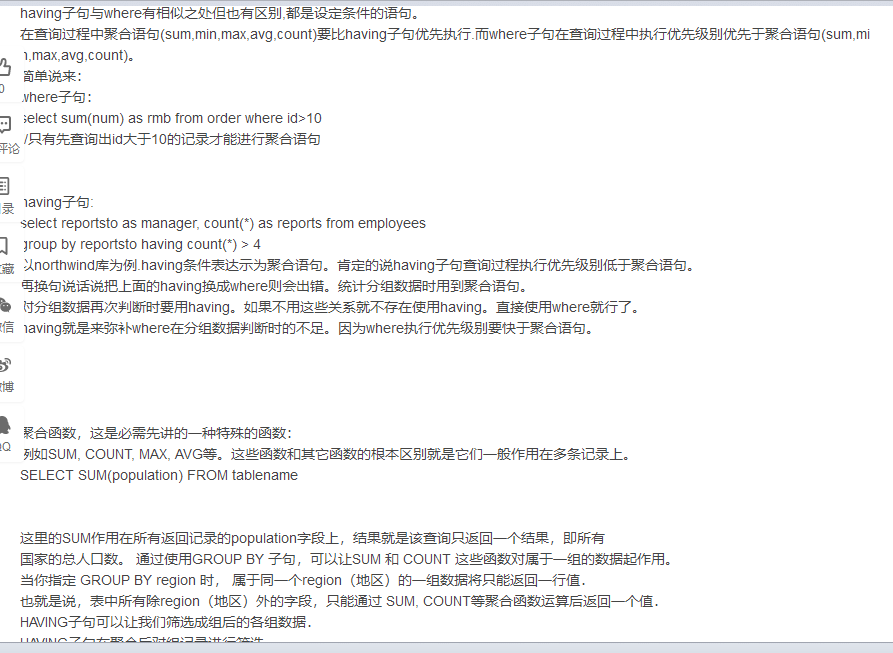
select cust_id,count(*) as orders from orders group by cust_id having count(*)>=2l; #where 过滤行,having过滤分组###我理解的是where对表初始的行数据过滤,而having是聚集函数处理以后的分组过滤(感觉不大对)#####对面大神说用了group by了不能用where,要用having。(P87页说和聚集函数一起使用列,必须使用group by,不能使用order by ,相应地,下面的csdn的网友说,聚集函数要用having筛选分组,所以以此类推,用了group by不能用where,要用having的意思吗??? )###

P86
select vend_id,count(*) as num_prods from products where prod_price>=10 group by vend_id having count(*)>=2; #条件是列prod_price>=10,count(*)>=2 ,这个语句同时出现where和having #

有个我认为不错的解释:https://blog.csdn.net/zqtsx/article/details/41869049
P88
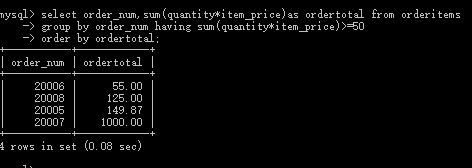
select order_num,sum(quantity*item_price) as ordertotal from orderitems group by order_num having sum(quantity*item_price)>=50; #group by 让排列按order_num来排列,having设定了组sum(quantity*item_price)或者是ordertotal大于50的条件.

select order_num,sum(quantity*item_price) as ordertotal from orderitems group by order_num having sum(quantity*item_price)>=50 order by ordertotal ; #group by 让排列按order_num来排列,having设定了聚集函数得到的组sum(quantity*item_price)大于等于50,order by 得到最后的顺序由ordertotal排序输出(ordertatal的顺序默认是升序)#.
#group by 分组说明,仅限于聚集函数得到的分组;
having :组级过滤;
where:行级过滤,表中的行;
order by :输出的排序过滤。
limit n :要检索的行数;
limit (n,m) :要检索的(开始的行数:第n个开始,检索m行即是第n+m个结束)#
《mysql必知必会》学习_第13章_20180803_欢的更多相关文章
- 《mysql必知必会》学习_第18章_20180807_欢
第18章 全文本搜索 P121 #创建一个新表,对表的列进行定义,定义之后,MySQL自动维护该索引# create table productnotes ( note_id int NOT ...
- 《mysql必知必会》学习_第五章_20180730_欢
使用的工具是wamp的Mysql. P29 select prod_name from products; #在表products中选列prod_name,顺寻不是纯粹的随机,但是没有说明排列顺序, ...
- 《mysql必知必会》学习_第22章_20180809_欢
第22章:使用视图,视图是虚拟的表,以表形式呈现的是你查询的结果.并不是说在数据库里面真的存在这个表,但是是真的存在这些数据. select cust_name,cust_contact from c ...
- 《mysql必知必会》学习_第20章_20180809_欢
第20章:更新和删除数据 P140 update customers set_emails='elmer@fudd.com' where cust_id=10005; 更新多个列,用逗号隔开.注意被指 ...
- 《mysql必知必会》学习_第19章_20180809_欢
第19章 插入数据 P132 insert into customers VALUES(NULL,'Pep E.Lapew','100 Main Street',,Los Angeles','CA', ...
- 《mysql必知必会》学习_第17章_20180807_欢
第17章:组合查询 P114 select vend_id ,prod_id,prod_price from products where prod_price <=5 ; select ven ...
- 《mysql必知必会》学习_第16章_20180807_欢
第16章:创建高级联结. P106 select concat(RTrim(vend_name),'(',RTrim(vend_country),')') as vend_title from ven ...
- 《mysql必知必会》学习_第15章_20180806_欢
第15章:联结表 P98 外键:外键为某个表的一列A,同时这一列包含另一个表的主键值B(B属于A,等于或者小于的关系) P99 select vend_name,prod_name,prod_pric ...
- 《mysql必知必会》学习_第14章_20180806_欢
第14章:使用子查询. 子查询是镶嵌在其他查询里面,相当其他的select查询的条件来. P91 select order_num from where prod_id='tnt2'; #检索条件 ...
随机推荐
- PAT 1024 科学计数法 (20)(精简版代码+思路+推荐测试样例)
1024 科学计数法 (20)(20 分) 科学计数法是科学家用来表示很大或很小的数字的一种方便的方法,其满足正则表达式[+-][1-9]"."[0-9]+E[+-][0-9]+, ...
- java8 数据结构的改变(二) 对ConcurrentHashMap影响
https://www.cnblogs.com/study-everyday/p/6430462.html http://www.importnew.com/22007.html
- 10个办法让设计小白迅速get海报设计要点!
对于设计师而言,海报和宣传单的设计,几乎是每一个设计师的必修课.如今网页上的 Banner.宣传和促销的数字海报,大多脱胎于我们所熟知的海报设计. 对于推销产品.连接客户,海报始终是一种最为有趣和实用 ...
- 看起来像是PS的照片,实际上却令人难以置信!
图片来源:网络 在现实生活中 很多照片看起来不可思议 就像经过PS处理的一样. 今天就跟随米醋一起来感受一下 看这些超现实的真实照片. 一张感光过度的照片, 让狗的头看起来像是悬浮的. 一只被困在琥珀 ...
- Eclipse新建tld文件
tld(tag lib description文件)就是以.tld结尾的XML文件 选好目录右键 --> New --> Other -->找到XML FIle --> Nex ...
- cron Linux下的定时执行工具
说明:测试平台 Ubuntu 16.04.4 LTS cron是一个Linux下的定时执行工具,可以在无需人工干预的情况下运行作业.所以,在Linux中,周期性执行的任务一般由cron这个守护进程来 ...
- js中将斜杠\替换的方法
js中将/替换的方法replace(/\//g, '-') 中间涉及到js的一些转义问题,试了几个方法,发现这个可以,就记下来.
- git版本控制工具的使用(2)
git checkout -b dev创建一个为dev的分支.并选择该分支. git branch dev 创建分支 git checkout dev 选择该分支 git branch 查看当前分支和 ...
- 初识kbmmw 中的ORM
在kbmmw 5.02.1 中,加入了ORM 的功能(这里可能和其他语言的定义不完全一样),我们就简单的认为 它就是一个类与数据库的转换吧.今天就先介绍一下如何通过kbmmw 的ORM 功能,实现类与 ...
- Python sys.argv[] 的用法
sys.argv变量是一个list, 执行 python abc.py a b c 时, sys.argv[0]为 abc.py sys.argv[1]为 a sys.argv[2]为 b sys.a ...