
centos 6.7 搭建tornado + nginx + supervisor的方法(已经实践)
首先,本来不想写这篇博客了,但是我测试了很多网上的例子包括简书的,全不行,我总结原因是自己太笨,搞了俩个晚上,后来决定,自己还是写一篇记录下来,保证自己以后使用
环境:
centos6.7 64
python2.7.11
pip 9.0.1
nginx1.4.5
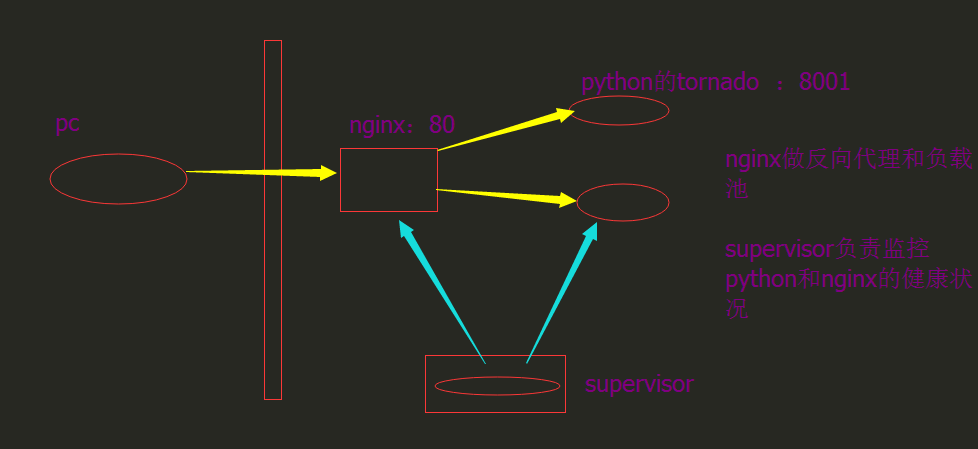
1.安装nginx
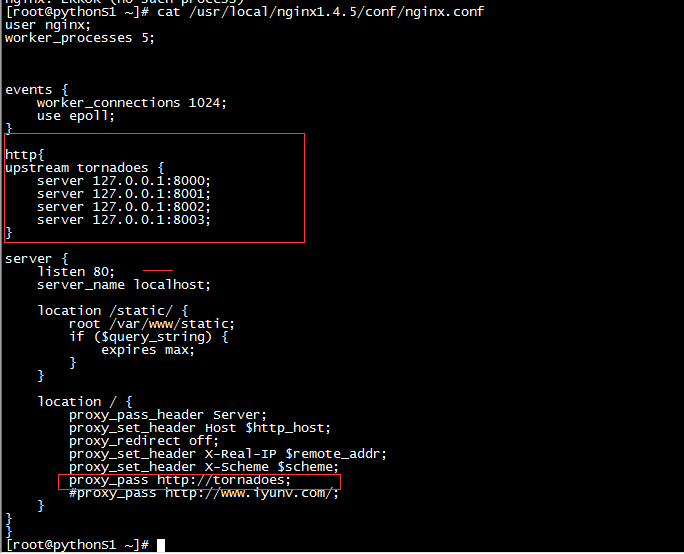
[root@pythonS1 ~]# vim /usr/local/nginx1.4.5/conf/nginx.conf

user nginx;

worker_processes ;

events {

    worker_connections ;

    use epoll;

}

http{

upstream tornadoes {

    server 127.0.0.1:;

    server 127.0.0.1:;

    server 127.0.0.1:;

    server 127.0.0.1:;

}

server {

    listen ;

    server_name localhost;

    location /static/ {

        root /var/www/static;

        if ($query_string) {

            expires max;

        }

    }

    location / {

        proxy_pass_header Server;

        proxy_set_header Host $http_host;

        proxy_redirect off;

        proxy_set_header X-Real-IP $remote_addr;

        proxy_set_header X-Scheme $scheme;

        proxy_pass http://tornadoes;

        #proxy_pass http://www.iyunv.com/;

    }

}

}
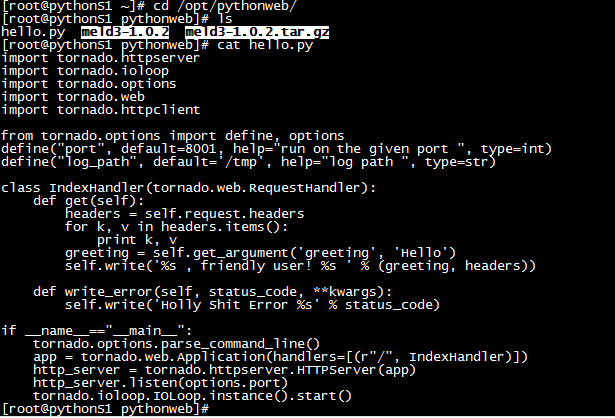
2.tornado的代码
我把自己的代码放在了/opt/pythonweb下面
3.supervisor安装和使用
启动supervisor的时候报错pkg_resources.DistributionNotFound: meld3>=0.6.5
Traceback (most recent call last):

  File "/usr/bin/echo_supervisord_conf", line , in <module>

    from pkg_resources import load_entry_point

  File "/usr/lib/python2.6/site-packages/setuptools-0.6c11-py2.6.egg/pkg_resources.py", line , in <module>

  File "/usr/lib/python2.6/site-packages/setuptools-0.6c11-py2.6.egg/pkg_resources.py", line , in require

  File "/usr/lib/python2.6/site-packages/setuptools-0.6c11-py2.6.egg/pkg_resources.py", line , in resolve

pkg_resources.DistributionNotFound: meld3>=0.6.
解决方法:pip安装的meld3不可用,手动安装。
wget https://pypi.python.org/packages/source/m/meld3/meld3-1.0.2.tar.gz

tar -zxf meld3-1.0..tar.gz

cd meld3-1.0.

python setup.py install
生成配置文件
echo_supervisord_conf > /etc/supervisord.conf
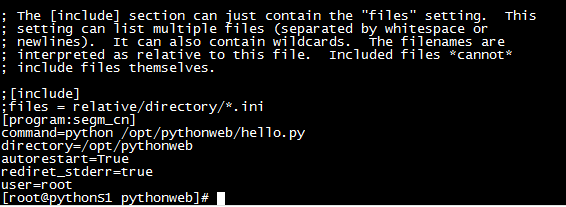 配置文件最后添加的内容,注意没有user会报错的
启动服务
/usr/local/nginx1.4.5/sbin/nginx

supervisorctl

start all
4.监控多个进程服务,监控nginx, celery等
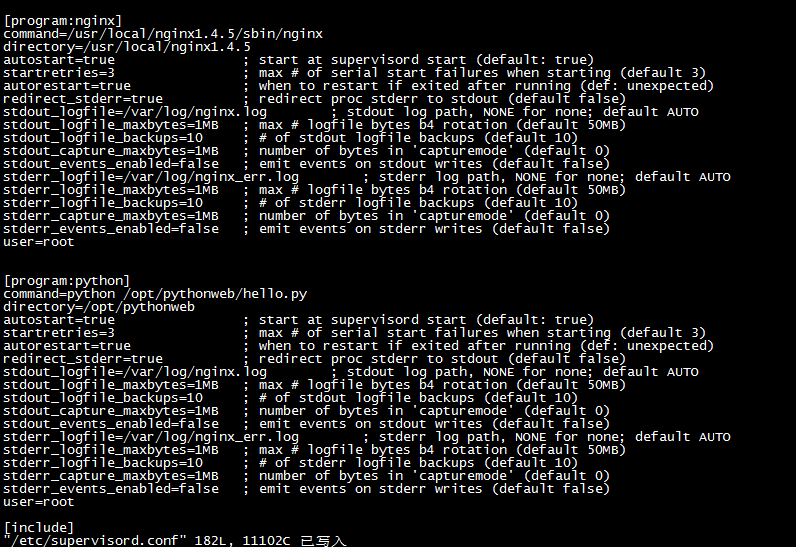
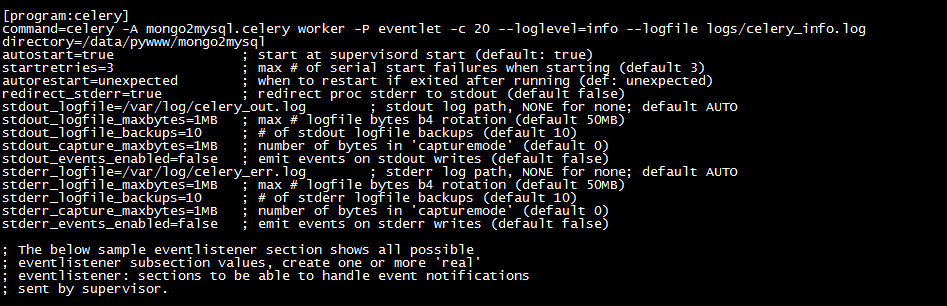
[program:python]

command=python /opt/pythonweb/hello.py

directory=/opt/pythonweb

autostart=true                ; start at supervisord start (default: true)

startretries=                ; max # of serial start failures when starting (default )

autorestart=true              ; when to restart if exited after running (def: unexpected)

redirect_stderr=true          ; redirect proc stderr to stdout (default false)

stdout_logfile=/var/log/nginx.log        ; stdout log path, NONE for none; default AUTO

stdout_logfile_maxbytes=1MB   ; max # logfile bytes b4 rotation (default 50MB)

stdout_logfile_backups=     ; # of stdout logfile backups (default )

stdout_capture_maxbytes=1MB   ; number of bytes in 'capturemode' (default )

stdout_events_enabled=false   ; emit events on stdout writes (default false)

stderr_logfile=/var/log/nginx_err.log        ; stderr log path, NONE for none; default AUTO

stderr_logfile_maxbytes=1MB   ; max # logfile bytes b4 rotation (default 50MB)

stderr_logfile_backups=     ; # of stderr logfile backups (default )

stderr_capture_maxbytes=1MB   ; number of bytes in 'capturemode' (default )

stderr_events_enabled=false   ; emit events on stderr writes (default false)

user=root
supervisorctl start nginx  # 启动 nginx

supervisorctl start all    # 启动所有进程

supervisorctl status       # 查看进程状态
5.注意每次更新完supervisor以后一定要重启supervisor,ps -ef | grep supervisor ,,,kill
centos 6.7 搭建tornado + nginx + supervisor的方法(已经实践)的更多相关文章
- tornado nginx supervisor
安装:sudo apt-get install python-tornado sudo apt-get install nginx sudo apt-get install supervisor 1. ...
- 搭建Tornado+Nginx
Tornado一个高效的异步非阻塞式的实时Web服务器,是Facebook旗下的 FriendFeed 网站开源Web服务器版本.但是它内置的HTTP服务器功能有限,不能在生产环境下使用. 在 Fri ...
- centos ftp服务器搭建 vsftpd 匿名访问配置方法 ftp 550 Failed to open file 错误处理
vsftpd是linux下常用的ftp服务软件,配置起来其实不复杂,只是网上很多文章,配置后都无法成功.我使用它是用于局域网内部分享文件的,所以使用匿名的方式. ftp本身密码是明文传输的,如果需要安 ...
- CentOS,net core2 sdk nginx、supervisor、mysql
CentOS下 .net core2 sdk nginx.supervisor.mysql环境搭建 作为.neter,看到.net core 2.0的正式发布,心里是有点小激动的,迫不及待的体验了一把 ...
- 在CentOS 6上搭建私有的Docker Registry
在CentOS 6上搭建私有的Docker Registry v2Registry概念 :Registry是一个无状态的, 高可扩展的服务器端应用程序, 用于存储和分发Docker Image. 依赖 ...
- CentOS 6.5 搭建 Zabbix
CentOS 6.5 搭建 Zabbix 说明: 操作系统:CentOS 6.5 IP地址:192.168.21.127 Web环境:Nginx+MySQL+PHP zabbix版本:Zabbix 2 ...
- asp.net core 二 Nginx Supervisor 负载,监听
ASP.NET Core负载均衡集群搭建(CentOS7+Nginx+Supervisor+Kestrel) asp.net core在linux运行下,一但命令行退出 ...
- Linux+Nginx+Supervisor部署ASP.NET Core实操手册
一.课程介绍 在上一节课程<ASP.NET Core托管和部署Linux实操演练手册>中我们学过net core的部署方式多样性和灵活性.我们通过远程工具输入dotnet 程序集名称.dl ...
- Centos vsftpd服务器搭建
Centos vsftpd服务器搭建 时间:2016-07-18 1.最为简单的vsftpd服务器搭建 1.安装vsftpd 1.yum 安装 yum install vsftpd 2.rpm文件安装 ...
随机推荐
- (转) android里,addContentView()动态增加view控件,并实现控件的顶部,中间,底部布局
http://blog.csdn.net/bfboys/article/details/52563089
- YYKit学习系列 ---- 开篇
准备花半年时间系统学习YYKit, 学习过程会放入"YYKit学习系列"这个分类, 喜欢YYKit的可以随时留意我的文章, 一起学习!!!
- 【BZOJ-3673&3674】可持久化并查集 可持久化线段树 + 并查集
3673: 可持久化并查集 by zky Time Limit: 5 Sec Memory Limit: 128 MBSubmit: 1878 Solved: 846[Submit][Status ...
- SSH免密码登陆原理
Master作为客户端,要实现无密码公钥认证,连接到服务器Salve上时,需要在Master上生成一个密钥对,包括一个公钥和一个私钥,而后将公钥复制到所有的Salve上.当Master通过SSH链接到 ...
- Mysql 如何批量插入百万行测试数据
Mysql 如何批量插入百万行测试数据
- UVA1225
每增加1个整数,所有位上的对应数都加一.建立一个10000列10行的表,然后查表就可以了. #include<stdio.h> #include<string.h> ][]; ...
- dom 节点篇
1,创建元素 document.createElement('要创建的元素名'); 2.插入节点 appendChild 和insertBefore 3.删除节点 removeChild 用法 re ...
- 个人对B/S项目的一些理解(一)
以下是我自工作以来,结合对C/S项目的认知,对B/S项目的一些理解. 如有不足或者错误,请各位指正. B/S browser/server ----对于这两个软件的个人看法 本质上,也是两个软 ...
- p/invoke 碎片-- 对字符串的处理
字符串在内存中的的几种风格 字符串作为参数和返回值 参考 字符串在内存中的几种风格 所谓的风格,也就是字符串在内存中的存在形式.如何存放的,占据内存的大小,还有存放顺序等.在不同的编程语言和不同的平台 ...
- Configuring Autofac to work with the ASP.NET Identity Framework in MVC 5
https://developingsoftware.com/configuring-autofac-to-work-with-the-aspnet-identity-framework-in-mvc ...