
[Bug]Unable to start process dotnet.exe
This morning I did a sync of a repo using of Visual Studio and then tried to run a web application I was going start working when I got this error:
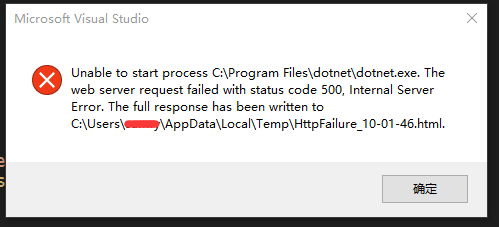
Unable to start process C:\Program Files\dotnet\dotnet.exe. The web server request failed with status code 500, Internal Server Error. The full response has been written to C:\Users\ericl\AppData\Local\Temp\HttpFailure_11-01-57.html.
As directed by the error message I opened up the referenced html file. The file stated the requested page cannot be access because the related configuration data for the page is invalid. Along with the path to the configuration file. Here is a screen shot of the rendered file.
I checked the config file referenced in the error message and I saw nothing wrong. It is the default generated file with no changes.
Since this project ran fine on another computer the day before I thought I would search for my profile name on from the other computer on the one having issues. This led me to the .vs/config folder found at the solution level of my application which contained the applicationhost.config file.
The solution
applicationhost.config has a lot of information in it, but the section I needed to change was under the sites tag. The physical path was set to the directory where the project was located on my other computer. I changed the path to match the path on my current computer and all worked fine. Not sure why this path isn’t relative one it exists within the solution. This is the line that I needed to change.
<virtualDirectorypath="/" physicalPath="C:\Users\ericl\Source\Repos\ASP.NET Core Contacts\Contacts\src\Contacts" />
As an alternative it also works to close Visual Studio delete the whole .vs folder and reopen the project in Visual Studio. This causes the config file to regenerated with the proper values.
Looks like the .vs folder is in the default .gitignore file, but my project was missing the ignore file.
原文:
http://www.elanderson.net/2016/09/unable-to-start-process-dotnet-exe/
[Bug]Unable to start process dotnet.exe的更多相关文章
- Fatal error in launcher: Unable to create process using '"c:\python37\python3.exe" "C:\Python37\Scripts\pip3.exe" install opencv-python'
pip3.exe install opencv-python 报错: Fatal error in launcher: Unable to create process using '"c: ...
- pip运行报错Fatal error in launcher: Unable to create process using pip.exe
使用pip的时候报错Fatal error in launcher: Unable to create process using pip.exe 解决办法,升级pip python -m pip i ...
- pip安装lxml报错 Fatal error in launcher: Unable to create process using '"c:\users\administrator\appdata\local\programs\python\python36\python.exe" "C:\Users\Administrator\AppData\L
pip install lxml 安装报错 E:\apollo\spider_code>Fatal error in launcher: Unable to create process usi ...
- pip3命令报错Fatal error in launcher: Unable to create process using '"d:\old_files\py3.6\python.exe" "E:\py3.6\Scripts\pip3.exe" list'
cmd输入pip3 list命令报错 Fatal error in launcher: Unable to create process using '"d:\old_files\py3.6 ...
- python:python2与python3共存时,pip冲突,提示Fatal error in launcher: Unable to create process using '"d:\python27\python2.exe" "D:\Python27\Scripts\pip2.exe" '
问题背景: 机器上同时装了python2.和python3后,导致只能用pip3了,使用pip2时提示:Fatal error in launcher: Unable to create proces ...
- Fatal error in launcher: Unable to create process using '"'
今天遇到了 Fatal error in launcher: Unable to create process using '"' 这个问题,原来是我上次装python3.5的时候,pyth ...
- python3.6执行pip3时 Unable to create process using '"'
问题需求 由于在windows操作系统中已经安装了python2.7,要在安装python3的时候 将python3.6安装在C:\Python36目录下 然后进入C:\Python36目录下执行pi ...
- pip ipython启动错误 Fatal error in launcher: Unable to create process using
完整的错误提示: C:\Users\yyy>ipython3Fatal error in launcher: Unable to create process using '"c:\u ...
- python pip使用报错:Fatal error in launcher: Unable to create process using '"'
在一个系统中共存Python2.python3的时候,pip.pip2.pip3使用的时候会报错: c:\Python35\Scripts>pip3Fatal error in launcher ...
随机推荐
- LCT摘要
介绍.用途 LCT是树链剖分中的一种,又叫实链剖分.动态树,常用于维护动态的树.森林. 维护方式 LCT并不直接维护原树,而是用一堆splay作为辅助树来维护.原树中的一条实链上的点在一棵splay中 ...
- sublime text 3 使用简介
2014年1月22日 09:47:50 2用了一段时间感觉不错,就是自带的高亮显示匹配标签或者代码块儿时有点儿不清楚,所以一直是sublime 开PHP,notepad++开html 现在想只用一个编 ...
- nginx:在centos中自启动
参考网址:http://www.jb51.net/article/120545.htm # vi /etc/init.d/nginx #!/bin/sh # Name:nginx4comex # ng ...
- 【Android开发】之Fragment重要函数讲解
上一节我们讲到了Fragment的生命周期(都是基于android.support.v4.app包下的Fragment),学习之后相信大家对它的生命周期有了很深入的了解了,如果还有不懂得,可以再看一下 ...
- flask你一定要知道的上下文管理机制
前引 在了解flask上下文管理机制之前,先来一波必知必会的知识点. 面向对象双下方法 首先,先来聊一聊面向对象中的一些特殊的双下划线方法,比如__call__.__getattr__系列.__get ...
- hdu 5427(排序水题)
排序 年轻的排前面 名字中可能有空格 Sample Input21FancyCoder 19962FancyCoder 1996xyz111 1997 Sample OutputFancyCoderx ...
- appium入门级教程(3)—— 安装 Android SDK
前言 搭建Android平台不是必须的,如果你不想使用 Android 模拟器运行测试的话可以跳过,不过,建议安装:原生 Android 好折腾!关键是它自带的一些工具是做 appium 测试必须要用 ...
- centos redis 自动重启
配置init脚本 对于Centos,有一份https://gist.github.com/1335694 经过修改,如下: ########################## PATH=/usr/l ...
- 主动学习——active learning
阅读目录 1. 写在前面 2. 什么是active learning? 3. active learning的基本思想 4. active learning与半监督学习的不同 5. 参考文献 1. ...
- P2870 [USACO07DEC]最佳牛线,黄金Best Cow Line, Gold
P2870 [USACO07DEC]最佳牛线,黄金Best Cow Line, Gold我比赛的时候A了,luogu上25分,QAQ,又憨又傻的200+代码,我为什么要干电脑干的事情,无语了.如果左边 ...