
[Android自动化] 在 pip-9.0.1 版本情况下安装 uiautomator2 报错的解决办法
1、在命令窗口中使用命令: pip install uiautomator2 时报 pip 版本过低,需要先升级 pip 版本,理论上会按照提示进行升级 pip 操作,但执行升级命令时到最后却还是报错,仍提示 pip 版本过低
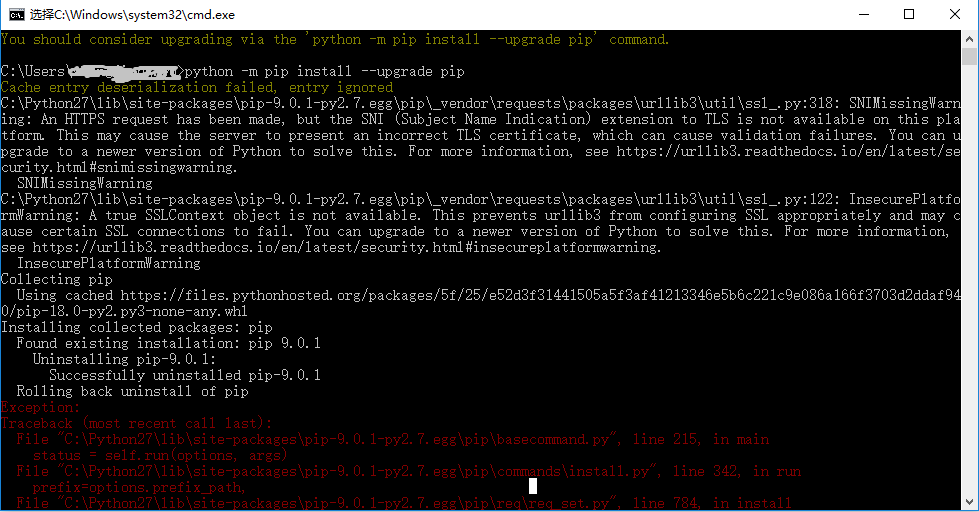
解决办法:
直接先在命令窗口中执行命令: python -m pip install --upgrade pip setuptools wheel 待提示成功安装即可
 Installing collected packages: setuptools, wheel

   Found existing installation: setuptools 28.8.0

     Uninstalling setuptools-28.8.0:

       Successfully uninstalled setuptools-28.8.0

 Successfully installed setuptools-40.0.0 wheel-0.31.1
此时再安装 uiautomator2 即可成功(都不需要升级 pip 版本号)
 C:\Users\xx00>pip install uiautomator2

 Collecting uiautomator2

 c:\python27\lib\site-packages\pip-9.0.1-py2.7.egg\pip\_vendor\requests\packages\urllib3\util\ssl_.py:318: SNIMissingWarning: An HTTPS request has been made, but the SNI (Subject Name Indication) extension to TLS is not available on this platform. This may cause the server to present an incorrect TLS certificate, which can cause validation failures. You can upgrade to a newer version of Python to solve this. For more information, see https://urllib3.readthedocs.io/en/latest/security.html#snimissingwarning.

   SNIMissingWarning

 c:\python27\lib\site-packages\pip-9.0.1-py2.7.egg\pip\_vendor\requests\packages\urllib3\util\ssl_.py:122: InsecurePlatformWarning: A true SSLContext object is not available. This prevents urllib3 from configuring SSL appropriately and may cause certain SSL connections to fail. You can upgrade to a newer version of Python to solve this. For more information, see https://urllib3.readthedocs.io/en/latest/security.html#insecureplatformwarning.

   InsecurePlatformWarning

 Collecting retry>=0.9.2 (from uiautomator2)

   Using cached https://files.pythonhosted.org/packages/4b/0d/53aea75710af4528a25ed6837d71d117602b01946b307a3912cb3cfcbcba/retry-0.9.2-py2.py3-none-any.whl

 Collecting humanize (from uiautomator2)

 Collecting whichcraft (from uiautomator2)

   Using cached https://files.pythonhosted.org/packages/60/8a/5c52e30e11672f7e3aa61f348ddae443d122bcd96bc8b785ac76dbae944b/whichcraft-0.4.1-py2.py3-none-any.whl

 Collecting fire (from uiautomator2)

 Collecting six (from uiautomator2)

   Using cached https://files.pythonhosted.org/packages/67/4b/141a581104b1f6397bfa78ac9d43d8ad29a7ca43ea90a2d863fe3056e86a/six-1.11.0-py2.py3-none-any.whl

 Collecting progress>=1.3 (from uiautomator2)

 Collecting requests>=2.7.0 (from uiautomator2)

   Using cached https://files.pythonhosted.org/packages/65/47/7e02164a2a3db50ed6d8a6ab1d6d60b69c4c3fdf57a284257925dfc12bda/requests-2.19.1-py2.py3-none-any.whl

 Collecting decorator>=3.4.2 (from retry>=0.9.2->uiautomator2)

   Using cached https://files.pythonhosted.org/packages/bc/bb/a24838832ba35baf52f32ab1a49b906b5f82fb7c76b2f6a7e35e140bac30/decorator-4.3.0-py2.py3-none-any.whl

 Collecting py<2.0.0,>=1.4.26 (from retry>=0.9.2->uiautomator2)

   Using cached https://files.pythonhosted.org/packages/f3/bd/83369ff2dee18f22f27d16b78dd651e8939825af5f8b0b83c38729069962/py-1.5.4-py2.py3-none-any.whl

 Collecting urllib3<1.24,>=1.21.1 (from requests>=2.7.0->uiautomator2)

   Using cached https://files.pythonhosted.org/packages/bd/c9/6fdd990019071a4a32a5e7cb78a1d92c53851ef4f56f62a3486e6a7d8ffb/urllib3-1.23-py2.py3-none-any.whl

 Collecting chardet<3.1.0,>=3.0.2 (from requests>=2.7.0->uiautomator2)

   Using cached https://files.pythonhosted.org/packages/bc/a9/01ffebfb562e4274b6487b4bb1ddec7ca55ec7510b22e4c51f14098443b8/chardet-3.0.4-py2.py3-none-any.whl

 Collecting certifi>=2017.4.17 (from requests>=2.7.0->uiautomator2)

   Using cached https://files.pythonhosted.org/packages/7c/e6/92ad559b7192d846975fc916b65f667c7b8c3a32bea7372340bfe9a15fa5/certifi-2018.4.16-py2.py3-none-any.whl

 Collecting idna<2.8,>=2.5 (from requests>=2.7.0->uiautomator2)

   Using cached https://files.pythonhosted.org/packages/4b/2a/0276479a4b3caeb8a8c1af2f8e4355746a97fab05a372e4a2c6a6b876165/idna-2.7-py2.py3-none-any.whl

 Installing collected packages: decorator, py, retry, humanize, whichcraft, six, fire, progress, urllib3, chardet, certifi, idna, requests, uiautomator2

   Found existing installation: py 1.4.20

     Uninstalling py-1.4.20:

       Successfully uninstalled py-1.4.20

   Found existing installation: urllib3 1.8.2

     Uninstalling urllib3-1.8.2:

       Successfully uninstalled urllib3-1.8.2

   Found existing installation: requests 2.3.0

     Uninstalling requests-2.3.0:

       Successfully uninstalled requests-2.3.0

 Successfully installed certifi-2018.4.16 chardet-3.0.4 decorator-4.3.0 fire-0.1.3 humanize-0.5.1 idna-2.7 progress-1.4 py-1.5.4 requests-2.19.1 retry-0.9.2 six-1.11.0 uiautomator2-0.1.2 urllib3-1.23 whichcraft-0.4.1

 Traceback (most recent call last):

   File "C:\Python27\Scripts\pip-script.py", line 9, in <module>

     load_entry_point('pip==9.0.1', 'console_scripts', 'pip')()

   File "c:\python27\lib\site-packages\pip-9.0.1-py2.7.egg\pip\__init__.py", line 233, in main

     return command.main(cmd_args)

   File "c:\python27\lib\site-packages\pip-9.0.1-py2.7.egg\pip\basecommand.py", line 252, in main

     pip_version_check(session)

   File "c:\python27\lib\site-packages\pip-9.0.1-py2.7.egg\pip\utils\outdated.py", line 102, in pip_version_check

     installed_version = get_installed_version("pip")

   File "c:\python27\lib\site-packages\pip-9.0.1-py2.7.egg\pip\utils\__init__.py", line 838, in get_installed_version

     working_set = pkg_resources.WorkingSet()

   File "c:\python27\lib\site-packages\pip-9.0.1-py2.7.egg\pip\_vendor\pkg_resources\__init__.py", line 644, in __init__

     self.add_entry(entry)

   File "c:\python27\lib\site-packages\pip-9.0.1-py2.7.egg\pip\_vendor\pkg_resources\__init__.py", line 700, in add_entry

     for dist in find_distributions(entry, True):

   File "c:\python27\lib\site-packages\pip-9.0.1-py2.7.egg\pip\_vendor\pkg_resources\__init__.py", line 1949, in find_eggs_in_zip

     if metadata.has_metadata('PKG-INFO'):

   File "c:\python27\lib\site-packages\pip-9.0.1-py2.7.egg\pip\_vendor\pkg_resources\__init__.py", line 1463, in has_metadata

     return self.egg_info and self._has(self._fn(self.egg_info, name))

   File "c:\python27\lib\site-packages\pip-9.0.1-py2.7.egg\pip\_vendor\pkg_resources\__init__.py", line 1823, in _has

     return zip_path in self.zipinfo or zip_path in self._index()

   File "c:\python27\lib\site-packages\pip-9.0.1-py2.7.egg\pip\_vendor\pkg_resources\__init__.py", line 1703, in zipinfo

     return self._zip_manifests.load(self.loader.archive)

   File "c:\python27\lib\site-packages\pip-9.0.1-py2.7.egg\pip\_vendor\pkg_resources\__init__.py", line 1643, in load

     mtime = os.stat(path).st_mtime

 WindowsError: [Error 2] : 'C:\\Python27\\lib\\site-packages\\urllib3-1.8.2-py2.7.egg'
此时再同时查看 uiautomator 和 uiautomator2的版本号,确认两个安装情况(显示如下即为成功)
 C:\Users\xxoo>pip show uiautomator

 Name: uiautomator

 Version: 0.1.32

 Summary: Python Wrapper for Android UiAutomator test tool

 Home-page: https://github.com/xiaocong/uiautomator

 Author: youwei deng

 Author-email: xiaocong@gmail.com

 License: MIT

 Location: c:\python27\lib\site-packages\uiautomator-0.1.32-py2.7.egg

 Requires: urllib3

 You are using pip version 9.0.1, however version 18.0 is available.

 You should consider upgrading via the 'python -m pip install --upgrade pip' command.

 C:\Users\xxoo>pip show uiautomator2

 Name: uiautomator2

 Version: 0.1.2

 Summary: Python Wrapper for Android UiAutomator2 test tool

 Home-page: https://github.com/codeskyblue/uiautomator2

 Author: codeskyblue

 Author-email: codeskyblue@gmail.com

 License: MIT

 Location: c:\python27\lib\site-packages

 Requires: retry, humanize, whichcraft, fire, six, progress, requests

 You are using pip version 9.0.1, however version 18.0 is available.

 You should consider upgrading via the 'python -m pip install --upgrade pip' command.
[Android自动化] 在 pip-9.0.1 版本情况下安装 uiautomator2 报错的解决办法的更多相关文章
- window下安装redis报错: creating server tcp listening socket 127.0.0.1:6379: bind No error
window下安装redis报错: creating server tcp listening socket 127.0.0.1:6379: bind No error 解决: 如果没有配置环境,在安 ...
- centos7编译安装LNMP(nginx-1.16.0,mysql8.0.16,php-7.3.6)常见问题报错及解决方法
LNMP的安装与配置 nginx-1.16.0安装及配置: 第一步:前往官网下载nignx源码包 下载完毕后上传至服务器(先安装lrzsz) yum -y install lrzsz 安装完毕后执行: ...
- vue1.0中$index一直报错的解决办法
原文链接:https://www.cnblogs.com/liqiong-web/p/8144925.html 看学习视频,因为年份比较早了,其实vue早已迭代到vue2.0了,遇到一些问题: v-f ...
- Eclipse中利用JSP把mysql-connector-java-8.0.13.jar放到WebContent\WEB-INF\lib中连接MySQL数据库时Connection conn = DriverManager.getConnection(url,username,password)报错的解决办法
开发环境: 1.系统:windows 7/8/10均可 2.jdk:1.8.0_144 3.服务器:apache-tomcat-9.0.8 4.IDE:eclipse+jsp 0.网页代码如下: &l ...
- TensorFlow 安装报错的解决办法(安装1.5版本)
1.安装Anaconda 百度下载windows版本,一路点下一步,安装好了Anaconda,自带python3.6.6. 2.安装TensorFlow (1)打开Anaconda Prompt,输入 ...
- ASP.NET CORE MVC 2.0 项目中引用第三方DLL报错的解决办法 - InvalidOperationException: Cannot find compilation library location for package
目前在学习ASP.NET CORE MVC中,今天看到微软在ASP.NET CORE MVC 2.0中又恢复了允许开发人员引用第三方DLL程序集的功能,感到甚是高兴!于是我急忙写了个Demo想试试,我 ...
- 【bug】vue-cli 3.0报错的解决办法
先上bug图片 bug说明:初装vue_cli3.0写了个组件,运行错误,显示如图, 代码提示:[Vue warn]: You are using the runtime-only build of ...
- 记一次用pip安装docker-compose报错及解决方法
Docker-Compose 的安装 方法一 # 下载1.25.0 docker compose sudo curl -L "https://github.com/docker/compos ...
- android 程序中res/values-v14/styles.xml报错的解决办法
从旧的ADT迁移的新的ADT时, android 程序中res/values-v14/styles.xml报错: error: Error retrieving parent for item: No ...
随机推荐
- vue实用组件——表格
之前用了一下vue-bootstrap,感觉里面的表格组件特别好用,但是如果仅仅为了使用表格就引入bootstrap,似乎有点不划算.所以自己就试着实现了一下bootstrap里面表格的部分功能,目前 ...
- MySql错误处理-错误处理的例子
有几种错误处理的声明形式: § 如果任何错误(不是 NOT FOUND ) , 设置 l_error 为 1 后继续执行: DECLARE CONTINUE HANDLER FOR SQLEXCEPT ...
- 从客户端(ASPxFormLayout1$txtRule="<YYYY><MM><DD><XXXX>")中检测到有潜在危险的 Request.Form 值
在有文本框的值属于这种时<YYYY><MM><DD><XXXX>,会报这个错 在webconfig中加入 <httpRuntime request ...
- [日常] Go语言圣经--接口约定习题2
练习 7.3: 为在gopl.io/ch4/treesort (§4.4)的*tree类型实现一个String方法去展示tree类型的值序列. package main import( "f ...
- Chromium源码--网络请求流程分析
转载请注明出处:http://www.cnblogs.com/fangkm/p/3784660.html 本文探讨一下chromium中加载URL的流程,具体来说是从地址栏输入URL地址到通过URLR ...
- springboot项目中js、css静态文件路径访问
springboot静态文件访问的问题,相信大家也有遇到这个问题,如下图项目结构. 项目结构如上所示,静态页面引入js.css如下所示. 大家肯定都是这样写的,但是运行的话就是出不来效果,图片也不显示 ...
- Finereport和Finebi的区别
1.问题描述 大家现在可能都知道,目前帆软旗下特色产品主要是FineReport和FineBI,但是部分用户可能会有个疑问:FineReport和FineBI到底有什么区别? 2.产品介绍FineRe ...
- Clumsy 弱网络环境模拟工具使用介绍
Clumsy 弱网络环境模拟工具使用介绍 by:授客 QQ:1033553122 简介 利用封装 Winodws Filtering Platform 的WinDivert 库, clumsy 能实时 ...
- Android Fragment的用法(二)
如果你经常使用平板电脑,应该会发现很多的平板应用现在都采用的是双页模式(程序会在左侧的面板上显示一个包含子项的列表,在右侧的面板上显示内容),因为平板电脑的屏幕足够大,完全可以同时显示下两页的内容,但 ...
- 解决 web.xml is missing and <failOnMissingWebXml> is set to true 报错
在学习maven模块化构建项目的时候遇到了如下报错信息: web.xml is missing and <failOnMissingWebXml> is set to true. 这时候需 ...