
利用HOG+SVM实现行人检测
利用HOG+SVM实现行人检测
很久以前做的行人检测,现在稍加温习,上传记录一下。
首先解析视频,提取视频的每一帧形成图片存到磁盘。代码如下
import os

import cv2

videos_src_path = 'D:\\test1'

videos_save_path = 'D:\\test2'

videos = os.listdir(videos_src_path)

videos = filter(lambda x: x.endswith('avi'), videos)

for each_video in videos:

    print (each_video)

    # get the name of each video, and make the directory to save frames

    each_video_name, _ = each_video.split('.')

    os.mkdir(videos_save_path + '/' + each_video_name)

    each_video_save_full_path = os.path.join(videos_save_path, each_video_name) + '/'

    # get the full path of each video, which will open the video tp extract frames

    each_video_full_path = os.path.join(videos_src_path, each_video)

    cap  = cv2.VideoCapture(each_video_full_path)

    frame_count = 1

    success = True

    while(success):

        success, frame = cap.read()

        print ('Read a new frame: ', success)

        params = []

        params.append(1)

        params.append(1)

        cv2.imwrite(each_video_save_full_path + each_video_name + "_%05d.ppm" % frame_count, frame, params)

        frame_count = frame_count + 1

cap.release()
对于图片的行人检测应用了梯度方向直方图和支持向量机。代码如下
这段代码可以实现对行人的标记。
# import the necessary packages

from __future__ import print_function

from imutils.object_detection import non_max_suppression

from imutils import paths

import numpy as np

import argparse

import imutils

import cv2

import os

# initialize the HOG descriptor/person detector

hog = cv2.HOGDescriptor()

hog.setSVMDetector(cv2.HOGDescriptor_getDefaultPeopleDetector())

list = []

path = 'D:\\test2\\111'

videos = os.listdir(path)

videos = filter(lambda x: x.endswith('ppm'), videos)

for each in videos:

    new_path=path + "\\" + each

    list.append(new_path)

# loop over the image paths

for imagePath in list:

    # load the image and resize it to (1) reduce detection time

    # and (2) improve detection accuracy

    image = cv2.imread(imagePath)

    image = imutils.resize(image, width=min(400, image.shape[1]))

    orig = image.copy()

    # detect people in the image

    (rects, weights) = hog.detectMultiScale(image, winStride=(4, 4),

        padding=(8, 8), scale=1.05)

    # draw the original bounding boxes

    for (x, y, w, h) in rects:

        cv2.rectangle(orig, (x, y), (x + w, y + h), (0, 0, 255), 2)

    # apply non-maxima suppression to the bounding boxes using a

    # fairly large overlap threshold to try to maintain overlapping

    # boxes that are still people

    rects = np.array([[x, y, x + w, y + h] for (x, y, w, h) in rects])

    pick = non_max_suppression(rects, probs=None, overlapThresh=0.65)

    # draw the final bounding boxes

    for (xA, yA, xB, yB) in pick:

        cv2.rectangle(image, (xA, yA), (xB, yB), (0, 255, 0), 2)

    # show some information on the number of bounding boxes

    filename = imagePath[imagePath.rfind("/") + 1:]

    print("[INFO] {}: {} original boxes, {} after suppression".format(

        filename, len(rects), len(pick)))

    # show the output images

    cv2.imshow("Before NMS", orig)

    cv2.imshow("After NMS", image)

    cv2.waitKey(1)
在这里应用了非极大值抑制方法(NMS),处理了重叠标记的问题。但是这里存在一个问题就是,部分两个人物距离过近或者产生重叠的情况下,优化后会将两个人标记称为一个人,这个问题还没有解决。
最后,将多张标记后的图片按一定帧数还原成视频,就完成了对视频的行人检测。 完整代码如下
# import the necessary packages

from __future__ import print_function

from imutils.object_detection import non_max_suppression

from imutils import paths

import numpy as np

import argparse

import imutils

import cv2

import os

'''

# construct the argument parse and parse the arguments

ap = argparse.ArgumentParser()

ap.add_argument("-i", "--images", required=True, help="path to images directory")

args = vars(ap.parse_args())

'''

# initialize the HOG descriptor/person detector

hog = cv2.HOGDescriptor()

hog.setSVMDetector(cv2.HOGDescriptor_getDefaultPeopleDetector())

list = []

path = 'D:\\test2\\111'

videos = os.listdir(path)

videos = filter(lambda x: x.endswith('ppm'), videos)

for each in videos:

    new_path=path + "\\" + each

    list.append(new_path)

fourcc = cv2.VideoWriter_fourcc(*'I420')

videoWriter = cv2.VideoWriter('D:\\test2\\111\\saveVideo.avi',-1,24,(720,404))

# loop over the image paths

for imagePath in list:

    # load the image and resize it to (1) reduce detection time

    # and (2) improve detection accuracy

    image = cv2.imread(imagePath)

    if image is None:

        break

    image = imutils.resize(image, width=min(400, image.shape[1]))

    orig = image.copy()

    # detect people in the image

    (rects, weights) = hog.detectMultiScale(image, winStride=(4, 4),

        padding=(8, 8), scale=1.05)

    # draw the original bounding boxes

    for (x, y, w, h) in rects:

        cv2.rectangle(orig, (x, y), (x + w, y + h), (0, 0, 255), 2)

    # apply non-maxima suppression to the bounding boxes using a

    # fairly large overlap threshold to try to maintain overlapping

    # boxes that are still people

    rects = np.array([[x, y, x + w, y + h] for (x, y, w, h) in rects])

    pick = non_max_suppression(rects, probs=None, overlapThresh=0.65)

    # draw the final bounding boxes

    for (xA, yA, xB, yB) in pick:

        cv2.rectangle(image, (xA, yA), (xB, yB), (0, 255, 0), 2)

    # show some information on the number of bounding boxes

    filename = imagePath[imagePath.rfind("/") + 1:]

    print("[INFO] {}: {} original boxes, {} after suppression".format(

        filename, len(rects), len(pick)))

    # show the output images

    cv2.imshow("Before NMS", orig)

    cv2.imshow("After NMS", image)

    videoWriter.write(image)

    cv2.waitKey(1)

videoWriter.release()
运行截图如下
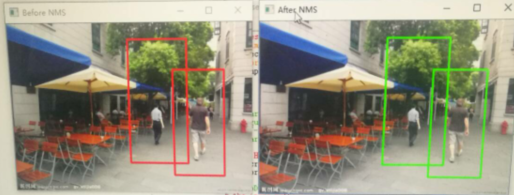
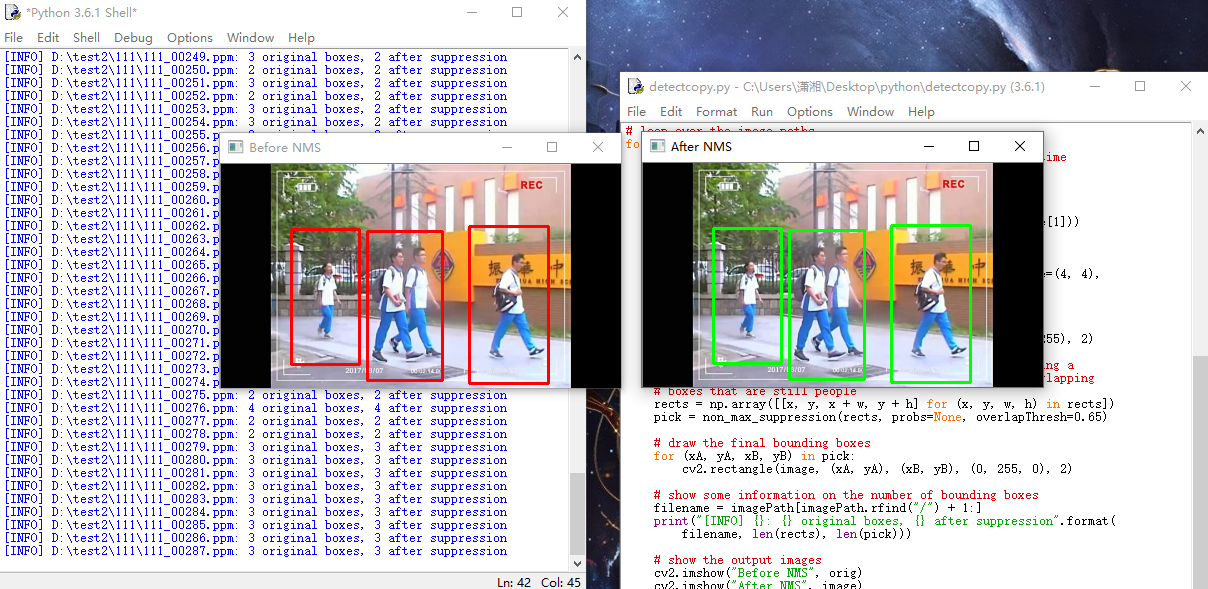
优化:预处理部分图像结果存在的磁盘上,导致运行速度偏难,可以先加载到内存中,以便加速。
关于视频,没有进行上下文处理,只是单纯的将图片合成视频,没有相互关联起来。
利用HOG+SVM实现行人检测的更多相关文章
- Hog SVM 车辆 行人检测
HOG SVM 车辆检测 近期需要对卡口车辆的车脸进行检测,首先选用一个常规的检测方法即是hog特征与SVM,Hog特征是由dalal在2005年提出的用于道路中行人检测的方法,并且取的了不错的识别效 ...
- OpenCV中基于HOG特征的行人检测
目前基于机器学习方法的行人检测的主流特征描述子之一是HOG(Histogram of Oriented Gradient, 方向梯度直方图).HOG特征是用于目标检测的特征描述子,它通过计算和统计图像 ...
- opencv+树莓PI的基于HOG特征的行人检测
树莓PI远程控制摄像头请参考前文:http://www.cnblogs.com/yuliyang/p/3561209.html 参考:http://answers.opencv.org/questio ...
- HoG SVM 目标检测分析
前一段时间开始了解HoG跟SVM行人识别,看了很多包括Dalal得前辈的文章及经验分享,对HoG理论有了些初步的认识. HoG 的全称是 Histogram of Oriented Gradient, ...
- paper 86:行人检测资源(上)综述文献【转载,以后使用】
行人检测具有极其广泛的应用:智能辅助驾驶,智能监控,行人分析以及智能机器人等领域.从2005年以来行人检测进入了一个快速的发展阶段,但是也存在很多问题还有待解决,主要还是在性能和速度方面还不能达到一个 ...
- PCL行人检测
首先我们知道Hog特征结合SVM分类器已经被广泛应用于图像识别中,尤其在行人检测中获得了极大的成功,HOG+SVM进行行人检测的方法是法国研究人员Dalal在2005的CVPR上提出的,而如今虽然有很 ...
- paper 87:行人检测资源(下)代码数据【转载,以后使用】
这是行人检测相关资源的第二部分:源码和数据集.考虑到实际应用的实时性要求,源码主要是C/C++的.源码和数据集的网址,经过测试都可访问,并注明了这些网址最后更新的日期,供学习和研究进行参考.(欢迎补充 ...
- 行人检测(Pedestrian Detection)资源
一.论文 综述类的文章 [1]P.Dollar, C. Wojek,B. Schiele, et al. Pedestrian detection: an evaluation of the stat ...
- 目标检测之行人检测(Pedestrian Detection)---行人检测之简介0
一.论文 综述类的文章 [1]P.Dollar, C. Wojek,B. Schiele, et al. Pedestrian detection: an evaluation of the stat ...
随机推荐
- tali -f 和 tail -F 之间的区别
tail -f 等同于--follow=descriptor,根据文件描述符进行追踪,当文件改名或被删除,追踪停止 tail -F 等同于--follow=name --retry ...
- Linux 出现 E325:ATTENTION swap
当用vim打开一个文件的时候,系统提示:E325:ATTENTION Found a swap by the name ".a.swp" owned by:…… …… 这是由于在编 ...
- 乘风破浪:LeetCode真题_035_Search Insert Position
乘风破浪:LeetCode真题_035_Search Insert Position 一.前言 这次的问题比较简单,也没有限制时间复杂度,但是要注意一些细节上的问题. 二.Search Insert ...
- HTML5 学习总结(三)——本地存储(localStorage、sessionStorage、WebSqlDataBase、IndexedDB)
HTML5问世以后,前端加入了一个重要的功能,便是本地存储,本地存储可分为4类: Local Storage:总的存储量有所限制,并不能提供真正的检索API,数据的生命期比窗口或浏览器的生命期长,数据 ...
- 5.Dubbo2.5.3泛化引用和泛化实现
转载请出自出处:http://www.cnblogs.com/hd3013779515/ 1.泛化引用 泛接口调用方式主要用于客户端没有API接口及模型类元的情况,参数及返回值中的所有POJO均用Ma ...
- Bank项目
项目概述: 技术涵盖:由 8 组由浅入深的模块构成,应用如下技术:面向对象的封装性.构造器.引用类型的成员变量.异构数组.继承.多态.方法的重载.方法的重写.包装类.单子模式.异常.集合. 实现功能: ...
- Rx = Observables(响应) + LINQ(声明式语言) + Schedulers(异步)
Reactive = Observables(响应)+ Schedulers(异步). Extensions = LINQ(语言集成查询) LINQ: The Operators of Reactiv ...
- CF700E:Cool Slogans(SAM,线段树合并)
Description 给你一个字符串,如果一个串包含两个可有交集的相同子串,那么这个串的价值就是子串的价值+1.问你给定字符串的最大价值子串的价值. Input 第一行读入字符串长度$n$,第二行是 ...
- [ERROR] Failed to execute goal org.mybatis.generator:mybatis-generator-maven-plugin:1.3.2:generate (default-cli) on project SSMMavenPro: configfile D:\java\PermissionPro\src\main\resources\generatorCo
看看自己的generatorConfig.xml文件是否放错,反正我不小心resources文件放在src目录下,并没有放在main目录下,所有找不带该文件
- k8s mongodb 集群配置
service.yaml apiVersion: v1 kind: Service metadata: name: mongo labels: name: mongo spec: ports: - p ...