
.netCoreMVC添加数据仓储
在上一篇关于CodeFirst从零搭建ASP.NETCore2.0中搭建起了完整.netCoreMVC项目,在这一篇中将实现如何注册service服务和Repository数据仓储到web中实现数据的统一处理.
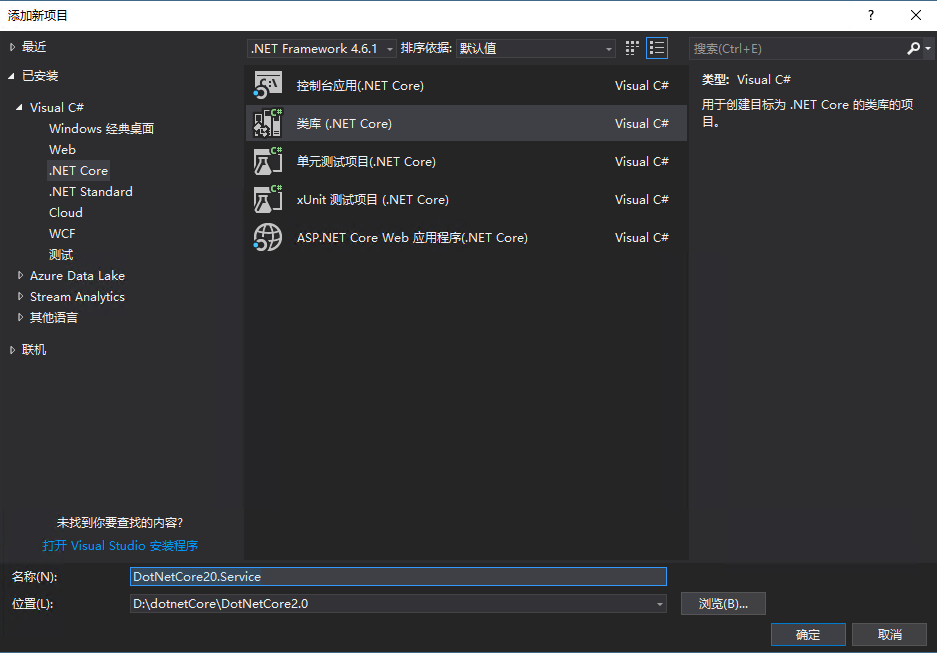
首先新建项目:DotNetCore20.Service:
右键解决方案>新建项目:DotNetCore20.Service
添加repository
原先计划自己实现一套repository(将在后续计划再写一篇参考:https://github.com/Arch/UnitOfWork实现Repository的文章),但是由于时间原因后来在nuget中找到了更好更全面的解决方案,暂且利用第三方组件实现repository.
nuget搜索:Microsoft.EntityFrameworkCore.UnitOfWork;源代码:https://github.com/Arch/UnitOfWork

安装到DotNetCore20.Service

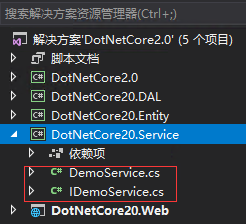
在DotNetCore20.Service中添加DemoService.cs和对应的接口IDemoService.cs,目录结构如下:
DemoService.cs:
using DotNetCore20.Entity;

using Microsoft.EntityFrameworkCore;

using System;

using System.Threading.Tasks;

namespace DotNetCore20.Service

{

    public class DemoService : IDemoService

    {

        private readonly IUnitOfWork _unitOfWork;

        public DemoService(IUnitOfWork unitOfWork)

        {

            _unitOfWork = unitOfWork;

        }

        public async Task<UserExtend> Meth()

        {

            var repo = _unitOfWork.GetRepository<UserExtend>();

            var value = await repo.FindAsync();

            return value;

        }

    }

}
IDemoService:
using DotNetCore20.Entity;

using Microsoft.EntityFrameworkCore;

using System;

using System.Threading.Tasks;

namespace DotNetCore20.Service

{

    public interface IDemoService

    {

        Task<UserExtend> Meth();

    }

}
Startup.cs中注册相关服务:
在Startup中的ConfigureServices方法中添加以下行:
//Customer's services

            services.AddUnitOfWork<DotNetCoreDbContext>();//注册数据仓储

            services.AddScoped(typeof(IDemoService), typeof(DemoService));//注册service,为了避免都要在此声明,所以之后会统一注册DotNetCore20.Service下的所有service
完整Startup如下:
using System;

using System.Collections.Generic;

using System.Linq;

using System.Threading.Tasks;

using Microsoft.AspNetCore.Builder;

using Microsoft.AspNetCore.Diagnostics.EntityFrameworkCore;

using Microsoft.AspNetCore.Identity;

using Microsoft.AspNetCore.Http;

using Microsoft.EntityFrameworkCore;

using Microsoft.AspNetCore.Hosting;

using Microsoft.Extensions.Configuration;

using Microsoft.Extensions.DependencyInjection;

using Microsoft.Extensions.Options;

using DotNetCore20.Web.Data;

using DotNetCore20.Web.Models;

using DotNetCore20.Web.Services;

using DotNetCore20.DAL.DbContext;

using DotNetCore20.Service;

namespace DotNetCore20.Web

{

    public class Startup

    {

        public Startup(IConfiguration configuration)

        {

            Configuration = configuration;

        }

        public IConfiguration Configuration { get; }

        // This method gets called by the runtime. Use this method to add services to the container.

        public void ConfigureServices(IServiceCollection services)

        {

            services.AddDbContext<ApplicationDbContext>(options =>

                options.UseSqlServer(Configuration.GetConnectionString("DefaultConnection")));

            //自定义数据库连接字符串

            services.AddDbContext<DotNetCoreDbContext>(options =>

                options.UseSqlServer(Configuration.GetConnectionString("DotNetCoreConnection")));

            services.AddIdentity<ApplicationUser, IdentityRole>()

                .AddEntityFrameworkStores<ApplicationDbContext>()

                .AddDefaultTokenProviders();

            // Add application services.

            services.AddTransient<IEmailSender, AuthMessageSender>();

            services.AddTransient<ISmsSender, AuthMessageSender>();

            //Customer's services

            services.AddUnitOfWork<DotNetCoreDbContext>();

            services.AddScoped(typeof(IDemoService), typeof(DemoService));

            services.AddMvc();

        }

        // This method gets called by the runtime. Use this method to configure the HTTP request pipeline.

        public void Configure(IApplicationBuilder app, IHostingEnvironment env)

        {

            if (env.IsDevelopment())

            {

                app.UseDeveloperExceptionPage();

                app.UseBrowserLink();

                app.UseDatabaseErrorPage();

            }

            else

            {

                app.UseExceptionHandler("/Home/Error");

            }

            app.UseStaticFiles();

            app.UseAuthentication();

            app.UseMvc(routes =>

            {

                routes.MapRoute(

                    name: "default",

                    template: "{controller=Home}/{action=Index}/{id?}");

            });

        }

    }

}
Startup
HomeController:
在Controller的HomeController中的构造函数中添加以下代码:
  public class HomeController : Controller

    {

        private IDemoService _demoService { get; set; }

        public HomeController(IDemoService demoService)

        {

            _demoService = demoService;

        }

}
使用Service
public IActionResult Index()

        {

            _demoService.Meth();

            return View();

        }
在此大功告成,点击 即可
即可
.netCoreMVC添加数据仓储的更多相关文章
- 从零开始,搭建博客系统MVC5+EF6搭建框架(2),测试添加数据、集成Autofac依赖注入
一.测试仓储层.业务层是否能实现对数据库表的操作 1.创建IsysUserInfoRepository接口来继承IBaseRepository父接口 namespace Wchl.WMBlog.IRe ...
- 从零开始,搭建博客系统MVC5+EF6搭建框架(1),EF Code frist、实现泛型数据仓储以及业务逻辑
前言 从上篇30岁找份程序员的工作(伪程序员的独白),文章开始,我说过我要用我自学的技术,来搭建一个博客系统,也希望大家给点意见,另外我很感谢博客园的各位朋友们,对我那篇算是自我阶段总结文章 ...
- 【干货】利用MVC5+EF6搭建博客系统(二)测试添加数据、集成Autofac依赖注入
PS:如果图片模糊,鼠标右击复制图片网址,然后在浏览器中打开即可. 一.测试仓储层.业务层是否能实现对数据库表的操作 1.在52MVCBlog.IRepository程序集下创建IsysUserInf ...
- C#数据仓储类
https://ninesky.codeplex.com/SourceControl/latest /*============================== 版本:v0.1 创建:2016.2 ...
- C#向sql server数据表添加数据源代码
HoverTree解决方案 学习C#.NET,Sql Server,WinForm等的解决方案. 本文链接http://hovertree.com/h/bjaf/0jteg8cv.htm 使用的技术. ...
- js表单动态添加数据并提交
情景1:已经存在form对象了,动态为form增加对象并提交 function formAppendSubmit(){ var myform=$('#newArticleForm'); //得到for ...
- 使用C#类向数据库添加数据的例子源码
在上一篇中,增加了sql server数据库操作类SqlOperator,用于操作sql server数据库.还有一个SqlStringHelper类,用于处理sql语句的单引号.那么这两个类怎么使用 ...
- EF批量添加数据性能慢的问题的解决方案
//EF批量添加数据性能慢的问题的解决方案 public ActionResult BatchAdd() { using (var db = new ToneRoad.CEA.DbContext.Db ...
- mybatis+oracle添加一条数据并返回所添加数据的主键问题
最近做mybatis+oracle项目的时候解决添加一条数据并返回所添加数据的主键问题 controller层 @RequestMapping("/addplan") public ...
随机推荐
- python基础学习2
一.算数运算符 +加法,-减法,*乘法,/除法,//地板除,%求余,**幂运算. 二.逻辑运算符 非not.且and.或or.优先级依次为not,and,or. 三.print()end结尾 prin ...
- [WPF]启动参数
在App.xaml.cs中重写方法OnStartup protected override void OnStartup(StartupEventArgs e) { //e.Args为命令行参数 // ...
- jsencrypt加密
在登录时,前台页面的用户名.密码都是明文传输到后台的,漏洞扫描认为这样子不安全,就想到了前台js加密,后台解密的方法,要用到jsencrypt.js,具体代码如下: 前台页面: <!DOCTYP ...
- mnist手写数字检测
# -*- coding: utf-8 -*- """ Created on Tue Apr 23 06:16:04 2019 @author: 92958 " ...
- Actor模式初步入门
Actor模型概念 Actor模型为并行而生,简单说是未解决高并发的一种编程思路.在Actor模型中,主角是Actor,类似一种worker,Actor彼此之间直接发送消息,不需要经过什么中介,消息是 ...
- [CTSC2018]混合果汁
题目连接:https://www.luogu.org/problemnew/show/P4602 因为题中说是让最小值最大,所以自然想到二分答案.对于每一个二分的值,判断是否合法,若合法,在右区间二分 ...
- MyBatis之Collection
Collection翻译过来,意为"集合"的意思,既然是集合,肯定是代表多个. MyBatis以其自身,小巧易懂,闻名于JavaEE. 传统的JDBC就不说了,Hibernate记 ...
- nginx中server的匹配顺序
在开始处理一个http请求时,nginx会取出header头中的host,与nginx.conf中每个server的server_name进行匹配,以此决定到底由哪一个server块来处理这个请求. ...
- GitHub上最火的40个Android开源项目(二)
21.drag-sort-listview DragSortListView(DSLV)是Android ListView的一个扩展,支持拖拽排序和左右滑动删除功能.重写了TouchIntercept ...
- 微信小程序开发 [00] 写在前面的话,疯狂唠唠
我总是喜欢在写东西之前唠唠嗑,按照惯例会在博文的开篇写这么一段"写在前面的话",这次却为了这个唠嗑单独开了一篇文,大概预想着要胡说八道的话有点多. 前段时间突然对小程序来了兴趣,说 ...