
Redis Cluster with SpringBoot
前提:
按照 https://www.cnblogs.com/luffystory/p/12081074.html 配置好Redis Cluster in Ubuntu
按照如下结构搭建项目结构:
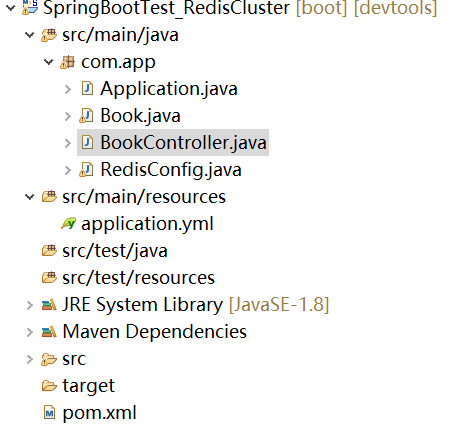
POM
<project xmlns="http://maven.apache.org/POM/4.0.0" xmlns:xsi="http://www.w3.org/2001/XMLSchema-instance"

    xsi:schemaLocation="http://maven.apache.org/POM/4.0.0 https://maven.apache.org/xsd/maven-4.0.0.xsd">

    <modelVersion>4.0.0</modelVersion>

    <parent>

        <groupId>org.springframework.boot</groupId>

        <artifactId>spring-boot-starter-parent</artifactId>

        <version>2.0.1.RELEASE</version>

        <relativePath /> <!-- lookup parent from repository -->

    </parent>

    <groupId>com.study</groupId>

    <artifactId>SpringBootTest_RedisCluster</artifactId>

    <version>0.0.1-SNAPSHOT</version>

    <name>SpringBootTest-2</name>

    <description>Demo project for Spring Boot</description>

    <properties>

        <java.version>1.8</java.version>

    </properties>

    <dependencies>

        <dependency>

            <groupId>org.springframework.boot</groupId>

            <artifactId>spring-boot-starter-web</artifactId>

        </dependency>

        <dependency>

            <groupId>org.springframework.boot</groupId>

            <artifactId>spring-boot-devtools</artifactId>

            <optional>true</optional>

        </dependency>

        <dependency>

            <groupId>org.springframework.boot</groupId>

            <artifactId>spring-boot-starter-test</artifactId>

            <scope>test</scope>

        </dependency>

        <dependency>

            <groupId>org.springframework.boot</groupId>

            <artifactId>spring-boot-starter-data-redis</artifactId>

            <exclusions>

                <exclusion>

                    <groupId>io.lettuce</groupId>

                    <artifactId>lettuce-core</artifactId>

                </exclusion>

            </exclusions>

        </dependency>

        <dependency>

            <groupId>org.apache.commons</groupId>

            <artifactId>commons-pool2</artifactId>

        </dependency>

        <dependency>

            <groupId>redis.clients</groupId>

            <artifactId>jedis</artifactId>

        </dependency>

    </dependencies>

    <build>

        <plugins>

            <plugin>

                <groupId>org.springframework.boot</groupId>

                <artifactId>spring-boot-maven-plugin</artifactId>

            </plugin>

        </plugins>

    </build>

</project>
package com.app;

import org.springframework.boot.SpringApplication;

import org.springframework.boot.autoconfigure.SpringBootApplication;

@SpringBootApplication

public class Application {

    public static void main(String[] args) {

        SpringApplication.run(Application.class, args);

    }

}
package com.app;

import java.io.Serializable;

public class Book implements Serializable {

    private String name;

    private String author;

    public String getName() {

        return name;

    }

    public void setName(String name) {

        this.name = name;

    }

    public String getAuthor() {

        return author;

    }

    public void setAuthor(String author) {

        this.author = author;

    }

    public String toString(){

    return String.format("Book: { name: %s, author: %s }", name,author);

    }

}
package com.app;

import org.springframework.beans.factory.annotation.Autowired;

import org.springframework.data.redis.core.RedisTemplate;

import org.springframework.data.redis.core.StringRedisTemplate;

import org.springframework.data.redis.core.ValueOperations;

import org.springframework.web.bind.annotation.GetMapping;

import org.springframework.web.bind.annotation.RestController;

@RestController

public class BookController {

    @Autowired

    RedisTemplate<String, Book> redisTemplate;

    @Autowired

    StringRedisTemplate stringRedisTemplate;

    @GetMapping("/test1")

    public void test() {

    ValueOperations<String,Book> ops = redisTemplate.opsForValue();

    Book book = new Book();

    book.setName("水浒传");

    book.setAuthor("施耐庵");

    ops.set("b1", book);

    System.out.println(ops.get("b1"));

    ValueOperations<String,String> ops2 = stringRedisTemplate.opsForValue();

    ops2.set("Hello", "World");

    System.out.println(ops2.get("Hello"));

    }

}
package com.app;

import java.util.ArrayList;

import java.util.List;

import org.springframework.boot.context.properties.ConfigurationProperties;

import org.springframework.context.annotation.Bean;

import org.springframework.context.annotation.Configuration;

import org.springframework.data.redis.connection.RedisClusterConfiguration;

import org.springframework.data.redis.connection.RedisNode;

import org.springframework.data.redis.connection.jedis.JedisConnectionFactory;

import org.springframework.data.redis.core.RedisTemplate;

import org.springframework.data.redis.core.StringRedisTemplate;

import org.springframework.data.redis.serializer.JdkSerializationRedisSerializer;

import org.springframework.data.redis.serializer.StringRedisSerializer;

import redis.clients.jedis.JedisPoolConfig;

@Configuration

@ConfigurationProperties("spring.redis.cluster")

public class RedisConfig {

    List<Integer> ports;

    String host;

    JedisPoolConfig poolConfig;

    @Bean

    RedisClusterConfiguration redisClusterConfiguarion() {

    RedisClusterConfiguration configuration = new RedisClusterConfiguration();

    List<RedisNode> nodes = new ArrayList<>();

    for(Integer port : ports) {

        nodes.add(new RedisNode(host,port));

    }

    configuration.setClusterNodes(nodes);

    return configuration;

    }

    @Bean

    JedisConnectionFactory jedisConnectionFactory() {

    JedisConnectionFactory factory = new JedisConnectionFactory(redisClusterConfiguarion(), poolConfig);

        return factory;

    }

    @Bean

    RedisTemplate redisTempalte() {

    RedisTemplate redisTempalte = new RedisTemplate();

    redisTempalte.setConnectionFactory(jedisConnectionFactory());

    redisTempalte.setKeySerializer(new StringRedisSerializer());

    redisTempalte.setValueSerializer(new JdkSerializationRedisSerializer());

    return redisTempalte;

    }

    @Bean

    StringRedisTemplate stringRedisTemplate() {

    StringRedisTemplate stringRedisTemplate = new StringRedisTemplate(jedisConnectionFactory());

    stringRedisTemplate.setKeySerializer(new StringRedisSerializer());

    stringRedisTemplate.setValueSerializer(new StringRedisSerializer());

    return stringRedisTemplate;

    }

    public List<Integer> getPorts() {

        return ports;

    }

    public void setPorts(List<Integer> ports) {

        this.ports = ports;

    }

    public String getHost() {

        return host;

    }

    public void setHost(String host) {

        this.host = host;

    }

    public JedisPoolConfig getPoolConfig() {

        return poolConfig;

    }

    public void setPoolConfig(JedisPoolConfig poolConfig) {

        this.poolConfig = poolConfig;

    }

}
application.yml
server:

  port: 8091

spring:

  redis:

    cluster:

      ports:

        - 8001

        - 8002

        - 8003

        - 8004

        - 8005

        - 8006

        - 8007

        - 8008

      host: 192.168.157.131  #此处所有的node都在同一台机器上,所以用了一个 host

      poolConfig:

        max-total: 8

        max-idle: 8

        max-wait-millis: -1

        min-idle: 0
启动SpringBoot Application ,并在浏览器中输入: http://localhost:8091/test1

连接任意一个Redis 实例,验证结果:


Redis Cluster with SpringBoot的更多相关文章
- Redis Cluster Cache with SpringBoot
前提: 根据 https://www.cnblogs.com/luffystory/p/12081074.html 创建好Redis集群 <project xmlns="http:/ ...
- Redis Cluster的搭建与部署,实现redis的分布式方案
前言 上篇Redis Sentinel安装与部署,实现redis的高可用实现了redis的高可用,针对的主要是master宕机的情况,我们发现所有节点的数据都是一样的,那么一旦数据量过大,redi也会 ...
- Redis Cluster(集群)的搭建
一.Redis的下载.安装.启动(单实例) 我们统一将Redis安装在/opt目录下,执行命令如下: $ cd /opt $ wget http://download.redis.io/release ...
- Redis Cluster 集群搭建与扩容、缩容
说明:仍然是伪集群,所有的Redis节点,都在一个服务器上,采用不同配置文件,不同端口的形式实现 前提:已经安装好了Redis,本文的redis的版本是redis-6.2.3 Redis的下载.安装参 ...
- window下使用Redis Cluster部署Redis集群
日常的项目很多时候都需要用到缓存.redis算是一个比较好的选择.一般情况下做一个主从就可以满足一些比较小的项目需要.在一些并发量比较大的项目可能就需要用到集群了,redis在Windows下做集群可 ...
- Redis Cluster 分区实现原理
Redis Cluster本身提供了自动将数据分散到Redis Cluster不同节点的能力,分区实现的关键点问题包括:如何将数据自动地打散到不同的节点,使得不同节点的存储数据相对均匀:如何保证客户端 ...
- Redis Cluster
使用 Redis Cluster Redis 3.0 在2015年出了Stable版本,3.0版本相对于2.8版本带来的主要新特性包括: 实现了Redis Cluster,从而做到了对集群的支持: 引 ...
- Redis Cluster 介绍与使用
Redis Cluster 功能特性 Redis 集群是分布式的redis 实现,具有以下特性: 1. 高可用性与可线性扩张到1000个节点 2. 数据自动路由到多个节点 3. 节点间数据共享 4. ...
- Redis Cluster原理
Redis Cluster 是Redis的集群实现,内置数据自动分片机制,集群内部将所有的key映射到16384个Slot中,集群中的每个Redis Instance负责其中的一部分的Slot的读写. ...
随机推荐
- 3d旋转焦点图
在线演示 本地下载
- PageObject 页面对象模式
一.PageObject 页面对象设计模式 (一个页面建一个类,即对象,页面对象) 每个页面都建对应的class,类中包含了页面的输入框.标题.元素等元素,测试代码中测试这个页面时,只需要调用这个页 ...
- C++ 类类型转换函数explicit 关键字
标准数据之间会进行 隐式类型安全转换. 转换规则: 隐式类型转换的问题: #include <iostream> #include <string> using namesp ...
- 勒索病毒[recoverydata54@cock.li].harma,这样恢复文件。
还没有从搬新家的喜悦中恢复回来,突然有一天发现,自己的1T的硬盘的历史遗迹里面的文件都不能打开了.尤其是孩子们的珍贵照片. 这可让我着急了好几天.过了几天我才知道,原来是有天晚上,4周岁的儿子自己不知 ...
- PHP扩展开发01:第一个扩展
我们先假设业务场景,是需要有这么一个扩展,提供一个叫ccvita_string的函数,他的主要作用是返回一段字符.(这个业务场景实在太假,大家就这么看看吧)对应的PHP代码可能是这样: functio ...
- 重学HTML5的语义化
干了这么多年的前端,之前面试的时候经常会遇到面试官提问:你是如何理解HTML的语义化的? 说实话,之前遇到这个问题的时候,都是从网上找参考答案,然后记下来,用自己的语言重新组织一下,就变成自己的理解了 ...
- SpringMVC @Valid,@RequestBody,@RequestParam标注参数时,进行Postman测试
@Valid(post请求) 可与@RequestBody一起使用 > (@RequestBody @Valid User user) @RequestBody(post请求) 这里的requi ...
- PhpStorm中如何使用database工具,详细操作方法
1.简介: PhpStorm是一个轻量级且便捷的PHP IDE,其提供的智能代码补全,快速导航以及即时错误检查等功能大大提高了编码效率.它以其独特的开发便利性,短时间内赢得了大量PHPer的青睐. ...
- pkg-config --libs libusb-1.0
pkg-config --libs libusb-1.0 pkg-config --libs libusb-1.0 pkg-config --libs libusb-1.0
- 微信小程序 canIUse
wx.canIUse(); 微信文档中定义在API中,可以理解为一个函数. 返回值: true 或者 false 示例: // 在JS文件的函数中进行使用 console.log(wx.canIUse ...