
python-Django框架
常用命令
- 生成应用
python manage.py start app(app_name)
2. 开启服务器
python manage.py runserver 0.0.0.0:8001
3. 声称以及修改数据模型
python manage.py makemigrations app(app_name)
4. 数据库模型移植
python manage.py migrate
5. 使用管理界面之前建立管理员用户(必须在cmd下运行)
python manage.py createsuperuser
ERROR
ERROR:在使用python虚环境(安装了django)的情况下运行manage.py出错
I:\code\python\web\django\django0510>I:\code\python\web\django\djangoenv\Scripts\python manage.py 8001

Traceback (most recent call last):

  File "manage.py", line 10, in <module>

    execute_from_command_line(sys.argv)

  File "I:\code\python\web\django\djangoenv\lib\site-packages\django\core\management\__init__.py", line 350, in execute_from_command_line

    utility.execute()

  File "I:\code\python\web\django\djangoenv\lib\site-packages\django\core\management\__init__.py", line 324, in execute

    django.setup()

  File "I:\code\python\web\django\djangoenv\lib\site-packages\django\__init__.py", line 18, in setup

    apps.populate(settings.INSTALLED_APPS)

  File "I:\code\python\web\django\djangoenv\lib\site-packages\django\apps\registry.py", line 108, in populate

    app_config.import_models(all_models)

  File "I:\code\python\web\django\djangoenv\lib\site-packages\django\apps\config.py", line 202, in import_models

    self.models_module = import_module(models_module_name)

  File "h:\64soft\python27\Lib\importlib\__init__.py", line 37, in import_module

    __import__(name)

  File "I:\code\python\web\django\djangoenv\lib\site-packages\django\contrib\auth\models.py", line 297, in <module>

    class AbstractUser(AbstractBaseUser, PermissionsMixin):

  File "I:\code\python\web\django\djangoenv\lib\site-packages\django\db\models\base.py", line 251, in __new__

    new_class.add_to_class(field.name, new_field)

  File "I:\code\python\web\django\djangoenv\lib\site-packages\django\db\models\base.py", line 299, in add_to_class

    value.contribute_to_class(cls, name)

  File "I:\code\python\web\django\djangoenv\lib\site-packages\django\db\models\fields\__init__.py", line 672, in contribute_to_class

    cls._meta.add_field(self)

  File "I:\code\python\web\django\djangoenv\lib\site-packages\django\db\models\options.py", line 312, in add_field

    self.local_fields.insert(bisect(self.local_fields, field), field)

  File "h:\64soft\python27\Lib\functools.py", line 56, in <lambda>

    '__lt__': [('__gt__', lambda self, other: other < self),

  ......

  File "h:\64soft\python27\Lib\functools.py", line 56, in <lambda>

    '__lt__': [('__gt__', lambda self, other: other < self),

RuntimeError: maximum recursion depth exceeded while calling a Python object
SOLUTION: 修改h:\64soft\python27\Lib\functools.py里的convert,如下
convert = {

        '__lt__': [('__gt__', lambda self, other: not (self < other or self == other)),

                   ('__le__', lambda self, other: self < other or self == other),

                   ('__ge__', lambda self, other: not self < other)],

        '__le__': [('__ge__', lambda self, other: not self <= other or self == other),

                   ('__lt__', lambda self, other: self <= other and not self == other),

                   ('__gt__', lambda self, other: not self <= other)],

        '__gt__': [('__lt__', lambda self, other: not (self > other or self == other)),

                   ('__ge__', lambda self, other: self > other or self == other),

                   ('__le__', lambda self, other: not self > other)],

        '__ge__ ': [('__le__', lambda self, other: (not self >= other) or self == other),

                   ('__gt__', lambda self, other: self >= other and not self == other),

                   ('__lt__', lambda self, other: not self >= other)]

    }
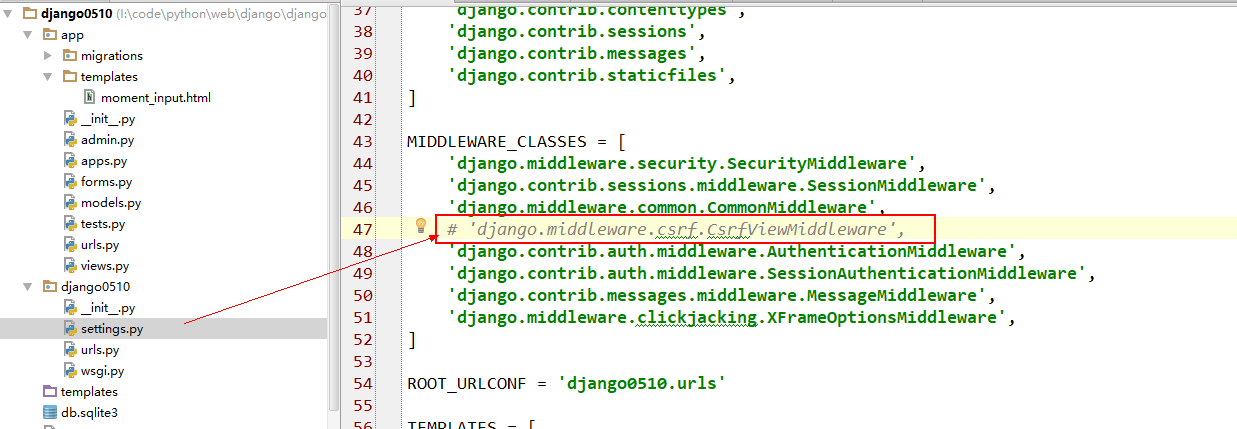
ERROR: 访问url报错Forbidden (CSRF cookie not set.): xxx
SOLUTION: 注释掉setting.py里的下列语句
python-Django框架的更多相关文章
- [Python] Django框架入门
说明:Django框架入门 当前项目环境:python3.5.django-1.11 项目名:test1 应用名:booktest 命令可简写为:python manager.py xxx => ...
- 利用 Python django 框架 输入汉字,数字,字符,等。。转成二维码!
利用 Python django 框架 输入汉字,数字,字符,等..转成二维码! 模块必备:Python环境 + pillow + qrcode 模块 核心代码import qrcode qr = ...
- Python Django框架笔记(五):模型
#前言部分来自Django Book (一) 前言 大多数web应用本质上: 1. 每个页面都是将数据库的数据以HTML格式进行展现. 2. 向用户提供修改数据库数据的方法.(例如:注册.发表评 ...
- Python Django框架笔记(三):django工作方式简单说明和创建用户界面
(一) 说明 简单说明下django的工作方式,并举2个例子. (二) Django工作方式 假定我们有下面这些文件 ,这里在前2篇的基础上增加了 templates目录(存放html文件) 和s ...
- Python Django框架笔记(一):安装及创建项目
#推荐一本书<Python核心编程>(适合有一定基础的),美国人Wesley Chun编写的,京东.淘宝应该都有.我是觉得写的很好,详细.简洁.满满的干货,不像有的书整本看完也没什么用. ...
- python django框架(一)
s4day63内容回顾: 1. 安装 2. 创建用户 + 授权 3. 连接 - 数据库 终端创建数据库(字符编码) - 数据表 终端 ORM pymysql create ...)engine=inn ...
- [Python] Django框架入门5——静态文件、中间件、上传图片和分页
说明: 本文主要描述Django其他的内容,涉及静态文件处理.中间件.上传文件.分页等. 开发环境:win10.Python3.5.Django1.10. 一.静态文件处理 在Django项目的静态文 ...
- python Django框架正式准备工作
之前由于不太了解数据库方面的知识,但经过一段时间的web应用的开发学习,成功的用其他框架连接了数据库,并完成了相关操作,数据爬取也初识了,更了解了python这门语言的语法,但路还很长,因此现在才能正 ...
- python django框架+vue.js前后端分离
本文用于学习django+vue.js实现web前后端分离协作开发.以一个添加和删除数据库书籍应用为实例. django框架官方地址:https://www.djangoproject.com/ vu ...
- Python Django框架笔记(六):模板
(一){%%}和{{ }} {% for post in posts %} <a href=""><h2>{{ post.title }}</h2&g ...
随机推荐
- JavaEE--JavaWeb三大组件Servlet、Filter、Listener
Servlet.Filter.Listener是JavaEE Web服务规定的服务器动态组件,由开发者编写由Web容器创建,并保证单例以及线程安全性,其中加载顺序为Linstener -> Fl ...
- Redis原子计数器incr,防止并发请求
转自:https://blog.csdn.net/Roy_70/article/details/78260826 一.前言在一些对高并发请求有限制的系统或者功能里,比如说秒杀活动,或者一些网站返回的当 ...
- wpf ActualWidth为0解决方法
LocalNewsControl() { var descriptor = DependencyPropertyDescriptor.FromProperty(ActualWidthProperty, ...
- CDH5.16.1升级kafka0.10到1.0.1
激活1.0.1的包
- 9、linux权限-ACL权限
来自为知笔记(Wiz)
- 外网访问VMware(Centos7.0,NAT模式)搭建的web服务器应用
首先参考 https://www.cnblogs.com/studyhard-cq/p/11551755.html 设置好NAT模式,能访问公网. 1.打开VMware,点击左上角编辑 ...
- 图书管理系统UML建模
图书管理系统UML建模 用例图 借阅者请求服务用例图 图书管理员处理借书还书用例图 系统管理员系统维护用例图 时序图 系统管理员添加书籍时序图 协作图 借阅者预留书籍协作图 状态图 书的状态图 活动图 ...
- 牛客练习赛47 E DongDong数颜色 (树状数组维护区间元素种类数)
链接:https://ac.nowcoder.com/acm/contest/904/E 来源:牛客网 DongDong数颜色 时间限制:C/C++ 1秒,其他语言2秒 空间限制:C/C++ 5242 ...
- tcpdump工具抓到的cap文件
一.链路层 ---> 以太网数据包 一个数据包被称为一帧, 制定这个规则的协议就是以太网协议.一个完整的以太网数据包如下图所示: 整个数据帧由首部.数据和尾部三部分组成,首部固定为14个字节 ...
- mysql细说show slave status参数详解(最全)
1. Slave_IO_State 这里显示了当前slave I/O线程的状态(slave连接到master的状态).状态信息和使用show processlist | grep "syst ...