
【代码笔记】Web-CSS-CSS Align
一,效果图。
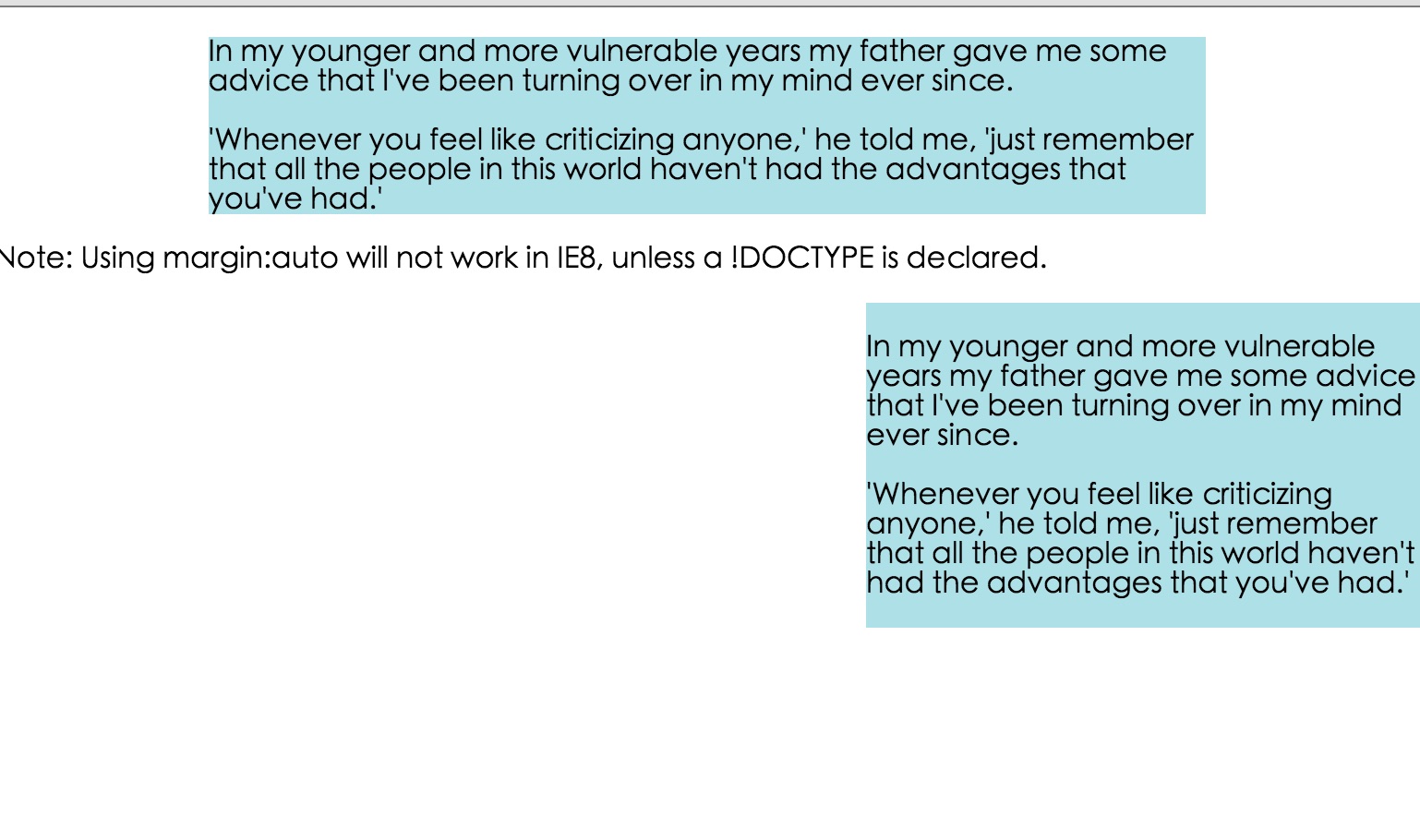
二,代码。

<!DOCTYPE html>

<html>

<head>

    <meta charset="utf-8">

    <title>CSS Align</title>

    <style>

    body {

        margin: 0;

        padding: 0;

    }

    .container {

        position: relative;

        width: 100%;

    }

    .center {

        margin: auto;

        width: 70%;

        background-color: #b0e0e6;

    }

    .right {

        position: absolute;

        right: 0px;

        width: 300px;

        background-color: #b0e0e6;

    }

    .right {

        float: right;

        width: 300px;

        background-color: #b0e0e6;

    }

    </style>

</head>

<body>

    <div class="center">

        <p>In my younger and more vulnerable years my father gave me some advice that I've been turning over in my mind ever since.</p>

        <p>'Whenever you feel like criticizing anyone,' he told me, 'just remember that all the people in this world haven't had the advantages that you've had.'</p>

    </div>

    <p><b>Note: </b>Using margin:auto will not work in IE8, unless a !DOCTYPE is declared.</p>

    <div class="right">

        <p>In my younger and more vulnerable years my father gave me some advice that I've been turning over in my mind ever since.</p>

        <p>'Whenever you feel like criticizing anyone,' he told me, 'just remember that all the people in this world haven't had the advantages that you've had.'</p>

    </div>

    <div class="container">

        <div class="right">

            <p><b>Note: </b>When aligning using the position property, always include the !DOCTYPE declaration! If missing, it can produce strange results in IE browsers.</p>

        </div>

    </div>

    <div class="right">

        <p>In my younger and more vulnerable years my father gave me some advice that I've been turning over in my mind ever since.</p>

        <p>'Whenever you feel like criticizing anyone,' he told me, 'just remember that all the people in this world haven't had the advantages that you've had.'</p>

    </div>

</body>

</html>
参考资料:《菜鸟教程》
【代码笔记】Web-CSS-CSS Align的更多相关文章
- Python学习笔记整理总结【web基础】【web/HTML/CSS/JavaScript/DOM/jQuery】
一.HTML HTML是英文Hyper Text Mark-up Language(超文本标记语言)的缩写,他是一种制作万维网页面标准语言(标记).相当于定义统一的一套规则,大家都来遵守他,这样就可以 ...
- WEB前端 CSS(非布局)
目录 WEB前端 CSS CSS引入方式 CSS结构 CSS选择器 直接选择器 组合选择器 分组选择器 也叫并集选择器 属性选择器 伪类选择器 伪元素选择器 CSS选择器是一个查找的过程,高效的查找影 ...
- 《编写高质量代码:Web 前端开发修炼之道》 笔记与读后感
编写高质量代码:Web 前端开发修炼之道/曹刘阳著. —北京:机械工业出版社,2010.5 第一版 涉及到的知识点: 1. CSS Sprites 在国内很多人叫css精灵,是一种网页图片应用处理方式 ...
- CSS3基础——笔记+实战案例(CSS基本用法、CSS层叠性、CSS继承性)
CSS3基础——笔记 CSS是Cascading Style Sheet的缩写,翻译为"层叠样式表" 或 "级联样式表".CSS定义如何显示HTML的标签央视, ...
- Tridiv:基于 Web 的 CSS 编辑器,创建炫丽 3D 图形
Tridiv 是一个基于 Web 的编辑器,使用 CSS 创建 3D 形状.它提供了一个传统的四个面板的操作界面,给出了从每个平面的视图,以及一个预览窗格中示出的最终的效果.使用 Tridiv 可以创 ...
- @import————————css代码内部链接另外css
在css代码里这样可以链接另外的css @import url("style.css"); @import语法结构 @import + 空格+ url(CSS文件路径地址); ...
- Web云笔记--CSS
CSS CSS CSS Web自学第二阶段之CSS 参考资料:<Head First HTML&CSS>(中文第二版)(美国)弗里昂ISBN:9787508356464 中国电力出 ...
- 写给自己的web总结——css篇(1)
上一篇写了关于html的知识,算是小试牛刀,这次来尝试写一下css. 初步了解css css的全称为cascading style sheet-- 层叠样式表,通过编入代码来对html里的标签做出各种 ...
- Web前端-CSS必备知识点
Web前端-CSS必备知识点 css基本内容,类选择符,id选择符,伪类,伪元素,结构,继承,特殊性,层叠,元素分类,颜色,长度,url,文本,字体,边框,块级元素,浮动元素,内联元素,定位. 链接: ...
- 前端笔记 (2.CSS)
知识点借鉴于慕课网,菜鸟教程和w3shool CSS方面: CSS全称为“层叠样式表”,它主要是用于定义HTML内容在浏览器内的显示样式,如文字大小.颜色.字体加粗等. 使用CSS样式的一个好处是通过 ...
随机推荐
- c#批量抓取免费代理并验证有效性
之前看到某公司的官网的文章的浏览量刷新一次网页就会增加一次,给人的感觉不太好,一个公司的官网给人如此直白的漏洞,我批量发起请求的时候发现页面打开都报错,100多人的公司的官网文章刷新一次你给我看这个, ...
- Asp.Net Core 轻松学-多线程之Task快速上手
前言 Task是从 .NET Framework 4 开始引入的一项基于队列的异步任务(TAP)模式,从 .NET Framework 4.5 开始,任何使用 async/await 进行修饰 ...
- 学习python的第一天
2019.4.25自我总结 一.Typora 关于用Typora 自我感觉良好,基本快捷键也比较简单,ps:还是要多用用 二.编程 1.编程语言 是用来定义计算机程序的形式语言.它是一种被标准化的交流 ...
- Hystrix源码解析
1. Hystrix源码解析 1.1. @HystrixCommand原理 直接通过Aspect切面来做的 1.2. feign hystrix原理 它的本质原理就是对HystrixCommand的动 ...
- Windows Server 2016 安装虚拟机版黑群晖
硬件配置 Dell R730 CPU: Intel(R) Xeon(R) CPU E5-2603 v4 @1.70GHz(6 cores) Ram: 16Gb HDD: 系统-600GB SAS X2 ...
- cesium 之三维场景展示篇(附源码下载)
前言 cesium 官网的api文档介绍地址cesium官网api,里面详细的介绍 cesium 各个类的介绍,还有就是在线例子:cesium 官网在线例子,这个也是学习 cesium 的好素材. 内 ...
- Android Studio 受不了了
今天遇到一个问题,受不了了,来吐槽一下: Android Studio 里面创建两个工程:app, baselib.一个是App 一个是库.编译不过去. targetSdkVersion 26 imp ...
- python+selenium 自动化测试实战
一.前言: 之前的文章说过, 要写一篇自动化实战的文章, 这段时间比较忙再加回家过11一直没有更新博客,今天整理一下实战项目的代码共大家学习.(注:项目是针对我们公司内部系统的测试,只能内部网络访问, ...
- mysql的学习笔记(八)
1.存储引擎(表类型) mysql将数据以不同的技术存储在文件(内存)中,这种技术称为存储引擎.每一种存储引擎使用不同的存储机制,索引技巧,锁定水平,提供广泛且不同的功能. mysql支持的存储引擎 ...
- ASP.NET Core Web API 版本控制
在nuget.org上,您可以找到 Microsoft.AspNetCore.Mvc.Versioning包,它提供了有关如何对Web API端点进行版本化的更多选项.这个包的好处是允许你直接在控制 ...