
Python模块 - configparser
configparser模块用来对配置文件进行操作
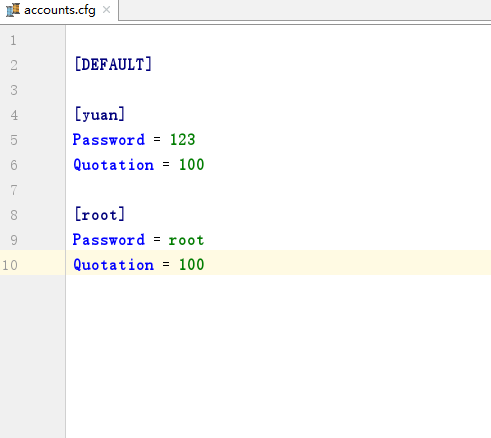
1、获取所有块
import configparser

config = configparser.ConfigParser()

config.read('xxxooo', encoding='utf-8')

ret = config.sections()

print(ret)
2、获取指定块下所有的键值对
import configparser

config = configparser.ConfigParser()

config.read('xxxooo', encoding='utf-8')

ret = config.items('section1')

print(ret)
3、获取指定块下所有的建
import configparser

config = configparser.ConfigParser()

config.read('xxxooo', encoding='utf-8')

ret = config.options('section1')

print(ret)
4、获取指定块下指定key的值
import configparser

config = configparser.ConfigParser()

config.read('xxxooo', encoding='utf-8')

v = config.get('section1', 'k1')

# v = config.getint('section1', 'k1')

# v = config.getfloat('section1', 'k1')

# v = config.getboolean('section1', 'k1')

print(v)
5、检查、删除、添加块
import configparser

config = configparser.ConfigParser()

config.read('xxxooo', encoding='utf-8')

# 检查

has_sec = config.has_section('section1')

print(has_sec)

# 添加块

config.add_section("SEC_1")

config.write(open('xxxooo', 'w'))

# 删除块

config.remove_section("SEC_1")

config.write(open('xxxooo', 'w'))
6、检查、删除、设置指定组内的键值对
import configparser

config = configparser.ConfigParser()

config.read('xxxooo', encoding='utf-8')

# 检查

has_opt = config.has_option('section1', 'k1')

print(has_opt)

# 删除

config.remove_option('section1', 'k1')

config.write(open('xxxooo', 'w'))

# 设置

config.set('section1', 'k10', "")

config.write(open('xxxooo', 'w'))
Python模块 - configparser的更多相关文章
- 保留注释换行的python模块configparser
python语言用来解析配置文件的模块是ConfigParser,python3中是configparser模块,我在使用中发现write方法在将配置项重新写入文 件时,配置文件中的空行和注释行都会被 ...
- Python模块configparser(操作配置文件ini)
configparser模块提供对ini文件的增删改查方法. ini文件的数据格式: [name1] attribute1=value1 attribute2=value2 [name2] attri ...
- Python模块——configparser
configparser模块 该模块适用于配置文件的格式与windows ini文件类似,可以包含一个或多个节(section),每个节可以有多个参数(键=值) 创建文件 import configp ...
- python 模块之-configparser
python 模块configparser 配置文件模块 import configparser config = configparser.ConfigParser() config[&q ...
- python模块(shelve,xml,configparser,hashlib,logging)
1.1shelve模块 shelve 模块比pickle模块简单,只有一个open函数,返回类似字典对象,可读可写:key必须为字符串, 而值可以是python所支持的数据类型. shelve模块主要 ...
- python模块基础之json,requeste,xml,configparser,logging,subprocess,shutil。
1.json模块 json 用于[字符串]和 [python基本数据类型] 间进行转换(可用于不同语言之前转换),json.loads,将字符串转成python的基本数据类型,json.dum ...
- Python之配置文件模块 ConfigParser
写项目肯定用的到配置文件,这次学习一下python中的配置文件模块 ConfigParser 安装就不说了,pip一下即可,直接来个实例 配置文件 project.conf [db] host = ' ...
- python封装configparser模块获取conf.ini值(优化版)
昨天晚上封装了configparser模块,是根据keyname获取的value.python封装configparser模块获取conf.ini值 我原本是想通过config.ini文件中的sect ...
- python中confIgparser模块学习
python中configparser模块学习 ConfigParser模块在python中用来读取配置文件,配置文件的格式跟windows下的ini配置文件相似,可以包含一个或多个节(section ...
随机推荐
- 微信公众平台开发,API接入与推送事件(1)
博客好久没有更新了,今天说说微信开发.微信开发的好多初学者都会又这样的迷惑,微信开发到底是什么?其实微信开发本质我和我们的网站开发没有太大的区别.我们常说的微信开发也就是公众号开,微信公众号分为三个类 ...
- NVisionXR引擎基本介绍
NVisionXR引擎基本介绍 一. 介绍 1.1 NVisionXR是什么? NVisionXR引擎是全球首款跨平台多兼容的原生AR应用开发引擎,让AR应用开发更高效. 1. ...
- alpha冲刺第五天
一.合照 二.项目燃尽图 三.项目进展 调整了一些界面的布局 细化了部分小功能的界面 注册界面和服务器响应了,但是在insert数据库方面出现了错误 四.明日规划 继续研究如何将注册的内容插入数据库 ...
- 网络1711-1712班 c 语言评分总表一览
学号 姓名 作业地址 PTA实验作业5分 PTA排名2分 阅读代码2分 总结1分 代码规范扣分-2--0 总分 是否推荐博客 1 **莹 http://www.cnblogs.com/wwwwxy12 ...
- 随机ID添加
var http = require("http"); var fs = require("fs"); var server = http.createServ ...
- 【iOS】Swift if let 和 if var
if let unwrappedOptional = postDict { print("The optional has a value! It's \(unwrappedOptional ...
- SpringMVC之HandlerMapping的使用
上篇博客在了解SpringMVC的工作流程时留了一些疑问,今天先学习下HandlerMapping,在HandlerMapping中可以通过HandlerExecutionChain getHandl ...
- vue 在methods中调用mounted中的方法?
首先可以在data中先声明一个变量 比如 isShow=' ' mounted 中 ---> methods 中 ---> this.sureDelBox(item) 直接this调用 ...
- CSS <input type="file">样式设置
这是最终想要的效果~~~ 实现很简单,div设置背景图片,<input type="file"/>绝对定位上去再设置opacity:0(透明度为0 ) 直接上代码,希望 ...
- JAVA_SE基础——14.循环结构语句
建议有些基础的同学阅读,0基础可能会有些困难(最好看正文配合基础课本的例子) 所谓循环语句主要就是在满足条件的情况下反复执行某一个操作.Java提供了3种常用的循环语句,分别为for循环语句.whil ...