
Aspose.Words导出图片 表格 Interop.Word
先定义一个WORD 模板, 然后替换文本、域 ,定位开始表格
文本和段落
                // Specify font formatting

                Aspose.Words.Font font = builder.Font;

                font.Size = ;

                font.Bold = true; ;

                font.Color = Color.Black;

                font.Name ="Arial";

                font.Underline=Underline.Dash;

                //builder.Write("Sample text."); //插入文本

                // Specify paragraph formatting

                ParagraphFormat paragraphFormat = builder.ParagraphFormat;

                paragraphFormat.FirstLineIndent = ;

                paragraphFormat.Alignment = ParagraphAlignment.Justify;

                paragraphFormat.KeepTogether= true;

                builder.Writeln("A whole paragraph.");  //插入一段文本(需要加格式的ParagraphFormat)
                    //Specify paragraph formatting

                    ParagraphFormat paragraphFormat = builder.ParagraphFormat;

                    paragraphFormat.FirstLineIndent = ;

                    //paragraphFormat.Alignment = ParagraphAlignment.Justify;

                    //paragraphFormat.KeepTogether = true;

                    Aspose.Words.Font font = builder.Font;

                    InSertText(builder, i + "、我在", , "仿宋", false);

                    InSertText(builder, item["期数"].ToString(), , "仿宋", true);

                    InSertText(builder, "资金清算账户于", , "仿宋", false);

                    InSertText(builder, Convert.ToDateTime(item["资金垫付日期"]).ToString("yyyy年MM月dd日"), , "仿宋", true);

                    InSertText(builder, "元为偿还第", , "仿宋", false);

                    InSertText(builder, item["垫付期数"].ToString(), , "仿宋", true);

                    InSertText(builder, "期的款项;", , "仿宋", false);

                    builder.Writeln();  //插入段落文本

        /// <summary>

        /// 插入文本

        /// </summary>

        /// <param name="builder"></param>

        /// <param name="strText"></param>

        /// <param name="size"></param>

        /// <param name="fontName"></param>

        /// <param name="isUnderline"></param>

        /// <param name="bold"></param>

        private void InSertText(DocumentBuilder builder, string strText, int size = ,string fontName = "仿宋", bool isUnderline = false, bool bold = false)

        {

            Aspose.Words.Font font = builder.Font;

            font.Size = size;

            font.Bold = bold; ;

            font.Color = Color.Black;

            font.Name = fontName;

            if (isUnderline)

            {

                font.Underline = Underline.Single;

            }

            builder.Write(strText);

            font.ClearFormatting();

        }
单元格
        /// <summary>

        /// 添加单元格

        /// </summary>

        /// <param name="builder"></param>

        /// <param name="data"></param>

        /// <param name="width"></param>

        public static void InsertCell(DocumentBuilder builder, string data, double width)

        {

            builder.InsertCell();

            builder.RowFormat.Height = ;

            builder.CellFormat.Width = width;

            builder.CellFormat.Borders.LineStyle = LineStyle.Single;

            builder.CellFormat.Borders.Color = System.Drawing.Color.Black;

            builder.CellFormat.VerticalMerge = CellMerge.None;

            builder.CellFormat.VerticalAlignment = CellVerticalAlignment.Center;

            builder.ParagraphFormat.Alignment = ParagraphAlignment.Center;//水平居中

            builder.Font.Size = ;

            //builder.Font.Bold = true;

            builder.Write(data);

        }
图片单元格
        /// <summary>

        /// 添加带图片的单元格

        /// </summary>

        /// <param name="doc">word文档</param>

        /// <param name="builder"></param>

        /// <param name="strUrl">图片路径</param>

        /// <param name="width">单元格宽度</param>

        /// <param name="height">单元格高度</param>

        /// <param name="tableIndex">表索引</param>

        /// <param name="rowIndex">行索引</param>

        /// <param name="columnIndex">列索引</param>

        private static void InsertCellWithImage(Document doc, DocumentBuilder builder, string strUrl, double width, double height, int rowIndex, int columnIndex)

        {

            builder.InsertCell();

            builder.RowFormat.Height = height;

            builder.CellFormat.Width = width;

            builder.CellFormat.Borders.LineStyle = LineStyle.Single;

            builder.CellFormat.Borders.Color = System.Drawing.Color.Black;

            builder.CellFormat.VerticalAlignment = CellVerticalAlignment.Center;    // 垂直居中

            builder.ParagraphFormat.Alignment = ParagraphAlignment.Center;  // 水平居中

            if (File.Exists(HttpContext.Current.Server.MapPath(strUrl)))

            {

                // 向此单元格中插入图片

                Shape shape = new Shape(doc, ShapeType.Image);

                shape.ImageData.SetImage(HttpContext.Current.Server.MapPath(strUrl));

                shape.Width = width - ;

                shape.Height = height-;

                shape.HorizontalAlignment = HorizontalAlignment.Center;

                shape.VerticalAlignment = VerticalAlignment.Center;

                builder.InsertNode(shape);

            }

        }
表格--书签位置
            DocumentBuilder builder = new DocumentBuilder(doc);

            builder.MoveToBookmark("table"); //移动到书签

            builder.StartTable();

            builder.CellFormat.Shading.BackgroundPatternColor = Color.Yellow;

            InsertCell(builder, "测试", );

            builder.EndRow();

            builder.CellFormat.Shading.BackgroundPatternColor = Color.White;

            builder.EndTable();
替换: 插入-文本部件-域
            string[] fieldNames = {  "Test01","Test02"};

            object[] fieldValues = {  "Test01","Test02"};

            fieldValues[]="测试01";

            fieldValues[]="测试02";
            doc.MailMerge.Execute(fieldNames, fieldValues);

            doc.MailMerge.DeleteFields();

            string strPhysicsPath = HttpContext.Current.Server.MapPath(DocPath);

            if (!Directory.Exists(strPhysicsPath))

            {

                Directory.CreateDirectory(strPhysicsPath);

            }

            string tempUrl = "/" + strProjName + filename + ".doc";

            strPhysicsPath = strPhysicsPath.TrimEnd('\\') + tempUrl;

            if (Directory.Exists(strPhysicsPath))

            {

                File.Delete(strPhysicsPath);

            }

            doc.Save(strPhysicsPath, SaveFormat.Docx);

            return  tempUrl;
            filepath = "~/Config/Template/" + filepath;

            Document doc = new Document(HttpContext.Current.Server.MapPath(filepath));

            DocumentBuilder builder = new DocumentBuilder(doc);

            var dicData = new Dictionary<string, object>();

            PropertyInfo[] pros = data.GetType().GetProperties();

            foreach (var pro in pros)

            {

                dicData.Add(pro.Name, pro.GetValue(data));

            }

            var lstCheckReportQuestion = (List<TCheckReportQuestion>)dicData["checkquest"];

            var lstQualityQuestion = lstCheckReportQuestion.FindAll(c => c.QuestType == "");       // 质量问题

            var lstSecurityQuestion = lstCheckReportQuestion.FindAll(c => c.QuestType == "");      // 安全文明问题

            #region 1:域  “插入” →“文档部件”→“域”→“MergeField”

            //“插入” →“文档部件”→“域”→“MergeField”

            //表格2种方法:1.域,表格主要是注意tablestart和tableend,标题不用插入域,只需在下一行定义好域即可;  第一列《TableStart:arrangeList(数据数组)》《Id》     最后一列《name》《TableEnd:arrangeList(数据数组)》

            //在循环的列表下添加列表的起始和结束域: << TableStart:RawMaterialList >> 和 << TableEnd:RawMaterialList >> 以及列表中的各项域.

            //2.域《Quality》,表格:builder.MoveToBookmark("Quality"); Table tableQ = builder.StartTable();

             // 绘制质量风险问题表

             builder.MoveToBookmark("Quality");

            Table tableQ = builder.StartTable();

            double height = ;

            int rowIndex = ;

            lstQualityQuestion.ForEach(p =>

            {

                InsertCellWithImage(doc, builder, p.MiniImgUrl, , height, rowIndex, );

                InsertCell(builder, p.QuestDesc, p.CorrectWay, , height, );

                rowIndex++;

                builder.EndRow();

            });

            if (tableQ.FirstRow != null)

            {

                tableQ.AllowAutoFit = false;

            }

            builder.EndTable();

            // 绘制安全文明问题表

            builder.MoveToBookmark("Security");

            Table tableS = builder.StartTable();

            rowIndex = ;

            lstSecurityQuestion.ForEach(p =>

            {

                InsertCellWithImage(doc, builder, p.MiniImgUrl, , height, rowIndex, );

                InsertCell(builder, p.QuestDesc, p.CorrectWay, , height, );

                rowIndex++;

                builder.EndRow();

            });

            if (tableS.FirstRow != null)

            {

                tableS.AllowAutoFit = false;

            }

            builder.EndTable();

            string[] fieldNames = new string[] { "ProjectName", "CreateTime", "ConstruStage", "CheckTime", "InspectLeader", "InspectMember", "ComEvaluation", "FeedBack", "Advice", "InstitutionManage", "InspectProgress", "Description", "Email", "Signature", "SignDate" };

            object[] fieldValues = new object[] { "ProjectName", "CreateTime", "ConstruStage", "CheckTime", "InspectLeader", "InspectMember", "ComEvaluation", "FeedBack", "Advice", "InstitutionManage", "InspectProgress", "Description", "Email", "Signature", "SignDate" };

            for (int i = ; i < fieldValues.Length; i++)

            {

                fieldValues[i] = dicData[fieldValues[i].ToString().ToLower()];

            }

            #endregion

            #region 2:书签  “插入” →“书签”

            //书签的局限性在于:一个word文档里只有一个书签,不能同名

            //for (int k = 0; k < fieldNames.Length; k++)

            //{

            //    if (doc.Range.Bookmarks[fieldNames[k].ToString()] != null)

            //    {

            //        doc.Range.Bookmarks[fieldNames[k].ToString()].Text = fieldValues[k].ToString();

            //    }

            //}

            #endregion

            doc.MailMerge.Execute(fieldNames, fieldValues);

            doc.MailMerge.DeleteFields();   //清除

            doc.Range.Bookmarks.Clear();    //清除

            string strPhysicsPath = HttpContext.Current.Server.MapPath(Config.AccPath + "Temp/Export");

            if (!Directory.Exists(strPhysicsPath))

            {

                Directory.CreateDirectory(strPhysicsPath);

            }

            string tempUrl = string.Format("/{0}项目{1}报告.doc", dicData["projectname"], dicData["checktime"]);

            strPhysicsPath = strPhysicsPath.TrimEnd('\\') + tempUrl;

            if (File.Exists(strPhysicsPath))

            {

                File.Delete(strPhysicsPath);

            }

            doc.Save(strPhysicsPath, SaveFormat.Docx);

            return Config.AccPath.Replace("~", "") + "Temp/Export" + tempUrl;
---以上用过的
         /// <summary>

         /// 设置打开密码

         /// </summary>

         /// <param name="pwd"></param>

         public void SetPassword(string pwd)

         {

             WordDoc.Protect(ProtectionType.ReadOnly, pwd);

         }

         /// <summary>

         /// 不可编辑受保护,需输入密码

         /// </summary>

         /// <param name="Password"></param>

         public void NoEdit(string Password)

         {

             WordDoc.Protect(ProtectionType.ReadOnly, Password);

         }
https://www.cnblogs.com/birchlee/archive/2013/05/23/3094632.html
https://blog.csdn.net/spt_dream/article/details/79664155
https://www.cnblogs.com/seejoy/p/6847570.html 有DLL下载
https://www.cnblogs.com/ariter/p/5948597.html
导出表格数据–获取表格对象方法一
//数据行开始的索引  从第二行开始插入数据

int intRowIndex = ;

//获取表格对象 获取文档中的第一个表格

Table table = (Table)doc.GetChild(NodeType.Table, , true);

//复制并添加行

table.Rows.Insert(intRowIndex, table.LastRow.Clone(true));

//对表格进行赋值

builder.MoveToCell(, intRowIndex, , );

builder.Write("填充数据");

builder.MoveToCell(, intRowIndex, , );

builder.Write("填充数据");

//去除最后的空行

if (table != null)

{

    table.LastRow.Remove();

}
导出表格数据–获取表格对象方法二
NodeCollection allTables = doc.GetChildNodes(NodeType.Table, true); //获得word中的所有表格

Table table1 = allTables[] as Aspose.Words.Tables.Table;  //取到第二个表

DocumentBuilder builder = new DocumentBuilder(doc);

int rowsNum = ;  //插入数据开始行

builder.MoveTo(table1.Rows[rowsNum].Cells[].Paragraphs[]);

builder.Write(Num.ToString());

builder.MoveTo(table1.Rows[rowsNum].Cells[].Paragraphs[]);

builder.Write("值");
一段清除html格式的方法
public static string NoHTML(string Htmlstring)
{
if (Htmlstring.Length > )
{
//删除脚本
Htmlstring = Regex.Replace(Htmlstring, @"<script[^>]*?>.*?</script>", "", RegexOptions.IgnoreCase);
//删除HTML
Htmlstring = Regex.Replace(Htmlstring, @"<(.[^>]*)>", "", RegexOptions.IgnoreCase);
Htmlstring = Regex.Replace(Htmlstring, @"([\r\n])[\s]+", "", RegexOptions.IgnoreCase);
Htmlstring = Regex.Replace(Htmlstring, @"-->", "", RegexOptions.IgnoreCase);
Htmlstring = Regex.Replace(Htmlstring, @"<!--.*", "", RegexOptions.IgnoreCase);
Htmlstring = Regex.Replace(Htmlstring, @"&(quot|#34);", "\"", RegexOptions.IgnoreCase);
Htmlstring = Regex.Replace(Htmlstring, @"&(amp|#38);", "&", RegexOptions.IgnoreCase);
Htmlstring = Regex.Replace(Htmlstring, @"&(lt|#60);", "<", RegexOptions.IgnoreCase);
Htmlstring = Regex.Replace(Htmlstring, @"&(gt|#62);", ">", RegexOptions.IgnoreCase);
Htmlstring = Regex.Replace(Htmlstring, @"&(nbsp|#160);", " ", RegexOptions.IgnoreCase);
Htmlstring = Regex.Replace(Htmlstring, @"&(iexcl|#161);", "\xa1", RegexOptions.IgnoreCase);
Htmlstring = Regex.Replace(Htmlstring, @"&(cent|#162);", "\xa2", RegexOptions.IgnoreCase);
Htmlstring = Regex.Replace(Htmlstring, @"&(pound|#163);", "\xa3", RegexOptions.IgnoreCase);
Htmlstring = Regex.Replace(Htmlstring, @"&(copy|#169);", "\xa9", RegexOptions.IgnoreCase);
Htmlstring = Regex.Replace(Htmlstring, @"&#(\d+);", "", RegexOptions.IgnoreCase);
Htmlstring = Regex.Replace(Htmlstring, @"“", "\"", RegexOptions.IgnoreCase);//保留【 “ 】的标点符合
Htmlstring = Regex.Replace(Htmlstring, @"”", "\"", RegexOptions.IgnoreCase);//保留【 ” 】的标点符合
Htmlstring.Replace("<", "");
Htmlstring.Replace(">", "");
Htmlstring.Replace("\r\n", "");
Htmlstring = HttpContext.Current.Server.HtmlEncode(Htmlstring).Trim();
}
return Htmlstring;
}
用Aspose.Words把word转成图片
Document doc = new Document("f:\\333.doc");

ImageSaveOptions iso = new          ImageSaveOptions(SaveFormat.Jpeg);

iso.Resolution = ;

iso.PrettyFormat = true;

iso.UseAntiAliasing = true;

for (int i = ; i < doc.PageCount; i++)

{

        iso.PageIndex = i;

         doc.Save("D:/test/test" + i + ".jpg", iso);

}
使用 Microsoft.Office.Interop.Word --用过的
public class ExportWord

    {

        private Application wordApp = null;

        private Document wordDoc = null;

        public Application Application

        {

            get

            {

                return wordApp;

            }

            set

            {

                wordApp = value;

            }

        }

        public Document Document

        {

            get

            {

                return wordDoc;

            }

            set

            {

                wordDoc = value;

            }

        }

        //通过模板创建新文档

        public void CreateNewDocument(string filePath)

        {

            killWinWordProcess();

            wordApp = new Application();//ApplicationClass此类不被识别请看下列问题对应的解决方法

            wordApp.DisplayAlerts = WdAlertLevel.wdAlertsNone;

            wordApp.Visible = false;

            object missing = System.Reflection.Missing.Value;

            object templateName = filePath;

            //--也可以

            //wordDoc = wordApp.Documents.Open(ref templateName, ref missing,

            //  ref missing, ref missing, ref missing, ref missing, ref missing,

            //  ref missing, ref missing, ref missing, ref missing, ref missing,

            //  ref missing, ref missing, ref missing, ref missing);

            object objDocType = WdDocumentType.wdTypeDocument;

            object objfalse = false;

            object objtrue = true;

            wordDoc = wordApp.Documents.Add(ref templateName, ref objfalse, ref objDocType, ref objtrue);

        }

        //保存新文件

        public void SaveDocument(string filePath)

        {

            object fileName = filePath;

            object format = WdSaveFormat.wdFormatDocument;//保存格式

            object miss = System.Reflection.Missing.Value;

            wordDoc.SaveAs(ref fileName, ref format, ref miss,

              ref miss, ref miss, ref miss, ref miss,

              ref miss, ref miss, ref miss, ref miss,

              ref miss, ref miss, ref miss, ref miss,

              ref miss);

            //关闭wordDoc,wordApp对象

            object SaveChanges = WdSaveOptions.wdSaveChanges;

            object OriginalFormat = WdOriginalFormat.wdOriginalDocumentFormat;

            object RouteDocument = false;

            wordDoc.Close(ref SaveChanges, ref OriginalFormat, ref RouteDocument);

            wordApp.Quit(ref SaveChanges, ref OriginalFormat, ref RouteDocument); //关闭Word进程

        }

        /// <summary>

        /// 关闭wordDoc,wordApp对象

        /// </summary>

        private void DisposeWord()

        {

            object SaveChanges = WdSaveOptions.wdSaveChanges;

            object OriginalFormat = WdOriginalFormat.wdOriginalDocumentFormat;

            object RouteDocument = false;

            wordDoc.Close(ref SaveChanges, ref OriginalFormat, ref RouteDocument);

            wordApp.Quit(ref SaveChanges, ref OriginalFormat, ref RouteDocument); //关闭Word进程

        }

        //在书签处插入值

        public bool InsertValue(string bookmark, string value)

        {

            object bkObj = bookmark;

            if (wordApp.ActiveDocument.Bookmarks.Exists(bookmark))

            {

                wordApp.ActiveDocument.Bookmarks.get_Item(ref bkObj).Select();

                wordApp.Selection.TypeText(value);

                return true;

            }

            return false;

        }

        //插入表格,bookmark书签

        public Table InsertTable(string bookmark, int rows, int columns, float width)

        {

            object miss = System.Reflection.Missing.Value;

            object oStart = bookmark;

            //Range range = wordDoc.Bookmarks.get_Item(ref oStart).Range;//表格插入位置

            // Range range = wordDoc.Bookmarks.get_Item(ref oStart).Range;//表格插入位置

            // wordApp.Selection.EndKey(6, 0);

            wordApp.Selection.EndKey(WdUnits.wdStory);

            wordApp.Selection.InsertNewPage();

            //object start = 0;

            //object end = 0;

            //Range tableLocation = wordDoc.Range(ref start, ref end);

            Table newTable = wordDoc.Tables.Add(wordApp.Selection.Range, rows, columns, ref miss, ref miss);

            //设置表的格式

            newTable.Borders.Enable = ; //允许有边框,默认没有边框(为0时报错,1为实线边框,2、3为虚线边框,以后的数字没试过)

            newTable.Borders.OutsideLineWidth = WdLineWidth.wdLineWidth050pt;//边框宽度

            if (width != )

            {

                newTable.PreferredWidth = width;//表格宽度

            }

            newTable.AllowPageBreaks = false;

            //object oMissing = System.Reflection.Missing.Value;

            //wordApp.Visible = true;

            //wordDoc = wordApp.Documents.Add(ref oMissing, ref oMissing, ref oMissing, ref oMissing);

            //object start = 0;

            //object end = 0;

            //Microsoft.Office.Interop.Word.Range tableLocation = wordDoc.Range(ref start, ref end);

            //Table newTable = wordDoc.Tables.Add(tableLocation, rows, columns, ref oMissing, ref oMissing);

            return newTable;

        }

        /// <summary>

        /// 添加一个新表 参考

        /// </summary>

        public Table AddTable(int rows, int columns)

        {

            object oMissing = System.Reflection.Missing.Value;

            Microsoft.Office.Interop.Word.Application WordApp;

            Microsoft.Office.Interop.Word.Document WordDoc;

            WordApp = new Microsoft.Office.Interop.Word.Application();

            WordApp.Visible = true;

            WordDoc = WordApp.Documents.Add(ref oMissing, ref oMissing, ref oMissing, ref oMissing);

            object start = ;

            object end = ;

            Microsoft.Office.Interop.Word.Range tableLocation = WordDoc.Range(ref start, ref end);

            Table newTable = WordDoc.Tables.Add(tableLocation, rows, columns, ref oMissing, ref oMissing);//3行4列的表

                                                                                                          //设置表的格式

            newTable.Borders.Enable = ; //允许有边框,默认没有边框(为0时报错,1为实线边框,2、3为虚线边框,以后的数字没试过)

            newTable.Borders.OutsideLineWidth = WdLineWidth.wdLineWidth050pt;//边框宽度

            newTable.AllowPageBreaks = false;

            return newTable;

        }

        //合并单元格 表名,开始行号,开始列号,结束行号,结束列号

        public void MergeCell(Microsoft.Office.Interop.Word.Table table, int row1, int column1, int row2, int column2)

        {

            table.Cell(row1, column1).Merge(table.Cell(row2, column2));

        }

        //设置表格内容对齐方式Align水平方向,Vertical垂直方向(左对齐,居中对齐,右对齐分别对应Align和Vertical的值为-1,0,1)

        public void SetParagraph_Table(Microsoft.Office.Interop.Word.Table table, int Align, int Vertical)

        {

            switch (Align)

            {

                case -: table.Range.ParagraphFormat.Alignment = WdParagraphAlignment.wdAlignParagraphLeft; break;//左对齐

                case : table.Range.ParagraphFormat.Alignment = WdParagraphAlignment.wdAlignParagraphCenter; break;//水平居中

                case : table.Range.ParagraphFormat.Alignment = WdParagraphAlignment.wdAlignParagraphRight; break;//右对齐

            }

            switch (Vertical)

            {

                case -: table.Range.Cells.VerticalAlignment = WdCellVerticalAlignment.wdCellAlignVerticalTop; break;//顶端对齐

                case : table.Range.Cells.VerticalAlignment = WdCellVerticalAlignment.wdCellAlignVerticalCenter; break;//垂直居中

                case : table.Range.Cells.VerticalAlignment = WdCellVerticalAlignment.wdCellAlignVerticalBottom; break;//底端对齐

            }

        }

        //设置表格字体

        public void SetFont_Table(Microsoft.Office.Interop.Word.Table table, string fontName, double size)

        {

            if (size != )

            {

                table.Range.Font.Size = Convert.ToSingle(size);

            }

            if (fontName != "")

            {

                table.Range.Font.Name = fontName;

            }

        }

        //是否使用边框,n表格的序号,use是或否

        public void UseBorder(int n, bool use)

        {

            if (use)

            {

                wordDoc.Content.Tables[n].Borders.Enable = ; //允许有边框,默认没有边框(为0时无边框,1为实线边框,2、3为虚线边框,以后的数字没试过)

            }

            else

            {

                wordDoc.Content.Tables[n].Borders.Enable = ; //允许有边框,默认没有边框(为0时无边框,1为实线边框,2、3为虚线边框,以后的数字没试过)

            }

        }

        //给表格插入一行,n表格的序号从1开始记

        public void AddRow(int n)

        {

            object miss = System.Reflection.Missing.Value;

            wordDoc.Content.Tables[n].Rows.Add(ref miss);

            wordDoc.Content.Tables[n].Rows.Height = ;//设置新增加的这行表格的高度

        }

        //给表格添加一行

        public void AddRow(Microsoft.Office.Interop.Word.Table table)

        {

            object miss = System.Reflection.Missing.Value;

            table.Rows.Height = ;

            table.Rows.Add(ref miss);

        }

        //给表格插入rows行,n为表格的序号

        public void AddRow(int n, int rows)

        {

            object miss = System.Reflection.Missing.Value;

            Microsoft.Office.Interop.Word.Table table = wordDoc.Content.Tables[n];

            for (int i = ; i < rows; i++)

            {

                table.Rows.Add(ref miss);

            }

        }

        //给表格中单元格插入元素,table所在表格,row行号,column列号,value插入的元素

        public void InsertCell(Microsoft.Office.Interop.Word.Table table, int row, int column, string value)

        {

            table.Cell(row, column).Range.Text = value;

        }

        //给表格中单元格插入元素,n表格的序号从1开始记,row行号,column列号,value插入的元素

        public void InsertCell(int n, int row, int column, string value)

        {

            wordDoc.Content.Tables[n].Cell(row, column).Range.Text = value;

        }

        //给表格插入一行数据,n为表格的序号,row行号,columns列数,values插入的值

        public void InsertCell(int n, int row, int columns, string[] values)

        {

            Microsoft.Office.Interop.Word.Table table = wordDoc.Content.Tables[n];

            for (int i = ; i < columns; i++)

            {

                table.Cell(row, i + ).Range.Text = values[i];

            }

        }

        //插入图片

        public void InsertPicture(string bookmark, string picturePath, float width, float hight)

        {

            object miss = System.Reflection.Missing.Value;

            object oStart = bookmark;

            Object linkToFile = false;    //图片是否为外部链接

            Object saveWithDocument = true; //图片是否随文档一起保存

            object range = wordDoc.Bookmarks.get_Item(ref oStart).Range;//图片插入位置

            wordDoc.InlineShapes.AddPicture(picturePath, ref linkToFile, ref saveWithDocument, ref range);

            wordDoc.Application.ActiveDocument.InlineShapes[].Width = width; //设置图片宽度

            wordDoc.Application.ActiveDocument.InlineShapes[].Height = hight; //设置图片高度

        }

        //插入一段文字,text为文字内容

        public void InsertText(string bookmark, string text)

        {

            object oStart = bookmark;

            object range = wordDoc.Bookmarks.get_Item(ref oStart).Range;

            Paragraph wp = wordDoc.Content.Paragraphs.Add(ref range);

            wp.Format.SpaceBefore = ;

            wp.Range.Text = text;

            wp.Format.SpaceAfter = ;

            wp.Range.InsertParagraphAfter();

            wordDoc.Paragraphs.Last.Range.Text = "\n";

        }

        //杀掉winword.exe进程

        public void killWinWordProcess()

        {

            System.Diagnostics.Process[] processes = System.Diagnostics.Process.GetProcessesByName("WINWORD");

            foreach (System.Diagnostics.Process process in processes)

            {

                bool b = process.MainWindowTitle == "";

                if (process.MainWindowTitle == "")

                {

                    process.Kill();

                }

            }

        }

        public static bool ExportLoanLawyersLetter()

        {

            //生成WORD程序对象和WORD文档对象

            Microsoft.Office.Interop.Word.Application appWord = new Microsoft.Office.Interop.Word.Application();

            Microsoft.Office.Interop.Word.Document doc = new Document();

            object miss = System.Reflection.Missing.Value;

            try

            {

                //打开模板文档,并指定doc的文档类型

                //object objTemplate = System.Windows.Forms.Application.StartupPath + @"\UploadFiles\tz103.doc";

                //路径一定要正确

                object objTemplate = @"d:\\敢贷律师函模板.doc";

                object objDocType = WdDocumentType.wdTypeDocument;

                object objfalse = false;

                object objtrue = true;

                doc = (Document)appWord.Documents.Add(ref objTemplate, ref objfalse, ref objDocType, ref objtrue);

                //获取模板中所有的书签

                Bookmarks odf = doc.Bookmarks;

                string[] testTableremarks = { "CustName", "GenderName", "LoanDate", "ContractName","LoanAmount", "Periods", "MonthSupply", "RepaymentPeriod", "Periods2", "Month", "Day", "UnSettlAmount", "TotalAmount", "Year", "Month2", "Day2" };

                string[] testTablevalues = { "CustName", "GenderName", "LoanDate", "ContractName", "LoanAmount", "Periods", "MonthSupply", "RepaymentPeriod", "Periods2", "Month", "Day", "UnSettlAmount", "TotalAmount", "Year", "Month2", "Day2" };

                //循环所有的书签,并给书签赋值

                for (int oIndex = ; oIndex < testTableremarks.Length; oIndex++)

                {

                    object obDD_Name = "";

                    obDD_Name = testTableremarks[oIndex];

                    //doc.Bookmarks.get_Item(ref obDD_Name).Range.Text = p_TestReportTable.Rows[0][testTablevalues[oIndex]].ToString();//此处Range也是WORD中很重要的一个对象,就是当前操作参数所在的区域

                    odf.get_Item(ref obDD_Name).Range.Text = testTablevalues[oIndex];

                }

                ////附件,插入表格

                ////这里简单生成样例数据表,工作中要以实际的数据集为准

                //System.Data.DataTable dt = new System.Data.DataTable();

                //dt.Columns.Add("name", typeof(string));

                //dt.Columns.Add("age", typeof(string));

                //DataRow dr = dt.NewRow();

                //dr["name"] = "姓名"; dr["age"] = "年龄";

                //dt.Rows.Add(dr);

                //dr = dt.NewRow();

                //dr["name"] = "张三"; dr["age"] = "20";

                //dt.Rows.Add(dr);

                //dr = dt.NewRow();

                //dr["name"] = "李四"; dr["age"] = "25";

                //dt.Rows.Add(dr);

                ////附件一

                //object obAttachMent = "Attachment1";

                ////创建Word表格,并指定标签

                //Microsoft.Office.Interop.Word.Table dtWord = doc.Tables.Add(odf.get_Item(ref obAttachMent).Range, dt.Rows.Count, dt.Columns.Count);

                //dtWord.Borders.InsideLineStyle = WdLineStyle.wdLineStyleDot;

                //dtWord.Borders.OutsideLineStyle = WdLineStyle.wdLineStyleDot;

                ////循环往表格里赋值

                //for (int i = 1; i <= dt.Rows.Count; i++)

                //{

                //    for (int j = 1; j <= dt.Columns.Count; j++)

                //    {

                //        dtWord.Rows[i].Cells[j].Range.Text = dt.Rows[i - 1][j - 1].ToString();

                //    }

                //}

                //第四步 生成word,将当前的文档对象另存为指定的路径,然后关闭doc对象。关闭应用程序

                object filename = "d:\\" + DateTime.Now.ToString("yyyy-MM-dd") + ".doc";//HttpContext.Current.Server.MapPath("f:\\") + "Testing_" + DateTime.Now.ToShortDateString() + ".doc";

                //object Password = "P@55w0rd";

                ////对Word文档进行加密保护,不允许编辑

                //if (Password != null)

                //{

                //    doc.Protect(WdProtectionType.wdAllowOnlyReading, ref objfalse, ref Password, ref miss, ref miss);

                //}

                doc.SaveAs(ref filename, ref miss, ref miss, ref miss, ref miss, ref miss,

                    ref miss, ref miss, ref miss, ref miss, ref miss, ref miss, ref miss, ref miss, ref miss, ref miss);

                object doNotSaveChanges = WdSaveOptions.wdDoNotSaveChanges;

                doc.Close(ref doNotSaveChanges, ref miss, ref miss);

                appWord.Application.Quit(ref miss, ref miss, ref miss);

                doc = null;

                appWord = null;

                //MessageBox.Show("生成成功!");

                //System.Diagnostics.Process.Start(filename.ToString());//打开文档

            }

            catch (Exception ex)

            {

                doc.Close(ref miss, ref miss, ref miss);

                appWord.Application.Quit(ref miss, ref miss, ref miss);

                doc = null;

                appWord = null;

            }

            return true;

        }

    }
使用方式 ---导出.docx出错
1)按书签导入值 书签设置见下方
ExportWord report = new ExportWord();

var path = System.Web.HttpContext.Current.Server.MapPath("/files/word/2.doc");

var savapath = System.Web.HttpContext.Current.Server.MapPath("/files/word/" + RandomStr.GetSerialNumber() + ".doc");

report.CreateNewDocument(path); //模板路径

report.InsertValue("name", "世界杯");//在书签“name”处插入值
)导入表格

Table table2 = report.InsertTable("table2", , , ); //在书签“table2”处插入2行3列行宽

    )导入表格数据

report.InsertCell(table2, , , "项目名称");//表名,行号,列号,值

   )合并单元格

report.MergeCell(table2, , , , ); //表名,开始行号,开始列号,结束行号,结束列号

  )设置字体大小

report.SetFont_Table(table2, "宋体", );//宋体14磅

  )文档保存

report.SaveDocument(savapath);

  )类中可修改的叮当

table.Rows.Height = ; //添加行时可 修改当前行的高度AddRow方法

//InsertTable方法修改回按书签的位置来添加表格 此方法不适用多个表格的导出

public Table InsertTable(string bookmark, int rows, int columns, float width)

       {

           object miss = System.Reflection.Missing.Value;

           object oStart = bookmark;

           Range range = wordDoc.Bookmarks.get_Item(ref oStart).Range;//表格插入位置

           Table newTable = wordDoc.Tables.Add(range, rows, columns, ref miss, ref miss);

           //设置表的格式

           newTable.Borders.Enable = ; //允许有边框,默认没有边框(为0时报错,1为实线边框,2、3为虚线边框,以后的数字没试过)

           newTable.Borders.OutsideLineWidth = WdLineWidth.wdLineWidth050pt;//边框宽度

           if (width != )

           {

               newTable.PreferredWidth = width;//表格宽度

           }

           newTable.AllowPageBreaks = false;

           return newTable;

       }


wordApp.Selection.EndKey(WdUnits.wdStory);//焦点放到文档最后
5)注意点
1)表格导出时会嵌套表
原因 :表格导入完成后 焦点的位置默认会在表格里 在次插入会导致在表格内嵌套
解决:把焦点放到文档末尾 wordApp.Selection.EndKey(WdUnits.wdStory);
2)合并时会报所要求的的成员不存在
原因:这个错误的原因就是没有找到单元格,会有几种情况1)没有代码中定义的书签,2)表格前一项合并完 多列合成一列 后面再用之前的列值来合并。肯定找不到
解决:先输出对应的列与值,最后在处理合并。每次合并都记录,当前行的合并列数 如下
//处理合并

var pans = ;//合并数

foreach (var o in lo)   //lo为一个list<other>

{

    report.MergeCell(table2, o.row, o.col1-pans, o.row, o.col2- pans);

    pans++;

}
3)书签的插入
word->插入->书签->输入书签名称->添加 (选项-高级-显示书签)
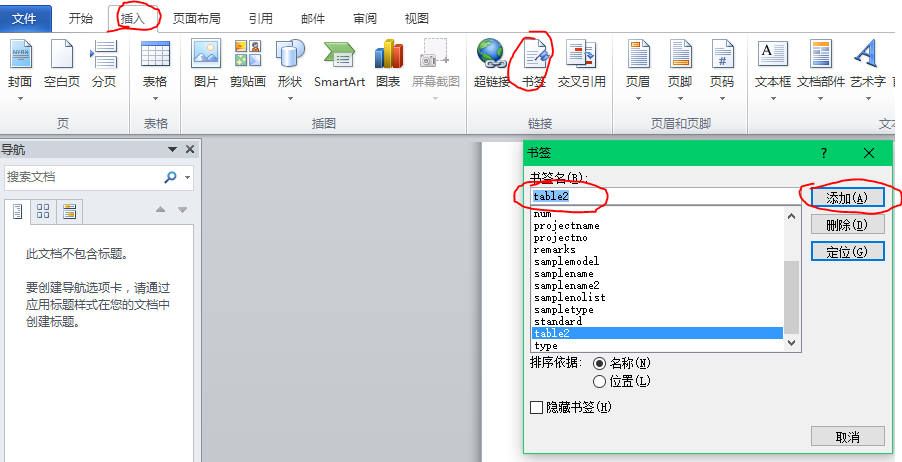
4)检索 COM 类工厂中 CLSID 为 {000209FF-0000-0000-C000-000000000046} 的组件失败,原因是出现以下错误: 80070005 拒绝访问
原因:没有权限读取word.dll
解决:http://blog.csdn.net/ououou123456789/article/details/6102036
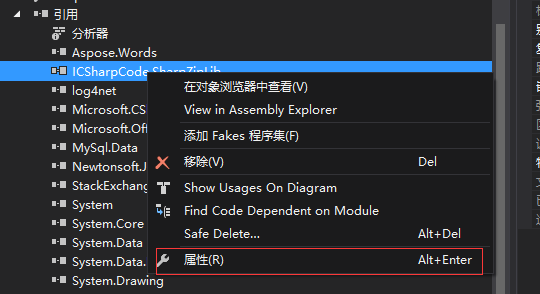
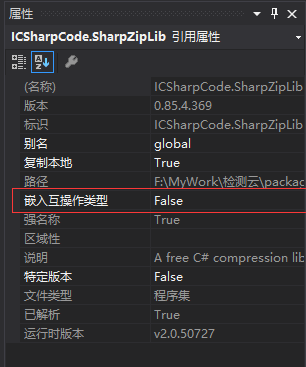
5)ApplicationClass() 不被识别
https://www.cnblogs.com/colder/p/5753159.html
https://www.cnblogs.com/itljf/p/5859445.html
https://www.cnblogs.com/songjl/p/7469524.html
https://www.cnblogs.com/seejoy/p/6847570.html
https://blog.csdn.net/fraing/article/details/8989736 试卷
Aspose.Words导出图片 表格 Interop.Word的更多相关文章
- JAVAWEB导出word文档,遍历表格数据,导出图片
这是写的另一个导出word方法:https://www.cnblogs.com/pxblog/p/12790904.html 本次使用的是easypoi框架 官方教程:https://opensour ...
- PHP导入导出excel表格图片(转)
写excel的时候,我用过pear的库,也用过pack压包的头,同样那些利用smarty等作的简单替换xml的也用过,csv的就更不用谈了.呵呵.(COM方式不讲了,这种可读的太多了,我也写过利用wp ...
- Asp.net通过模板(.dot/Html)导出Word,同时导出图片
一.Office组件导出Word(服务器配置麻烦) 需要引用Office的DLL,在下文的附件中,不同的Offic版本用的不一样,虽然高级版本可以兼容低级的,不过,还是统一版本最好 贴上核心代码(转载 ...
- 关于.net Microsoft.Office.Interop.Word组建操作word的问题,如何控制word表格单元格内部段落的样式。
控制word表格单元格内部文字样式.我要将数据导出到word当中,对于word表格一个单元格中的一段文字,要设置不同的样式,比如第一行文字作为标题要居中,加粗,第二行为正常的正文. 代码如下 publ ...
- ITextSharp导出PDF表格和图片(C#)
文章主要介绍使用ITextSharp导出PDF表格和图片的简单操作说明,以下为ITextSharp.dll下载链接 分享链接:http://pan.baidu.com/s/1nuc6glj 密码:3g ...
- 利用Aspose.Word控件和Aspose.Cell控件,实现Word文档和Excel文档的模板化导出
我们知道,一般都导出的Word文档或者Excel文档,基本上分为两类,一类是动态生成全部文档的内容方式,一种是基于固定模板化的内容输出,后者在很多场合用的比较多,这也是企业报表规范化的一个体现. 我的 ...
- word模板导出的几种方式:第一种:占位符替换模板导出(只适用于word中含有表格形式的)
1.占位符替换模板导出(只适用于word中含有表格形式的): /// <summary> /// 使用替换模板进行到处word文件 /// </summary> public ...
- thinkphp5中使用excel导出数据表格(包涵图片)
首先使用composer require phpoffice/phpexcel下载安装phpexcel包. 将包放入extend下面. 不附加图片的导出 /** * 导出excel(不带图片) * @ ...
- PHP导入导出excel表格图片的代码和方法大全
基本上导出的文件分为两种: 1:类Excel格式,这个其实不是传统意义上的Excel文件,只是因为Excel的兼容能力强,能够正确打开而已.修改这种文件后再保存,通常会提示你是否要转换成Excel文件 ...
随机推荐
- 使用DDE传输数据至SQL Server
DDE即是Dynamic Data Exchange,相关可以搜索MSDN在线帮助. 想把SPC-Light的数据传送至SQL Server中.刚开始是尝试了<Transfer data to ...
- dubbo事件通知机制 (2)
此文已由作者赵计刚授权网易云社区发布. 欢迎访问网易云社区,了解更多网易技术产品运营经验. 142 * 反射执行xxxService.onthrow方法:至少要有一个入参且第一个入参类型为T ...
- Unity UGUI 原理篇(二):Canvas Scaler 縮放核心
https://blog.csdn.net/gz_huangzl/article/details/52484611 Canvas Scaler Canvas Scaler是Unity UI系統中,控制 ...
- HDU - 1166 敌兵布阵 方法一:(线段树+单点修改,区间查询和) 方法二:利用树状数组
C国的死对头A国这段时间正在进行军事演习,所以C国间谍头子Derek和他手下Tidy又开始忙乎了.A国在海岸线沿直线布置了N个工兵营地,Derek和Tidy的任务就是要监视这些工兵营地的活动情况.由于 ...
- (原创)BZOJ 2038 小Z的袜子(hose) 莫队入门题+分块
I - 小Z的袜子(hose) 作为一个生活散漫的人,小Z每天早上都要耗费很久从一堆五颜六色的袜子中找出一双来穿.终于有一天,小Z再也无法忍受这恼人的找袜子过程,于是他决定听天由命…… 具体来说,小Z ...
- 设计一个MQ的考虑点
转自: https://segmentfault.com/a/1190000004461970 序 这里总结下MQ的研究点,以及如果要自己设计一个MQ应该考虑的因素. 考虑点 1.远程通信功能 (1) ...
- Dynamic Rankings(整体二分)
Dynamic Rankings(整体二分) 带修区间第k小.\(n,q\le 10^4\). 这次我们旧瓶装新酒,不用带修主席树.我们用整体二分!整体二分是啥东西呢? 二分答案可以解决一次询问的问题 ...
- 洛谷P4074 [WC2013]糖果公园(莫队)
传送门 总算会树形莫队了…… 上次听说树形莫队是给树分块,实在看不懂.然后用括号序列的方法做总算能弄明白了 先说一下什么是括号序列,就是在$dfs$的时候,进入的时候记录一下,出去的时候也记录一下 拿 ...
- Shell-2-命令之乐
1.cat (1)基本用法 [root@cai tmp]# cat 1.txt 2.txt this is a test1 this is a test 2 (2)cat -s file(删除额外空白 ...
- H5教程(二),CSS入门(一)选择器
这是我的第二篇博客,H5教程CSS入门,适合刚开始学习H5的新手,让我们共同进步. 1. CSS简介 1.1 CSS是什么? CSS称为样式层叠表,是用于增强或控制网页样式,并允许将样式信息与网页 ...