
springloud系列搭建注册中心
首先搭建父工程:

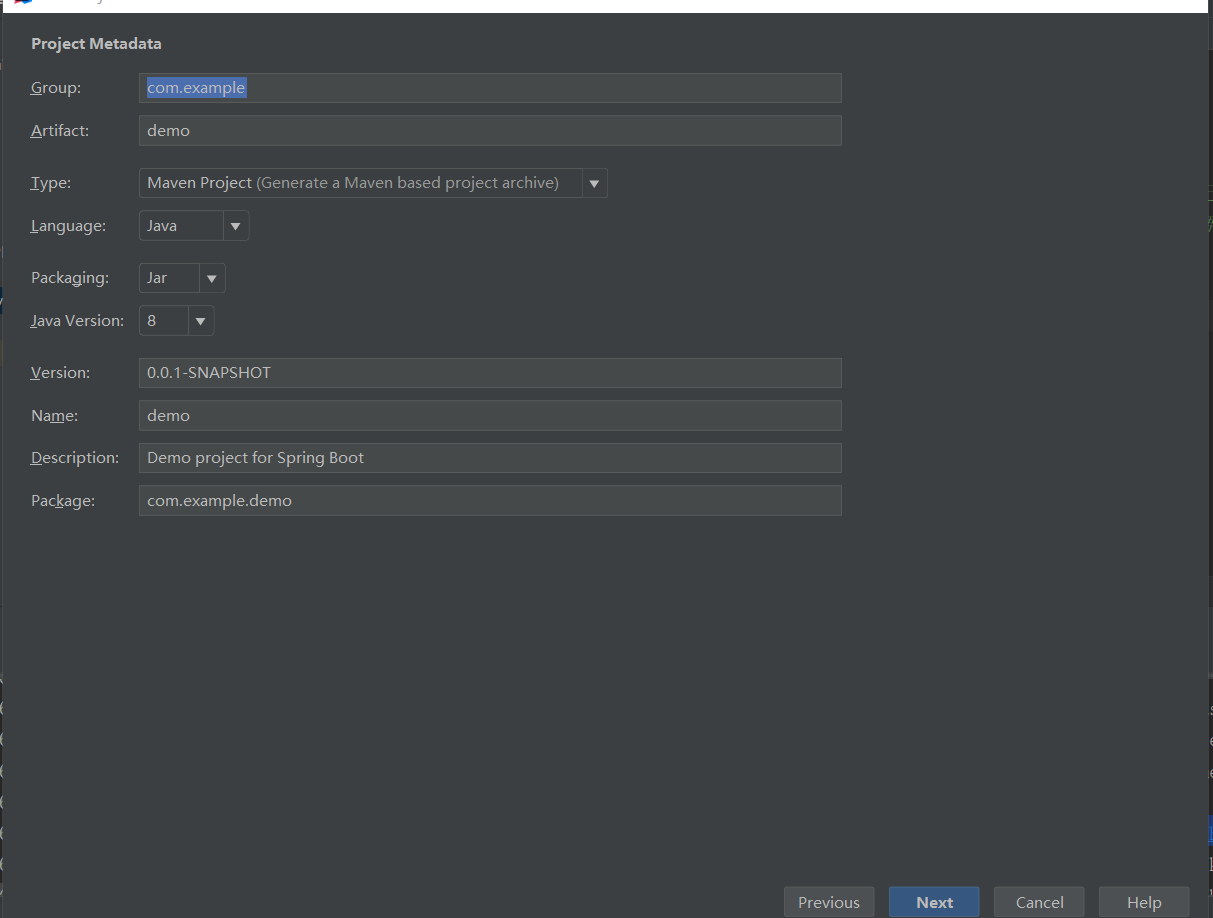
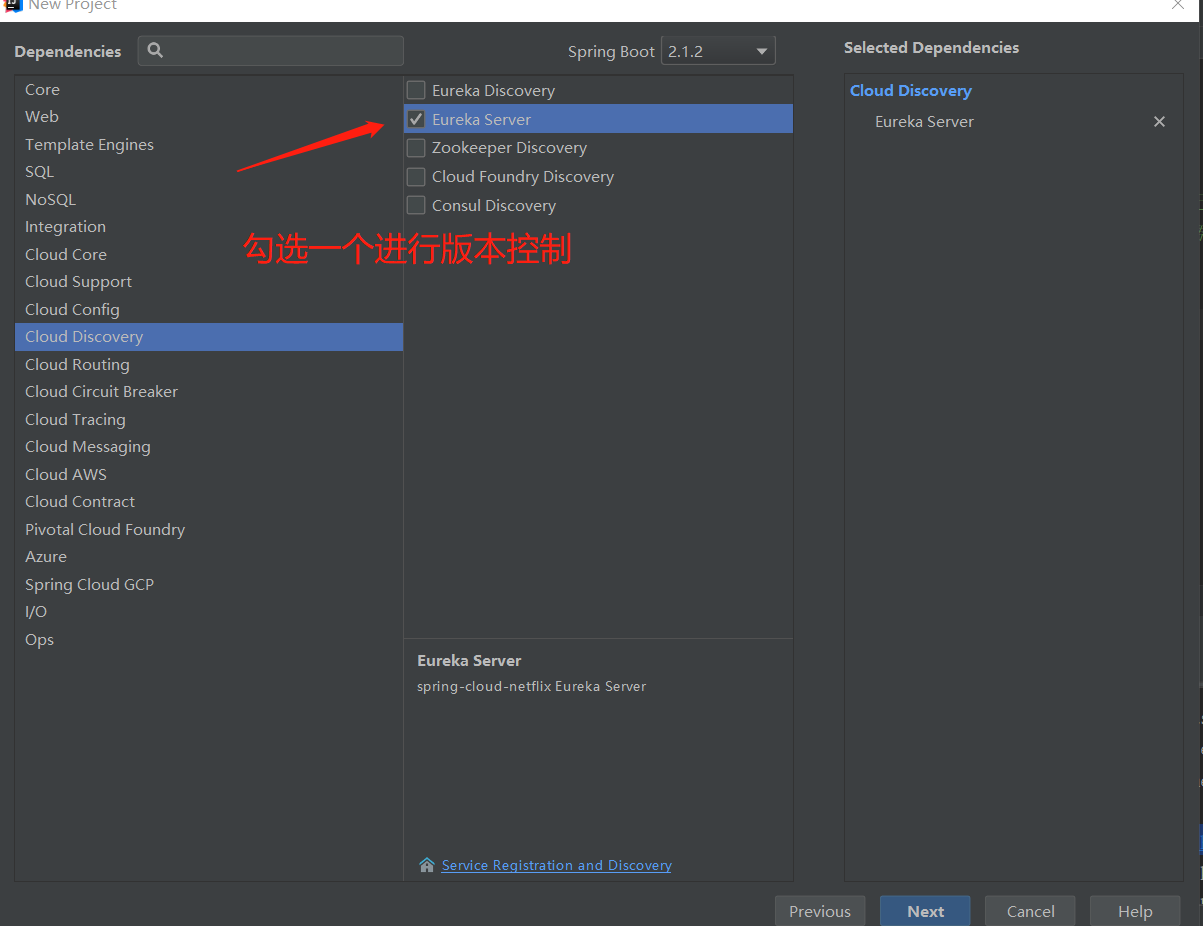
点击next父工程就搭建完成;
pom.xml文件:
<?xml version="1.0" encoding="UTF-8"?>

<project xmlns="http://maven.apache.org/POM/4.0.0" xmlns:xsi="http://www.w3.org/2001/XMLSchema-instance"

         xsi:schemaLocation="http://maven.apache.org/POM/4.0.0 http://maven.apache.org/xsd/maven-4.0.0.xsd">

    <modelVersion>4.0.</modelVersion>

    <packaging>pom</packaging>

    <modules>

        <module>spring-eureka</module>

    </modules>

    <parent>

        <groupId>org.springframework.boot</groupId>

        <artifactId>spring-boot-starter-parent</artifactId>

        <version>2.1..RELEASE</version>

        <relativePath/> <!-- lookup parent from repository -->

    </parent>

    <groupId>com.cxy</groupId>

    <artifactId>springcloud-parent</artifactId>

    <version>0.0.-SNAPSHOT</version>

    <name>springcloud-parent</name>

    <description>Demo project for Spring Boot</description>

    <properties>

        <java.version>1.8</java.version>

        <spring-cloud.version>Greenwich.RELEASE</spring-cloud.version>

    </properties>

    <dependencies>

        <dependency>

            <groupId>org.springframework.boot</groupId>

            <artifactId>spring-boot-starter-test</artifactId>

            <scope>test</scope>

        </dependency>

    </dependencies>

    <dependencyManagement>

        <dependencies>

            <dependency>

                <groupId>org.springframework.cloud</groupId>

                <artifactId>spring-cloud-dependencies</artifactId>

                <version>${spring-cloud.version}</version>

                <type>pom</type>

                <scope>import</scope>

            </dependency>

        </dependencies>

    </dependencyManagement>

    <build>

        <plugins>

            <plugin>

                <groupId>org.springframework.boot</groupId>

                <artifactId>spring-boot-maven-plugin</artifactId>

            </plugin>

        </plugins>

    </build>

    <repositories>

        <repository>

            <id>spring-milestones</id>

            <name>Spring Milestones</name>

            <url>https://repo.spring.io/milestone</url>

        </repository>

    </repositories>

</project>
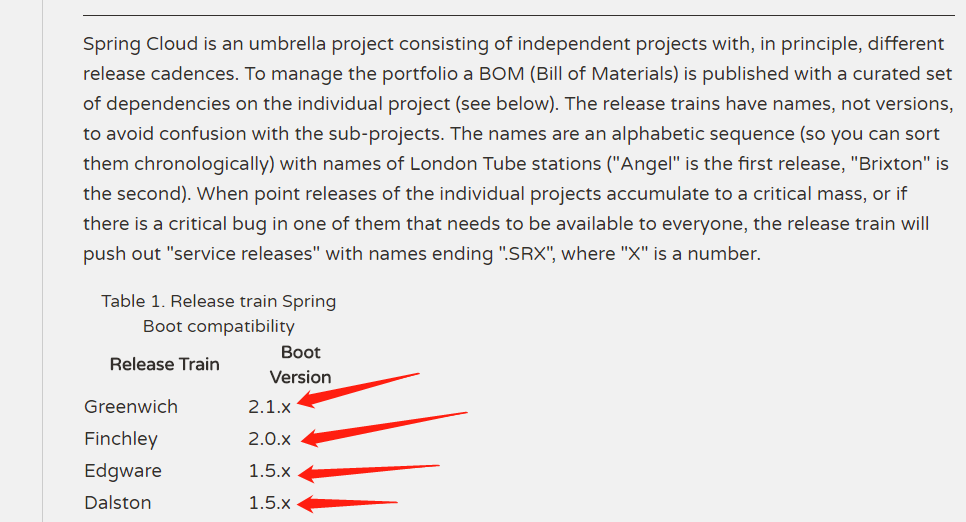
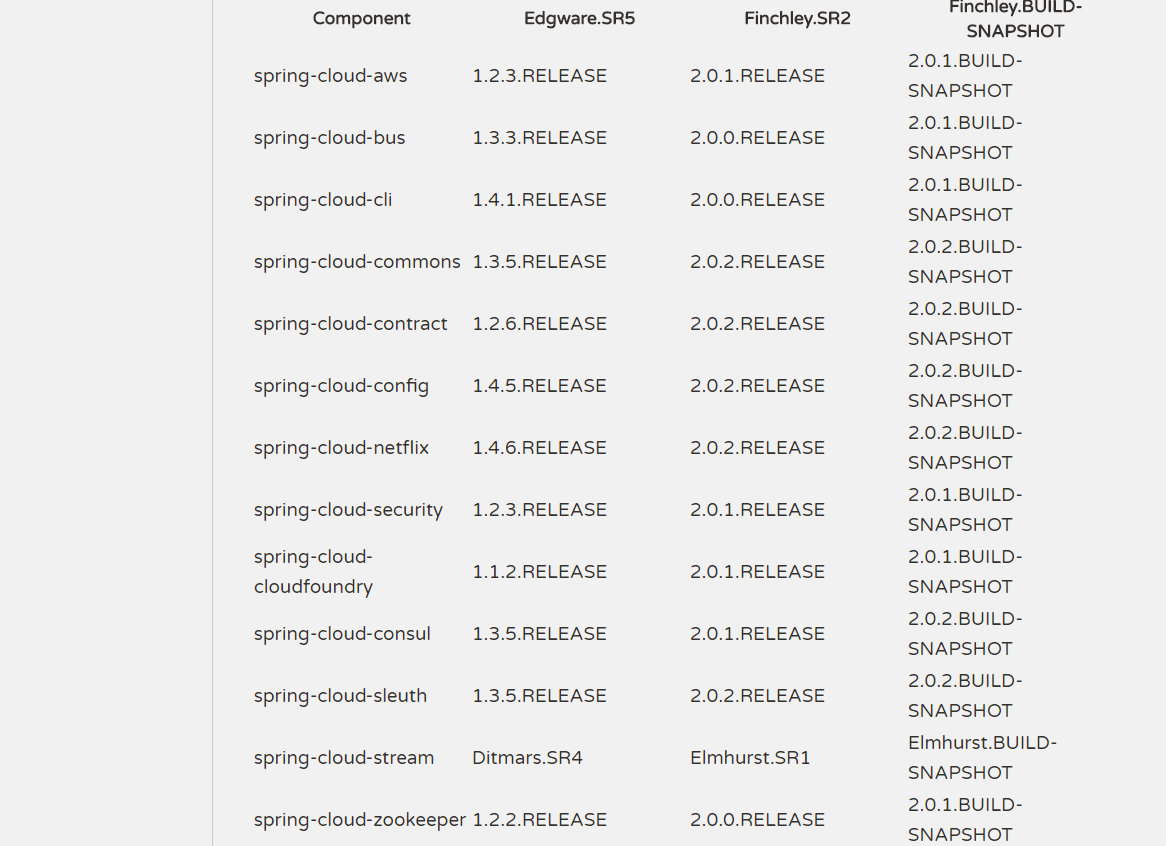
可以修改springboot得版本,还有springcloud得版本进行控制,然后将eureka的依赖删除了
但是要注意
https://projects.spring.io/spring-cloud/
springloud系列搭建注册中心的更多相关文章
- spring boot / cloud (十七) 快速搭建注册中心和配置中心
spring boot / cloud (十七) 快速搭建注册中心和配置中心 本文将使用spring cloud的eureka和config server来搭建. 然后搭建的模式,有很多种,本文主要聊 ...
- SpringCloud搭建注册中心与服务注册
上一篇文章<微服务注册中心原理,看这篇就够了!>介绍了注册中心的概念和原理,本文将介绍下利用Eureka搭建中心并注册服务到注册中心的过程. 本文目录 一.Eureka介绍二.搭建注册中心 ...
- springcloud系列二 搭建注册中心启动
创建modul 然后就创建完成了 添加yml文件: server: port: eureka: client: register-with-eureka: false #单机版建议设置为false,设 ...
- 《springcloud 一》搭建注册中心,服务提供者,服务消费者
注册中心环境搭建 Maven依赖信息 <parent> <groupId>org.springframework.boot</groupId> <artifa ...
- Dubbo源码学习总结系列七---注册中心
Dubbo注册中心是框架的核心模块,提供了服务注册发现(包括服务提供者.消费者.路由策略.覆盖规则)的功能,该功能集中体现了服务治理的特性.该模块结合Cluster模块实现了集群服务.Dubbo管理控 ...
- springcloud入门系列(二):注册中心Eureka
搭建注册中心Eureka 1.pom中依赖 <dependencies> <dependency> <groupId>org.springframework.clo ...
- 历史上最详细的SpringCloud搭建微服务的过程。(包括注册中心,服务提供者和服务消费者)
首先搭建注册中心,创建一个springboot的maven工程. 工程创建完成之后,先在资源文件中的application.properties中写配置文件. server.port= spring. ...
- 搭建简单的SpringCloud项目一:注册中心和公共层
注:笔者在搭建途中其实遇见不少问题,统一放在后面的文章说明,现在的搭建是测试OK的. GitHub:https://github.com/ownzyuan/test-cloud 后续:搭建简单的Spr ...
- SpringCloud注册中心(Eureka)
注册中心的作用就是用来方便接口暴露出来的一个管理工具,如果所有的接口只是暴露出来,没有一个同一的管理工具,又有谁知道你暴露了哪些接口了,Eureka是一个springcloud的服务注册和发现模块 搭 ...
随机推荐
- composer update的错误使用以及如何更新composer.lock文件
用composer update装包是错误的. 安装包标准的方法应该是 require ,或者手动写 compose.json 文件,然后 composer install .如果只是需要更新 com ...
- Linux常用的编辑保存退出命令
Vi Vim进入编辑后退出 按ESC后 1.保存退出 :wq :x 最快捷的方法:直接按shift+zz,或者切换到大写模式按ZZ,就可以保存退出了,即是按2下大写的Z.区别::wq 强制性写入文件并 ...
- Tomcat 不能正常启动
启动过程提示: Stopping ProtocolHandler ["http-bio-8080"] the JRE_HOME environment variable is no ...
- 2016上海浦东汽车展览会C+罩杯 车模名单
只能帮你们到这了
- [poj1703]Find them, Catch them(种类并查集)
题意:食物链的弱化版本 解题关键:种类并查集,注意向量的合成. $rank$为1代表与父亲对立,$rank$为0代表与父亲同类. #include<iostream> #include&l ...
- Codeforces #536 div2 E (1106E)Lunar New Year and Red Envelopes (DP)
题意:过年了,Bob要抢红包.抢红包的时间段为1 - n,有m个红包,每个红包有三个属性:st(红包出现的时间), ed(红包消失的时间),d(如果抢了这个红包,能够抢下一个红包的时间),w(红包的收 ...
- Swing的MVC结构
--------------siwuxie095 工程名:TestMVC 包名:com.siwuxie095.mvc 类名:Test.java ...
- JS 中的数组遍历方式效率比较
JS数组遍历,基本就是for,forin,foreach,forof,map等等一些方法,以下介绍几种本文分析用到的数组遍历方式以及进行性能分析对比 第一种:普通for循环 代码如下: ; j < ...
- ROS Learning-003 beginner_Tutorials 创建ROS工作空间
ROS Indigo beginner_Tutorials-02 创建ROS工作空间 我使用的虚拟机软件:VMware Workstation 11 使用的Ubuntu系统:Ubuntu 14.04. ...
- Windows cmd 将命令(/指令)写到一个文件里,直接运行这个文件。提高工作效率
Windows cmd 批处理(cmd/bat)文件的简单使用介绍 前言 如果你想我一样,要每天都需要在cmd上,用键盘去敲击相同的命令,时间一长,你就觉得很无聊.有没有什么比较高效的方法,让我们不用 ...