
spring batch 读取多个文件数据导入数据库
项目的目录结构

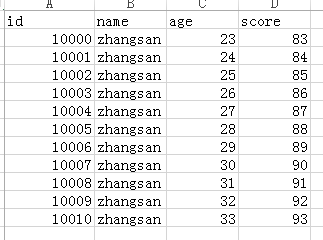
需要读取文件的的数据格式
applicatonContext.xml的配置
<?xml version="1.0" encoding="UTF-8"?>

<beans xmlns="http://www.springframework.org/schema/beans"

    xmlns:xsi="http://www.w3.org/2001/XMLSchema-instance" xmlns:p="http://www.springframework.org/schema/p"

    xmlns:tx="http://www.springframework.org/schema/tx" xmlns:aop="http://www.springframework.org/schema/aop"

    xmlns:context="http://www.springframework.org/schema/context"

    xsi:schemaLocation="http://www.springframework.org/schema/beans

    http://www.springframework.org/schema/beans/spring-beans-3.0.xsd

    http://www.springframework.org/schema/tx

    http://www.springframework.org/schema/tx/spring-tx-3.0.xsd

    http://www.springframework.org/schema/aop

    http://www.springframework.org/schema/aop/spring-aop-3.0.xsd

    http://www.springframework.org/schema/context

    http://www.springframework.org/schema/context/spring-context-3.0.xsd"

    default-autowire="byName">

    <context:component-scan base-package="com.aliyun.springbatch" />

    <bean id="jobLauncher" class="org.springframework.batch.core.launch.support.SimpleJobLauncher">

        <property name="jobRepository" ref="jobRepository"/>

    </bean>

    <bean id="jobRepository" class="org.springframework.batch.core.repository.support.MapJobRepositoryFactoryBean">

        <property name="transactionManager" ref="transactionManager"></property>

    </bean>

    <bean id="transactionManager"

        class="org.springframework.batch.support.transaction.ResourcelessTransactionManager">

    </bean>

     <bean id="jdbcTemplate" class="org.springframework.jdbc.core.JdbcTemplate">

         <property name="dataSource" ref="dataSource"></property>

     </bean>

      <!-- 引入外部数据源配置信息 -->

    <bean class="org.springframework.beans.factory.config.PropertyPlaceholderConfigurer">

        <property name="locations">

            <value>classpath:com/aliyun/springbatch/sample/db/jdbc.properties</value>

        </property>

    </bean>

     <!-- 配置数据源 -->

    <bean id="dataSource" class="org.springframework.jdbc.datasource.DriverManagerDataSource">

        <property name="driverClassName" value="${jdbc.driver}"></property>

        <property name="url" value="${jdbc.url}"></property>

        <property name="username" value="${jdbc.username}"></property>

        <property name="password" value="${jdbc.password}"></property>

    </bean>

</beans>
batch.xml的配置
<?xml version="1.0" encoding="UTF-8"?>

<bean:beans xmlns="http://www.springframework.org/schema/batch"

    xmlns:bean="http://www.springframework.org/schema/beans" xmlns:xsi="http://www.w3.org/2001/XMLSchema-instance"

    xmlns:p="http://www.springframework.org/schema/p" xmlns:tx="http://www.springframework.org/schema/tx"

    xmlns:aop="http://www.springframework.org/schema/aop" xmlns:context="http://www.springframework.org/schema/context"

    xmlns:util="http://www.springframework.org/schema/util"

    xsi:schemaLocation="http://www.springframework.org/schema/beans

http://www.springframework.org/schema/beans/spring-beans-3.0.xsd

http://www.springframework.org/schema/tx

http://www.springframework.org/schema/tx/spring-tx-3.0.xsd

http://www.springframework.org/schema/aop

http://www.springframework.org/schema/aop/spring-aop-3.0.xsd

http://www.springframework.org/schema/context

http://www.springframework.org/schema/context/spring-context-3.0.xsd

http://www.springframework.org/schema/batch

http://www.springframework.org/schema/batch/spring-batch-3.0.xsd

http://www.springframework.org/schema/util http://www.springframework.org/schema/util/spring-util.xsd">

    <!-- <bean:import resource="dataSource.xml" /> -->

    <bean:import resource="applicationContext.xml" />

    <!-- Job的配置信息 -->

    <!-- commit-interval="1" 表示每处理完1条数据提交一次事务 -->

    <job id="dbJob">

        <step id="dbReadAndWriterStep" >

            <tasklet>

                <chunk reader="userReader" writer="jdbcItemWriter"

                    commit-interval="1">

                </chunk>

            </tasklet>

        </step>

    </job>

    <!-- <bean:bean id="jdbcItemReader" class="org.springframework.batch.item.database.JdbcCursorItemReader"

        scope="step"> <bean:property name="dataSource" ref="dataSource" /> <bean:property

        name="sql" value="select id,name,age,score from t_user" /> <bean:property

        name="rowMapper"> <bean:bean class="org.springframework.jdbc.core.BeanPropertyRowMapper">

        <bean:property name="mappedClass" value="com.aliyun.springbatch.sample.db.User"

        /> </bean:bean> </bean:property> </bean:bean> -->

    <!-- 读文件 多文件上传-->

    <bean:bean id="userReader" class="org.springframework.batch.item.file.MultiResourceItemReader"

        scope="step">

<!-- 单个文件读取 -->

        <!-- <property name="resource" value="file:./sample.csv" /> -->

<!-- 多个文件读取  读取文件的位置 -->

        <bean:property name="resources" value="file:#{jobParameters['inputFile']}" />

    <!-- 引入单个文件的读取对象 -->

        <bean:property name="delegate" ref="flatFileItemReader" />

    </bean:bean>

    <!-- 单个文件的读取对象 -->

    <bean:bean id="flatFileItemReader"

        class="org.springframework.batch.item.file.FlatFileItemReader">

    <!-- 跳过读取文件的第一行 因为第一行是列名-->

    <bean:property name="linesToSkip" value="1"/>

    <!-- 文件的行映射 -->

    <bean:property name="lineMapper">

      <bean:bean class="org.springframework.batch.item.file.mapping.DefaultLineMapper">

        <!-- 行的字段映射 -->

        <bean:property name="lineTokenizer">

            <!-- 映射的字段以下面names属性,以,隔开 -->

            <bean:bean

                    class="org.springframework.batch.item.file.transform.DelimitedLineTokenizer">

                <bean:property name="names" value="id,name,age,score" />

            </bean:bean>

        </bean:property>

        <!-- 设置 读取的字段映射给实体对象 -->

        <bean:property name="fieldSetMapper">

            <bean:bean

            class="org.springframework.batch.item.file.mapping.BeanWrapperFieldSetMapper">

                <bean:property name="prototypeBeanName" value="user" />

            </bean:bean>

        </bean:property>

      </bean:bean>

    </bean:property>

  </bean:bean>

  <bean:bean id="user" class="com.aliyun.springbatch.sample.db.User"></bean:bean>

    <!-- db数据的写 -->

    <!-- <bean:bean id="jdbcItemWriter"

        class="org.springframework.batch.item.database.JdbcBatchItemWriter">

        <bean:property name="dataSource" ref="dataSource" />

        <bean:property name="sql"

            value="insert into T_DESTUSER (ID,USERID,USERNAME,PASSWORD,UPDATETIME,UPDATEUSER)

                   values

                  (:id,:userId,:userName,:password,:updateDate,:updateUser)" />

        <bean:property name="itemSqlParameterSourceProvider">

            <bean:bean

                class="org.springframework.batch.item.database.BeanPropertyItemSqlParameterSourceProvider" />

        </bean:property>

    </bean:bean> -->

    <!-- 这是自定义的实现ItemWriter接口的ItemWriter的实现类 -->

<bean:bean id="jdbcItemWriter" class="com.aliyun.springbatch.sample.db.JdbcItemWriter">

</bean:bean>

</bean:beans>
jdbc.properties mysql数据源配置文件
#Oracle

#hibernate.dialect=org.hibernate.dialect.OracleDialect

#validationQuery.sqlserver=SELECT 1 FROM DUAL

#jdbc.driver=oracle.jdbc.driver.OracleDriver

#jdbc.url=jdbc:oracle:thin:@localhost:1521:orcl

#jdbc.username=activitproject

#jdbc.password=activitproject

#Mysql

jdbc.driver=com.mysql.jdbc.Driver

jdbc.url=jdbc:mysql://127.0.0.1:3306/spring_batch_demo

jdbc.username=root

jdbc.password=root
封装数据的实体类就自己写吧
测试主方法:
 public static void main(String[] args) {

        ApplicationContext context = new ClassPathXmlApplicationContext(

                "com/aliyun/springbatch/sample/db/batch.xml");

        JobLauncher launcher = (JobLauncher) context.getBean("jobLauncher");

        Job job = (Job) context.getBean("dbJob");

        try {

            // JOB执行,设置参数添加读取文件的路径

            JobExecution result = launcher.run(

                    job,

                    //添加job参数时,将读取的文件目录加入到job的参数中

                    new JobParametersBuilder()

                            .addString("inputFile",

                                    "src/main/java/com/aliyun/springbatch/sample/db/inputFile*.csv")

                            .toJobParameters());

            // 运行结果输出

            System.out.println(result.toString());

        } catch (Exception e) {

            e.printStackTrace();

        }

    }
over::
spring batch 读取多个文件数据导入数据库的更多相关文章
- larave5.6 将Excel文件数据导入数据库代码实例
<?php namespace App\Admin\Controllers; use App\AdminUser; use Illuminate\Http\Request; use Excel; ...
- 小数据量csv文件数据导入数据库(思路)
大致写写思路,因为sqlserver提供了可以直接导入的图形界面. 1.private static string GetConnectionString(string folderPath) // ...
- 读取Execl表数据 导入数据库
不知不觉博客园园林都两年多了,我是今年毕业的应届生,最近公司项目需要改动,很多的数据需要导入,很多的实体类需要些.考虑到这些问题自己写了两个winform版的小工具,一个是读取Execl数据导入数据库 ...
- MsSqlServer bak文件数据导入
MsSqlServer bak文件数据导入 第一步首先在你的数据库中建立一个空数据库 选中新建的数据库 鼠标右键 任务 还原 数据库 这个时候会弹出这种一个框 之后选择原设备 会弹出 点击加入 找到 ...
- springMVC(5)---导入excel文件数据到数据库
springMVC(5)---导入excel文件数据到数据库 上一篇文章写了从数据库导出数据到excel文件,这篇文章悄悄相反,写的是导入excel文件数据到数据库.上一篇链接:springMVC(4 ...
- C#选择多个文件并读取多个文件数据
原文:C#选择多个文件并读取多个文件数据 版权声明:本文为博主原创文章,转载请附上链接地址. https://blog.csdn.net/ld15102891672/article/details/8 ...
- 将Excel中数据导入数据库(一)
在工作中经常要将Excel中数据导入数据库,这里介绍一种方法. 假如Excel中的数据如下: 数据库建表如下: 其中Id为自增字段: Excel中数据导入数据库帮助类如下: using System; ...
- 使用python将excel数据导入数据库
使用python将excel数据导入数据库 因为需要对数据处理,将excel数据导入到数据库,记录一下过程. 使用到的库:xlrd 和 pymysql (如果需要写到excel可以使用xlwt) 直接 ...
- 使用openpyxl模块将Excel中的数据导入数据库
这里将不介绍openpyxl模块的详细操作. 主要就是记录一个使用openpyxl模块将Excel表格的数据导入数据库中的实例. from openpyxl import load_workbook ...
随机推荐
- MySQL在linux下安装
mysql在linux下的安装 安装环境:系统是 centos6.5 1.下载 下载地址:http://dev.mysql.com/downloads/mysql/5.6.html#downloa ...
- Centos 6.5 hadoop 2.2.0 全分布式安装
hadoop 2.2.0 cluster setup 环境: 操作系统:Centos 6.5 jdk:jdk1.7.0_51 hadoop版本:2.2.0 hostname ip master ...
- p4555&bzoj2565 最长双回文串
传送门(洛谷) 传送门(bzoj) 题目 顺序和逆序读起来完全一样的串叫做回文串.比如acbca是回文串,而abc不是(abc的顺序为abc,逆序为cba,不相同). 输入长度为 nnn 的串 SSS ...
- charles请求入参中有乱码
工作中,需要入参,但是发现入参中,有中文的都是乱码,仔细查阅headers,发现Content-Type是application/x-www-form-urlencoded类型,而实际上,入参是jso ...
- 诺基亚 920T - 我的非凡系列手机始终显示旋转齿轮而无响应,我该如何让手机停止显示旋转齿轮?
有时,在 OTA 更新 (或重置手机) 后,设备可能始终显示“旋转齿轮”而无响应. 如果“旋转齿轮”在屏幕上显示的时间超过 60 分钟,则需要执行恢复操作. 您可以尝试下面这些简单的解决方法: 按住电 ...
- 为什么Java的hash表的长度一直是2的指数次幂?为什么这个(hash&(h-1)=hash%h)位运算公式等价于取余运算?
1.什么是hash表? 答:简单回答散列表,在hash结构散列(分散)存放的一种数据集结构. 2.如何散列排布,如何均匀排布? 答:取余运算 3.Java中如何实现? 答:hash&(h-1) ...
- DESede/CBC/PKCS5Padding
Java.security.NoSuchAlgorithmException: Cannot find any provider supporting DESede/CBC/PKCS5Padding ...
- HTML 表单 / HTML5 表单元素datalist
<form> 属性的列表: 属性 描述 accept-charset 规定在被提交表单中使用的字符集(默认:页面字符集). action 规定向何处提交表单的地址(URL)(提交页面). ...
- c++手工扩栈
-Wl,--stack=64000000 c++手工扩展
- MCP|WJ|Identification of candidate plasma protein biomarkers for cervical cancer using the multiplex proximity extension assay(利用多重邻位延伸分析技术进行宫颈癌血浆蛋白候选生物标记物的鉴定研究)
文献名:Identification of candidate plasma protein biomarkers for cervical cancer using the multiplex pr ...