
用JavaScript实现CheckBox的全选取消反选,及遮罩层中添加内容
 <!DOCTYPE html>

 <html lang="en">

 <head>

     <meta charset="UTF-8">

     <title>Title</title>

     <style>

         .c1 {

             position: fixed;

             top: ;

             right: ;

             left: ;

             bottom: ;

             background-color: black;

             opacity: 0.5;

             z-index: ;

         }

         .c2 {

             width: 500px;

             height: 400px;

             background-color: white;

             position: fixed;

             left: %;

             top: %;

             margin-left: -250px;

             margin-top: -200px;

             z-index: ;

         }

         .c3 {

             display: none;

         }

     </style>

 </head>

 <body style="margin: 0 auto">

 <div>

     <input type="button" value="添加" onclick="add()">

     <input type="button" value="全选" onclick="ChooseAll()">

     <input type="button" value="取消" onclick="CancleAll()">

     <input type="button" value="反选" onclick="ReverseAll()">

     <table>

         <thead>

         <tr>

             <th>请选择</th>

             <th>主机名</th>

             <th>端口</th>

         </tr>

         </thead>

         <tbody id="tb">

         <!--给tbody设置ID用来找到它,然后循环它的孩子-->

         <tr>

             <td><input type="checkbox"></td>

             <td>192.168.99.1</td>

             <td></td>

         </tr>

         <tr>

             <td><input type="checkbox"></td>

             <td>192.168.99.2</td>

             <td></td>

         </tr>

         <tr>

             <td><input type="checkbox"></td>

             <td>192.168.99.3</td>

             <td></td>

         </tr>

         </tbody>

     </table>

 </div>

 <!-- 遮罩层开始-->

 <div id="i1" class="c1 c3">

 </div>

 <!-- 遮罩层结束-->

 <!-- 弹出框开始-->

 <div id="i2" class="c2 c3">

     <p>

         <input name="ip" type="text">

         <input name="duankou" type="text">

     </p>

     <p>

         <input type="button" value="确定" onclick="go()">

         <input type="button" value="取消" onclick="goback()">

     </p>

 </div>

 <!-- 弹出框开始-->

 <script>

     function add() {

         document.getElementById('i1').classList.remove('c3')

         document.getElementById('i2').classList.remove('c3')

     }

     function goback() {

         document.getElementById('i1').classList.add('c3')

         document.getElementById('i2').classList.add('c3')

     }

     function go() {

         var v1 = document.getElementById('i2').valueOf('ip').alert(v1)

     }

     //全选

     function ChooseAll() {

         var tbody = document.getElementById('tb')//根据ID找到tbody

         var tr_list = tbody.children             //获取子标签,并生成列表

         for (i = ; i < tr_list.length; i++) {           //循环tr_list得到每一个tr

             var current_tr = tr_list[i];        //拿到拿到每个td的子标签,也就是里面的所有的tr生成一个列表

             var checkbox = current_tr.children[].children[];//得到第一个tr里的第一个子标签也就是CheckBox了

             checkbox.checked = true;               //checkbox.checked是获取当前CheckBox的值是true还是false

             // 当然此时肯定是false,我们只需要让他等于true就可以修改他的当前状态为打上对勾的了

         }

     }

     //取消

     function CancleAll() {

         var tbody = document.getElementById('tb')//根据ID找到tbody

         var tr_list = tbody.children             //获取子标签,并生成列表

         for (i = ; i < tr_list.length; i++) {           //循环tr_list得到每一个tr

             var current_tr = tr_list[i];        //拿到拿到每个td的子标签,也就是里面的所有的tr生成一个列表

             var checkbox = current_tr.children[].children[];//得到第一个tr里的第一个子标签也就是CheckBox了

             checkbox.checked = false;               //checkbox.checked是获取当前CheckBox的值是true还是false

             // 当然此时肯定是false,我们只需要让他等于false就可以修改他的当前状态为去掉对勾了

         }

     }

     //反选

     function ReverseAll() {

         var tbody = document.getElementById('tb')//根据ID找到tbody

         var tr_list = tbody.children             //获取子标签,并生成列表

         for (i = ; i < tr_list.length; i++) {           //循环tr_list得到每一个tr

             var current_tr = tr_list[i];        //拿到拿到每个td的子标签,也就是里面的所有的tr生成一个列表

             var checkbox = current_tr.children[].children[];//得到第一个tr里的第一个子标签也就是CheckBox了

             var type = checkbox.checked;            //checkbox.checked是获取当前CheckBox的值是true还是false

             if (type == true) {                             //然后对当前状态进行判断 ;如果是true就将他改成false

                 // 如果是false就将他改成true;即可将他反选

                 checkbox.checked = false;

             }

             else {

                 checkbox.checked = true;

             }

         }

     }

 </script>

 </body>

 </html>
知识点:
<input type='checkbox'>
checkbox.checked获取当前CheckBox的当前值
document.getElementById()根据ID找到标签
标签.children  找到子标签并生成列表
for (i = 0; i < 标签标签.length; i++) 循环标签列表 得到每一个子标签

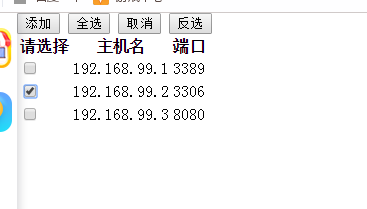
效果如下图
用JavaScript实现CheckBox的全选取消反选,及遮罩层中添加内容的更多相关文章
- html checkbox 实现全选/取消全选
html checkbox 实现全选/取消全选 <html> <body> <table border="1"> <tr> < ...
- jquery中checkbox的全选与反选
<!DOCTYPE html><html><head> <meta charset="utf-8" /> <title> ...
- jQuery checkbox的全选与反选
1:checkbox的全选与反选 js 代码 $("#cbAll").click(function(){ if($("#cbAll").is(":ch ...
- 通过VBA实现checkbox的全选和反选
checkbox的全选和反选可以通过VBA来控制,这种设计常见于一些交互式报表,代码如下: 1.分成两个IF判断 Private Sub CheckBox1_Click() ‘checkbox为总控 ...
- 【转载】checkbox实现全选/取消全选
比较简单.好理解的写法,做个备注.查看请前往原地址:http://blog.csdn.net/graceup/article/details/46650781 <html> <bod ...
- js实现checkbox的全选/取消
所有的操作都将使用jquery进行. 主要是为了实现指定内容的批量/单独删除操作. 先看一下页面的设计. 实现操作的主要地方是: 首先实现单击“标题”旁的checkbox实现所有条目的选择. 要点:j ...
- checkbox的全选与反选
最近在做一个项目,其中一个功能就是多选框的全选与反选.感觉很简单的小功能,一下子想不起来怎么实现了,很是耽误时间.我在想,我有必要整理下自己的一些小demo了,也方便以后再使用的时候能快速的完成功能. ...
- js及jQuery实现checkbox的全选、反选和全不选
html代码: <label><input type="checkbox" id="all"/>全选</label> < ...
- checkbox之全选和反选
先导入jquery组件 <input type="checkbox" id="checkall">全选<input type="ch ...
随机推荐
- (1009) HDU 6446 Tree and Permutation(规律+树上各个点的距离和)
题意: 给一棵N个点的树,对应于一个长为N的全排列,对于排列的每个相邻数字a和b,他们的贡献是对应树上顶点a和b的路径长,求所有排列的贡献和. 分析: 经过简单的分析可以得知,全部的贡献其实相当与(这 ...
- Silverlight Telerik 学习之主题的设置
Telerik控件版本:RadControls for Silverlight Q1 2013 当前的Telerik Silverlight 控件支持以下主题 Office Black - 这是默认主 ...
- Python 2.x和3.x不同点
1.print和print() 2.yield 出现下面的错误Traceback (most recent call last): File “<pyshell#32>”, line 1, ...
- (转)Web服务器磁盘满故障深入解析
Web服务器磁盘满故障深入解析 原文:http://blog.51cto.com/oldboy/612351 ############################################# ...
- 一,JVM 自带命令行工具之JPS
jps:虚拟机进程状况工具 可以列出正在运行的虚拟机进程,并显示虚拟机执行主类(main class,class()函数所在的类)的名称,以及这些进程的本地虚拟机的唯一ID. jps命令格式: jps ...
- 牛客网Java刷题知识点之四种不同的方式创建线程
不多说,直接上干货! 有4种方式可以用来创建线程: 第一种:继承Thread类,重写run方法 第二种:实现Runnable接口,并实现该接口的run方法(一般我们在编程的时候推荐用这种) 第三种:实 ...
- 10 - EmbeddedChannel-测试ChannelHandler链
方法 职责 writeInbound(Object... msgs) 将入站消息写入到EmbeddedChannel中 readInbound() 从EmbeddedChannel中读取一个入站消息, ...
- <llinux下kvm虚拟化>
原理就是本来可能要10台物理机完成的事现在只要5台,分别在每台物理机上虚拟一台,这5太虚拟机共享一个stronge,比如有一台物理机down掉后或是要做维护,我们可以把它上面的虚拟机牵走,从而减少损失 ...
- DNS跳转
switch (window.location.hostname) { case "www.zcom.gov.cn" ://确定域名为 www.zcom.gov.cn //wind ...
- Backbone源码风格
代码风格: 一.自执行匿名函数创建执行环境 var root = this; root保存全局执行环境的指针.浏览器端为window对象 二.依赖库 (1).underscore 如果bac ...