
10 class封装 ORM
1.版本1:初始化
# -*- coding:utf-8 -*-

from MySQLdb import *

class MysqlHelper:

    def __init__(self,host,port,user,passwd,db,charset='utf8'):

        self.host=host

        self.port=port

        self.user=user

        self.passwd=passwd

        self.db=db

        self.charset=charset

mysql1 = MysqlHelper("localhost",3306,"root","mysql","py31""utf8")
2.版本2:打开关闭方法
# -*- coding:utf-8 -*-

from MySQLdb import *

class MysqlHelper:

    """封装"""

    def __init__(self,host,port,user,passwd,db,charset='utf8'):

        """初始化"""

        self.host=host

        self.port=port

        self.user=user

        self.passwd=passwd

        self.db=db

        self.charset=charset

    def open(self):

        """连接数据库"""

        self.conn = connect(host=self.host, port=self.port, user=self.user, passwd=self.passwd, db=self.db, charset=self.charset)

        self.cursor1 = self.conn.cursor()

    def close(self):

        """关闭连接"""

        self.cursor1.close()

        self.conn.close()

mysql1 = MysqlHelper("localhost",3306,"root","mysql","py31""utf8")
3.版本3:增加修改删除
# -*- coding:utf-8 -*-

from MySQLdb import *

class MysqlHelper:

    """封装"""

    def __init__(self,host,port,user,passwd,db,charset='utf8'):

        """初始化"""

        self.host=host

        self.port=port

        self.user=user

        self.passwd=passwd

        self.db=db

        self.charset=charset

    def open(self):

        """连接数据库"""

        self.conn = connect(host=self.host, port=self.port, user=self.user, passwd=self.passwd, db=self.db, charset=self.charset)

        self.cursor1 = self.conn.cursor()

    def close(self):

        """关闭连接"""

        self.cursor1.close()

        self.conn.close()

    def iud(self,sql_content):

        """增删改"""

        self.open()   #调用open方法

        self.sql = '%s'[sql_content]

        self.cursor1.execute(self.sql)

        self.conn.commit()

        self.close()   #调用close方法

mysql1 = MysqlHelper("localhost",3306,"root","mysql","py31""utf8")

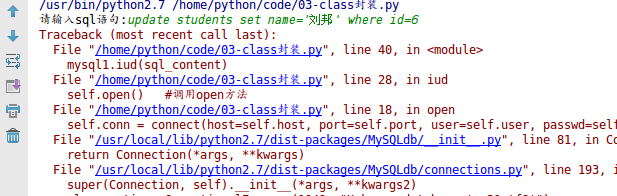
sql_content = raw_input('请输入sql语句:')

mysql1.iud(sql_content)
4.版本4:抛出异常,参数化
# -*- coding:utf-8 -*-

from MySQLdb import *

class MysqlHelper:

    """封装"""

    def __init__(self,host,port,user,passwd,db,charset='utf8'):

        """初始化"""

        self.host=host

        self.port=port

        self.user=user

        self.passwd=passwd

        self.db=db

        self.charset=charset

    def open(self):

        """连接数据库"""

        self.conn = connect(host=self.host, port=self.port, user=self.user, passwd=self.passwd, db=self.db, charset=self.charset)

        self.cursor1 = self.conn.cursor()

    def close(self):

        """关闭连接"""

        self.cursor1.close()

        self.conn.close()

    def iud(self,sql,params):

        """增删改"""

        try:

            self.open()   #调用open方法

            self.cursor1.execute(sql,params)

            self.conn.commit()

            self.close()   #调用close方法

            print('ok')

        except Exception as e:

            print(e.message)

mysql1 = MysqlHelper("localhost",3306,"root","mysql","py31","utf8")

name = "jack"

id = 1

sql = 'update students set name=%s where id=%s'

params=[name,id]

mysql1.iud(sql,params)
/usr/bin/python2.7 /home/python/code/03-class封装.py

ok

+----+------------+--------+---------------------+----------+

|  1 | jack       |       | 1999-09-09 00:00:00 |          |
5.版本5:查询
# -*- coding:utf-8 -*-

from MySQLdb import *

class MysqlHelper:

    """封装"""

    def __init__(self,host,port,user,passwd,db,charset='utf8'):

        """初始化"""

        self.host=host

        self.port=port

        self.user=user

        self.passwd=passwd

        self.db=db

        self.charset=charset

    def open(self):

        """连接数据库"""

        self.conn = connect(host=self.host, port=self.port, user=self.user, passwd=self.passwd, db=self.db, charset=self.charset)

        self.cursor1 = self.conn.cursor()

    def close(self):

        """关闭连接"""

        self.cursor1.close()

        self.conn.close()

    def iud(self,sql,params):

        """增删改"""

        try:

            self.open()   #调用open方法

            self.cursor1.execute(sql,params)

            self.conn.commit()

            self.close()   #调用close方法

            print('ok')

        except Exception as e:

            print(e.message)

    def all(self,sql,params=()):       #默认参数

        try:

            self.open()

            print ""

            self.cursor1.execute(sql,params)

            result = self.cursor1.fetchall()    #fetchall()获取多条数据

            print ""                                     #fetchone()获取1条数据

            print(result)

            self.close()

            return result                             #返回result

        except Exception as e:

            print(e.message)

mysql1 = MysqlHelper("localhost",3306,"root","mysql","py31","utf8")

sql = 'select * from students where id<5'

result = mysql1.all(sql)

print(result)
1

2

((1L, u'jack', '\x01', datetime.datetime(1999, 9, 9, 0, 0), '\x00'), (2L, u'\u817e\u65ed', '\x01', datetime.datetime(1990, 2, 2, 0, 0), '\x00'), (3L, u'\u7f51\u6613', '\x01', None, '\x00'), (4L, u'\u5c0f\u7c73', '\x01', None, '\x00'))

((1L, u'jack', '\x01', datetime.datetime(1999, 9, 9, 0, 0), '\x00'), (2L, u'\u817e\u65ed', '\x01', datetime.datetime(1990, 2, 2, 0, 0), '\x00'), (3L, u'\u7f51\u6613', '\x01', None, '\x00'), (4L, u'\u5c0f\u7c73', '\x01', None, '\x00'))
6.版本6:获取单条数据
# -*- coding:utf-8 -*-

from MySQLdb import *

class MysqlHelper:

    """封装"""

    def __init__(self,host,port,user,passwd,db,charset='utf8'):

        """初始化"""

        self.host=host

        self.port=port

        self.user=user

        self.passwd=passwd

        self.db=db

        self.charset=charset

    def open(self):

        """连接数据库"""

        self.conn = connect(host=self.host, port=self.port, user=self.user, passwd=self.passwd, db=self.db, charset=self.charset)

        self.cursor1 = self.conn.cursor()

    def close(self):

        """关闭连接"""

        self.cursor1.close()

        self.conn.close()

    def iud(self,sql,params):

        """增删改"""

        try:

            self.open()   #调用open方法

            self.cursor1.execute(sql,params)

            self.conn.commit()

            self.close()   #调用close方法

            print('ok')

        except Exception as e:

            print(e.message)

    def all(self,sql,params=()):

        """获取多条数据"""

        try:

            self.open()

            self.cursor1.execute(sql,params)

            result = self.cursor1.fetchall()

            print(result)

            self.close()

            return result

        except Exception as e:

            print(e.message)

    def one(self,sql,params=()):

        """获取单挑数据"""

        try:

            self.open()

            self.cursor1.execute(sql,params)

            result = self.cursor1.fetchone()

            print(result)

            self.close()

            return result

        except Exception as e:

            print(e.message)
7.版本7:封装完成
#encoding=utf8

import MySQLdb

class MysqlHelper():

    def __init__(self,host,port,db,user,passwd,charset='utf8'):

        self.host=host

        self.port=port

        self.db=db

        self.user=user

        self.passwd=passwd

        self.charset=charset

    def connect(self):

        self.conn=MySQLdb.connect(host=self.host,port=self.port,db=self.db,user=self.user,passwd=self.passwd,charset=self.charset)

        self.cursor=self.conn.cursor()

    def close(self):

        self.cursor.close()

        self.conn.close()

    def get_one(self,sql,params=()):

        result=None

        try:

            self.connect()

            self.cursor.execute(sql, params)

            result = self.cursor.fetchone()

            self.close()

        except Exception, e:

            print e.message

        return result

    def get_all(self,sql,params=()):

        list=()

        try:

            self.connect()

            self.cursor.execute(sql,params)

            list=self.cursor.fetchall()

            self.close()

        except Exception,e:

            print e.message

        return list

    def insert(self,sql,params=()):

        return self.__edit(sql,params)

    def update(self, sql, params=()):

        return self.__edit(sql, params)

    def delete(self, sql, params=()):

        return self.__edit(sql, params)

    def __edit(self,sql,params):

        count=0

        try:

            self.connect()

            count=self.cursor.execute(sql,params)

            self.conn.commit()

            self.close()

        except Exception,e:

            print e.message

        return count
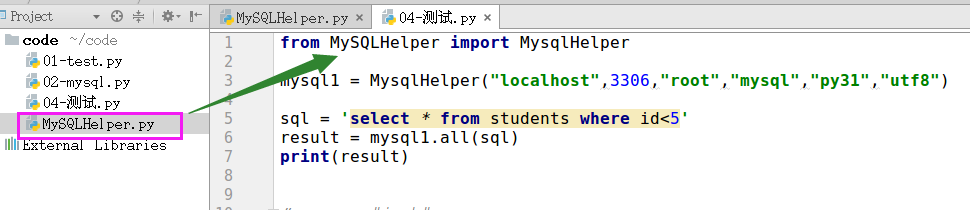
8 当做第三方模块导入
10 class封装 ORM的更多相关文章
- Windows XP/Windows 7/Windows 8/Windows 10系统封装的另类教程和思路
如果是早些年,XP时代的Ghost封装,各种的封装工具和驱动只能安装工具满天飞,比如龙帝国,还有很早用C++写的忘了什么名字了,自由天空的,非常的多: 当时为什么要用Ghost和用这些驱动安装工具以及 ...
- 10 python 封装----@property的用法
1.基本概念 在python中用双下划线开头的方式将属性隐藏起来(设置成私有的) #其实这仅仅这是一种变形操作 #类中所有双下划线开头的名称如__x都会自动变形成:_类名__x的形式: class A ...
- 封装ORM.py与mysql_client.py代码
ORM.py ''' ORM: 对象关系映射 ---> 映射到数据库MySQL中的数据表 类名 ---> 表名 对象 ---> 一条记录 对象.属性 ---> 字段 模拟Dja ...
- 我的第一个python web开发框架(30)——定制ORM(六)
在开发中,查询操作是使用最多的,而查询列表是其中之一,查询列表可分为分页查询和不分页查询(它们之间多了一次总记录数查询),还可以分为单表查询和多表关联查询,返回的结构体根据前端使用的表单框架不同而有所 ...
- Django中ORM介绍和字段及字段参数
Object Relational Mapping(ORM) 1 ORM介绍 1.1 ORM概念 对象关系映射(Object Relational Mapping,简称ORM)模式是一种为了解决面向对 ...
- .Net Core3.1 + EF Core + LayUI 封装的MVC版后台管理系统
项目名称:学生信息管理系统1.0 后台框架:.Net Core 3.1 + EF Core yrjw.ORM.Chimp 前端框架:ASP.NET Core MVC + LayUI + Bo ...
- Django基础四之测试环境和ORM查询
Django基础四之测试环境和ORM查询 目录 Django基础四之测试环境和ORM查询 1. 搭建测试环境 1.1 测试环境搭建方法: 1.2 使用测试环境对数据库进行CURD 1.3 返回Quer ...
- 【ASP.NET程序员福利】打造一款人见人爱的ORM(二)
上一篇我已经给大家介绍AntORM的框架[ASP.NET程序员福利]打造一款人见人爱的ORM(一),今天就来着重介绍一下如何使用这套框架 1>AntORM 所有成员 如果你只想操作一种数据库,可 ...
- Moon.Orm 5.0 (MQL版)
Moon.Orm 5.0 (MQL版) 实战实例Moon.Orm 5.0 革命性的设计 打造最便捷的异步分页技术(提供下载) 摘要: 一.建一个项目(以WebForm为例)配置文件配置(注意您自己的路 ...
随机推荐
- Jetty服务器的使用
Jetty 是一个开源的servlet容器,它为基于Java的web容器,例如JSP和servlet提供运行环境.Jetty是使用Java语言编写的,它的API以一组JAR包的形式发布.开发人员可以将 ...
- 在西雅图华盛顿大学 (University of Washington) 就读是怎样一番体验?
http://www.zhihu.com/question/20811431 先说学校.优点: 如果你是个文青/装逼犯,你来对地方了.连绵不断的雨水会一下子让写诗的感觉将你充满. 美丽的校园.尤其 ...
- vos设置禁止被叫特定号码段特定区域
问题: 为了防止卡线遭投诉被运营商停,给公司带来损失,对一些特定号段特定区域要进行限制,不让客户呼出 打开VOS3000 落地网关——补充设置——落地被叫前缀——禁止 添加禁止号段 具体案例: 如填写 ...
- Verilog频率计设计
这是以前的一个可编程逻辑课上机实验三 实验报告 数字频率计的基本设计思路是在给定一个time开始测量的时候产生的T的个数,也就是采用一个标准的基准时钟,在单位时间(1秒)里对被测信号的脉冲数进行计数. ...
- 如何在 ubuntu linux 一行中执行多条指令
cd /my_folder rm *.jar svn co path to repo mvn compile package install 使用&& 运算符连接指令 cd /my_f ...
- 字符串处理(POJ1782)
题目链接:http://poj.org/problem?id=1782 解题报告: #include <iostream> #include <cstdio> #include ...
- PHP精度问题
PHP 为任意精度数学计算提供了二进制计算器(Binary Calculator),它支持任意大小和精度的数字,以字符串形式描述 bcadd — 加法bccomp — 比较bcdiv — 相除bcmo ...
- Vuex进阶
1.插件 下面以一个对state进行持久化存储的插件为例进行介绍: 代码结构: saveInLocal.js export default function (store) { if (localSt ...
- IIS配置MIME类型
有时候我们上传的视频,如果IIS上没有配置此格式是播放不了的.这个时候需要你在IIS上添加这个类型才能播放. MIME类型 ①打开你的IIS,点你的网站 ②双击 MIME类型 ③右键-->添加 ...
- jq weui 图片浏览器Photo Browser 第一次点击任意图片总是显示第一张
第一次做这个图片浏览器的时候遇到一个问题,如共有6张图片,每次进入页面时,第一次点击,无论去点击6张图片的哪一张初始化显示的都是第一张图片.后面的每次点击都没有问题的. for(let i = 0;i ...