
python模块详解 time与date time
模块的分类:
a:标准库 内置模块 如sys,os等
b:开源模块 大神封装好的 直接可以拿来用的。
c:自定义模块 自己封装的模块
Python中通常表示时间的方式有:时间戳、格式化的日期、元组(九个元素表示)。
time模块
time模块属于常用的内置模块。通常用来处理时间。
时间戳
import time

print(time.time()) #1501743350.2958055
格式化日期
元组
import time

print(time.localtime())#time.struct_time(tm_year=2017, tm_mon=8, tm_mday=3, tm_hour=15, tm_min=0, tm_sec=1, tm_wday=3, tm_yday=215, tm_isdst=0)
tm_year:年 tm_mon:月 tm_mday:日 tm_hour:时 tm_min:分 tm_sec:秒 tm_wday:一周的第几天 tm_yday:一年的第几天 tm_isdst:是否是夏令时。0=否。
常用函数
time.timezone 当地时间和UTC时间的差值 以秒为单位。
import time

print(time.timezone) #-28800
time.altzone 夏令时和UTC时间的差值 以秒为单位。
import time

print(time.altzone) #-32400
time.dayligth 是否使用了夏令时
import time

print(time.daylight) #0 未使用
常用函数
sleep(s) 延时几秒执行
time.sleep(2) #,延时2秒在执行
gmtime(s) 时间戳转元组(UTC时间、标准时间、格林威治时间) 如果不传时间戳表示当前时间
import time

print(time.time())#1501745154.610916

print(time.gmtime(1501745138.0052316))#time.struct_time(tm_year=2017, tm_mon=8, tm_mday=3, tm_hour=7, tm_min=25, tm_sec=38, tm_wday=3, tm_yday=215, tm_isdst=0)
localtime(s) 时间戳转元组(当前时区) 如果不传时间戳表示当前时间
import time

print(time.time()) #1501745513.560935

print(time.localtime(1501745500.8039103)) #time.struct_time(tm_year=2017, tm_mon=8, tm_mday=3, tm_hour=15, tm_min=31, tm_sec=40, tm_wday=3, tm_yday=215, tm_isdst=0)
元组格式取值:
x = time.localtime(1501745500.8039103)

print(x.tm_year)  #2017

print(x.tm_mon)  #8

print(x.tm_mday) #3
mktime(t) 元组转时间戳
x = time.localtime(1501745500.8039103)

print(time.mktime(x)) #1501745500.0
strftime(t) 元组转格式化时间
x = time.localtime(1501745500.8039103)

print(time.strftime('%Y-%m-%d %H:%M:%S %z %a %A',x))#2017-08-03 15:31:40 +0800 Thu Thursday
strftime(f) 格式化时间 转 元组
print(time.strptime('2017-08-03 15:31:40','%Y-%m-%d %H:%M:%S'))
#time.struct_time(tm_year=2017, tm_mon=8, tm_mday=3, tm_hour=15, tm_min=31, tm_sec=40, tm_wday=3, tm_yday=215, tm_isdst=-1)
asctime(t) 元组转字符串时间 有点像js的时间格式 如果不传参数表示当前时间的元组格式 当前时区
print(time.asctime()) #Thu Aug 3 16:28:32 2017
ctime(s) 时间戳转成字符串时间 有点像js的时间格式 如果不传参数表示当前时间的时间戳 当前时区
print(time.ctime()) #Thu Aug 3 16:30:56 2017
这种字符串时间的格式:
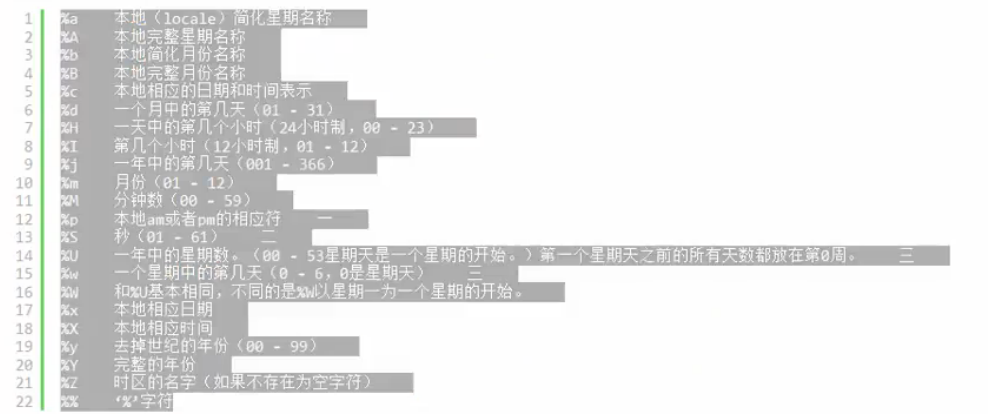
datetime模块
datetime.datetime.now() 获取当前时间 #第一个datetime是模块 第二个datetime是类 now是方法
import datetime

print(datetime.datetime.now())#2017-08-03 16:36:47.864395
datetime.datetime.now() + datetime.timedelta(day) 查询几天后的时间
print(datetime.datetime.now() + datetime.timedelta(3))#3天后的时间
print(datetime.datetime.now() + datetime.timedelta(-3))#3天前时间
print(datetime.datetime.now() + datetime.timedelta(hours =3))#3小时后的时间

print(datetime.datetime.now() + datetime.timedelta(minutes=3))#3分钟后的时间
python模块详解 time与date time的更多相关文章
- python模块详解 | selenium(持续更新中)
目录: 关于selenium Selenium 安装Selenium 安装浏览器驱动 配置环境变量 selenium方法详解 定位元素 元素操作 浏览器操作 鼠标事件 浏览器事件 设置元素等待 多表单 ...
- python模块详解 random os
random模块 常用方法 random.random() 随机产生一个小于1的浮点数 import random print(random.random()) #0.4153761818276826 ...
- python模块详解
什么是模块? 常见的场景:一个模块就是一个包含了python定义和声明的文件,文件名就是模块名字加上.py的后缀. 但其实import加载的模块分为四个通用类别: 1 使用python编写的代码(.p ...
- python模块详解 sys shutil
sys模块 sys.argv 命令行参数List,第一个元素是程序本身路径 sys.exit(n) 退出程序,正常退出时exit(0) sys.version 获取Python解释程序的版本信息 sy ...
- python模块详解 | shutil
简介: shutil是python的一个内置模块,提供了许多关于文件和文件集合的高级操作,特别提供文件夹与文件操作.归档操作了支持文件复制和删除的功能. 文件夹与文件操作: copyfileobj(f ...
- 小白的Python之路 day5 python模块详解及import本质
一.定义 模块:用来从逻辑上组织python代码(变量,函数,类,逻辑:实现一个功能) 本质就是.py结尾的python文件(文件名:test.py,对应的模块名:test) 包:用来从逻辑上组织模块 ...
- Python 模块详解及import本质
同在当前目录下的模块和包导入 模块定义 本质就是.py结尾的python文件. 用来从逻辑上组织python代码(变量,函数,类,逻辑) 文件名: test.py; 对应的模块名 : test 模块 ...
- Python模块详解以及import本质,获得文件当前路径os.path.abspath,获得文件的父目录os.path.dirname,放到系统变量的第一位sys.path.insert(0,x)
模块介绍 1.定义: 模块:用来从逻辑上组织python代码(变量,函数,类,逻辑:实现一个功能),本质就是.py结尾的python文件(文件名:test.py,对应的模块名:test) 包:用来从逻 ...
- python模块详解 logging
打印日志的五个级别: import logging logging.debug('test debug') logging.info('test info') logging.warning('tes ...
随机推荐
- 改变iOS app的icon(iOS10.3)
原文 改变iOS app的icon官方iOS10.3新增了可以让开发者去更改app的icon,接下来看看怎么更改.官方API给的东西很少,只是介绍了一个实例方法: 1 open func setAlt ...
- [转载]sscanf函数
来源:http://c.biancheng.net/cpp/html/296.html 头文件:#include <stdio.h> sscanf()函数用于从字符串中读取指定格式的数据, ...
- SPI 实现原理及运用
SPI原理 SPI的全名为Service Provider Interface.大多数开发人员可能不熟悉,因为这个是针对厂商或者插件的.在java.util.ServiceLoader的文档里有比较详 ...
- 07. 如何实现移动端rem适配
如何实现移动端rem适配 <!DOCTYPE html> <html> <head> <meta charset="UTF-8"> ...
- webpack4.0入门配置文件
wepback风头正火 ,但是公司一直在用gulp,正好赶上年底活动,借此机会第一次尝试了webpack,说实话webpack真的很强大,内容一层一层递进. 这几天跟着官网跑了一遍,然后写了自己的配置 ...
- iperf简单说明
1.官网下载安装包 https://iperf.fr/iperf-download.php 2.安装(根据下载包的类型进行安装) 3.参数说明服务端(默认监听端口5201) iperf -s -u - ...
- P3172 [CQOI2015]选数(莫比乌斯反演)
[题目链接] https://www.luogu.org/problemnew/show/P3172 [题解] https://www.luogu.org/blog/user29936/solutio ...
- yum安装zabbix故障报错
装zabbix时报错 [root@zabbix ~]# rpm -ivh zabbix-server-mysql-2.2.3-1.el6.x86_64.rpm zabbix-web-mysql-2.2 ...
- SSH防入侵
1.1 ssh防止入侵方法说明 如何防止SSH登录入侵小结: 1.用密钥登录,不用密码登陆 2.牤牛阵法:解决SSH安全问题 a.防火墙封闭SSH,指定源IP限制(局域网.信任公网) b.开启SSH只 ...
- WIN2008R2 asp.net core的配置
配置IIS Windows Server上通过“添加角色和功能”,桌面Windows上通过“启用和关闭Windows功能”来安装和配置IIS.确保勾选Web服务和“IIS 管理控制台”: Window ...