
WebAPI示例
一、新建项目
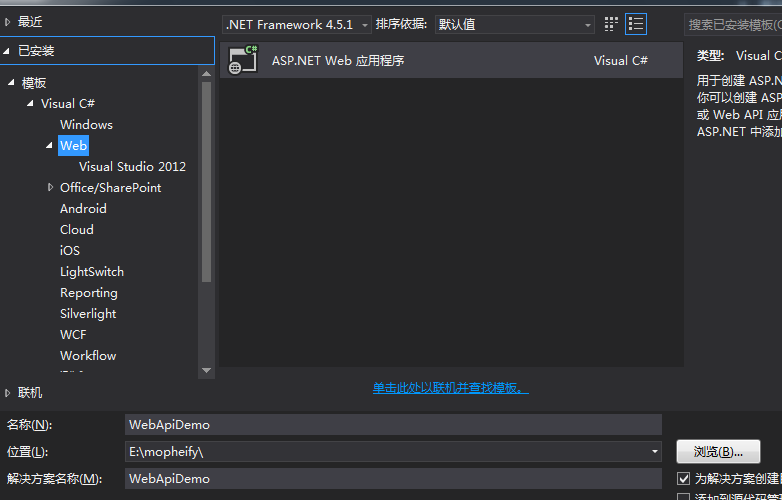
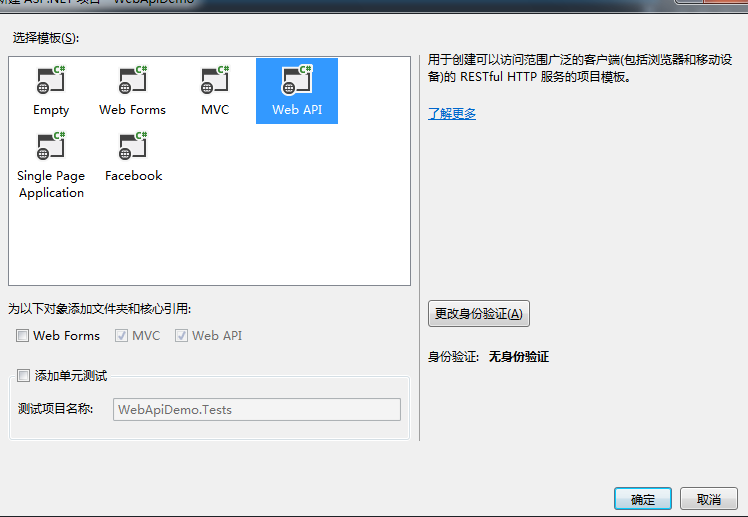
二、
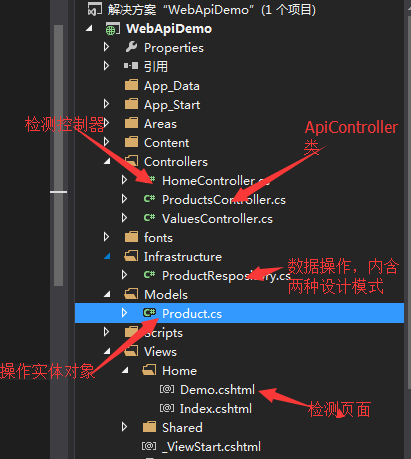
代码:
Models.Products实体类
    public class Product

    {

        /// <summary>

        /// 产品编号

        /// </summary>

        public int Pid { get; set; }

        /// <summary>

        /// 产品名称

        /// </summary>

        public string Name { get; set; }

        /// <summary>

        /// 产品价格

        /// </summary>

        public decimal Price { get; set; }

        /// <summary>

        /// 产品库存

        /// </summary>

        public int  Stock { get; set; }

    }
ProductsController类
using System;

using System.Collections.Generic;

using System.Linq;

using System.Net;

using System.Net.Http;

using System.Web.Http;

using WebApiDemo.Infrastructure;

using WebApiDemo.Models;

namespace WebApiDemo.Controllers

{

    public class ProductsController : ApiController

    {

        //推荐使用锁机制,能有效规避多线程时创建多个实例问题。

        private ProductRespository respo = ProductRespository.CurrentLock;

        public IEnumerable<Product> Get()

        {

            return respo.GetAll();

        }

        public Product Get(int pid)

        {

            return respo.GetOneById(pid);

        }

        public Product Post(Product product)

        {

            if (ModelState.IsValid)

            {

                product = respo.AddOne(product);

            }

            return product;

        }

        public bool Put(Product product)

        {

            if (ModelState.IsValid)

            {

                return respo.Update(product);

            }

            return false;

        }

        public bool Delete(int pid)

        {

            return respo.Remove(pid);

        }

    }

}
Infrastructure.ProductRespository类
using System;

using System.Collections.Generic;

using System.Linq;

using System.Web;

using WebApiDemo.Models;

namespace WebApiDemo.Infrastructure

{

    public sealed class ProductRespository

    {

        //单例模式,先创建型(饿汉)

        private static ProductRespository _currentHungry = new ProductRespository();

        public static ProductRespository CurrentHungry

        {

            get { return _currentHungry; }

        }

        //单例模式,按需创建型(懒汉)

        //单例模式,先创建型(饿汉)

        private static ProductRespository _currentLazy = null;

        public static ProductRespository CurrentLazy

        {

            get

            {

                return _currentLazy ?? (_currentLazy = new ProductRespository());

            }

        }

        //单例模式,锁机制

        private static object lockobj = new object();

        private static ProductRespository _currentLock = null;

        public static ProductRespository CurrentLock

        {

            get

            {

                if (_currentLock == null)

                {

                    lock (lockobj)

                    {

                        if (_currentLock == null)

                        {

                            _currentLock = new ProductRespository();

                        }

                    }

                }

                return _currentLock;

            }

        }

        private List<Product> products = new List<Product>() {

            new Product{ Pid=,Name="Product1",Price=20.23M,Stock=},

            new Product{ Pid=,Name="Product2",Price=10.23M,Stock=},

            new Product{ Pid=,Name="Product3",Price=,Stock=},

            new Product{ Pid=,Name="Product4",Price=,Stock=},

        };

        /// <summary>

        /// 获得所有产品

        /// </summary>

        /// <returns></returns>

        public IEnumerable<Product> GetAll()

        {

            return products;

        }

        /// <summary>

        /// 根据ID选择产品

        /// </summary>

        /// <param name="pid">产品ID</param>

        /// <returns></returns>

        public Product GetOneById(int pid)

        {

            var selected = products.Where(p => p.Pid == pid).FirstOrDefault();

            return selected;

        }

        /// <summary>

        /// 加入对象操作

        /// </summary>

        /// <param name="newitem"></param>

        /// <returns></returns>

        public Product AddOne(Product newitem)

        {

            newitem.Pid = products.Count + ;

            products.Add(newitem);

            return newitem;

        }

        /// <summary>

        /// 根据ID删除对象

        /// </summary>

        /// <param name="pid">待删除的对象的编号</param>

        /// <returns></returns>

        public bool Remove(int pid)

        {

            var item = GetOneById(pid);

            if (item != null)

            {

                products.Remove(item);

                return true;

            }

            return false;

        }

        /// <summary>

        /// 更新产品操作

        /// </summary>

        /// <param name="item"></param>

        /// <returns></returns>

        public bool Update(Product item)

        {

            var olditem = GetOneById(item.Pid);

            if (olditem != null)

            {

                products.Remove(olditem);

                products.Add(item);

                return true;

            }

            else

            {

                return false;

            }

        }

    }

}
测试页面内容
@{

    Layout = null;

}

<!DOCTYPE html>

<html>

<head>

    <meta name="viewport" content="width=device-width" />

    <title>Demo</title>

    <link href="~/Content/bootstrap.min.css" rel="stylesheet" />

    <link href="~/Content/Site.css" rel="stylesheet" />

    <script src="~/Scripts/jquery-1.10.2.min.js"></script>

    <script type="text/javascript">

        $(function () {

            $("#getAllJson").click(function () {

                AjaxHelper("get", "", "", function (data) {

                    $("#result").html(JSON.stringify(data));

                })

            });

            $("#getAllXml").click(function () {

                AjaxHelper("get", "", "XML", function (data) {

                    var oSerializer = new XMLSerializer();

                    var sXML = oSerializer.serializeToString(data);

                    $("#result").html(sXML);

                })

            });

            $("#getOneJson").click(function () {

                AjaxHelper("get", { "pid": 1 }, "Json", function (data) {

                    $("#result").html(JSON.stringify(data));

                })

            });

            $("#postOneXml").click(function () {

                AjaxHelper("post", { "Name": "Product5", "Price": 19.98, "Stock": 1 }, "Json", function (data) {

                    $("#result").html(JSON.stringify(data));

                })

            });

            $("#putOneXml").click(function () {

                AjaxHelper("Put", { "Pid": 5, "Name": "Product5+", "Price": 19.98, "Stock": 1 }, "Json", function (data) {

                    $("#result").html(JSON.stringify(data));

                })

            });

            $("#delOneXml").click(function () {

                AjaxHelper("DELETE", "", "Json", function (data) {

                    $("#result").html(JSON.stringify(data));

                })

            });

        });

        function AjaxHelper(_method, _data, _datatype, _success)

        {

            $.ajax({

                url: "/Api/Products/5",

                type: _method||"get",

                data: _data,

                dataType: _datatype||"Json",

                success: _success

            });

        }

    </script>

</head>

<body>

    <div class="container">

        <div class="row">

        </div>

        <div class="row">

            <div class="btn-group">

                <button id="getAllJson" class="btn btn-default">获得所有(Json)</button>

                <button id="getAllXml" class="btn btn-default">获得所有(XML)</button>

                <button id="getOneJson" class="btn btn-default">获得(id=1)</button>

                <button id="postOneXml" class="btn btn-default">新建(post)</button>

                <button id="putOneXml" class="btn btn-default">更新()</button>

                <button id="delOneXml" class="btn btn-default">删除()</button>

            </div>

        </div>

        <div class="row">

            <div id="result">

            </div>

        </div>

    </div>

</body>

</html>
运行结果:

至此一个完整的WebAPIDemo创建完成。
WebAPI示例的更多相关文章
- ASP.NET MVC4 WebAPI若干要点
本文仅仅是将一些可以运行无误的WebAPI示例的要点,记录下来,供自己查阅,也供刚刚学习WebAPI的读者参考之. 1.默认的API是不会过滤到action这个级别的,如果要过滤到这个级别,必须在路由 ...
- mvc中的webapi
MVC中 webapi的使用 和 在其他网站中如何来调用(MVC) 1.webapi的路由规则注册在App_Start\WebApiConfig.cs文件中 2.webapi控制器继承父类 apiCo ...
- [开源]快速构建一个WebApi项目
项目代码:MasterChief.DotNet.ProjectTemplate.WebApi 示例代码:https://github.com/YanZhiwei/MasterChief.Project ...
- Asp.Net WebApi学习教程之增删改查
webapi简介 在asp.net中,创建一个HTTP服务,有很多方案,以前用ashx,一般处理程序(HttpHandler),现在可以用webapi 微软的web api是在vs2012上的mvc4 ...
- Asp.Net Core WebAPI入门整理(一)
一.Asp.Net Core WebAPI 1.目前版本是v1.1 2.默认路由处理和Asp.Net WebAPI有些 区别了,现在使用的是控制器路由[Route("api/Menu&qu ...
- 我的“第一次”,就这样没了:DDD(领域驱动设计)理论结合实践
写在前面 插一句:本人超爱落网-<平凡的世界>这一期,分享给大家. 阅读目录: 关于DDD 前期分析 框架搭建 代码实现 开源-发布 后记 第一次听你,清风吹送,田野短笛:第一次看你,半弯 ...
- RESTful API URI 设计的一些总结
非常赞的四篇文章: Resource Naming Best Practices for Designing a Pragmatic RESTful API 撰写合格的 REST API JSON 风 ...
- DDD(领域驱动设计)理论结合实践
DDD(领域驱动设计)理论结合实践 写在前面 插一句:本人超爱落网-<平凡的世界>这一期,分享给大家. 阅读目录: 关于DDD 前期分析 框架搭建 代码实现 开源-发布 后记 第一次听 ...
- .NET Core微服务之基于Steeltoe集成Zuul实现统一API网关
Tip: 此篇已加入.NET Core微服务基础系列文章索引,本篇接上一篇<基于Steeltoe使用Eureka实现服务注册与发现>,所演示的示例也是基于上一篇的基础上而扩展的. => ...
随机推荐
- 洛谷 P2982 [USACO10FEB]慢下来Slowing down
题目描述 Every day each of Farmer John's N (1 <= N <= 100,000) cows conveniently numbered 1..N mov ...
- 【实例分割】PANet简单笔记
PANet是18年的一篇CVPR,作者来自港中文,北大,商汤与腾讯优图,PANET可看作Mask-RCNN+,是在Mask-RCNN基础上做的几处改进. 论文地址:https://arxiv.org/ ...
- Kibana6.2.2源码入口
后端入口 \kibana-6.2.2\src\server\kbn_server.js 前端入口 kibana-6.2.2\src\ui\public\chrome\chrome.js 页面框架模板 ...
- hdu3567 八数码2(康托展开+多次bfs+预处理)
Eight II Time Limit: 4000/2000 MS (Java/Others) Memory Limit: 130000/65536 K (Java/Others)Total S ...
- linux学习3(vim)
一.文档编辑 1. vi和vim命令 Vim的打开文件的方式(4种,要求掌握的就前三种): 1. vim 文件路径 ...
- day23 模块
1. 模块 1. 首先,我们先看个老生常谈的问题. 什么是模块. 模块就是一个包含了python定义和声 明的文件, 文件名就是模块的名字加上.py后缀. 换句话说我们目前写的所有的py文件都可以 看 ...
- windows开机启动软件设置
开机启动软件设置 操作步骤如下: 1.按win+r,输入 C:\ProgramData\Microsoft\Windows\Start Menu\Programs\Startup,点击确定: 2.拖动 ...
- java——int、args[]传参、标签、数字塔?、一个输入格式
1.当int型整数超出自己范围时,会从它的上界重新开始. public class exp { public static void main(String[] args) { int i = 214 ...
- mysql 安装以及卸载 CentOS 6.9
mysql官网下载地址:https://dev.mysql.com/downloads/mysql/ 本次操作系统是 阿里云服务器 CentOS 6.9 64位 下载得到tar 包: mysql ...
- Vue.js-----轻量高效的MVVM框架(九、组件利用Props传递数据)
#使用props传递数据 html:传递普通的字符串 <h3>#使用props传递数据</h3> <div id="dr01"> <div ...