
Oracle Study之-AIX6.1构建Oracle 10gR2 RAC(4)
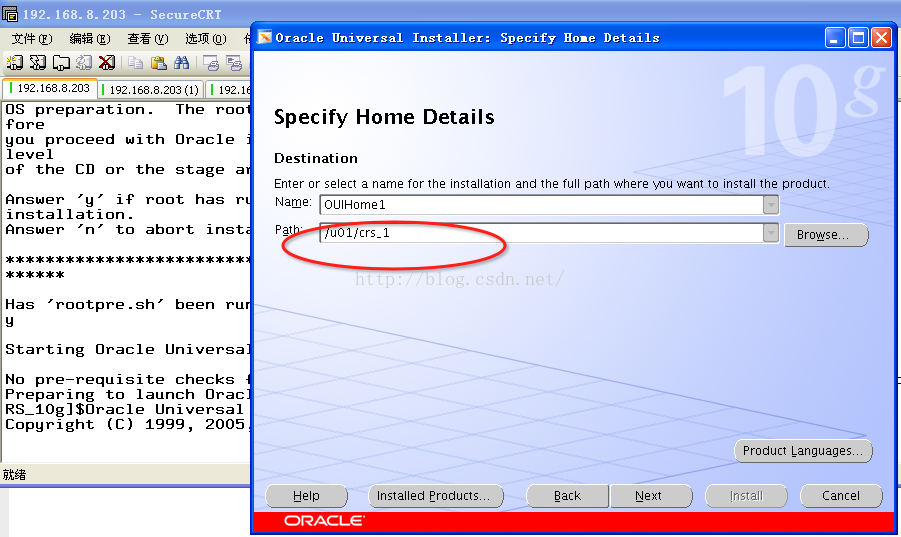
[root@aix203 p6718715_10203_AIX64-5L]#./rootpre.sh
./rootpre.sh output will be logged in /tmp/rootpre.out_16-03-15.17:51:20

Saving the original files in /etc/ora_save_16-03-15.17:51:20....

Copying new kernel extension to /etc....

./rootpre.sh[295]: test: argument expected

Loading the kernel extension from /etc

 Oracle Kernel Extension Loader for AIX

       Copyright (c) 1998,1999 Oracle Corporation

 Kernel Extension /etc/pw-syscall.64bit_kernel already loaded, unloading it

 Unconfigured the kernel extension successfully

 Unloaded the kernel extension successfully

 Successfully loaded /etc/pw-syscall.64bit_kernel with kmid: 0x50e5d000

 Successfully configured /etc/pw-syscall.64bit_kernel with kmid: 0x50e5d000

The kernel extension was successfuly loaded.

./rootpre.sh[360]: test: argument expected

Checking if group services should be configured....

Please confirm your Oracle userid is a member of the group: hagsuser

Configuring HACMP group services socket for possible use by Oracle.
USAGE:

cluvfy [ -help ]

cluvfy stage { -list | -help }

cluvfy stage {-pre|-post} <stage-name> <stage-specific options>  [-verbose]

cluvfy comp  { -list | -help }

cluvfy comp  <component-name> <component-specific options>  [-verbose]
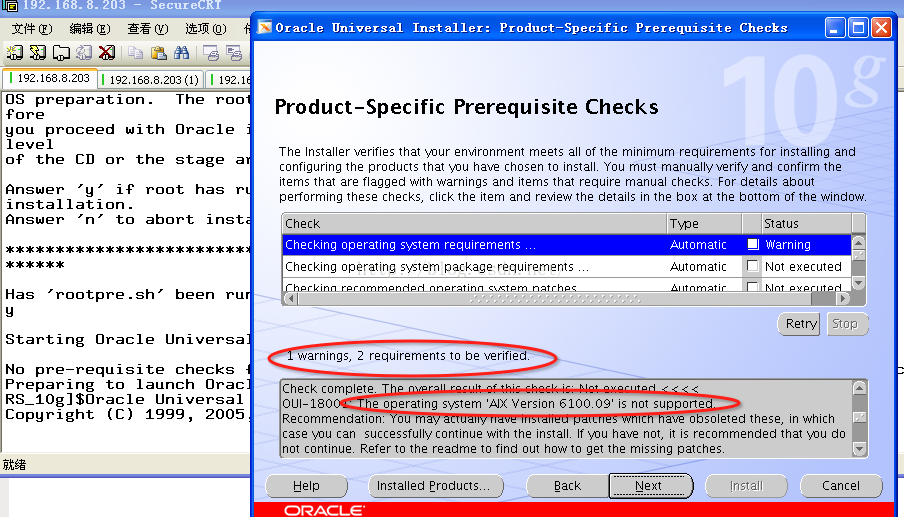
[oracle@aix203 cluvfy]$./runcluvfy.sh stage -pre crsinst -n aix203,aix204 -verbose
Performing pre-checks for cluster services setup

Checking node reachability...

Check: Node reachability from node "aix203"

  Destination Node                      Reachable?

------------------------------------  ------------------------

  aix203                                yes

  aix204                                yes

Result: Node reachability check passed from node "aix203".

Checking user equivalence...

Check: User equivalence for user "oracle"

  Node Name                             Comment

  ------------------------------------  ------------------------

  aix204                                passed

  aix203                                passed

Result: User equivalence check passed for user "oracle".

Checking administrative privileges...

Check: Existence of user "oracle"

  Node Name     User Exists               Comment

  ------------  ------------------------  ------------------------

  aix204        yes                       passed

  aix203        yes                       passed

Result: User existence check passed for "oracle".

Check: Existence of group "oinstall"

  Node Name     Status                    Group ID

  ------------  ------------------------  ------------------------

  aix204        exists                    300

  aix203        exists                    300

Result: Group existence check passed for "oinstall".

Check: Membership of user "oracle" in group "oinstall" [as Primary]

  Node Name         User Exists   Group Exists  User in Group  Primary       Comment

  ----------------  ------------  ------------  ------------  ------------  ------------

  aix204            yes           yes           yes           yes           passed

  aix203            yes           yes           yes           yes           passed

Result: Membership check for user "oracle" in group "oinstall" [as Primary] passed.

Administrative privileges check passed.

Checking node connectivity...

Interface information for node "aix204"

  Interface Name                  IP Address                      Subnet

  ------------------------------  ------------------------------  ----------------

  en0                             192.168.8.204                   192.168.8.0

  en2                             10.10.10.204                    10.10.10.0

Interface information for node "aix203"

  Interface Name                  IP Address                      Subnet

  ------------------------------  ------------------------------  ----------------

  en0                             192.168.8.203                   192.168.8.0

  en2                             10.10.10.203                    10.10.10.0

Check: Node connectivity of subnet "192.168.8.0"

  Source                          Destination                     Connected?

  ------------------------------  ------------------------------  ----------------

  aix204:en0                      aix203:en0                      yes

Result: Node connectivity check passed for subnet "192.168.8.0" with node(s) aix204,aix203.

Check: Node connectivity of subnet "10.10.10.0"

  Source                          Destination                     Connected?

------------------------------  ------------------------------  ----------------

  aix204:en2                      aix203:en2                      yes

Result: Node connectivity check passed for subnet "10.10.10.0" with node(s) aix204,aix203.

Suitable interfaces for the private interconnect on subnet "192.168.8.0":

aix204 en0:192.168.8.204

aix203 en0:192.168.8.203

Suitable interfaces for the private interconnect on subnet "10.10.10.0":

aix204 en2:10.10.10.204

aix203 en2:10.10.10.203

ERROR:

Could not find a suitable set of interfaces for VIPs.

Result: Node connectivity check failed.

Checking system requirements for 'crs'...

No checks registered for this product.

Pre-check for cluster services setup was unsuccessful on all the nodes.
watermark/2/text/aHR0cDovL2Jsb2cuY3Nkbi5uZXQv/font/5a6L5L2T/fontsize/400/fill/I0JBQkFCMA==/dissolve/70/gravity/Center" alt="" />
watermark/2/text/aHR0cDovL2Jsb2cuY3Nkbi5uZXQv/font/5a6L5L2T/fontsize/400/fill/I0JBQkFCMA==/dissolve/70/gravity/Center" alt="" />
watermark/2/text/aHR0cDovL2Jsb2cuY3Nkbi5uZXQv/font/5a6L5L2T/fontsize/400/fill/I0JBQkFCMA==/dissolve/70/gravity/Center" alt="" />
watermark/2/text/aHR0cDovL2Jsb2cuY3Nkbi5uZXQv/font/5a6L5L2T/fontsize/400/fill/I0JBQkFCMA==/dissolve/70/gravity/Center" alt="" />
2560+0 records in
2560+0 records out
[root@aix203 /]#dd if=/dev/zero of=/dev/rrac_vote bs=8192 count=2560
2560+0 records in
2560+0 records out
[root@aix203 /]#/u01/crs_1/root.sh
WARNING: directory '/u01' is not owned by root

Checking to see if Oracle CRS stack is already configured

Checking to see if any 9i GSD is up

Setting the permissions on OCR backup directory

Setting up NS directories

Oracle Cluster Registry configuration upgraded successfully

WARNING: directory '/u01' is not owned by root

Successfully accumulated necessary OCR keys.

Using ports: CSS=49895 CRS=49896 EVMC=49898 and EVMR=49897.

node <nodenumber>: <nodename> <private interconnect name> <hostname>

node 1: aix203 aix203-priv aix203

node 2: aix204 aix204-priv aix204

Creating OCR keys for user 'root', privgrp 'system'..

Operation successful.

Now formatting voting device: /dev/rrac_vote

Format of 1 voting devices complete.

Startup will be queued to init within 30 seconds.

Adding daemons to inittab

Adding daemons to inittab

Expecting the CRS daemons to be up within 600 seconds.

CSS is active on these nodes.

        aix203

CSS is inactive on these nodes.

        aix204

Local node checking complete.

Run root.sh on remaining nodes to start CRS daemons.
node2:
[root@aix204 /]#dd if=/dev/zero of=/dev/rrac_vote bs=8192 count=2560
2560+0 records in
2560+0 records out
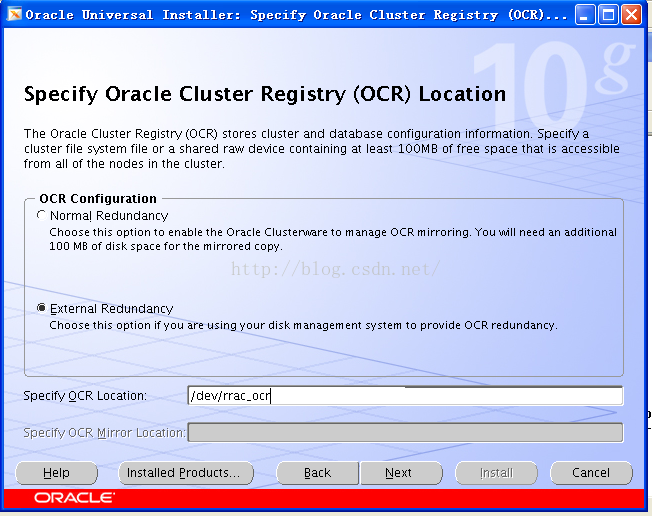
[root@aix204 /]#dd if=/dev/zero of=/dev/rrac_ocr bs=8192 count=2560
2560+0 records in
2560+0 records out
[root@aix204 /]#/u01/crs_1/root.sh
WARNING: directory '/u01' is not owned by root

Checking to see if Oracle CRS stack is already configured

Checking to see if any 9i GSD is up

/etc/oracle does not exist. Creating it now.

Setting the permissions on OCR backup directory

Setting up NS directories

Oracle Cluster Registry configuration upgraded successfully

WARNING: directory '/u01' is not owned by root

clscfg: EXISTING configuration version 3 detected.

clscfg: version 3 is 10G Release 2.

Successfully accumulated necessary OCR keys.

Using ports: CSS=49895 CRS=49896 EVMC=49898 and EVMR=49897.

node <nodenumber>: <nodename> <private interconnect name> <hostname>

node 1: aix203 aix203-priv aix203

node 2: aix204 aix204-priv aix204

clscfg: Arguments check out successfully.

NO KEYS WERE WRITTEN. Supply -force parameter to override.

-force is destructive and will destroy any previous cluster

configuration.

Oracle Cluster Registry for cluster has already been initialized

Startup will be queued to init within 30 seconds.

Adding daemons to inittab

Adding daemons to inittab

Expecting the CRS daemons to be up within 600 seconds.

CSS is active on these nodes.

        aix203

        aix204

CSS is active on all nodes.

Waiting for the Oracle CRSD and EVMD to start

Waiting for the Oracle CRSD and EVMD to start

<span style="color:#cc0000;">Oracle CRS stack installed and running under init(1M)

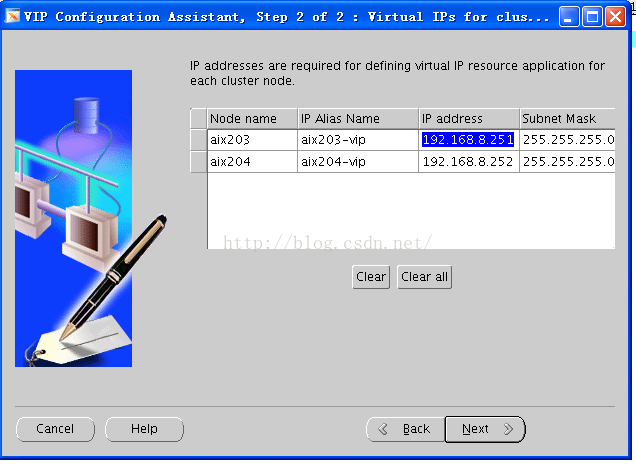
Running vipca(silent) for configuring nodeapps

The given interface(s), "en0" is not public. Public interfaces should be used to configure virtual IPs.</span>
7)执行vipca配置CRS资源
[root@aix204 bin]#./vipca

watermark/2/text/aHR0cDovL2Jsb2cuY3Nkbi5uZXQv/font/5a6L5L2T/fontsize/400/fill/I0JBQkFCMA==/dissolve/70/gravity/Center" alt="" />
<strong>[root@aix203 /]#crsctl check crs</strong>

CSS appears healthy

CRS appears healthy

EVM appears healthy

<strong>[root@aix203 /]#crs_stat -t</strong>

Name           Type           Target    State     Host

------------------------------------------------------------

ora.aix203.gsd application    ONLINE    ONLINE    aix203

ora.aix203.ons application    ONLINE    ONLINE    aix203

ora.aix203.vip application    ONLINE    ONLINE    aix203

ora.aix204.gsd application    ONLINE    ONLINE    aix204

ora.aix204.ons application    ONLINE    ONLINE    aix204

ora.aix204.vip application    ONLINE    ONLINE    aix204

<strong>[root@aix204 bin]#crsctl check crs</strong>

CSS appears healthy

CRS appears healthy

EVM appears healthy

<strong>[root@aix204 bin]#crs_stat -t</strong>

Name           Type           Target    State     Host

------------------------------------------------------------

ora.aix203.gsd application    ONLINE    ONLINE    aix203

ora.aix203.ons application    ONLINE    ONLINE    aix203

ora.aix203.vip application    ONLINE    ONLINE    aix203

ora.aix204.gsd application    ONLINE    ONLINE    aix204

ora.aix204.ons application    ONLINE    ONLINE    aix204

ora.aix204.vip application    ONLINE    ONLINE    aix204
Oracle Study之-AIX6.1构建Oracle 10gR2 RAC(4)的更多相关文章
- Oracle Study之-AIX6.1构建Oracle 10gR2 RAC(3)
Oracle Study之-AIX6.1构建Oracle 10gR2 RAC(3) 一.配置共享存储 [oracle@aix203 ~]$lsdev -c disk hdisk0 Available ...
- Oracle Study之--Oracle 11gR2通过RMAN克隆数据库
Oracle Study之--Oracle 11gR2通过RMAN克隆数据库 Purpose of Database Duplication A duplicate database is usefu ...
- Oracle Study之--Oracle 单实例11.2.0.1.0升级到11.2.0.3.0
Oracle Study之--Oracle 单实例11.2.0.1.0升级到11.2.0.3.0 系统环境: 操作系统:RedHat EL6(64位) Oracle: Oracle 11gR2 ...
- 构建Oracle的Docker镜像
说明:本次构建环境,Centos7.7,Oracle12.2.0.1,Docker19 注意:已安装好docker的,请检查docker版本,1.13以下版本要升级: # df -h 命令检查根目录的 ...
- Oracle 10gR2 RAC 启动与关闭
一. 检查共享设备 一般情况下, 存放OCR 和 Voting Disk 的OCFS2 或者raw 都是自动启动的. 如果他们没有启动,RAC 肯定是启动不了的. 1.1 如果使用ocfs2的,检查o ...
- 【Oracle 集群】Linux下Oracle RAC集群搭建之基本测试与使用(九)
Oracle 11G RAC数据库安装(九) 概述:写下本文档的初衷和动力,来源于上篇的<oracle基本操作手册>.oracle基本操作手册是作者研一假期对oracle基础知识学习的汇总 ...
- 【转】【Oracle 集群】Linux下Oracle RAC集群搭建之基本测试与使用(九)
原文地址:http://www.cnblogs.com/baiboy/p/orc9.html 阅读目录 目录 检查RAC状态 检查创建的数据库 全部参考文献 相关文章 Oracle 11G RAC ...
- 【Oracle 集群】Linux下Oracle RAC集群搭建之Oracle DataBase安装(八)
Oracle 11G RAC数据库安装(八) 概述:写下本文档的初衷和动力,来源于上篇的<oracle基本操作手册>.oracle基本操作手册是作者研一假期对oracle基础知识学习的汇总 ...
- Oracle Forms 10g Tutorial Ebook Download - Oracle Forms Blog
A step by step tutorial for Oracle Forms 10g development. This guide is helpful for freshers in Orac ...
随机推荐
- Codeforces Round #325 (Div. 2) B
B. Laurenty and Shop time limit per test 1 second memory limit per test 256 megabytes input standard ...
- vue后台项目
https://github.com/PanJiaChen/vue-element-admin
- POJ -1679(次小生成树)模板
The Unique MST Time Limit: 1000MS Memory Limit: 10000K Total Submissions:34617 Accepted: 12637 D ...
- MAP的get与containskey
前提是:Map可以出现在k与v的映射中,v为null的情况, 所以containsKey出现更加必要. map.get(key)是得到的key所对应的value值. map.contains(key) ...
- Waifu2x测试
真的是好玩..给大家(?)提供一个能用Waifu2x upscale的图片类型集合.. 上面是原图下面是Upscaled..因为是png大家自行下载对比..
- 【飞天奔月出品】memcached四大注意事项(key长度,空格限制,最大item)
1. key值最大长度? memcached的key的最大长度是250个字符. 注意250是memcached服务器端内部的限制(可以修改) 如果您使用的客户端支持"key的前缀&quo ...
- 移动端web开发 浅析
1. viewport ① viewport在移动端承载网页的区域:具有默认格式 ②设置viewport属性,适配移动端设备 主流设置: <meta name = ”viewport” cont ...
- 道路修建(bzoj 2435)
Description 在 W 星球上有 n 个国家.为了各自国家的经济发展,他们决定在各个国家之间建设双向道路使得国家之间连通.但是每个国家的国王都很吝啬,他们只愿意修建恰好 n – 1条双向道路. ...
- 转载: CentOS/Linux 解决 SSH 连接慢
CentOS/Linux 解决 SSH 连接慢 现在连接Linux服务器一般都是使用SSH远程连接的方式.最近新装了一台服务器,发现telnet时速度很快,ping时一切也正常,但SSH连接的时候却很 ...
- DropZone图片上传控件的使用
前台代码: <!DOCTYPE HTML PUBLIC "-//W3C//DTD HTML 4.01 Transitional//EN" "http://www.w ...