
spring+struts1
概括及介绍:
集成原理:在Action 中获得BeanFactory,通过BeanFactory取得业务逻辑对象
本例采用:JDK1.8,tomcat7.0.9
技术点:spring与strut1集成方案例子介绍
集成原理:在Action 中获得BeanFactory,通过BeanFactory取得业务逻辑对象

1、spring和struts1的依赖包管理

   * struts1

   -- 拷贝struts1和jstl的依赖包

   -- 在web.xml文件中配置 ActionServlet

   -- 提供 struts-config.xml 文件

   -- 提供国际化支持,提供缺省国际化资源文件

   * spring

   -- 拷贝spring相关依赖包

   -- 提供spring的配置文件

 2、在web.xml文件中配置ContextLoaderListener,让web server	在启动的时候

   BeanFactory 放到serverletContext中提高效率。

	  <!-- 在web.xml中通过contextConfigLocation配置spring,

	  contextConfigLocation参数定义了要装入的 Spring 配置文件。  -->

	    <param-name>contextConfigLocation</param-name>

	    <param-value>classpath:applicationContext1.xml</param-value>

	  </context-param>

	  <listener>

	    <listener-class>org.springframework.web.context.ContextLoaderListener</listener-class>

	  </listener>

3、 在action中采用 	 WebApplicationContextUtils.getRequiredWebApplicationContext() 从

  ServletContext 中取得BeanFactory。

4. BeanFactory从业务逻辑中取得对象

	存在缺点:

	  (主动查找存在问题,存在对象依赖。)Action中存在了依赖查找,所以action 依赖 spring 的 API。

	     进一步了解依赖查找和依赖注入
一、项目架构截图
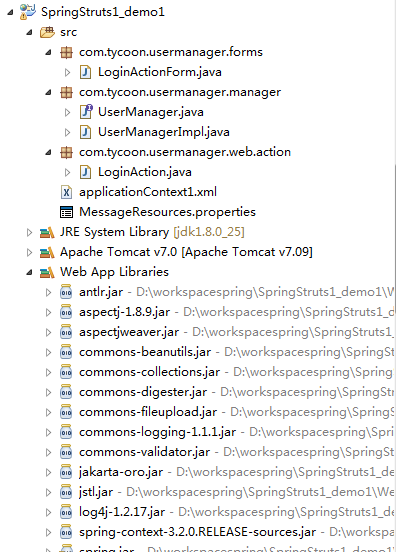
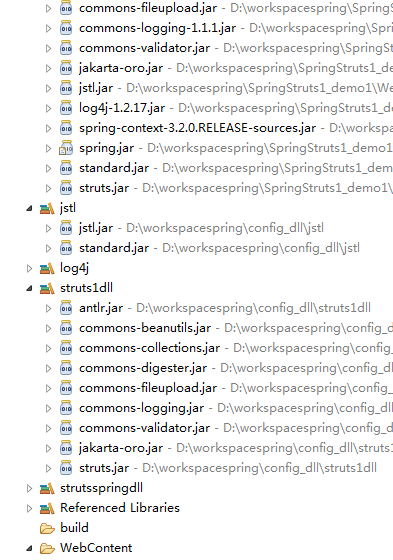
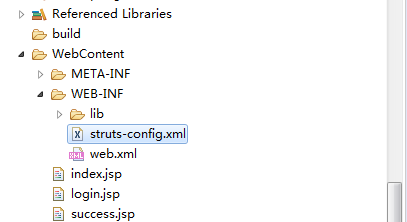
二、代码接口介绍
1、strut1中LoginActionForm 获得前台提交数据
2、定义模拟验证登录接口:UserManager
3、实现登录接口实现类:UserManagerImpl
4、strut1的Action:LoginAction
5、spring的配置文件:applicationContext1.xml
6、strut1配置文件:struts-config.xml
7、strut1中web.xml文件
8、欢迎页:index.jsp
9、登录页:login.jsp
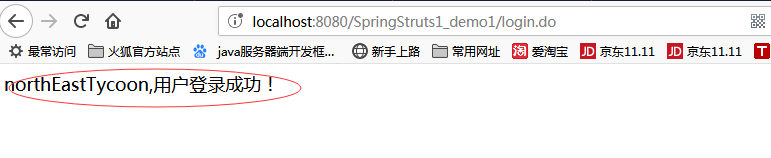
10、登录成功页:success.jsp
三、代码
1、strut1中LoginActionForm 获得前台提交数据
package com.tycoon.usermanager.forms;

import org.apache.struts.action.ActionForm;

/**

 *

 * LoginActionForm

 * @author northEastTycoon

 */

public class LoginActionForm extends ActionForm {

	private static final long serialVersionUID = 1L;

	// 用户名称

	private String username="northEastTycoon";

	// 用户密码

	private String password="northEastTycoon";

	public String getUsername() {

		return username;

	}

	public void setUsername(String username) {

		this.username = username;

	}

	public String getPassword() {

		return password;

	}

	public void setPassword(String password) {

		this.password = password;

	}

}
2、定义模拟验证登录接口:UserManager
package com.tycoon.usermanager.manager;

/**

 *

 * UserManager :模拟登陆接口

 * @author northEastTycoon

 */

public interface UserManager {

	public void login(String username,String password);

}
3、实现登录接口实现类:UserManagerImpl
package com.tycoon.usermanager.manager;

/**

 *

 * UserManager :实现模拟登陆接口类

 * @author northEastTycoon

 */

public class UserManagerImpl implements UserManager {

	@Override

	public void login(String username, String password) {

		System.out.println(this.getClass()+",username:"+username);

	}

}
4、 strut1的Action:LoginAction
package com.tycoon.usermanager.web.action;

import javax.servlet.http.HttpServletRequest;

import javax.servlet.http.HttpServletResponse;

import org.apache.struts.action.Action;

import org.apache.struts.action.ActionForm;

import org.apache.struts.action.ActionForward;

import org.apache.struts.action.ActionMapping;

import org.springframework.beans.factory.BeanFactory;

import org.springframework.web.context.support.WebApplicationContextUtils;

import com.tycoon.usermanager.forms.LoginActionForm;

import com.tycoon.usermanager.manager.UserManager;

/**

 *

 * Action类 :控制类

 * @author northEastTycoon

 */

public class LoginAction extends Action {

	@Override

	public ActionForward execute(ActionMapping mapping, ActionForm form, HttpServletRequest request,

			HttpServletResponse response) throws Exception {

		LoginActionForm laf = (LoginActionForm) form;

		String username = laf.getUsername();

		String password = laf.getPassword();

		// 由于耗时,还可以从ServletContext获得BeanFactory对象

		BeanFactory factory = WebApplicationContextUtils.getRequiredWebApplicationContext(request.getSession().getServletContext());

		UserManager userManager = (UserManager)factory.getBean("userManager");

		userManager.login(username, password);

		return mapping.findForward("success");

	}

}
5、 spring的配置文件:applicationContext1.xml
<?xml version="1.0" encoding="UTF-8"?>

<beans xmlns="http://www.springframework.org/schema/beans"

	xmlns:xsi="http://www.w3.org/2001/XMLSchema-instance"

	xmlns:p="http://www.springframework.org/schema/p"

	xmlns:aop="http://www.springframework.org/schema/aop"

	xsi:schemaLocation="http://www.springframework.org/schema/beans

		http://www.springframework.org/schema/beans/spring-beans-3.0.xsd

		http://www.springframework.org/schema/aop

		http://www.springframework.org/schema/aop/spring-aop-3.0.xsd">

	<bean id="userManager" class="com.tycoon.usermanager.manager.UserManagerImpl"/>

</beans>
6、strut1配置文件:struts-config.xml
<?xml version="1.0" encoding="UTF-8"?>

<!DOCTYPE struts-config PUBLIC

"-//Apache Software Foundation//DTD Struts Configuration 1.2//EN"

 "http://struts.apache.org/dtds/struts-config_1_2.dtd">

<struts-config>

	<form-beans>

		<form-bean name="loginForm"

			type="com.tycoon.usermanager.forms.LoginActionForm"></form-bean>

	</form-beans>

	<action-mappings>

		<action path="/login" type="com.tycoon.usermanager.web.action.LoginAction"

			name="loginForm" scope="request">

			<forward name="success" path="/success.jsp"></forward>

		</action>

	</action-mappings>

	<message-resources parameter="MessageResources" />

</struts-config>
7、strut1中web.xml文件
<?xml version="1.0" encoding="UTF-8"?>

<web-app xmlns:xsi="http://www.w3.org/2001/XMLSchema-instance" xmlns="http://java.sun.com/xml/ns/j2ee" xmlns:web="http://xmlns.jcp.org/xml/ns/javaee" xsi:schemaLocation="http://java.sun.com/xml/ns/j2ee http://java.sun.com/xml/ns/j2ee/web-app_2_4.xsd http://xmlns.jcp.org/xml/ns/javaee http://java.sun.com/xml/ns/javaee/web-app_2_5.xsd" version="2.4">

  <welcome-file-list>

    <welcome-file>/index.jsp</welcome-file>

  </welcome-file-list>

  <servlet>

    <servlet-name>action</servlet-name>

    <servlet-class>org.apache.struts.action.ActionServlet</servlet-class>

    <init-param>

      <param-name>config</param-name>

      <param-value>/WEB-INF/struts-config.xml</param-value>

    </init-param>

    <init-param>

      <param-name>debug</param-name>

      <param-value>3</param-value>

    </init-param>

    <init-param>

      <param-name>detail</param-name>

      <param-value>3</param-value>

    </init-param>

    <load-on-startup>0</load-on-startup>

  </servlet>

  <servlet-mapping>

    <servlet-name>action</servlet-name>

    <url-pattern>*.do</url-pattern>

  </servlet-mapping>

  <context-param>

  <!-- 在web.xml中通过contextConfigLocation配置spring,

  contextConfigLocation参数定义了要装入的 Spring 配置文件。  -->

    <param-name>contextConfigLocation</param-name>

    <param-value>classpath:applicationContext1.xml</param-value>

  </context-param>

  <listener>

    <listener-class>org.springframework.web.context.ContextLoaderListener</listener-class>

  </listener>

</web-app>
8、欢迎页:index.jsp
<%@ page language="java" contentType="text/html; charset=GB18030"

    pageEncoding="GB18030"%>

<!DOCTYPE html PUBLIC "-//W3C//DTD HTML 4.01 Transitional//EN" "http://www.w3.org/TR/html4/loose.dtd">

<html>

<head>

<meta http-equiv="Content-Type" content="text/html; charset=GB18030">

<title>Insert title here</title>

</head>

<body>

	<h1>Spring+struts1(东北大亨实例)</h1>

	<hr>

	<hr>

	<a href="login.jsp">登录</a>

</body>

</html>
9、登录页:login.jsp
<%@ page language="java" contentType="text/html; charset=GB18030"

	pageEncoding="GB18030"%>

<!DOCTYPE html PUBLIC "-//W3C//DTD HTML 4.01 Transitional//EN" "http://www.w3.org/TR/html4/loose.dtd">

<html>

<head>

<meta http-equiv="Content-Type" content="text/html; charset=GB18030">

<title>Insert title here</title>

</head>

<body>

	<form action="login.do" method="post">

		用户:<input type="text" name="username"><br> 密码:<input

			type="password" name="password"><br> <input

			type="submit" value="登录">

	</form>

</body>

</html>
10、 登录成功页:success.jsp
<%@ page language="java" contentType="text/html; charset=GB18030"

    pageEncoding="GB18030"%>

<!DOCTYPE html PUBLIC "-//W3C//DTD HTML 4.01 Transitional//EN" "http://www.w3.org/TR/html4/loose.dtd">

<html>

<head>

<meta http-equiv="Content-Type" content="text/html; charset=GB18030">

<title>Insert title here</title>

</head>

<body>

	${loginForm.username},用户登录成功!

</body>

</html>
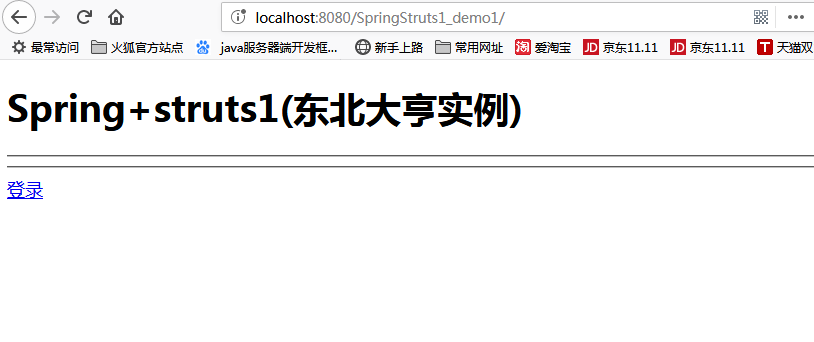
运行截图:
1、请求欢迎页面
2、点击登录,跳转到登录页面
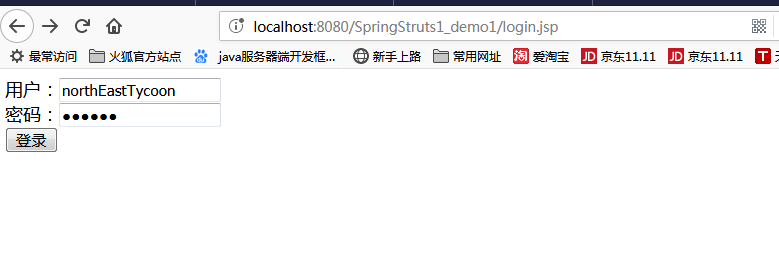
3、显示成功后页面
spring+struts1的更多相关文章
- Spring一套全通—工厂
百知教育 - Spring系列课程 - 工厂 第一章 引言 1. EJB存在的问题 2. 什么是Spring Spring是一个轻量级的JavaEE解决方案,整合众多优秀的设计模式 轻量级 1. 对于 ...
- java面试题之ssh
1.写出你熟悉的开源框架以及各自的作用(项目中为什么使用SSH) 答:框架:hibernate,spring,struts1/struts2. Hibernate主要用于数据持久化:封装了JDBC操作 ...
- 【HPP开发】让所有中小企业拥有自己的APP
HPP hybirdApp或者hbuilderApp, 指通过html,css,js语言开发出ios和android两个版本的APP, 开发效率成倍上升,开发时间大幅缩减,开发成本同样也大大缩减. 移 ...
- 我的Java自学之路
其实在转正之后我就想抽个时间好好的梳理一下我的 Java 上车之路 ,但是一直拖到现在 ,因为有学弟问到 ,所以也就给了我动力 .毕竟答应了人家的事要做到 . 首先要有相应的背景介绍 ,不然说个毛线啊 ...
- 【转载】Hybrid APP了解
原文:http://uikoo9.com/blog/detail/hpp 不错的hybrid app框架:http://www.dcloud.io/case/#group-1 HPP hybirdAp ...
- struts1+spring+myeclipse +cxf 开发webservice以及普通java应用调用webservice的实例
Cxf + Spring+ myeclipse+ cxf 进行 Webservice服务端开发 使用Cxf开发webservice的服务端项目结构 Spring配置文件applicationCont ...
- struts1,struts2,hibernate,spring的运行原理结构图
一.struts1运行原理 1.初始化:struts框架的总控制器ActionServlet是一个Servlet,它在web.xml中配置成自动启动的Servlet,在启动时总控制器会读取配置文件(s ...
- struts1.3整合spring2.5(将spring委托给struts方式)
前提是配置完struts1.3 导包 spring-2.5.6.jar //spring核心包 spring-webmvc-struts-2.5.5.jar //struts整合spring使用 lo ...
- spring 整合 Struts1.X [转]
这篇博客摘自[http://blog.csdn.net/chendc201/article/details/8464008], 其中也有一些是自己增加的部分 . 第一步, 需要为 Struts 装载 ...
随机推荐
- 设计模式之状态模式(PHP实现)
github地址:https://github.com/ZQCard/design_pattern /** * 在状态模式(State Pattern)中,类的行为是基于它的状态改变的.这种类型的设计 ...
- Tomcat:Java Web服务器配置详解
一.Tomcat概述 1.tomcat简介 tomcat是基于JDK的web服务器,其能运行Servlet和JSP规范总.Tomcat 5支持最新的Servlet 2.4 和JSP 2.0规范.实际上 ...
- 【Hadoop】如何形象描述大数据生态?
作者:千岁大王链接:https://www.zhihu.com/question/27974418/answer/39845635来源:知乎著作权归作者所有,转载请联系作者获得授权. Google内部 ...
- SparkMLlib基础内容
SparkMLlib基础内容 (一),多种数据类型 1.1 本地向量集 def testVetor: Unit ={ val vd:Vector=Vectors.dense(2,3,6) printl ...
- 2017.7.12 IDEA热部署(更新jsp或java代码不用重启tomcat即可即时生效)
选择war explored. 主要在于 On frame deactivation选项配置选择为 Update classes and resourses(当且仅当在Deployment配置页,对应 ...
- 怎么将JSP页面的ID值传给Action进行更新和删除
这里只是单纯的SH整合. JSP页面代码 <!-- value=action中数据库的User对象集合list必须和action定义的名字一样, 且为了在这里能够访问,需要生成get/set方法 ...
- 7. JPA - Hibernate【从零开始学Spring Boot】
转载:http://blog.csdn.net/linxingliang/article/details/51636976 在说具体如何在spring boot 使用hibernate前,先抛装引玉些 ...
- Android 百度地图 简单实现--- 美食搜索
Android 百度地图 简单实现--- 美食 依赖包: 加入 Android 百度依赖包: 1 key: <!-- 开发人员 key --> <meta-dat ...
- SQL SERVER 使用订阅发布同步数据库(转)
一.数据库复制涉及 1.发布服务器: 数据的来源服务器,维护源数据,决定哪些数据将被分发,检测哪些数据发生了修改,并将这些信息提交给分发服务器. 2.分发服务器: 分发服务器负责把从发布服务器拿 ...
- Websphere: Stop Server and Uninstall Application
In WAS, stopping server and uninstalling application are important steps to re-deploy. SET ProfileLo ...