
服务注册和发现 Eureka
1.项目结构如图
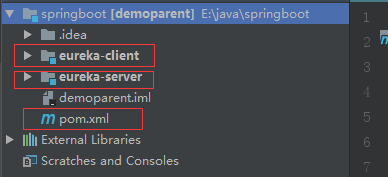
图中的pom.xml 是父级pom
eureka-client 和 eureka-server 是两个 Module项目,创建项目都可以用 Spring Initializr 方式创建
spring-boot-starter-parent 为 2.1.1.RELEASE
spring-cloud-dependencies 为 Greenwich.RC1
spring-cloud-starter-netflix-eureka-server 为 2.0.2.RELEASE
spring-cloud-starter-netflix-eureka-client 为 2.0.2.RELEASE
2.父级pom.xml 内容
<?xml version="1.0" encoding="UTF-8"?>

<project xmlns="http://maven.apache.org/POM/4.0.0" xmlns:xsi="http://www.w3.org/2001/XMLSchema-instance"

         xsi:schemaLocation="http://maven.apache.org/POM/4.0.0 http://maven.apache.org/xsd/maven-4.0.0.xsd">

    <modelVersion>4.0.0</modelVersion>

    <parent>

        <groupId>org.springframework.boot</groupId>

        <artifactId>spring-boot-starter-parent</artifactId>

        <version>2.1.1.RELEASE</version>

        <relativePath/> <!-- lookup parent from repository -->

    </parent>

    <groupId>com.hc</groupId>

    <artifactId>demoparent</artifactId>

    <version>0.0.1-SNAPSHOT</version>

    <name>demoparent</name>

    <packaging>pom</packaging>

    <description>Demo project for Spring Boot</description>

    <modules>

        <module>eureka-client</module>

        <module>eureka-server</module>

    </modules>

    <properties>

        <java.version>1.8</java.version>

        <spring-cloud.version>Greenwich.RC1</spring-cloud.version>

    </properties>

    <dependencies>

        <dependency>

            <groupId>org.springframework.boot</groupId>

            <artifactId>spring-boot-starter-test</artifactId>

        </dependency>

    </dependencies>

    <dependencyManagement>

        <dependencies>

            <dependency>

                <groupId>org.springframework.cloud</groupId>

                <artifactId>spring-cloud-dependencies</artifactId>

                <version>${spring-cloud.version}</version>

                <type>pom</type>

                <scope>import</scope>

            </dependency>

        </dependencies>

    </dependencyManagement>

    <build>

        <plugins>

            <plugin>

                <groupId>org.springframework.boot</groupId>

                <artifactId>spring-boot-maven-plugin</artifactId>

            </plugin>

        </plugins>

    </build>

</project>
3.eureka-server 中 pom.xml 内容
<?xml version="1.0" encoding="UTF-8"?>

<project xmlns="http://maven.apache.org/POM/4.0.0" xmlns:xsi="http://www.w3.org/2001/XMLSchema-instance"

         xsi:schemaLocation="http://maven.apache.org/POM/4.0.0 http://maven.apache.org/xsd/maven-4.0.0.xsd">

    <modelVersion>4.0.0</modelVersion>

    <parent>

        <groupId>com.hc</groupId>

        <artifactId>demoparent</artifactId>

        <version>0.0.1-SNAPSHOT</version>

        <relativePath/> <!-- lookup parent from repository -->

    </parent>

    <artifactId>eureka-server</artifactId>

    <dependencies>

        <!-- 引入关于 eureka-server的依赖 -->

        <dependency>

            <groupId>org.springframework.cloud</groupId>

            <artifactId>spring-cloud-starter-netflix-eureka-server</artifactId>

            <version>2.0.2.RELEASE</version>

        </dependency>

    </dependencies>

</project>
application.yml 内容
server:

  port: 8761

eureka:

  client:

    register-with-eureka: false

    fetch-registry: false

    service-url:

      defaultZone: http://localhost:${server.port}/eureka/

  server:

    # 关闭自我保护机制

    enable-self-preservation: false

    # 每隔10s扫描服务列表,移除失效服务

    eviction-interval-timer-in-ms: 10000
主程序入口加上 @EnableEurekaServer
4.eureka-client 中 pom.xml 内容
<?xml version="1.0" encoding="UTF-8"?>

<project xmlns="http://maven.apache.org/POM/4.0.0" xmlns:xsi="http://www.w3.org/2001/XMLSchema-instance"

         xsi:schemaLocation="http://maven.apache.org/POM/4.0.0 http://maven.apache.org/xsd/maven-4.0.0.xsd">

    <modelVersion>4.0.0</modelVersion>

    <parent>

        <groupId>com.hc</groupId>

        <artifactId>demoparent</artifactId>

        <version>0.0.1-SNAPSHOT</version>

        <relativePath/> <!-- lookup parent from repository -->

    </parent>

    <artifactId>eureka-client</artifactId>

    <dependencies>

        <dependency>

            <groupId>org.springframework.boot</groupId>

            <artifactId>spring-boot-starter-web</artifactId>

        </dependency>

        <!-- 引入关于 eureka-server的依赖 -->

        <dependency>

            <groupId>org.springframework.cloud</groupId>

            <artifactId>spring-cloud-starter-netflix-eureka-client</artifactId>

            <version>2.0.2.RELEASE</version>

        </dependency>

        <!--运行状态监控-->

        <dependency>

            <groupId>org.springframework.boot</groupId>

            <artifactId>spring-boot-starter-actuator</artifactId>

        </dependency>

        <!--mybatis配置 start-->

        <dependency>

            <groupId>org.mybatis.spring.boot</groupId>

            <artifactId>mybatis-spring-boot-starter</artifactId>

            <version>1.2.0</version>

        </dependency>

        <dependency>

            <groupId>mysql</groupId>

            <artifactId>mysql-connector-java</artifactId>

            <version>5.1.39</version>

        </dependency>

        <!--mybatis配置 end-->

    </dependencies>

</project>
application.yml 内容
server:

  port: 8762

spring:

  main:

    allow-bean-definition-overriding: true

  datasource:

    url: jdbc:mysql://192.168.0.1:3306/test1?useUnicode=true&characterEncoding=utf8

    username: root

    password: 123456

    driver-class-name: com.mysql.jdbc.Driver

  application:

    name: eureka-client001

eureka:

  client:

    #改变eureka server的检查方式,使用actuator 的health进行检查,可能会检查到数据库

    healthcheck:

      enabled: true

    service-url:

      defaultZone: http://localhost:8761/eureka/

  instance:

    prefer-ip-address: true

    instanceId: ${spring.application.name}:${server.port}

    # 每隔10s发送一次心跳

    lease-renewal-interval-in-seconds: 10

    # 告知服务端30秒还未收到心跳的话,就将该服务移除列表

    lease-expiration-duration-in-seconds: 30

    #改变eureka 服务端的 status 状态跳转查看页面

    status-page-url-path: /actuator/health

management:

  endpoints:

    web:

      exposure:

        include: "*"

  server:

    port: 10111

    servlet:

      context-path: /

    ssl:

      enabled: false

  endpoint:

    health:

      show-details: always
主程序入口加上 @EnableEurekaClient
创建controller 接口
package com.example.eurekaclient.controller;

import org.springframework.web.bind.annotation.RequestMapping;

import org.springframework.web.bind.annotation.RestController;

@RestController

public class clientController {

    @RequestMapping("/hello")

    public String hello() {

        return "hello this is client001";

    }

}
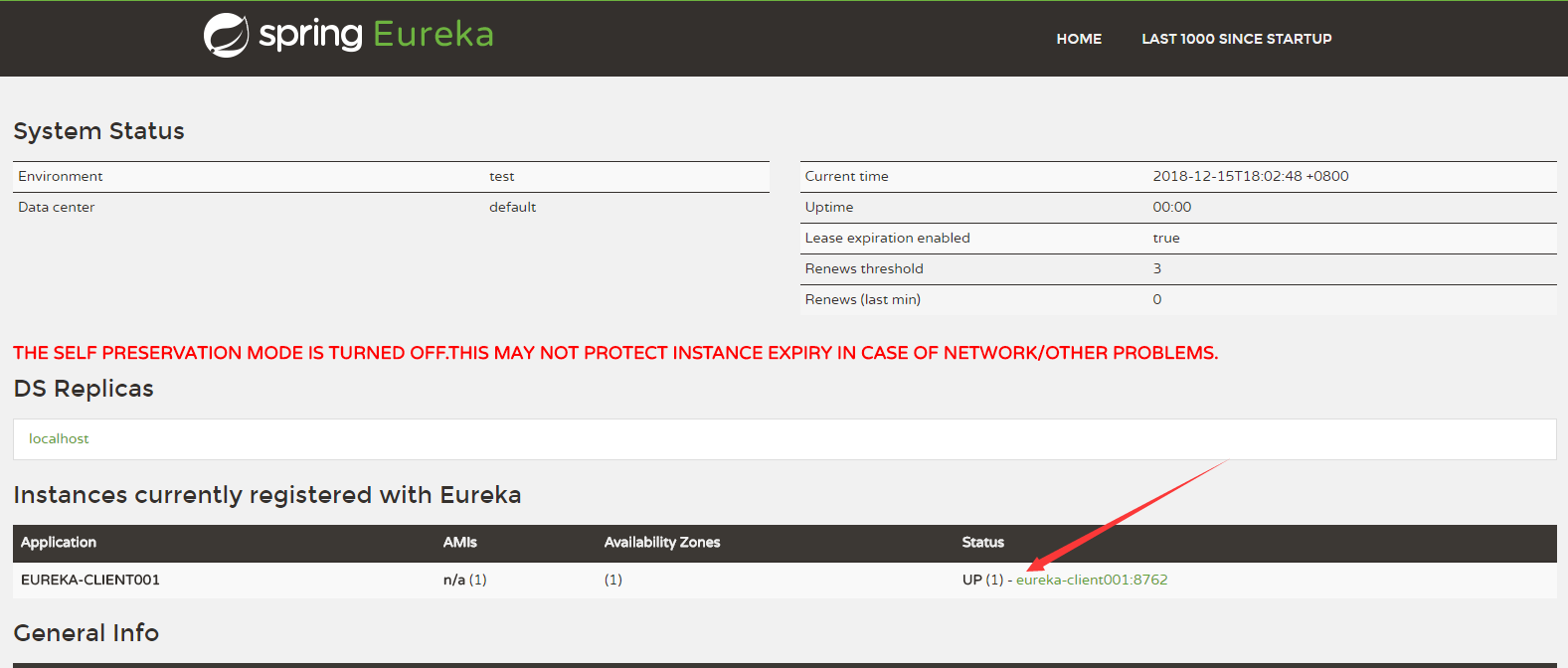
5.运行结果
6.spring cloud eureka 配置说明
见博客 https://www.cnblogs.com/li3807/p/7282492.html
|
配置参数 |
默认值 |
说明 |
|
服务注册中心配置 |
Bean类:org.springframework.cloud.netflix.eureka.server.EurekaServerConfigBean |
|
|
eureka.server.enable-self-preservation |
false |
关闭注册中心的保护机制,Eureka 会统计15分钟之内心跳失败的比例低于85%将会触发保护机制,不剔除服务提供者,如果关闭服务注册中心将不可用的实例正确剔除 |
|
服务实例类配置 |
Bean类:org.springframework.cloud.netflix.eureka.EurekaInstanceConfigBean |
|
|
eureka.instance.prefer-ip-address |
false |
不使用主机名来定义注册中心的地址,而使用IP地址的形式,如果设置了 eureka.instance.ip-address 属性,则使用该属性配置的IP,否则自动获取除环路IP外的第一个IP地址 |
|
eureka.instance.ip-address |
IP地址 |
|
|
eureka.instance.hostname |
设置当前实例的主机名称 |
|
|
eureka.instance.appname |
服务名,默认取 spring.application.name 配置值,如果没有则为 unknown |
|
|
eureka.instance.lease-renewal-interval-in-seconds |
30 |
定义服务续约任务(心跳)的调用间隔,单位:秒 |
|
eureka.instance.lease-expiration-duration-in-seconds |
90 |
定义服务失效的时间,单位:秒 |
|
eureka.instance.status-page-url-path |
/info |
状态页面的URL,相对路径,默认使用 HTTP 访问,如果需要使用 HTTPS则需要使用绝对路径配置 |
|
eureka.instance.status-page-url |
状态页面的URL,绝对路径 |
|
|
eureka.instance.health-check-url-path |
/health |
健康检查页面的URL,相对路径,默认使用 HTTP 访问,如果需要使用 HTTPS则需要使用绝对路径配置 |
|
eureka.instance.health-check-url |
健康检查页面的URL,绝对路径 |
|
|
服务注册类配置 |
Bean类:org.springframework.cloud.netflix.eureka.EurekaClientConfigBean |
|
|
eureka.client.service-url. |
指定服务注册中心地址,类型为 HashMap,并设置有一组默认值,默认的Key为 defaultZone;默认的Value为 http://localhost:8761/eureka ,如果服务注册中心为高可用集群时,多个注册中心地址以逗号分隔。 如果服务注册中心加入了安全验证,这里配置的地址格式为:http://<username>:<password>@localhost:8761/eureka 其中 <username> 为安全校验的用户名;<password> 为该用户的密码 |
|
|
eureka.client.fetch-registery |
true |
检索服务 |
|
eureka.client.registery-fetch-interval-seconds |
30 |
从Eureka服务器端获取注册信息的间隔时间,单位:秒 |
|
eureka.client.register-with-eureka |
true |
启动服务注册 |
|
eureka.client.eureka-server-connect-timeout-seconds |
5 |
连接 Eureka Server 的超时时间,单位:秒 |
|
eureka.client.eureka-server-read-timeout-seconds |
8 |
读取 Eureka Server 信息的超时时间,单位:秒 |
|
eureka.client.filter-only-up-instances |
true |
获取实例时是否过滤,只保留UP状态的实例 |
|
eureka.client.eureka-connection-idle-timeout-seconds |
30 |
Eureka 服务端连接空闲关闭时间,单位:秒 |
|
eureka.client.eureka-server-total-connections |
200 |
从Eureka 客户端到所有Eureka服务端的连接总数 |
|
eureka.client.eureka-server-total-connections-per-host |
50 |
从Eureka客户端到每个Eureka服务主机的连接总数 |
服务注册和发现 Eureka的更多相关文章
- Spring Cloud(二):服务注册与发现 Eureka【Finchley 版】
Spring Cloud(二):服务注册与发现 Eureka[Finchley 版] 发表于 2018-04-15 | 更新于 2018-05-07 | 上一篇主要介绍了相关理论,这一篇开始我们 ...
- spring cloud 学习之 服务注册和发现(Eureka)
一:服务注册和发现(Eureka) 1:采用Eureka作为服务注册和发现组件 2:Eureka 项目中 主要在启动类加上 注解@EnableEurekaServer @SpringBootAppli ...
- 小D课堂 - 新版本微服务springcloud+Docker教程_3-05 服务注册和发现Eureka Server搭建实战
笔记 5.服务注册和发现Eureka Server搭建实战 简介:使用IDEA搭建Eureka服务中心Server端并启动,项目基本骨架介绍 官方文档:http://clou ...
- springcloud~服务注册与发现Eureka的使用
服务注册与发现是微服务里的概念,也是一个基本的组件,负责服务组件的认证,即实现『你是谁』的功能,在服务注册与发现里,存在两种模式,即服务端发现和客户端发现,咱们今天说的eureka属于客户端发现! 下 ...
- SpringCloud学习笔记:服务注册与发现Eureka(2)
1. Eureka简介 Eureka是一个用于服务注册和发现的组件,分为Eureka Server和Eureka Client,Eureka Server为Eureka服务注册中心,Eureka Cl ...
- Spring Cloud实践之服务注册与发现Eureka
一.简述: 服务提供者producer与服务消费者consumer都注册到eureka server,然后服务consumer在其应用内直接调用producer的服务名来调用服务,而不是像之前一样调用 ...
- SpringCloud 学习(二) :服务注册与发现Eureka
Spring Cloud应用中可以支持多种的服务治理框架,比如Eureka.Consul.Zookeeper等,现在我们用的是consul,本文以SpringCloud Dalston.SR5版本介绍 ...
- 微服务注册与发现 —— eureka
基础概念 在微服务系统中,服务的注册和发现是第一步,常用的有: Eureka:https://github.com/Netflix/eureka Zookeeper:https://zookeeper ...
- 白话SpringCloud | 第三章:服务注册与发现(Eureka)-下
前言 上一章节,讲解了在单机模式下的服务注册与发现的相关知识点及简单示例.而在实际生产或者在这种微服务架构的分布式环境中,需要考虑发生故障时,各组件的高可用.而其实高可用,我的简单粗俗理解就是,通过系 ...
- 白话SpringCloud | 第二章:服务注册与发现(Eureka)-上
前言 从本章节开始,正式进入SpringCloud的基础教程.从第一章<什么是SpringCloud>中我们可以知道,一个微服务框架覆盖的东西是很多的,而如何去管理这些服务或者说API接口 ...
随机推荐
- anr trace文件分析
测试给的trace文件好几万行,怎么看? 1.搜索 你的包名,看它报错误报在你代码的哪里 2.在你代码里面分析 还有,synchronized 就是用来防止多线程调用的,没有那么神奇.
- 使用Autofac实现依赖注入注入
依赖注入是什么意思? 依赖倒置 在软件设计原则中,有一种重要的思想叫做依赖倒置.它的核心思想是:不能让高层组件依赖底层组件,而且,不管高层组件和底层组件,两者都应依赖于抽象.那么,这个原则和我们上面的 ...
- IOS多网卡抓包
linux下libpcap支持从多网卡抓包,设置为any即可 在IOS或者mac上就无法通过次方法抓取所有网卡报文 1.通过设置libevent事件回调,每个网卡注册读事件, fd通过 pd = pc ...
- hasOne
public boolean hasOne(int n) { int lastdigit=0; while( n >0 ){ lastdigit=(n % 10); if(lastdigit== ...
- Windows环境下,python webdriver环境搭建
最近刚开始学习selenium,这是我从虫师的<selenium2自动测试实战--基于Python语言>这本书上学到搭建环境的步骤,里面有加上我的一些总结,希望对大家有所帮助! 准备工 ...
- [类和对象]4 C++ static & friend
1.静态成员变量和成员函数 思考:每个变量,拥有属性.有没有一些属性,归所有对象拥有? 1.1 静态成员变量 1)定义静态成员变量 关键字 static 可以用于说明一个类的成员 静态成员提供了一个 ...
- bitbucket相关操作
常见命令: git checkout -b develop master 创建Develop分支的命令 git checkout master 切换到Master分支 git merge --no-f ...
- html 网页注意事项
html 知识总结; 1.内外边距 去掉浮动 *{ margin:0; padding:0; } 2.清除浮动 .clearfix:after { content:""; disp ...
- android 远程Service以及AIDL的跨进程通信
在Android中,Service是运行在主线程中的,如果在Service中处理一些耗时的操作,就会导致程序出现ANR. 但如果将本地的Service转换成一个远程的Service,就不会出现这样的问 ...
- DevExpress的GridControl控件设置自定义显示方法
比如要显示性别为字符串,数据库中保存为数值(1:男,2:女,3:未知). 方法一: 点击控件上的"Run Designer"按钮,进入设计界面. 选择“Columns", ...