
GSM:嗅探语音流量
GSM: Sniffing voice traffic
I wrap up the GSM series with a walkthrough on how to decrypt voice traffic. Voice is the way most people interact on a telecommunications network and therefore a major componenent of GSM traffic. I’ve explained a lot of the background on GSM communication in the previous posts so I’ll get right to it.
We will capture the traffic using the HackRF one and the call will take place between two Safaricom lines. The capture will take place on the downlink - that is the receiving end of the call. I’ll use a Blackberry as the receiving device so that I can easily get the TMSI and Kc.
Capturing the traffic
I’ll speed through a lot of these steps as they are similar to the sniffing SMS traffic scenario. I’ll use the Absolute Radio Frequency Channel Number ARFCN in specifying the radio channel. GSM uses ARFCNs to represent the various frequencies the BTS and mobile device communicate on. I’ll use the ARFCN instead of the frequency in the commands I’ll run for variety as I’ve been using frequency in the previous posts. We begin by getting the ARFCN, TMSI and Kc from the Blackberry. On a Blackberry these are readily available from the engineering screen menu. The ARFCN is gotten by navigating to the Cell Identity submenu, the TMSI from the Mobile Identity submenu and finally the Kc from the SIM Browser submenu.
The values I get are:
ARFCN: 17 TMSI: 8D4812F8 Kc: 239E4C213612C000
I use the airprobe_rtlsdr_capture module of gr-gsm to capture the voice traffic. I begin the capture by running the following command:
airprobe_rtlsdr_capture.py -a 17 -s 1000000 -g 40 -c voice_capture.cfile -T 150
-a is the ARFCN, -s the sample rate in Hz, -g the gain, -c the output file and -T the duration of our capture in seconds.
I then make a call while the capture is in progress.
Decoding BCCH
As explained in the previous post, in idle mode the phone has to listen on the BCCH to detect traffic to be sent to it. Our aim here is to identify what SDCCH (Standalone Dedicated Control Channel) is used for our call setup.
We first start wireshark, monitor the loopback interface and then run the following command:
airprobe_decode.py -c voice_capture.cfile -s 1000000 -a 17 -m BCCH -t 0
voice_capture.cfile is the file with the voice traffic we captured. We then search for traffic specific to our TMSI by searching for it in wireshark packet details. we look for the paging request and inspect the Immediate Assignment that follows:
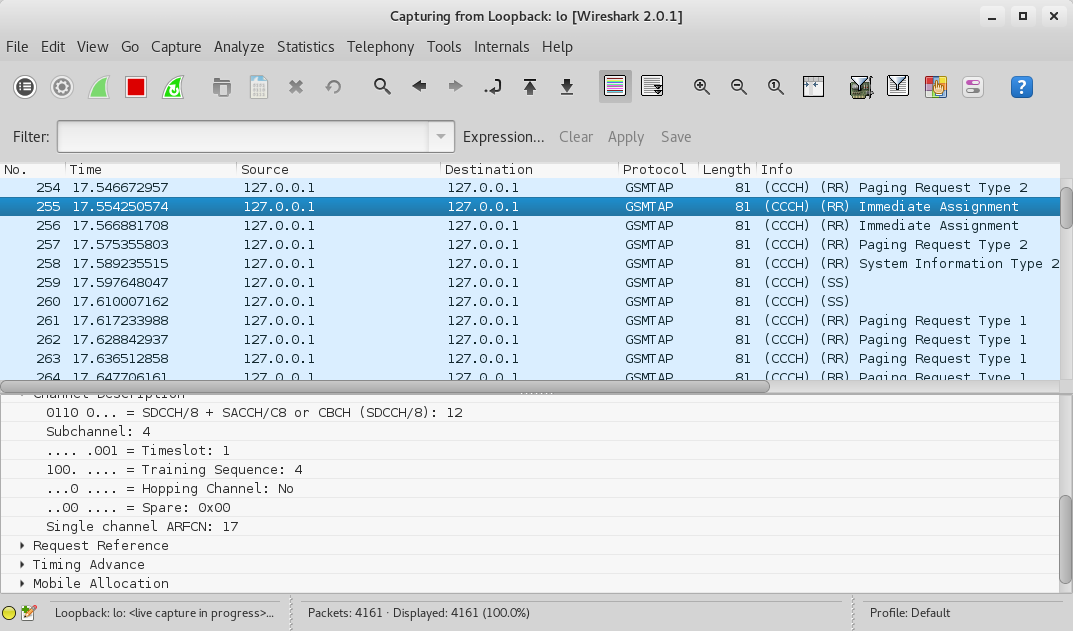
Note that it’s SDCCH/8, Timeslot 1.
Decoding SDCCH
We now need to identify the ciphering mode the BTS tells the phone to use. We restart wireshark on the loopback interface and then run the following command specifying SDCCH8 and Timeslot 1:
airprobe_decode.py -c voice_capture.cfile -s 1000000 -a 17 -m SDCCH8 -t 1
We look for a Paging Response followed by a Ciphering Mode Command.
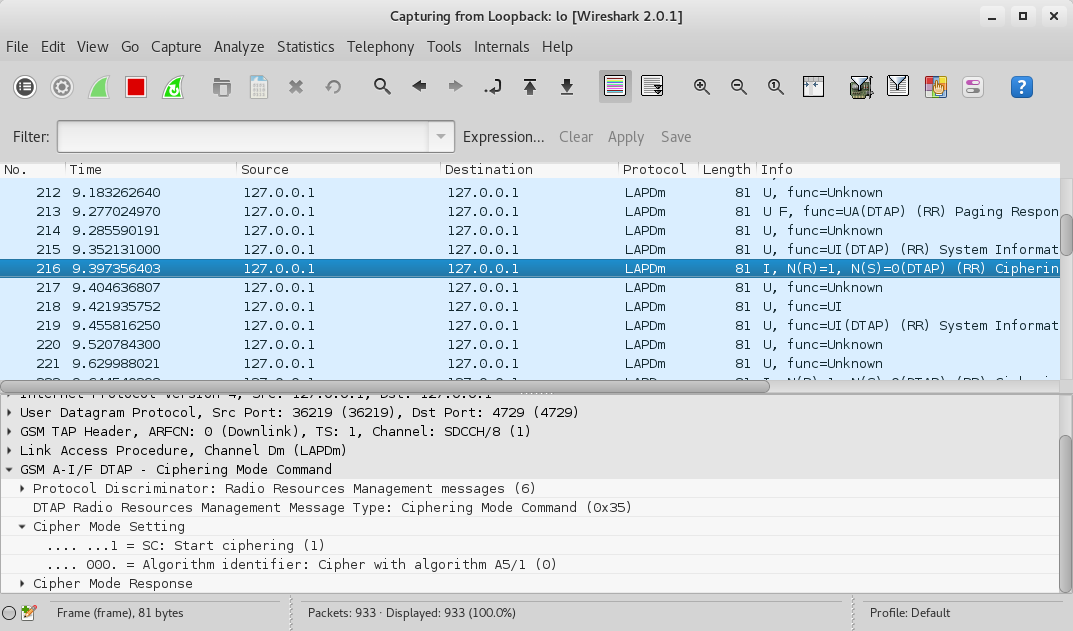
We see that the algorithm in use is A5/1.
Decoding TCH
TCH is the Traffic Channel in GSM and is used to carry voice traffic and data. It could either be full rate TCH/F or half rate TCH/H. You can read up more on it here.
We now restart wireshark on the loopback interface and run the following command:
airprobe_decode.py -c voice_capture.cfile -s 1000000 -a 17 -m SDCCH8 -t 1 -e 1 -k 0x23,0x9E,0x4C,0x21,0x36,0x12,0xC0,0x00
-e 1 specifies the algorithm A5/1, -k 0x23,0x9E,0x4C,0x21,0x36,0x12,0xC0,0x00 specifies the Kc.
On wireshark we first look for the Call Control Setup traffic and we can actually see the calling party number as below.
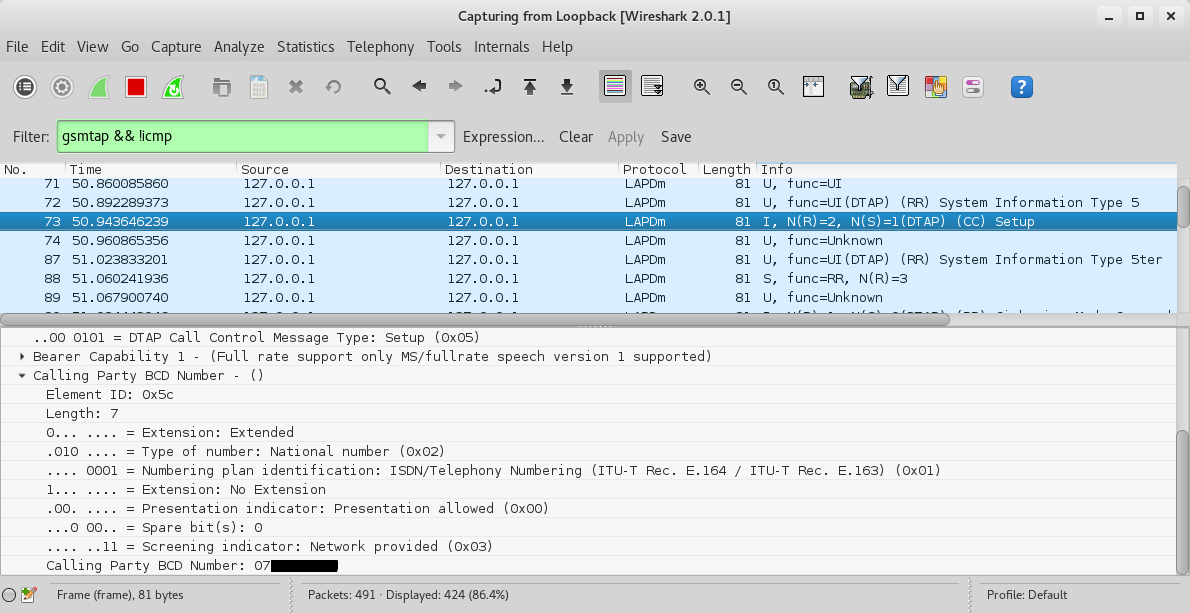
A bit down the capture we should see an Assignment command. We see that the voice call is assigned to Timeslot 7 and the Traffic Channel is full rate (TCH/F).

Decoding the voice traffic
We can now finally decode the voice traffic by running the following command:
airprobe_decode.py -c voice_capture.cfile -s 1000000 -a 17 -m TCHF -t 7 -e 1 -k 0x23,0x9E,0x4C,0x21,0x36,0x12,0xC0,0x00 -d FR -o speech.au.gsm
-m TCHF specifies the traffic channel, -t 7 the TCH/F timeslot, -d FR specifies the voice codec of the channel as full rate, and speech.au.gsm specifies the output file.
speech.au.gsm contains the voice traffic. We convert it to an audio file using toast as follows:
toast -d speech.au.gsm
We will get a file called speech.au which we can play back and listen to the captured voice call :).
Alternative method
Alternatively one could use the mainstream airprobe modules instead of gr-gsm with the same results. The original modules had issues with the HackRF and later GNU Radio versions. I however did some patching and you can clone the patched version from my Github here.
The equivalent commands for the whole process starting from decoding BCCH to decoding voice are:
./go.sh voice_capture.cfile 64 0B

./go.sh voice_capture.cfile 64 1S 239E4C213612C00001

./go.sh voice_capture.cfile 64 7T 239E4C213612C00001

toast -d speech.au.gsm
That concludes the GSM radio series for now. Till next time, happy hacking!
原文链接:https://www.ckn.io/blog/2016/01/25/gsm-sniffing-voice-traffic/
GSM:嗅探语音流量的更多相关文章
- BUUCTF-被嗅探的流量
被嗅探的流量 提示告知是文件传输的流量,那进去过滤http流量包即可,找到一个upload目录的,并且是post方式即可,追踪http流即可发现flag
- 一种基于SDR实现的被动GSM嗅探
软件定义无线电(SDR)是一种无线电通信系统,简单来说,就是通过数字信号处理技术在通用可编程数字信号处理硬件平台上,利用软件定义来实现无线电台的各单元功能,从而对无线电信号进行调制.解调.测量.SDR ...
- GSM嗅探
GSM初探 大家应该都听说过HTTP协议,又听说WEB服务,每一个服务的背后都有一个协议在工作着.所谓的没有规矩不成方圆,说的就是这个道理,每一个细小的部分,都已经规定好,只要按照协议执行,就不会出现 ...
- Tor真的匿名和安全吗?——如果是http数据,则在出口节点容易被嗅探明文流量,这就是根本问题
Tor真的匿名和安全吗? from:http://baham.github.io/04_03_torzhen-de-ni-ming-he-an-quan-ma-%3F.html 很多人相信Tor是完全 ...
- linux 下如何抓取HTTP流量包(httpry)
基于某些原因你需要嗅探HTTP Web流量(即HTTP请求和响应).例如,你可能会测试Web服务器的性能,或者x奥uy调试Web应用程序或RESTful服务 ,又或者试图解决PAC(代理自动配置)问题 ...
- metasploit framework(七):密码嗅探
run 当嗅探到流量中的用户密码信息时打印出来,目前只支持FTP,http get , pop3 还可以对抓包文件,进行密码提取,设置需要提取的文件路径 run就能提取里面的用户密码信息 查看和停掉某 ...
- 虚拟局域网(VLAN)__语音VLAN
1.语音VLAN特性使得访问端口能够携带来自IP电话的IP语音流量.当交换机连接到Cisco IP电话时,IP电话就用第3层IP优先级(precedence)和第2层服务级别(class of ser ...
- 3G 2G GPRS 1G的概念
3G, 第三代移动通信技术(3rd-generation,3G),是指支持高速数据传输的蜂窝移动通讯技术.3G服务 能够同时传送声音及数据信息,速率一般在几百kbps以上.3G标准:它们分别是WCDM ...
- GPRS优点介绍及GPRS上网相关知识(转)
源:http://blog.chinaunix.net/uid-20745340-id-1878732.html 单片机微控制器以其体积小.功耗低.使用方便等特点,广泛应用于各种工业.民用的嵌入式系统 ...
随机推荐
- WSGI协议主要包括server和application两部分:
WSGI server负责从客户端接收请求,将request转发给application,将application返回的response返回给客户端:WSGI application接收由server ...
- CentOS7.5下安装、配置MySql数据库 --CentOS7.5
1.下载MySql的rpm包 [root@VM_39_157_centos -]# wget http://repo.mysql.com/mysql-community-release-el7-5.n ...
- vue作用域插槽的应用
问题场景: 存在一个列表,然后当鼠标放入列表中的名称上的时候,自动弹出简介,类似这种效果, 我们当然可以使用positon relative和absolute搭配达到这样的效果,但是现在有一个奇葩的问 ...
- json处理+list.sort()排序
#coding:utf-8 """ json是一种轻量级数据交换格式,可以对复杂数据进行表达和存储 规格: 1.数据保存在键值对里 2.键值对之间由逗号分隔 3.花括号用 ...
- CentOS7部署Flask+Gunicorn+Nginx+Supervisor
1. Git客户端 Win10安装git for windows 1.1 设置Git全局参数 打开Git Bash $ git config --global user.name "Alic ...
- aggregate基础 使用记录
mongoDB中聚合(aggregate)的具体使用 我们可以用$指定字段来表示选定的document的field,另外可以使用$$ROOT来表示选定的document的所有内容(例如:chosenD ...
- 【IDEA填坑】xml不编译
今天在maven编译Springboot项目的时候,发现src/main/resources下的配置文件编译失败(就是war包中没有放入xml配置文件导致程序启动失败),经查询资料,发现新版本的IDE ...
- WinForm界面设计-Button添加背景图去边框
转自:https://www.cnblogs.com/tommy-huang/p/4283538.html 1.既然是添加背景图片 所以这里应该使用 Button.BackgroudImage = & ...
- Django全文检索(django-haystack+whoosh+jieba)
前言: 全文检索就是针对所有内容进行动态匹配搜索的概念,针对特定的关键词建立索引并精确匹配达到性能优化的目的 class Whoose_seach(object): analyzer = Chines ...
- css的position属性
position: relative:保持未定位前的位置不变,若给了left,top的值,那么就会相对于原来的位置进行移动 absolute:元素原先在正常文档流中所占的空间会关闭,就好像元素原来不存 ...