
Android EditText常用属性
一、EditText介绍
①EditText是一个输入框,在Android开发中是常用的控件。也是获取用户数据的一种方式。
②EditText是TextView的子类,它继承了TextView的所有属性。
二、常用属性
1 输入类型:android:inputType="value" value列表
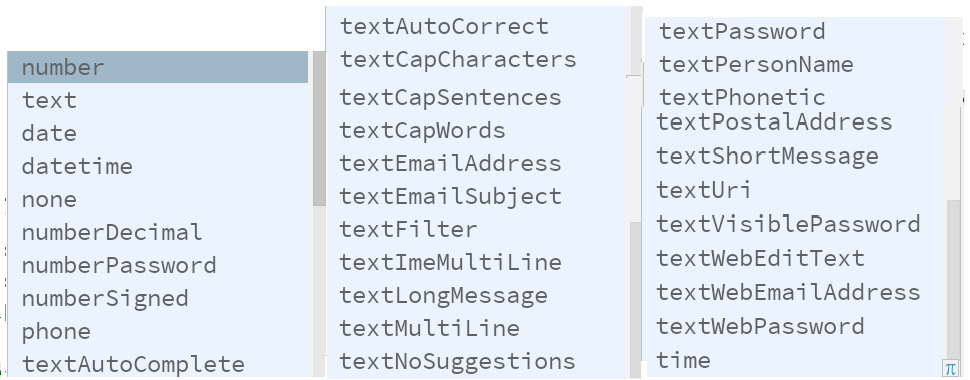
①number 只能输入数字
②numberDecimal 只能输入浮点数(小数)整数
③带password 将输入的文字显示···,用户输入密码
④textMultiLine 多行输入
⑤textNoSuggestions 无提示
 设置不可编辑  android:editable="false"

   true 表示可以编辑

   false 表示不可编辑
3 提示文字 android:hint="密码"
三、常用方法
设置焦点,光标的位置
et.setFocusable(true);
et.requestFocus();
et.setFocusableInTouchMode(true);
文本监听事件
  et.addTextChangedListener(new TextWatcher() {
      @Override
      public void beforeTextChanged(CharSequence charSequence, int i, int i1, int i2) {
          //文本改变前
      }

      @Override
      public void onTextChanged(CharSequence charSequence, int i, int i1, int i2) {
          //文本改变时
      }

      @Override
      public void afterTextChanged(Editable editable) {
          //文本改变后,一般使用此方法
      }
  });
3 设置EditText不可编辑但可拖动查看内容
四、练习
【效果】结合其他属性和控件,编写登录界面
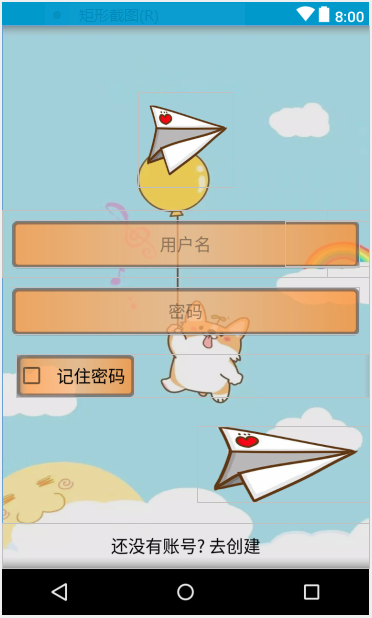
【代码】
 <?xml version="1.0" encoding="utf-8"?>

 <RelativeLayout xmlns:android="http://schemas.android.com/apk/res/android"

     xmlns:app="http://schemas.android.com/apk/res-auto"

     xmlns:tools="http://schemas.android.com/tools"

     android:layout_width="match_parent"

     android:layout_height="match_parent"

     tools:context=".view.LoginActivity"

     android:background="@drawable/login_main_bg2">

     <LinearLayout

         android:layout_width="match_parent"

         android:layout_height="match_parent"

         android:background="#3fa0a0a0"

         android:gravity="center"

         android:orientation="vertical">

         <ImageView

             android:id="@+id/change_user"

             android:layout_width="100dp"

             android:layout_height="100dp"

             android:layout_gravity="center_horizontal"

             android:layout_marginBottom="24dp"

             android:src="@drawable/next" />

         <RelativeLayout

             android:layout_width="match_parent"

             android:layout_height="wrap_content">

             <EditText

                 android:id="@+id/user_name"

                 android:layout_width="match_parent"

                 android:layout_height="50sp"

                 android:layout_margin="10dp"

                 android:background="@drawable/login_input_bg"

                 android:gravity="center"

                 android:hint="用户名"

                 android:inputType="number"

                 android:padding="5dp" />

             <Button

                 android:id="@+id/rl_user"

                 android:layout_width="wrap_content"

                 android:layout_height="wrap_content"

                 android:layout_alignParentRight="true"

                 android:layout_centerVertical="true"

                 android:background="@null"

                 />

         </RelativeLayout>

         <EditText

             android:id="@+id/user_password"

             android:layout_width="match_parent"

             android:layout_height="50sp"

             android:layout_margin="10dp"

             android:background="@drawable/login_input_bg"

             android:gravity="center"

             android:hint="密码"

             android:inputType="textPassword"

             android:padding="5dp" />

         <LinearLayout

             android:layout_width="match_parent"

             android:layout_height="wrap_content"

             android:layout_marginLeft="10dp"

             android:layout_marginTop="10dp">

             <CheckBox

                 android:id="@+id/cb"

                 android:layout_width="wrap_content"

                 android:layout_height="wrap_content"

                 android:background="@drawable/login_input_bg"

                 android:padding="10dp"

                 android:text="记住密码"

                 android:textSize="18sp" />

         </LinearLayout>

         <Button

             android:id="@+id/btn_denglu"

             android:layout_width="180dp"

             android:layout_height="80dp"

             android:layout_gravity="right"

             android:layout_marginTop="30dp"

             android:background="@drawable/next" />

     </LinearLayout>

     <Button

         android:id="@+id/btn_zhuche"

         android:layout_width="match_parent"

         android:layout_height="wrap_content"

         android:layout_alignParentBottom="true"

         android:gravity="center"

         android:textColor="#050505"

         android:text="还没有账号? 去创建"

         android:textSize="18sp"

         android:background="@null"/>

 </RelativeLayout>
Android EditText常用属性的更多相关文章
- android布局常用属性记录
android布局常用属性记录 http://blog.csdn.net/xn4545945/article/details/7717086这里有一部分别人总结的其余的: align:对齐 par ...
- Android:EditText 常用属性
属性 作用 android:hint="输入邮箱/用户名" 提示信息 android:inputType="textPassword" 设置文本的类型 andr ...
- Android开发常用属性
1.android string.xml 文字中间加入空格 android string.xml前后加空格的技巧 <string name="password">密 ...
- Android TextView常用属性
[说明] TextView是用来显示文本的组件.以下介绍的是XML代码中的属性,在java代码中同样可通过 "组件名.setXXX()方法设置.如,tv.setTextColor(); [属 ...
- (获取选中的光标起始位置)EditText常用属性【三】:EditText选取操作
转自:http://blog.csdn.net/wirelessqa/article/details/8567702 话不多说,直接上码: activity_main.xml <ScrollVi ...
- 【Android自学日记】五大布局常用属性
线性布局(LinearLayout)常用属性: android:orientation="vertical"--决定子类控件的排布方式(vertical垂直:horizontal水 ...
- Android EditText属性
1.EditText输入的文字为密码形式的设置 (1)通过.xml里设置: 把该EditText设为:android:password="true" // 以”.”形式显示文本 ( ...
- Android中Edittext的属性
//此为转载别人的,挺不错的 1.EditText输入的文字为密码形式的设置 (1)通过.xml里设置: 把该EditText设为:android:password="true" ...
- 【Android 应用开发】Android UI 设计之 TextView EditText 组件属性方法最详细解析
. 作者 :万境绝尘 转载请注明出处 : http://blog.csdn.net/shulianghan/article/details/18964835 . TextView 相关类的继承结构 ...
随机推荐
- Zookeeper+Dubbo+SpringMVC环境搭建
项目码云GIT地址:https://gitee.com/xshuai/dubbo/ 开发工具 MyEclipse 10.7 JDK 1.7 容器 Tomcat 8(运行dubbo) zookeeper ...
- [Swift]LeetCode543. 二叉树的直径 | Diameter of Binary Tree
Given a binary tree, you need to compute the length of the diameter of the tree. The diameter of a b ...
- Python面试真题第二节
26.字符串a = "not 404 found 张三 99 深圳",每个词中间是空格,用正则过滤掉英文和数字,最终输出"张三 深圳" 27.filter方法求 ...
- hadoop退出安全模式Name node is in safe mode
在使用 hdfs 的时候出现如下错误: 18/01/12 09:04:34 INFO fs.TrashPolicyDefault: Namenode trash configuration: Dele ...
- 11.Flask钩子函数
在Flask中钩子函数是使用特定的装饰器的函数.为什么叫做钩子函数呢,是因为钩子函数可以在正常执行的代码中,插入一段自己想要执行的代码,那么这种函数就叫做钩子函数. before_first_requ ...
- 8.Flask-Script
Flask-script的作用是可以通过命令行的形式操作flask.安装方式:pip install flask-script 1.1.command装饰器 (1)创建manage.py from f ...
- MyBatis 分页插件 PageHelper 使用
1. 引入Maven依赖 <?xml version="1.0" encoding="UTF-8"?> <project xmlns=&qu ...
- 关于 IdentityServer4 中的 Jwt Token 与 Reference Token
OpenID Connect(Core),OAuth 2.0(RFC 6749),JSON Web Token (JWT)(RFC 7519) 之间有着密不可分联系,对比了不同语言的实现,还是觉得 I ...
- C++版 - 剑指offer面试题28: 字符串的排列
题目: 字符串的排列 热度指数:5777 时间限制:1秒 空间限制:32768K 本题知识点: 字符串 题目描述 输入一个字符串,按字典序打印出该字符串中字符的所有排列.例如输入字符串abc,则打印出 ...
- 行为驱动:Cucumber + Selenium + Java(四) - 实现测试用例的参数化
在上一篇中,我们介绍了Selenium + Cucumber + Java框架下的使用Tags对测试用例分组的实现方法,这一篇我们用数据表格来实现测试用例参数化. 4.1 什么是用例参数化 实际测试中 ...