
Apache Hadoop 2.9.2 的集群管理之服役和退役
Apache Hadoop 2.9.2 的集群管理之服役和退役
作者:尹正杰
版权声明:原创作品,谢绝转载!否则将追究法律责任。
随着公司业务的发展,客户量越来越多,产生的日志自然也就越来越大来,可能我们现有集群的DataNode节点的容量依旧不能满足存储数据的需求,因此需要在现有的集群基础之上动态添加DataNode在生成环境中也是很有可能的。
一.添加新节点的过程(服役)
1>.查看需要加入进群的节点的IP地址
[root@node110.yinzhengjie.org.cn ~]# ifconfig

eth0: flags=<UP,BROADCAST,RUNNING,MULTICAST>  mtu

        inet 172.30.1.110  netmask 255.255.255.0  broadcast 172.30.1.255

        inet6 fe80::21c:42ff:fe11:  prefixlen   scopeid 0x20<link>

        ether :1c::::  txqueuelen   (Ethernet)

        RX packets   bytes  (7.6 KiB)

        RX errors   dropped   overruns   frame

        TX packets   bytes  (7.3 KiB)

        TX errors   dropped  overruns   carrier   collisions

lo: flags=<UP,LOOPBACK,RUNNING>  mtu

        inet 127.0.0.1  netmask 255.0.0.0

        inet6 ::  prefixlen   scopeid 0x10<host>

        loop  txqueuelen   (Local Loopback)

        RX packets   bytes  (0.0 B)

        RX errors   dropped   overruns   frame

        TX packets   bytes  (0.0 B)

        TX errors   dropped  overruns   carrier   collisions

[root@node110.yinzhengjie.org.cn ~]#
[root@node110.yinzhengjie.org.cn ~]# ifconfig
[root@node110.yinzhengjie.org.cn ~]# cat /etc/hosts | grep yinzhengjie

172.30.1.101 node101.yinzhengjie.org.cn

172.30.1.102 node102.yinzhengjie.org.cn

172.30.1.103 node103.yinzhengjie.org.cn

172.30.1.110 node110.yinzhengjie.org.cn

[root@node110.yinzhengjie.org.cn ~]#
[root@node110.yinzhengjie.org.cn ~]# cat /etc/hosts | grep yinzhengjie
[root@node110.yinzhengjie.org.cn ~]# yum -y install java-1.8.-openjdk-devel

Loaded plugins: fastestmirror, langpacks

Loading mirror speeds from cached hostfile

 * base: mirrors.aliyun.com

 * extras: mirrors.aliyun.com

 * updates: mirrors.aliyun.com

Resolving Dependencies

--> Running transaction check

---> Package java-1.8.-openjdk-devel.x86_64 :1.8.0.201.b09-.el7_6 will be installed

--> Processing Dependency: java-1.8.-openjdk(x86-) = :1.8.0.201.b09-.el7_6 for package: :java-1.8.-openjdk-devel-1.8.0.201.b09-.el7_6.x86_64

--> Running transaction check

---> Package java-1.8.-openjdk.x86_64 :1.8.0.201.b09-.el7_6 will be installed

--> Processing Dependency: java-1.8.-openjdk-headless(x86-) = :1.8.0.201.b09-.el7_6 for package: :java-1.8.-openjdk-1.8.0.201.b09-.el7_6.x86_64

--> Running transaction check

---> Package java-1.8.-openjdk-headless.x86_64 :1.8.0.201.b09-.el7_6 will be installed

--> Finished Dependency Resolution

Dependencies Resolved

==========================================================================================================================================================================================================================================

 Package                                                             Arch                                           Version                                                         Repository                                       Size

==========================================================================================================================================================================================================================================

Installing:

 java-1.8.-openjdk-devel                                            x86_64                                         :1.8.0.201.b09-.el7_6                                         updates                                         9.8 M

Installing for dependencies:

 java-1.8.-openjdk                                                  x86_64                                         :1.8.0.201.b09-.el7_6                                         updates                                          k

 java-1.8.-openjdk-headless                                         x86_64                                         :1.8.0.201.b09-.el7_6                                         updates                                           M

Transaction Summary

==========================================================================================================================================================================================================================================

Install   Package (+ Dependent packages)

Total download size:  M

Installed size:  M

Downloading packages:

(/): java-1.8.-openjdk-1.8.0.201.b09-.el7_6.x86_64.rpm                                                                                                                                                         |  kB  ::

(/): java-1.8.-openjdk-devel-1.8.0.201.b09-.el7_6.x86_64.rpm                                                                                                                                                   | 9.8 MB  ::

(/): java-1.8.-openjdk-headless-1.8.0.201.b09-.el7_6.x86_64.rpm                                                                                                                                                |   MB  ::

------------------------------------------------------------------------------------------------------------------------------------------------------------------------------------------------------------------------------------------

Total                                                                                                                                                                                                     2.3 MB/s |   MB  ::

Running transaction check

Running transaction test

Transaction test succeeded

Running transaction

  Installing : :java-1.8.-openjdk-headless-1.8.0.201.b09-.el7_6.x86_64                                                                                                                                                             /

  Installing : :java-1.8.-openjdk-1.8.0.201.b09-.el7_6.x86_64                                                                                                                                                                      /

  Installing : :java-1.8.-openjdk-devel-1.8.0.201.b09-.el7_6.x86_64                                                                                                                                                                /

  Verifying  : :java-1.8.-openjdk-1.8.0.201.b09-.el7_6.x86_64                                                                                                                                                                      /

  Verifying  : :java-1.8.-openjdk-headless-1.8.0.201.b09-.el7_6.x86_64                                                                                                                                                             /

  Verifying  : :java-1.8.-openjdk-devel-1.8.0.201.b09-.el7_6.x86_64                                                                                                                                                                /

Installed:

  java-1.8.-openjdk-devel.x86_64 :1.8.0.201.b09-.el7_6

Dependency Installed:

  java-1.8.-openjdk.x86_64 :1.8.0.201.b09-.el7_6                                                               java-1.8.-openjdk-headless.x86_64 :1.8.0.201.b09-.el7_6

Complete!

[root@node110.yinzhengjie.org.cn ~]#
[root@node110.yinzhengjie.org.cn ~]# yum -y install java-1.8.0-openjdk-devel
2>.将NameNode节点配置环境拷贝到需要加入进群的节点的服务器
[root@node101.yinzhengjie.org.cn ~]# cat /yinzhengjie/softwares/hadoop-2.9./etc/hadoop/hdfs-site.xml

<?xml version="1.0" encoding="UTF-8"?>

<?xml-stylesheet type="text/xsl" href="configuration.xsl"?>

<configuration>

        <property>

                <name>dfs.namenode.checkpoint.period</name>

                <value></value>

        </property>

        <property>

                <name>dfs.namenode.name.dir</name>

                <value>file:///${hadoop.tmp.dir}/dfs/namenode1,file:///${hadoop.tmp.dir}/dfs/namenode2,file:///${hadoop.tmp.dir}/dfs/namenode3</value>

        </property>

        <property>

                <name>dfs.datanode.data.dir</name>

                <value>file:///${hadoop.tmp.dir}/dfs/data1,file:///${hadoop.tmp.dir}/dfs/data2</value>

        </property>

        <property>

                <name>dfs.replication</name>

                <value></value>

        </property>

        <property>

                <name>dfs.namenode.heartbeat.recheck-interval</name>

                <value></value>

        </property>

        <property>

                <name> dfs.heartbeat.interval </name>

                <value></value>

        </property>

<!--

        <property>

                <name>dfs.hosts</name>

                <value>file:///${hadoop.tmp.dir}/DataNodesHostname.txt</value>

        </property>

-->

        <property>

                <name>dfs.hosts.exclude</name>

                <value>file:///${hadoop.tmp.dir}/dfs.hosts.exclude.txt</value>

        </property>

</configuration>

<!--

hdfs-site.xml 配置文件的作用:

        #HDFS的相关设定,如文件副本的个数、块大小及是否使用强制权限等,此中的参数定义会覆盖hdfs-default.xml文件中的默认配置.

dfs.namenode.checkpoint.period 参数的作用:

        #两个定期检查点之间的秒数,默认是3600,即1小时。

dfs.namenode.name.dir 参数的作用:

        #指定namenode的工作目录,默认是file://${hadoop.tmp.dir}/dfs/name,namenode的本地目录可以配置成多个,且每个目录存放内容相同,增加了可靠性。建议配置的多目录用不同磁盘挂在,这样可以提升IO性能!

dfs.datanode.data.dir 参数的作用:

        #指定datanode的工作目录,议配置的多目录用不同磁盘挂在,这样可以提升IO性能!但是多个目录存储的数据并不相同哟!而是把数据存放在不同的目录,当namenode存储数据时效率更高!

dfs.replication 参数的作用:

        #为了数据可用性及冗余的目的,HDFS会在多个节点上保存同一个数据块的多个副本,其默认为3个。而只有一个节点的伪分布式环境中其仅用

保存一个副本即可,这可以通过dfs.replication属性进行定义。它是一个软件级备份。

dfs.heartbeat.interval  参数的作用:

        #设置心跳检测时间

dfs.namenode.heartbeat.recheck-interval和dfs.heartbeat.interval  参数的作用:

        #设置HDFS中NameNode和DataNode的超时时间,计算公式为:timeout  =  * dfs.namenode.heartbeat.recheck-interval +  * dfs.heartbeat.interval。

dfs.hosts 参数的作用:

        #添加白名单,功能和黑名单(dfs.hosts.exclude)相反。我这里是将其注释掉了。

dfs.hosts.exclude 参数的作用:

        #这是我们添加的黑名单,该属性的value定义的是一个配置文件,这个配置文件的主机就是需要退役的节点。

-->

[root@node101.yinzhengjie.org.cn ~]#
[root@node101.yinzhengjie.org.cn ~]# cat /yinzhengjie/softwares/hadoop-2.9.2/etc/hadoop/hdfs-site.xml
[root@node101.yinzhengjie.org.cn ~]# ssh-copy-id node110.yinzhengjie.org.cn

/usr/bin/ssh-copy-id: INFO: Source of key(s) to be installed: "/root/.ssh/id_rsa.pub"

The authenticity of host 'node110.yinzhengjie.org.cn (172.30.1.110)' can't be established.

ECDSA key fingerprint is SHA256:7fUJXbFRvzvhON0FKnxvIivwkEZsiQ1jXE3V3i7ONEg.

ECDSA key fingerprint is MD5:7b::fb:ed:::ed:7b::db:::::0c:5b.

Are you sure you want to continue connecting (yes/no)? yes

/usr/bin/ssh-copy-id: INFO: attempting to log in with the new key(s), to filter out any that are already installed

/usr/bin/ssh-copy-id: INFO:  key(s) remain to be installed -- if you are prompted now it is to install the new keys

root@node110.yinzhengjie.org.cn's password:

Number of key(s) added:

Now try logging into the machine, with:   "ssh 'node110.yinzhengjie.org.cn'"

and check to make sure that only the key(s) you wanted were added.

[root@node101.yinzhengjie.org.cn ~]#

[root@node101.yinzhengjie.org.cn ~]#
[root@node101.yinzhengjie.org.cn ~]# ssh-copy-id node110.yinzhengjie.org.cn
[root@node101.yinzhengjie.org.cn ~]# scp -r /yinzhengjie/softwares/hadoop-2.9./ node110.yinzhengjie.org.cn:/yinzhengjie/softwares/

.......

README.txt                                                                                                                                                                                            %      .8MB/s   :

mapred-config.cmd                                                                                                                                                                                     %      .8MB/s   :

hdfs-config.sh                                                                                                                                                                                        %      .9MB/s   :

httpfs-config.sh                                                                                                                                                                                      %     .4MB/s   :

hdfs-config.cmd                                                                                                                                                                                       %      .3MB/s   :

yarn-config.cmd                                                                                                                                                                                       %      .0MB/s   :

mapred-config.sh                                                                                                                                                                                      %      .6MB/s   :

hadoop-config.cmd                                                                                                                                                                                     %     .3MB/s   :

hadoop-config.sh                                                                                                                                                                                      %   11KB  .3MB/s   :

yarn-config.sh                                                                                                                                                                                        %      .4MB/s   :

kms-config.sh                                                                                                                                                                                         %     .3MB/s   :

libhadooppipes.a                                                                                                                                                                                      % 1594KB  .3MB/s   :

libhadooputils.a                                                                                                                                                                                      %  465KB  .0MB/s   :

libhdfs.so.0.0.                                                                                                                                                                                      %  278KB  .4MB/s   :

wordcount-part                                                                                                                                                                                        %  933KB  .5MB/s   :

wordcount-simple                                                                                                                                                                                      %  924KB  .3MB/s   :

pipes-sort                                                                                                                                                                                            %  910KB  .9MB/s   :

wordcount-nopipe                                                                                                                                                                                      %  972KB  .8MB/s   :

libhdfs.so                                                                                                                                                                                            %  278KB  .1MB/s   :

libhdfs.a                                                                                                                                                                                             %  444KB  .7MB/s   :

libhadoop.so                                                                                                                                                                                          %  822KB  .9MB/s   :

libhadoop.a                                                                                                                                                                                           % 1406KB  .3MB/s   :

libhadoop.so.1.0.                                                                                                                                                                                    %  822KB  .6MB/s   :

[root@node101.yinzhengjie.org.cn ~]#
[root@node101.yinzhengjie.org.cn ~]# scp -r /yinzhengjie/softwares/hadoop-2.9.2/ node110.yinzhengjie.org.cn:/yinzhengjie/softwares/
[root@node101.yinzhengjie.org.cn ~]# scp /etc/profile node110.yinzhengjie.org.cn:/etc/

profile                                                                                                                                                                                               %      .8MB/s   :

[root@node101.yinzhengjie.org.cn ~]#
[root@node101.yinzhengjie.org.cn ~]# scp /etc/profile node110.yinzhengjie.org.cn:/etc/ profile
3>.在新加入的datanode节点上单独启动datanode进程
[root@node110.yinzhengjie.org.cn ~]# hadoop-daemon.sh start datanode

starting datanode, logging to /yinzhengjie/softwares/hadoop-2.9./logs/hadoop-root-datanode-node110.yinzhengjie.org.cn.out

[root@node110.yinzhengjie.org.cn ~]#

[root@node110.yinzhengjie.org.cn ~]# jps

 DataNode

 Jps

[root@node110.yinzhengjie.org.cn ~]#
[root@node110.yinzhengjie.org.cn ~]# hadoop-daemon.sh start datanode
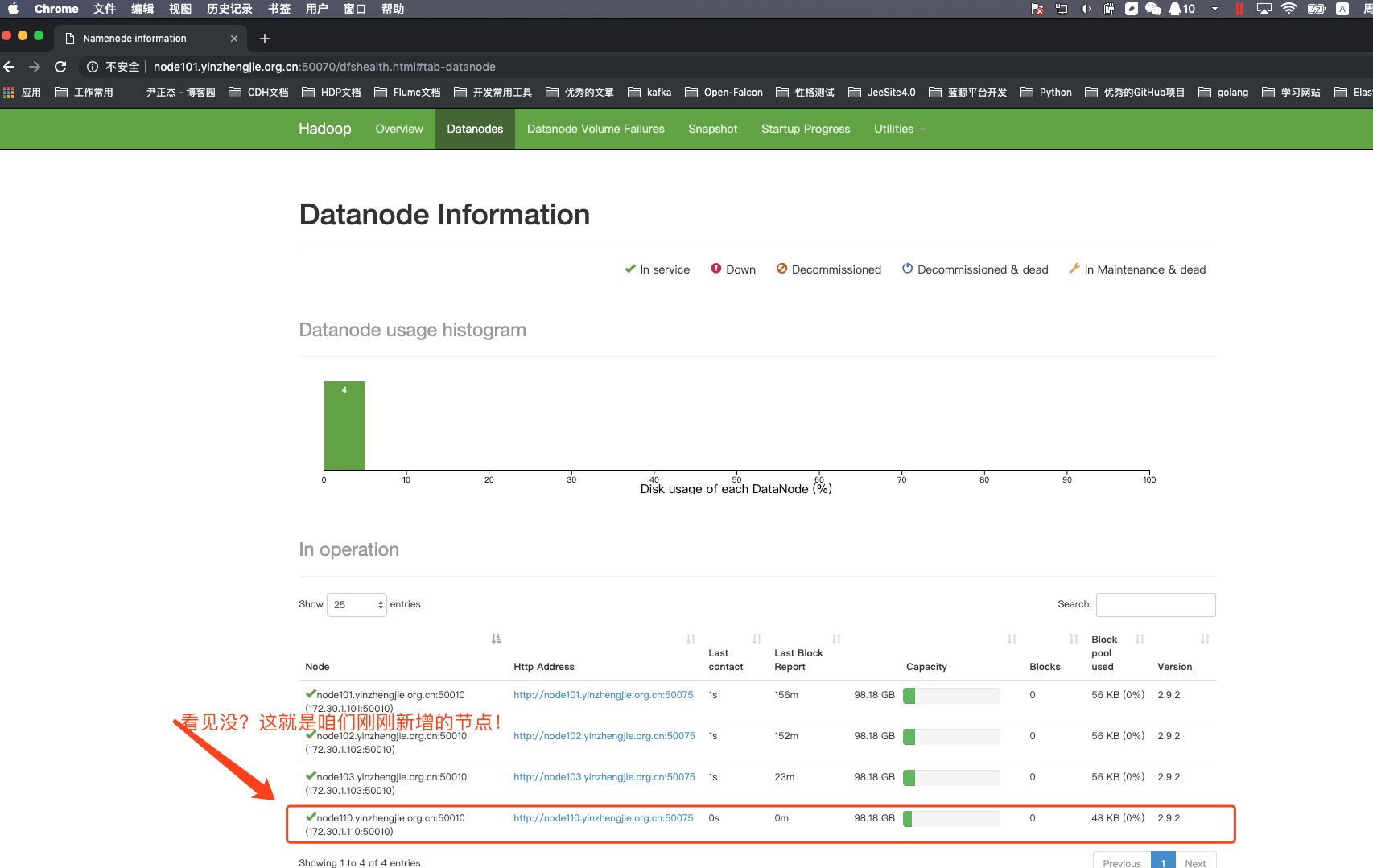
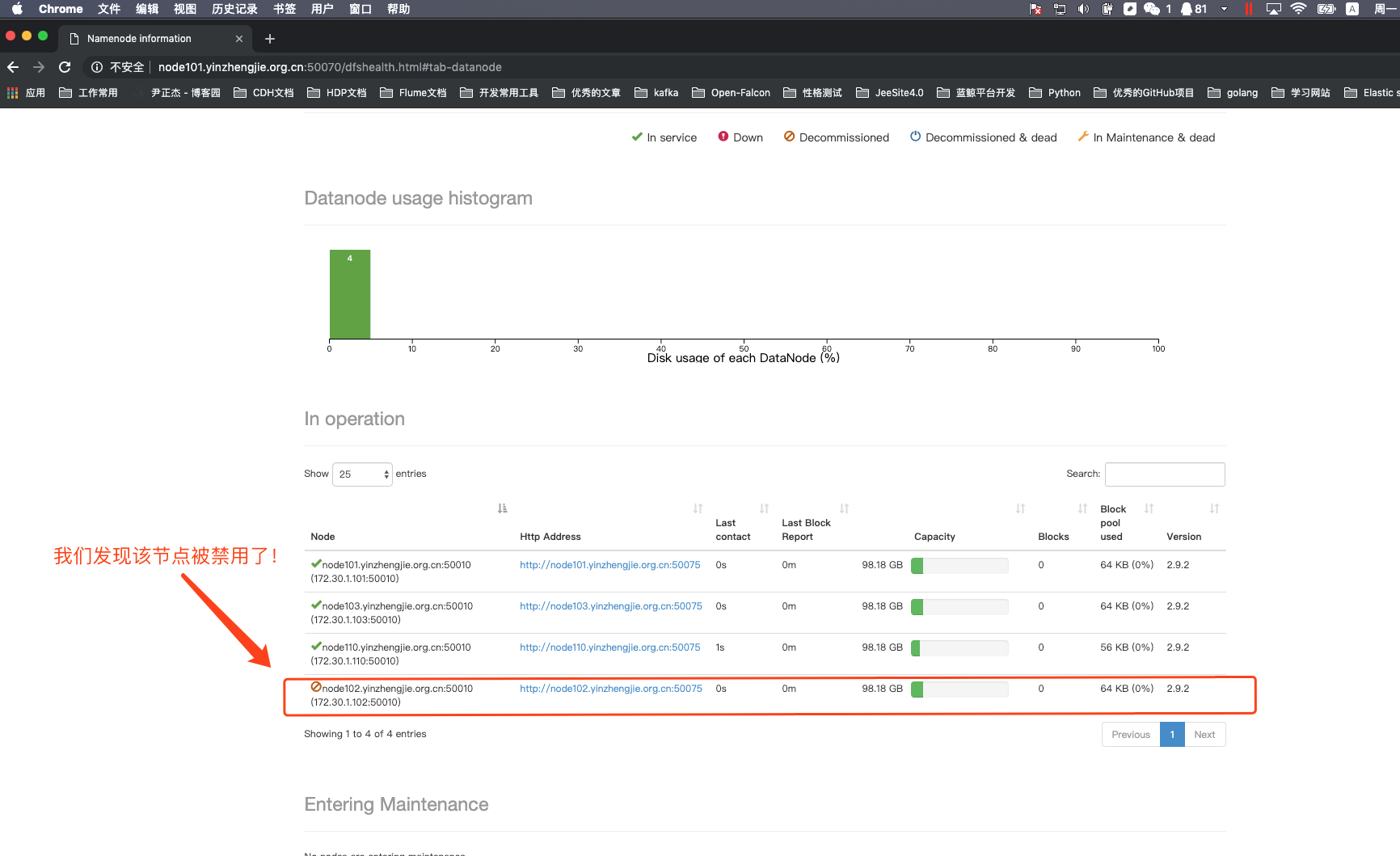
4>.编辑黑名单,将node102.yinzhengjie.org.cn节点加入我们定义好的配置文件
[root@node101.yinzhengjie.org.cn ~]# cat /data/hadoop/hdfs/dfs.hosts.exclude.txt

node102.yinzhengjie.org.cn

[root@node101.yinzhengjie.org.cn ~]#
[root@node101.yinzhengjie.org.cn ~]# cat /data/hadoop/hdfs/dfs.hosts.exclude.txt
[root@node101.yinzhengjie.org.cn ~]# hdfs dfsadmin -refreshNodes

Refresh nodes successful

[root@node101.yinzhengjie.org.cn ~]#
[root@node101.yinzhengjie.org.cn ~]# hdfs dfsadmin -refreshNodes #如果有同时不存在文件的话可以重启一下集群!
5>.关于服役相关说明
根据上述的步骤,我们可以成功将一个节点加入到集另一个群中。也可以禁用某个节点,只需要将该主机加入到我们自定义的黑名单配置文件中即可。其实我们将节点加入集群成功后,我们最好将slaves文件也修改为最新的状态,从而达到便于管理集群的DataNode的目的,不用每次启动集群时都新加入的集群需要单独启动!
[root@node101.yinzhengjie.org.cn ~]# cat /yinzhengjie/softwares/hadoop-2.9./etc/hadoop/slaves

node101.yinzhengjie.org.cn

node102.yinzhengjie.org.cn

node103.yinzhengjie.org.cn

node110.yinzhengjie.org.cn

[root@node101.yinzhengjie.org.cn ~]#
[root@node101.yinzhengjie.org.cn ~]# cat /yinzhengjie/softwares/hadoop-2.9.2/etc/hadoop/slaves
二.删除旧节点的过程(退役)
1>.修改NameNode的配置文件并同步到其他节点上去
[root@node101.yinzhengjie.org.cn ~]# cat /yinzhengjie/softwares/hadoop-2.9./etc/hadoop/hdfs-site.xml

<?xml version="1.0" encoding="UTF-8"?>

<?xml-stylesheet type="text/xsl" href="configuration.xsl"?>

<configuration>

        <property>

                <name>dfs.namenode.checkpoint.period</name>

                <value></value>

        </property>

        <property>

                <name>dfs.namenode.name.dir</name>

                <value>file:///${hadoop.tmp.dir}/dfs/namenode1,file:///${hadoop.tmp.dir}/dfs/namenode2,file:///${hadoop.tmp.dir}/dfs/namenode3</value>

        </property>

        <property>

                <name>dfs.datanode.data.dir</name>

                <value>file:///${hadoop.tmp.dir}/dfs/data1,file:///${hadoop.tmp.dir}/dfs/data2</value>

        </property>

        <property>

                <name>dfs.replication</name>

                <value></value>

        </property>

        <property>

                <name>dfs.namenode.heartbeat.recheck-interval</name>

                <value></value>

        </property>

        <property>

                <name> dfs.heartbeat.interval </name>

                <value></value>

        </property>

        <property>

                <name>dfs.hosts</name>

                <value>/data/hadoop/hdfs/DataNodesHostname.txt</value>

        </property>

<!--

        <property>

                <name>dfs.hosts.exclude</name>

                <value>/data/hadoop/hdfs/dfs.hosts.exclude.txt</value>

        </property>

-->

</configuration>

<!--

hdfs-site.xml 配置文件的作用:

        #HDFS的相关设定,如文件副本的个数、块大小及是否使用强制权限等,此中的参数定义会覆盖hdfs-default.xml文件中的默认配置.

dfs.namenode.checkpoint.period 参数的作用:

        #两个定期检查点之间的秒数,默认是3600,即1小时。

dfs.namenode.name.dir 参数的作用:

        #指定namenode的工作目录,默认是file://${hadoop.tmp.dir}/dfs/name,namenode的本地目录可以配置成多个,且每个目录存放内容相同,增加了可靠性。建议配置的多目录用不同磁盘挂在,这样可以提升IO性能!

dfs.datanode.data.dir 参数的作用:

        #指定datanode的工作目录,议配置的多目录用不同磁盘挂在,这样可以提升IO性能!但是多个目录存储的数据并不相同哟!而是把数据存放在不同的目录,当namenode存储数据时效率更高!

dfs.replication 参数的作用:

        #为了数据可用性及冗余的目的,HDFS会在多个节点上保存同一个数据块的多个副本,其默认为3个。而只有一个节点的伪分布式环境中其仅用

保存一个副本即可,这可以通过dfs.replication属性进行定义。它是一个软件级备份。

dfs.heartbeat.interval  参数的作用:

        #设置心跳检测时间

dfs.namenode.heartbeat.recheck-interval和dfs.heartbeat.interval  参数的作用:

        #设置HDFS中NameNode和DataNode的超时时间,计算公式为:timeout  =  * dfs.namenode.heartbeat.recheck-interval +  * dfs.heartbeat.interval。

dfs.hosts 参数的作用:

        #添加白名单,功能和黑名单(dfs.hosts.exclude)相反。

dfs.hosts.exclude 参数的作用:

        #这是我们添加的黑名单,该属性的value定义的是一个配置文件,这个配置文件的主机就是需要退役的节点。我这里是将其注释掉了。

-->

[root@node101.yinzhengjie.org.cn ~]#
[root@node101.yinzhengjie.org.cn ~]# cat /yinzhengjie/softwares/hadoop-2.9.2/etc/hadoop/hdfs-site.xml
[root@node101.yinzhengjie.org.cn ~]# cat /yinzhengjie/softwares/hadoop-2.9./etc/hadoop/slaves

node101.yinzhengjie.org.cn

node102.yinzhengjie.org.cn

node103.yinzhengjie.org.cn

node110.yinzhengjie.org.cn

[root@node101.yinzhengjie.org.cn ~]#
[root@node101.yinzhengjie.org.cn ~]# cat /yinzhengjie/softwares/hadoop-2.9.2/etc/hadoop/slaves
[root@node101.yinzhengjie.org.cn ~]# stop-dfs.sh

Stopping namenodes on [node101.yinzhengjie.org.cn]

node101.yinzhengjie.org.cn: stopping namenode

node101.yinzhengjie.org.cn: stopping datanode

node102.yinzhengjie.org.cn: stopping datanode

node103.yinzhengjie.org.cn: stopping datanode

node110.yinzhengjie.org.cn: stopping datanode

Stopping secondary namenodes [account.jetbrains.com]

account.jetbrains.com: stopping secondarynamenode

[root@node101.yinzhengjie.org.cn ~]#
[root@node101.yinzhengjie.org.cn ~]# stop-dfs.sh
[root@node101.yinzhengjie.org.cn ~]# scp -r /yinzhengjie/softwares/hadoop-2.9./ node102.yinzhengjie.org.cn:/yinzhengjie/softwares/ ........
hadoop-yarn-server-applicationhistoryservice-2.9..jar % 528KB .6MB/s :
mssql-jdbc-6.2..jre7.jar % 774KB .0MB/s :
hadoop-streaming-2.9..jar % 132KB .4MB/s :
commons-math3-3.1..jar % 1562KB .9MB/s :
json-io-2.5..jar % 73KB .5MB/s :
ojalgo-43.0.jar % 1625KB .2MB/s :
hadoop-azure-datalake-2.9..jar % 52KB .3MB/s :
README.txt % .0MB/s :
mapred-config.cmd % .0MB/s :
hdfs-config.sh % .0MB/s :
httpfs-config.sh % .9MB/s :
hdfs-config.cmd % .0MB/s :
yarn-config.cmd % .2MB/s :
mapred-config.sh % .9MB/s :
hadoop-config.cmd % .1MB/s :
hadoop-config.sh % 11KB .5MB/s :
yarn-config.sh % .1MB/s :
kms-config.sh % .0MB/s :
libhadooppipes.a % 1594KB .4MB/s :
libhadooputils.a % 465KB .5MB/s :
libhdfs.so.0.0. % 278KB .1MB/s :
wordcount-part % 933KB .2MB/s :
wordcount-simple % 924KB .8MB/s :
pipes-sort % 910KB .9MB/s :
wordcount-nopipe % 972KB .6MB/s :
libhdfs.so % 278KB .1MB/s :
libhdfs.a % 444KB .7MB/s :
libhadoop.so % 822KB .9MB/s :
libhadoop.a % 1406KB .3MB/s :
libhadoop.so.1.0. % 822KB .9MB/s :
[root@node101.yinzhengjie.org.cn ~]#
[root@node101.yinzhengjie.org.cn ~]# scp -r /yinzhengjie/softwares/hadoop-2.9.2/ node102.yinzhengjie.org.cn:/yinzhengjie/softwares/
[root@node101.yinzhengjie.org.cn ~]# scp -r /yinzhengjie/softwares/hadoop-2.9./ node103.yinzhengjie.org.cn:/yinzhengjie/softwares/ ......
hadoop-yarn-server-applicationhistoryservice-2.9..jar % 528KB .0MB/s :
mssql-jdbc-6.2..jre7.jar % 774KB .6MB/s :
hadoop-streaming-2.9..jar % 132KB .0MB/s :
commons-math3-3.1..jar % 1562KB .3MB/s :
json-io-2.5..jar % 73KB .8MB/s :
ojalgo-43.0.jar % 1625KB .0MB/s :
hadoop-azure-datalake-2.9..jar % 52KB .3MB/s :
README.txt % .0MB/s :
mapred-config.cmd % .6MB/s :
hdfs-config.sh % .2MB/s :
httpfs-config.sh % .0MB/s :
hdfs-config.cmd % .8MB/s :
yarn-config.cmd % .4MB/s :
mapred-config.sh % .4MB/s :
hadoop-config.cmd % .4MB/s :
hadoop-config.sh % 11KB .1MB/s :
yarn-config.sh % .6MB/s :
kms-config.sh % .5MB/s :
libhadooppipes.a % 1594KB .6MB/s :
libhadooputils.a % 465KB .3MB/s :
libhdfs.so.0.0. % 278KB .6MB/s :
wordcount-part % 933KB .3MB/s :
wordcount-simple % 924KB .2MB/s :
pipes-sort % 910KB .2MB/s :
wordcount-nopipe % 972KB .2MB/s :
libhdfs.so % 278KB .6MB/s :
libhdfs.a % 444KB .3MB/s :
libhadoop.so % 822KB .9MB/s :
libhadoop.a % 1406KB .2MB/s :
libhadoop.so.1.0. % 822KB .3MB/s :
[root@node101.yinzhengjie.org.cn ~]#
[root@node101.yinzhengjie.org.cn ~]# scp -r /yinzhengjie/softwares/hadoop-2.9.2/ node103.yinzhengjie.org.cn:/yinzhengjie/softwares/
[root@node101.yinzhengjie.org.cn ~]# scp -r /yinzhengjie/softwares/hadoop-2.9./ node110.yinzhengjie.org.cn:/yinzhengjie/softwares/ .......
mssql-jdbc-6.2..jre7.jar % 774KB .9MB/s :
hadoop-streaming-2.9..jar % 132KB .1MB/s :
commons-math3-3.1..jar % 1562KB .7MB/s :
json-io-2.5..jar % 73KB .7MB/s :
ojalgo-43.0.jar % 1625KB .2MB/s :
hadoop-azure-datalake-2.9..jar % 52KB .5MB/s :
README.txt % .5MB/s :
mapred-config.cmd % .8MB/s :
hdfs-config.sh % .6KB/s :
httpfs-config.sh % .9MB/s :
hdfs-config.cmd % .1MB/s :
yarn-config.cmd % .3MB/s :
mapred-config.sh % .0MB/s :
hadoop-config.cmd % .9MB/s :
hadoop-config.sh % 11KB .7MB/s :
yarn-config.sh % .7MB/s :
kms-config.sh % .6MB/s :
libhadooppipes.a % 1594KB .1MB/s :
libhadooputils.a % 465KB .7MB/s :
libhdfs.so.0.0. % 278KB .3MB/s :
wordcount-part % 933KB .5MB/s :
wordcount-simple % 924KB .3MB/s :
pipes-sort % 910KB .6MB/s :
wordcount-nopipe % 972KB .4MB/s :
libhdfs.so % 278KB .4MB/s :
libhdfs.a % 444KB .2MB/s :
libhadoop.so % 822KB .9MB/s :
libhadoop.a % 1406KB .2MB/s :
libhadoop.so.1.0. % 822KB .3MB/s :
[root@node101.yinzhengjie.org.cn ~]#
[root@node101.yinzhengjie.org.cn ~]# scp -r /yinzhengjie/softwares/hadoop-2.9.2/ node110.yinzhengjie.org.cn:/yinzhengjie/softwares/
2>.编辑白名单
[root@node101.yinzhengjie.org.cn ~]# cat /data/hadoop/hdfs/DataNodesHostname.txt

node101.yinzhengjie.org.cn

node103.yinzhengjie.org.cn

node110.yinzhengjie.org.cn

[root@node101.yinzhengjie.org.cn ~]#
[root@node101.yinzhengjie.org.cn ~]# cat /data/hadoop/hdfs/DataNodesHostname.txt
[root@node101.yinzhengjie.org.cn ~]# start-dfs.sh

Starting namenodes on [node101.yinzhengjie.org.cn]

node101.yinzhengjie.org.cn: starting namenode, logging to /yinzhengjie/softwares/hadoop-2.9./logs/hadoop-root-namenode-node101.yinzhengjie.org.cn.out

node102.yinzhengjie.org.cn: starting datanode, logging to /yinzhengjie/softwares/hadoop-2.9./logs/hadoop-root-datanode-node102.yinzhengjie.org.cn.out

node101.yinzhengjie.org.cn: starting datanode, logging to /yinzhengjie/softwares/hadoop-2.9./logs/hadoop-root-datanode-node101.yinzhengjie.org.cn.out

node103.yinzhengjie.org.cn: starting datanode, logging to /yinzhengjie/softwares/hadoop-2.9./logs/hadoop-root-datanode-node103.yinzhengjie.org.cn.out

node110.yinzhengjie.org.cn: starting datanode, logging to /yinzhengjie/softwares/hadoop-2.9./logs/hadoop-root-datanode-node110.yinzhengjie.org.cn.out

Starting secondary namenodes [account.jetbrains.com]

account.jetbrains.com: starting secondarynamenode, logging to /yinzhengjie/softwares/hadoop-2.9./logs/hadoop-root-secondarynamenode-node101.yinzhengjie.org.cn.out

[root@node101.yinzhengjie.org.cn ~]#

[root@node101.yinzhengjie.org.cn ~]# jps

 Jps

 NameNode

 DataNode

 SecondaryNameNode

[root@node101.yinzhengjie.org.cn ~]#
[root@node101.yinzhengjie.org.cn ~]# start-dfs.sh
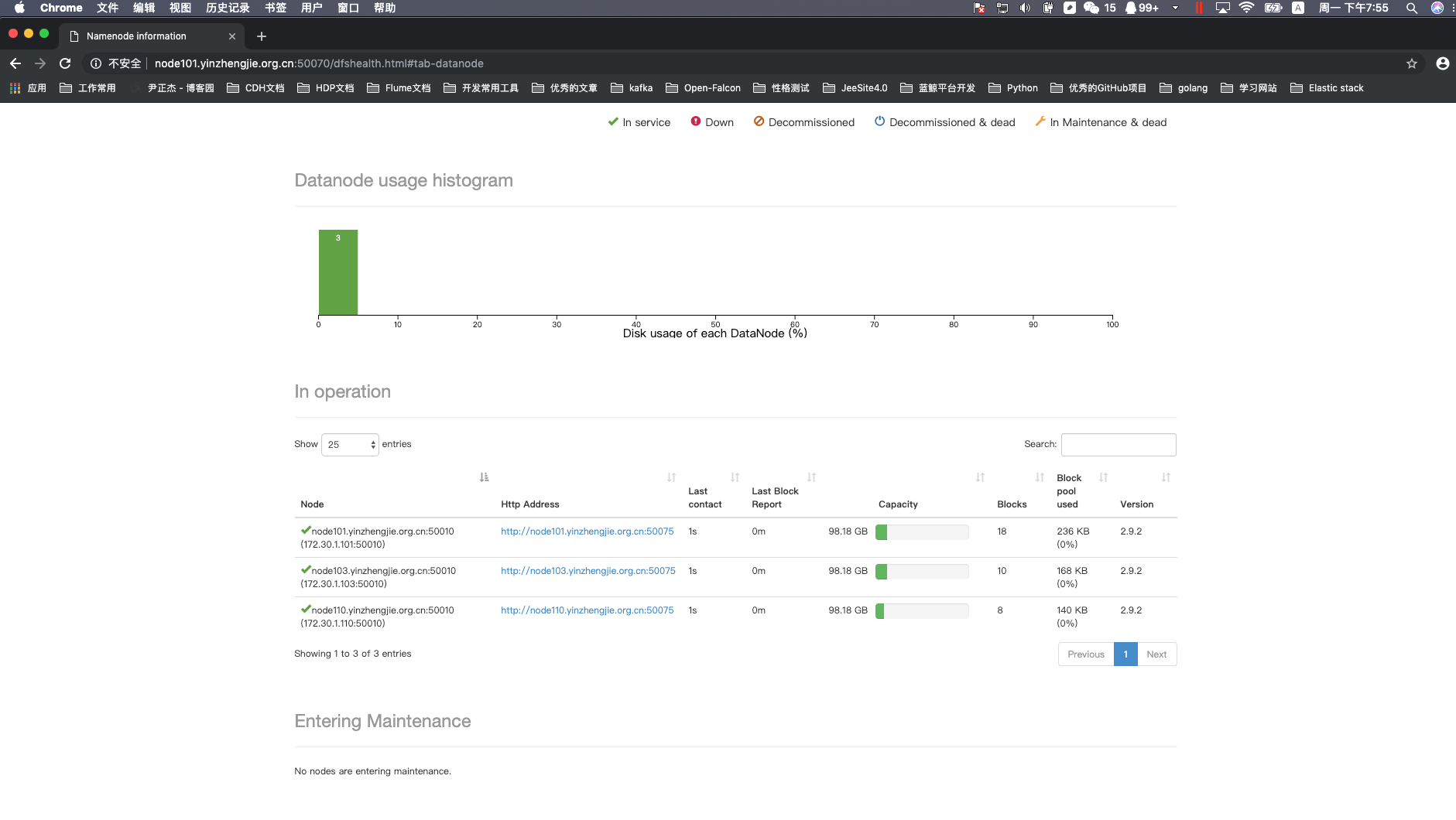
3>.关于yarn的服役和退役
配置的套路和上面配置DataNode的套路几乎一致!详情请参考:https://www.cnblogs.com/yinzhengjie/p/9101070.html。
Apache Hadoop 2.9.2 的集群管理之服役和退役的更多相关文章
- Hadoop基础-Hadoop的集群管理之服役和退役
Hadoop基础-Hadoop的集群管理之服役和退役 作者:尹正杰 版权声明:原创作品,谢绝转载!否则将追究法律责任. 在实际生产环境中,如果是上千万规模的集群,难免一个一个月会有那么几台服务器出点故 ...
- 大数据学习系列之七 ----- Hadoop+Spark+Zookeeper+HBase+Hive集群搭建 图文详解
引言 在之前的大数据学习系列中,搭建了Hadoop+Spark+HBase+Hive 环境以及一些测试.其实要说的话,我开始学习大数据的时候,搭建的就是集群,并不是单机模式和伪分布式.至于为什么先写单 ...
- 菜鸟玩云计算之十八:Hadoop 2.5.0 HA 集群安装第1章
菜鸟玩云计算之十八:Hadoop 2.5.0 HA 集群安装第1章 cheungmine, 2014-10-25 0 引言 在生产环境上安装Hadoop高可用集群一直是一个需要极度耐心和体力的细致工作 ...
- Hadoop ha CDH5.15.1-hadoop集群启动后,两个namenode都是standby模式
Hadoop ha CDH5.15.1-hadoop集群启动后,两个namenode都是standby模式 作者:尹正杰 版权声明:原创作品,谢绝转载!否则将追究法律责任. 一说起周五,想必大家都特别 ...
- HADOOP+SPARK+ZOOKEEPER+HBASE+HIVE集群搭建(转)
原文地址:https://www.cnblogs.com/hanzhi/articles/8794984.html 目录 引言 目录 一环境选择 1集群机器安装图 2配置说明 3下载地址 二集群的相关 ...
- Hadoop 2.7.3 分布式集群安装
1. 集群规划: 192.168.1.252 palo252 Namenode+Datanode 192.168.1.253 palo253 YarnManager+Datanode+Secondar ...
- Hadoop 系列(二)—— 集群资源管理器 YARN
一.hadoop yarn 简介 Apache YARN (Yet Another Resource Negotiator) 是 hadoop 2.0 引入的集群资源管理系统.用户可以将各种服务框架部 ...
- Hadoop 3.1.1 - 概述 - 集群安装
Hadoop 集群安装 目标 本文描述了如何从少数节点到包含上千节点的大规模集群上安装和配置 Hadoop 集群.如果只是为了尝试,你可以先从单台机器上安装开始(参阅单节点安装). 本文并不包含诸如安 ...
- 使用Apache + mod_jk + tomcat来实现tomcat集群的负载均衡出现的无法加载mod_jk.conf文件的问题
用Apache + mod_jk + tomcat来实现tomcat集群的负载均衡的 如果出现了问题,可以用cmd cd到Apache安装文件的bin下,运行httpd文件,错误信息就会打印出来. ...
随机推荐
- 教你一招 | 用Python实现简易可拓展的规则引擎
做这个规则引擎的初衷是用来实现一个可序列号为json,容易拓展的条件执行引擎,用在类似工作流的场景中,最终实现的效果希望是这样的: 简单整理下需求 执行结果最终返回=true= or false 支持 ...
- 多租户通用权限设计(基于casbin)
多租户通用权限设计(基于 casbin) 所谓权限控制, 概念并不复杂, 就是确认某个操作是否能做, 本质上仅仅就是个bool判断. 权限几乎是每个系统必不可少的功能, 和具体业务结合之后, 在系统中 ...
- 在vultr安装和使用golang
1.vultr可以用微信或支付宝充值,方便.好像推荐别人用还能挣美分,懒得弄了,参加了一个充10刀送50刀的活动,感觉实惠(实际用时感觉有点小贵). 2.注册登录后,控制面板上billing可查看余额 ...
- ubuntu tree 查看目录结构
首先需要安装tree这个软件 sudo apt install tree tree -L target_dir/ 2代表列举的目录结构深度
- 消息队列比较-rabbitmq/kafka/rocketmq/ONS
主要是比较这几种队列中间件: rabbitmq kafka rocketmq ONS 分以下几个维度来比较 高并发 毫无疑问KAFKA发消息的速度是最快的 ROCKETMQ/ONS次之 rabbitm ...
- MVC设计思想
MVC就是按照程序的功能将他们分成三个层,Model层(模型层),View层(显示层),Controller(控制层). Model层:可以细分为两层,分别是dao层.service层,这两层主要功能 ...
- Python发送邮件脚本
import smtplib from email.mime.text import MIMEText mailserver = "smtp.163.com" username_s ...
- Visual Studio Code扩展:
Auto Close TagAuto Rename TagBeautifyChinese (Simplified) Language Pack for Visual Studio CodeClass ...
- zookeeper-3.5.4-beta安装
官网地址 https://zookeeper.apache.org/ 下载文件解压进入conf目录下将zoo_sample.cfg名称修改为zoo.cfg # The number of millis ...
- Promise async-await 异步解决方案
1.简介: async和await在干什么,async用于申明一个function是异步的,而await可以认为是async wait的简写,等待一个异步方法执行完成. 2.基本语法 在C ...