
4. Spring 如何通过 XML 文件配置Bean,以及如何获取Bean
在 Spring 容器内拼凑 bean 叫做装配。装配 bean 的时候,你是在告诉容器,需要哪些 bean ,以及容器如何使用依赖注入将它们配合在一起。
理论上,bean 装配的信息可以从任何资源获得,包括属性文件,关系数据库等,但 XML 文件是最常见的 Spring 应用系统配置源, Spring 中的几种容器都支持使用 XML 装配 bean,包括:
--XMLBeanFactory
--ClassPathXMLApplicationContext
--FileSystemXMLApplicationContext
--XMLWebApplicationContext
其中我们常用的有 ClassPathXMLApplicationContext,FileSystemXMLApplicationContext 两种。
在 XML 文件中配置 bean 包括以下几个方面:
1. 添加 bean
2. 配置 bean 属性
2.1 手动配置
2.1.1 通过 setter 方法
2.1.2 通过 constructor
2.2 自动配置
下面,我们来添加 bean,并通过 setter 方法来对 bean 的属性来进行配置:
首先,先写两个 bean ,分别是 Person 和 Address , 其中 Person 是依赖于 Address 的。下面附上代码:
package com.spring.xmlBean;

public class Person {

    private String name;

    private int age;

    private Address address;

    public String getName() {

        return name;

    }

    public void setName(String name) {

        this.name = name;

    }

    public int getAge() {

        return age;

    }

    public void setAge(int age) {

        this.age = age;

    }

    public Address getAddress() {

        return address;

    }

    public void setAddress(Address address) {

        this.address = address;

    }

    public Person(String name, int age, Address address) {

        super();

        this.name = name;

        this.age = age;

        this.address = address;

    }

    public Person() {

        super();

    }

    @Override

    public String toString() {

        return "Person [name=" + name + ", age=" + age + ", address=" + address + "]";

    }

}
Person 类
package com.spring.xmlBean;

public class Person {

    private String name;

    private int age;

    private Address address;

    public String getName() {

        return name;

    }

    public void setName(String name) {

        this.name = name;

    }

    public int getAge() {

        return age;

    }

    public void setAge(int age) {

        this.age = age;

    }

    public Address getAddress() {

        return address;

    }

    public void setAddress(Address address) {

        this.address = address;

    }

    public Person(String name, int age, Address address) {

        super();

        this.name = name;

        this.age = age;

        this.address = address;

    }

    public Person() {

        super();

    }

    @Override

    public String toString() {

        return "Person [name=" + name + ", age=" + age + ", address=" + address + "]";

    }

}
Address 类
类写完之后,我们在 classpath 下创建一个 Spring Bean Configuration File
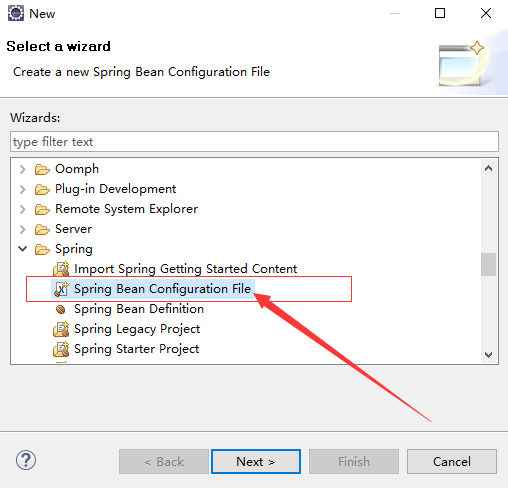
创建完 XML 文件之后,我们开始在这个文件里配置 Bean。
首先,第一步:添加 bean
<?xml version="1.0" encoding="UTF-8"?>

<beans xmlns="http://www.springframework.org/schema/beans"

    xmlns:xsi="http://www.w3.org/2001/XMLSchema-instance"

    xsi:schemaLocation="http://www.springframework.org/schema/beans http://www.springframework.org/schema/beans/spring-beans.xsd">

    <!-- 添加 Address 和 Person -->

    <bean id="address" class="com.spring.xmlBean.Address"></bean>

    <bean id="person" class="com.spring.xmlBean.Person"></bean>

</beans>
Spring Bean Configuration File
在这里,我们通过 <bean></bean> 节点来添加 bean ,其中 class 属性代表 bean 的全类名, id 属性用来对 bean 进行标示,在调用 bean 的时候会使用这个 id 名,这个名字是唯一的,在配置文件中不能有重复,否则 Spring 会报错
添加完 bean 之后,我们先来测试一下,看能不能获取到这个 bean。我们先试着获取一下 Person
package com.spring.test;

import org.springframework.context.ApplicationContext;

import org.springframework.context.support.ClassPathXmlApplicationContext;

import com.spring.helloworld.HelloWorld;

import com.spring.xmlBean.Person;

public class TestMain {

    public static void main(String[] args) {

        // 创建 Spring 的 IOC 容器

        ApplicationContext ctx = new ClassPathXmlApplicationContext("beanConfiguration-xml.xml");

        // 使用 getBean() 方法, 通过传入刚才的 id 名,来获取 bean, 但是这里返回的是一个 Object 对象, 所以要转型

        Person person = (Person) ctx.getBean("person");

        // 打印 person

        System.out.println(person);

    }

}
TestMain
运行 main 方法,控制台输出了以下信息

我们看到,我们成功的获取到了 person,但是,person 中的属性是空的,因为我们还没有配置他们,只是单纯的把它们添加到容器里面
那么现在,我们就来手动配置一下这两个 bean
前面讲过,手动配置 bean 有两种方式,一种是通过 setter 方法,一种是通过 构造器(constructor)来配置。下面,我们都试一下:
1. 通过 setter 方法
首先,需要注意的是,若要通过 setter 方法来配置 bean ,那么这个 bean 里面一定要有 setter 方法,否则 Spring 会报错
下面,我附上 XML 文件的代码
<?xml version="1.0" encoding="UTF-8"?>

<beans xmlns="http://www.springframework.org/schema/beans"

    xmlns:xsi="http://www.w3.org/2001/XMLSchema-instance"

    xsi:schemaLocation="http://www.springframework.org/schema/beans http://www.springframework.org/schema/beans/spring-beans.xsd">

    <!-- 添加 Address 和 Person -->

    <bean id="address" class="com.spring.xmlBean.Address">

        <property name="city" value="日照"></property>

        <property name="province" value="山东"></property>

    </bean>

    <bean id="person" class="com.spring.xmlBean.Person">

        <property name="name" value="Little-Koala"></property>

        <property name="age" value="18"></property>

        <!-- 通过 ref 引用了 address 这个 bean -->

        <property name="address" ref="address"></property>

    </bean>

</beans>
Spring Bean Configuration File
运行刚才测试用的那个 main 方法,发现配置成功了

在配置的时候,我们使用了 <property name="属性名" value="值" ></property> 这个节点来对 bean 进行配置
其中,我们的 person 中有一个 Address 属性,它通过 ref 这个属性节点引用了 id 值为 address 的 bean
总结:通过 setter 方法来配置 bean ,我们使用 property 节点来进行配置,但前提是这个 bean 要有 setter 方法。其中,name 属性表示 bean 的属性名,bean 的属性值可以通过 value 属性来直接设置,也可以通过 ref 属性来引用其他的 bean
2. 通过构造器来进行配置
首先要注意的问题,在配置之前要有自己的构造器。我们通过 <constructor-arg></constructor-arg> 这个节点来进行配置,下面附上代码:
<bean id="address" class="com.spring.xmlBean.Address">

        <constructor-arg name="city" value="日照"></constructor-arg>

        <constructor-arg name="province" value="山东"></constructor-arg>

        <!--

        <property name="city" value="日照"></property>

        <property name="province" value="山东"></property>

         -->

</bean>
Spring Bean Configuration File
上面的 Address 这个 bean 换成了用构造器来配置,运行的效果和上面是一样的
其中,name 代码构造器中属性的名字,value 代表值
刚才上面说了怎样配置 bean ,还没有具体的讲怎么样从容器中获取 bean
获取bean分两步:
1. 创建 IOC 容器
2. 从容器中获取 bean
下面附上代码:
package com.spring.test;

import org.springframework.context.ApplicationContext;

import org.springframework.context.support.ClassPathXmlApplicationContext;

import com.spring.helloworld.HelloWorld;

import com.spring.xmlBean.Person;

public class TestMain {

    public static void main(String[] args) {

        // 创建 Spring 的 IOC 容器

        ApplicationContext ctx = new ClassPathXmlApplicationContext("beanConfiguration-xml.xml");

        // 使用 getBean() 方法, 通过传入刚才的 id 名,来获取 bean, 但是这里返回的是一个 Object 对象, 所以要转型

        Person person = (Person) ctx.getBean("person");

        // 打印 person

        System.out.println(person);

    }

}
怎样获取 Bean
这是刚才的那个测试类
其中 getBean( ) 方法可以通过传入 id 值来获取 IOC 容器中的 bean ,也可以通过传入 Bean.class 来获取对应类型的对象
以上内容都是基础的内容,还有一部分没有提到,剩下的那些内容在以后的学习中会慢慢接触,多读源码,多看文档,慢慢的就会了
4. Spring 如何通过 XML 文件配置Bean,以及如何获取Bean的更多相关文章
- idea的spring整合基于xml文件配置的mybatis报Invalid bound statement (not found): com.music.dao.MusicDao.findAll的问题
一. 题主当时就是自己尝试整合spring和mybatis的时候遇到了这个问题,当时题主只看到了用注解的方式配置的dao层,题主用的是xml文件配置的形式, 而且坑爹的是题主的两个文件的路径写的也不一 ...
- 【Spring】application.xml文件配置
什么是Spring? Spring是分层的javaEE full-stack(一站式)轻量级开源框架. ---注解配置--针对SSM <?xml version="1.0" ...
- Spring框架入门之基于xml文件配置bean详解
关于Spring中基于xml文件配置bean的详细总结(spring 4.1.0) 一.Spring中的依赖注入方式介绍 依赖注入有三种方式 属性注入 构造方法注入 工厂方法注入(很少使用,不推荐,本 ...
- 跟着刚哥学习Spring框架--通过XML方式配置Bean(三)
Spring配置Bean有两种形式(XML和注解) 今天我们学习通过XML方式配置Bean 1. Bean的配置方式 通过全类名(反射)的方式 √ id:标识容器中的bean.id唯一. √ cl ...
- Spring整合Hibernate的XML文件配置,以及web.xml文件配置
利用Spring整合Hibernate时的XML文件配置 applicationContext.xml <?xml version="1.0" encoding=" ...
- Spring的applicationContext.xml文件
以下是详解Spring的applicationContext.xml文件代码:<!-- 头文件,主要注意一下编码 --><?xml version="1.0" e ...
- spring 框架的xml文件如何读取properties文件数据
spring 框架的xml文件如何读取properties文件数据 第一步:在spring配置文件中 注意:value可以多配置几个properties文件 <bean id="pro ...
- springmvc 项目完整示例07 设置配置整合springmvc springmvc所需jar包springmvc web.xml文件配置
前面主要是后台代码,spring以及mybatis的整合 下面主要是springmvc用来处理请求转发,展现层的处理 之前所有做到的,完成了后台,业务层和持久层的开发完成了 接下来就是展现层了 有很多 ...
- web.xml 文件配置01
web.xml 文件配置01 前言:一般的web工程中都会用到web.xml,方便开发web工程.web.xml主要用来配置Filter.Listener.Servlet等.但是要说明的是web. ...
随机推荐
- Eclipse 添加 lib (导入 .jar 包)
1.将要添加的 jar 包直接拖到 WEB-INF/lib 目录里. 2.在项目上右键,依次选择[Build Path]--[Configure Build Path...]-- [Libraries ...
- RSA Encrypting/Decrypting、RSA+AES Encrypting/Decrypting
catalogue . CryptoAPI介绍 . RSA Encrypting/Decrypting File 1. CryptoAPI介绍 0x1: Cryptography Service Pr ...
- ThetaSome_ThetaAll子查询
基本语法 表达式 θ some(子查询) 表达式 θ all (子查询) 语法中,θ是比较运算符 <,>,>=,<=,=,<> 如果表达式的值至少与子查询的结果的某 ...
- YYS FZU - 2278 (期望)JAVA
题目链接: G - YYS FZU - 2278 题目大意: 我们现在想要收集到n个卡片,现在已知抽到每种卡片的概率为1/n,现在每隔(n-1)!天就可以进行一次抽奖,问收集齐所有卡片的期望天数. 具 ...
- mysql 分库分表 ~ ShardingSphere生态圈
一 简介 Apache ShardingSphere是一款开源的分布式数据库中间件组成的生态圈二 成员包含 Sharding-JDBC是一款轻量级的Java框架,在JDBC层提供上述核心功能 ...
- Ansible------常用功能
local_action Ansible 默认只会对控制机器执行操作,但如果在这个过程中需要在 Ansible 本机执行操作就需要使用到local_action become:True Ansible ...
- 简易解说拉格朗日对偶(Lagrange duality)
引言:尝试用最简单易懂的描述解释清楚机器学习中会用到的拉格朗日对偶性知识,非科班出身,如有数学专业博友,望多提意见! 1.原始问题 假设是定义在上的连续可微函数(为什么要求连续可微呢,后面再说,这里不 ...
- day14 带参装饰器、迭代器、生成器
""" 今日内容: 1.带参装饰器及warps 2.迭代器 3.生成器 """ """ # 一.带参装饰器及w ...
- linux异步IO的两种方式【转】
转自:https://blog.csdn.net/shixin_0125/article/details/78898146 知道异步IO已经很久了,但是直到最近,才真正用它来解决一下实际问题(在一个C ...
- C++设计模式——观察者模式
观察者模式 在GOF的<设计模式:可复用面向对象软件的基础>一书中对观察者模式是这样说的:定义对象间的一种一对多的依赖关系,当一个对象的状态发生改变时,所有依赖于它的对象都得到通知并被自动 ...