
BootstrapTable,选中某几行,获取其数据并进行后台处理。以及其他的属性使用。
1、首先将复选框搞出来,<table data-single-select="true"> 属性,限制了只能单选。去除以后添加<th data-checkbox="true"></th>就可以添加复选框的功能了。
所以将复选框搞出来以后,就开始将获取到选择的数据值了。
 <table id="table" class="base_viewTable" data-toggle="table"

     data-locale="zh-CN" data-ajax="tableRequest"

     data-side-pagination="server" data-striped="true"

     data-single-select="true" data-click-to-select="true"

     data-pagination="true" data-pagination-first-text="首页"

     data-pagination-pre-text="上一页" data-pagination-next-text="下一页"

     data-pagination-last-text="末页">

     <thead style="text-align: center;">

         <tr>

             <th data-checkbox="true"></th><!--复选框-->

             <th data-field="id" data-formatter="indexFormatter" data-width="" data-halign="center" data-align="center">序号</th>

             <th data-field="alias" data-halign="center" data-align="center">别名</th>

             <th data-field="name" data-halign="center" data-align="center">名称</th>

             <th data-field="paramter" data-halign="center" data-align="center"  data-width="">参数</th>

             <th data-field="status" data-formatter="statusFormatter" data-halign="center" data-align="center" data-halign="center"  data-width="">状态</th>

             <th data-field="updateTime" data-formatter="timeFormatter" data-halign="center" data-align="center"  data-width="">时间</th>

             <th data-formatter="optFormatter" data-halign="center" data-align="center" data-width="">操作</th>

         </tr>

     </thead>

 </table>
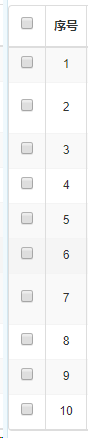
效果图:
其他属性简单使用介绍:
更多其他属性,用的时候直接查看参考https://blog.csdn.net/liushuiziyouliu/article/details/80988458。此网友写的以及很详细了,这里不重复转载了。
<table data-single-select="true"> 属性,限制了只能单选。去除以后添加<th data-checkbox="true"></th>就可以添加复选框的功能了。

<table data-click-to-select="true">属性,单机每一行,可以选中行首的单选框或者复选框哦。

<th data-checkbox="true"></th>属性,复选框。可以进行批量操作哦。默认false不显示checkbox(复选框),设为true则显示,checkbox的每列宽度已固定。

<th data-radio="true"></th>属性,单选框,可以进行单条数据操作。默认false不显示radio(单选按钮),设为true则显示,radio宽度是固定的。

<th data-field="id"></th>属性,是每列的字段名,不是表头所显示的名字,通过这个字段名可以给其赋值,相当于key,表内唯一。

<th data-halign="center"></th>属性,table header(表头)的对齐方式,有:left(靠左)、right(靠右)、center(居中)。

<th data-align="center"></th>属性。每格内数据的对齐方式,有:left(靠左)、right(靠右)、center(居中)。

<th data-width=""></th>属性。每列的宽度。详细参考https://blog.csdn.net/liushuiziyouliu/article/details/80988458。

其他属性,用的时候直接查看参考https://blog.csdn.net/liushuiziyouliu/article/details/80988458。此网友写的以及很详细了,这里不重复转载了。
2、使用js处理获取到的复选框数据,然后使用ajax将数据传递给struts的action。
 function selectTen(){

     //获取到本页选择的十条数据,使用getSelections即可获得,row是json格式的数据

     var getSelectRows = $("#jobTable").bootstrapTable('getSelections', function (row) {

           return row;

     });

     //console.log(getSelectRows);//控制台打印输出,方便观察值

     var ids = new Array();//定义js数组用于存放自己所需的值

     for(var i=;i<getSelectRows.length;i++){

         ids[i] = getSelectRows[i].id;

     }

     //将表单元素数组或者对象序列化,是.serialize()的核心方法

     var params = $.param({'ids' : ids},true);

     //console.log(ids);//控制台打印输出,方便观察值

     BootstrapDialog.show({

         title : '批量操作确认提示',

         message : '确定批量操作记录吗?',

         buttons : [

                 {

                     cssClass : "btn-info",

                     label : '批量操作',

                     action : function(dialog) {

                         $.ajax({

                             type : 'post',

                             url : "xxxAction!xxxAllForever.action",

                             dataType : 'json',

                             traditional : true,

                             data : params,//将表单元素数组或者对象序列化的数组值传递到后台。

                             async : false,

                             error : function(request, textStatus,

                                     errorThrown) {

                                 fxShowAjaxError(request, textStatus,

                                         errorThrown);

                             },

                             success : function(data) {

                                 dialog.close();

                                 $.alert(data.result);

                                 searchJob();

                             }

                         });

                     }

                 }, {

                     cssClass : "base_btn-bluecyan",

                     label : '关闭',

                     action : function(dialog) {

                         dialog.close();

                     }

                 } ]

     });

 }
3、由于公司框架还是使用的struts,所以在action里面定义一个private ArrayList<Integer> ids;变量。
Action中List的定义:
通过使用param方法的处理,在action中ids的类型不管是数组还是list都能够正确的接收到这些id了。
ps:一定不要忘了setter方法! 我习惯性加的setter和getter方法。
private ArrayList<Integer> ids;

public ArrayList<Integer> getIds() {

    return ids;

}

public void setIds(ArrayList<Integer> ids) {

    this.ids = ids;

}

public String xxxAllForever() {

    //System.out.println(ids);

    String result = null;

    if(ids.size() > ) {

        for(int i=;i<ids.size();i++) {

            result = xxxService.stopxxx(ids.get(i));

        }

    }

    dataMap.put("result", result);

    return SUCCESS;

}
待续......
BootstrapTable,选中某几行,获取其数据并进行后台处理。以及其他的属性使用。的更多相关文章
- Zookeeper命令行操作(常用命令;客户端连接;查看znode路径;创建节点;获取znode数据,查看节点内容,设置节点内容,删除节点;监听znode事件;telnet连接zookeeper)
8.1.常用命令 启动ZK服务 bin/zkServer.sh start 查看ZK服务状态 bin/zkServer.sh status 停止ZK服务 bin/zkServer.sh stop 重启 ...
- FineUI 选中多行获取行ID
http://www.fineui.com/bbs/forum.php?mod=viewthread&tid=2506&page=1 /// <summary> ...
- 在用easyui中做CRUD功能时,当删除一行或多行数据后再点击修改会提示你选中了多行,如何解决这个bug了?
在用easyui中做CRUD功能时,当删除一行或多行数据后再点击修改会提示你选中了多行,如何解决这个bug了? 在删除成功后,加上这句话就可以了:$("#dg").datagrid ...
- bootstrap-table前端实现多条件时间段查询数据
实现思路:通过正则匹配到字段是否符合条件,时间段转换为时间戳比对. 这是大体的效果图: 页面的html代码 <div class="content-head mgb10"&g ...
- 【转】如何在Windows+VS2005使用最新静态libcurl 7.35.0获取网页数据,支持HTTPS
地址: http://blog.csdn.net/hujkay作者:Jekkay Hu(34538980@qq.com)关键词:Windows,curl,ssl, visual c++ 2005, ...
- jmeter 性能测试 JDBC Request (查询数据库获取数据库数据) 的使用
JDBC Request 这个Sampler可以向数据库发送一个jdbc请求(sql语句),并获取返回的数据库数据进行操作.它经常需要和JDBC Connection Configuration配置原 ...
- solr与.net系列课程(四)solr查询参数的讲解与.net如何获取solr数据
solr与.net系列课程(四)solr查询参数的讲解与.net如何获取solr数据 上一节我们完成了solr连接数据库,细心的朋友会发现一个问题,就是solr其实和语言没有任何关系,配置完成后任何语 ...
- 通过js获取前台数据向一般处理程序传递Json数据,并解析Json数据,将前台传来的Json数据写入数据库表中
摘自:http://blog.csdn.net/mazhaojuan/article/details/8592015 通过js获取前台数据向一般处理程序传递Json数据,并解析Json数据,将前台传来 ...
- Jquery 模板插件 jquery.tmpl.js 的使用方法(1):基本语法,绑定,each循环,ajax获取json数据
jquery.tmpl.js 是一个模板js ,主要有2个方法 (1):$.template()方法,将一段script或者是Html编译为模板,例如 $.template('myTemplate' ...
随机推荐
- 【JVM】JVM随笔索引
JVM目录 [JVM]Java内存模型 [JVM]类加载机制 [JVM]深度分析Java的ClassLoader机制(源码级别) [JVM]关于类加载器准备阶段的一道面试题目 [JVM]JVM垃圾收集 ...
- did not finish being created even after we waited 189 seconds or 61 attempts. And its status is downloading
did not finish being created even after we waited 189 seconds or 61 attempts. And its status is down ...
- cookie-闲聊
最近练习时对cookie接触较多,所以就着cookie的Domain与path属性闲聊几句. 首先,对于cookie要明确,cookie可以由自身属性确定哪些站点可以看到相应的cookie.毕竟一个浏 ...
- spring问题
1.The matching wildcard is strict ,but no declaration can be found for element 'tx:annotation-driven ...
- TODO springboot学习笔记
学习中,是在是搞不懂是什么狗屎....
- Nacos集群环境的搭建与配置
Nacos集群环境的搭建与配置 集群搭建 一.环境: 服务器环境:CENTOS-7.4-64位 三台服务器IP:192.168.102.57:8848,192.168.102.59:8848,192. ...
- c++ boost库配置
1.官方下载地址 https://www.boost.org/ 2.下载解压 3.配置VS 4.配置目录
- Jmeter 逻辑控制器总结
本文主要总结Jmeter的逻辑控制器: 逻辑控制器下一共16个控制器: 1.foreach controller循环控制器 定义变量数组,按数组遍历循环 2.simple controller 简 ...
- 在 IDEA中运行 WordCount
一.新建一个maven项目 二.pom.xml 中内容 <?xml version="1.0" encoding="UTF-8"?> <pro ...
- nodeJS模块寻址规则
引子 阮一峰一则教程中, 将应用放置在 npm 模块安装目录同等级的目录(https://github.com/ruanyf/webpack-demos)下. 但是应用目录文件中, 引用标准库的使用 ...