
转载自——Json.net动态序列化以及对时间格式的处理
关于我工作中对Json处理的东西
第一:动态序列化类
第二:时间格式处理
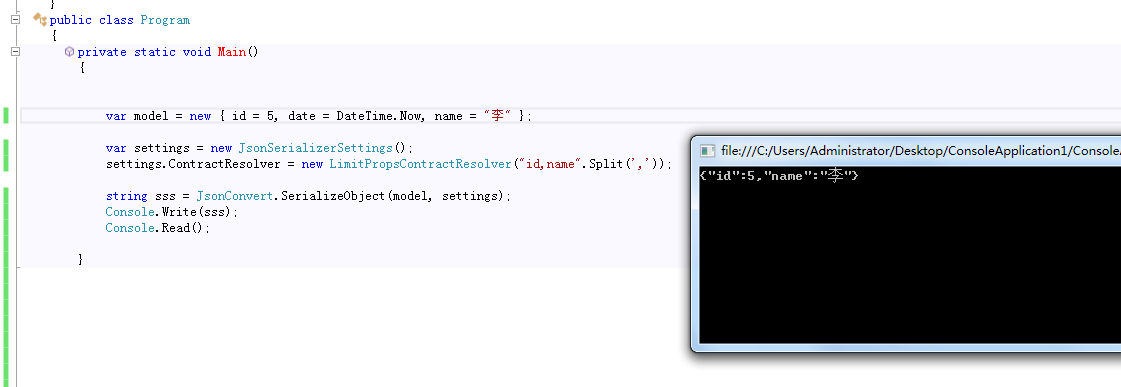
通常我们一个类里 可能有十到更多的属性,但是我们序列化通常只需要序列化其中的 三到五个这样的话就会有多余的数据

如果 我只想序列化 id 跟name如何处理
这是我找的网上的方法:
using Newtonsoft.Json;

using Newtonsoft.Json.Converters;

using Newtonsoft.Json.Serialization;

using System;

using System.Collections.Generic;

using System.Linq;

namespace CYP.New.WCF.Common.Common

{

    public class LimitPropsContractResolver : DefaultContractResolver

    {

        private string[] props = null;

        public LimitPropsContractResolver(string[] props)

        {

            this.props = props;

        }

        protected override IList<JsonProperty> CreateProperties(Type type, MemberSerialization memberSerialization)

        {

            IList<JsonProperty> list = base.CreateProperties(type, memberSerialization);

            //只保留清單有列出的屬性

            return list.Where(p => props.Contains(p.PropertyName)).ToList();

        }

    }

}
----------------------------------------------------------------------------------------------------------------------------------------------------------------------------------------------------------------------------------------------------------------------
关于Json.net 处理日期格式 看第一张图就知道 Json.net 处理日期格式 这尼玛根本就不是正常人类能看的懂得
你可能会发现Json.net 里有关于处理日期的东西
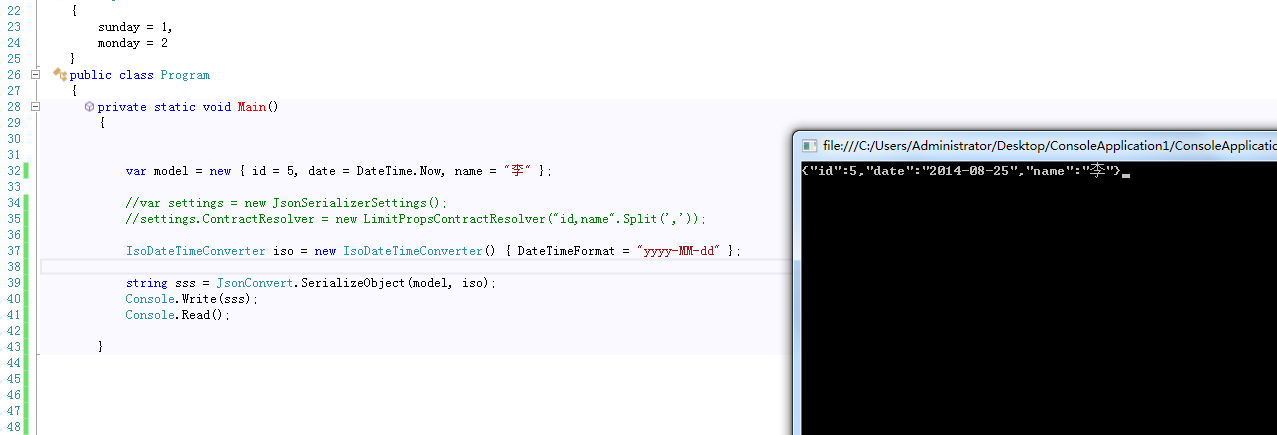
但是这个时候你就会发现 再Json.net的重载里边
        public static string SerializeObject(object value);

        public static string SerializeObject(object value, Formatting formatting);

        public static string SerializeObject(object value, JsonSerializerSettings settings);

        public static string SerializeObject(object value, params JsonConverter[] converters);

        public static string SerializeObject(object value, Formatting formatting, JsonSerializerSettings settings);

        public static string SerializeObject(object value, Formatting formatting, params JsonConverter[] converters);
你会发现 动态序列化 跟 时间处理的格式不能共存 这个问题 着实让我小小的蛋疼了一把.....
解决方案:
using Newtonsoft.Json;

using Newtonsoft.Json.Converters;

using Newtonsoft.Json.Serialization;

using System;

using System.Collections.Generic;

using System.Linq;

namespace CYP.New.WCF.Common.Common

{

    public class LimitPropsContractResolver : DefaultContractResolver

    {

        private string[] props = null;

        public LimitPropsContractResolver(string[] props)

        {

            this.props = props;

        }

        protected override IList<JsonProperty> CreateProperties(Type type, MemberSerialization memberSerialization)

        {

            IList<JsonProperty> list = base.CreateProperties(type, memberSerialization);

            IsoDateTimeConverter iso = new IsoDateTimeConverter() { DateTimeFormat = "yyyy-MM-dd HH:mm:ss" };

            IList<JsonProperty> listWithConver = new List<JsonProperty>();

            foreach (var item in list)

            {

                if (props.Contains(item.PropertyName))

                {

                    if (item.PropertyType.ToString().Contains("System.DateTime"))

                    {

                        item.Converter = iso;

                    }

                    listWithConver.Add(item);

                }

            }

            return listWithConver;

        }

    }

}

一些关于Json.net的处理
本着对大家有帮助的态度
关于Josn.net的下载地址 http://www.codeplex.com/
转载自:http://www.cnblogs.com/yesehuaqingqian/p/3934532.html
转载自——Json.net动态序列化以及对时间格式的处理的更多相关文章
- Newtonsoft.Json 序列化和反序列化 时间格式【转】
1.JSON序列化 string JsonStr= JsonConvert.SerializeObject(Entity); eg: A a=new A(); a.Name="Elain ...
- Newtonsoft.Json 序列化和反序列化 时间格式
From : http://www.cnblogs.com/litian/p/3870975.html 1.JSON序列化 string JsonStr= JsonConvert.SerializeO ...
- Newtonsoft.Json 序列化和反序列化 时间格式 [转]
1.JSON序列化 string JsonStr= JsonConvert.SerializeObject(Entity); eg: A a=new A(); a.Name="Elain ...
- [转]Newtonsoft.Json 序列化和反序列化 时间格式
本文转自:http://www.cnblogs.com/litian/p/3870975.html 1.JSON序列化 string JsonStr= JsonConvert.SerializeObj ...
- C#中Newtonsoft.Json 序列化和反序列化 时间格式
步骤 引用 using Newtonsoft.Json; using Newtonsoft.Json.Converters; 格式配置 IsoDateTimeConverter timeFormat ...
- 使用Newtonsoft.Json.dll(JSON.NET)动态解析JSON、.net 的json的序列化与反序列化(一)
在开发中,我非常喜欢动态语言和匿名对象带来的方便,JSON.NET具有动态序列化和反序列化任意JSON内容的能力,不必将它映射到具体的强类型对象,它可以处理不确定的类型(集合.字典.动态对象和匿名对象 ...
- DotNetCore跨平台~Json动态序列化属性
回到目录 Json动态序列化属性,主要为了解决一个大实体,在返回前端时根据需要去序列化,如果实体里的某个属性在任务情况下都不序列化,可以添加[JsonIgnore]特性,这种是全局的过滤,但是更多的情 ...
- 【转载】C#使用Newtonsoft.Json组件来序列化对象
在Asp.Net网站开发的过程中,很多时候会遇到对象的序列化和反序列化操作,Newtonsoft.Json组件是专门用来序列化和反序列化操作的一个功能组件,引入这个DLL组件后,就可使用JsonCon ...
- C# dynamic类型序列化和反序列化之Newtonsoft.Json,动态解析远端返回的jSON数据
一.说明 1.Newtonsoft.Json 中的Linq To Json中提供了方便的json数据查询.修改等操作. 例如:JObject,JArray 2.在JObject.FromObject( ...
随机推荐
- python3中文件的读与写
Python open() 函数用于打开一个文件,并返回文件对象,在对文件进行处理过程都需要使用到这个函数,如果该文件无法被打开,会抛出错误 完整语法:open(file, mode='r', buf ...
- Git-起步
Git命令行 只要输入git,Git就会不带任何参数地列出它的选项和最常用的子命令. 要得到一个完整的git子命令列表,可以输入git help --all 显示版本号 git --version 每 ...
- A JavaScript Image Gallery
childNodes property: The childNodes property is a way of getting information about the children of ...
- 浅谈javascript的运行机制
积累一下这几天学的,记录一下: 一.为什么JavaScript是单线程? JavaScript语言的一大特点就是单线程,也就是说,同一个时间只能做一件事.那么,为什么JavaScript不能有多个线程 ...
- Centos7 使用 Supervisor 守护进程 Celery
一.Supervisor 安装(centos7 还有另一个进程守护命令 Systemd ) Centos 7 安装 Supervisord 二.Supervisor 守护进程 Centos7 使用 S ...
- 运维Python面试题
本章内容 1 osodjfoskjdofjsdjfjsdf 123 sdfdfadf 1 2 3 4 5 6 from django.db import models class user ...
- IntelliJ IDEA 视频教程
相关视频教程: Intellij IDEA视频教程 最新版Intellij IDEA视频教程
- STL 里面的几个容器简叙
出处:http://blog.csdn.net/niushuai666/article/details/6654951 list1.list的成员函数push_back()把一个对象放到一个list的 ...
- Python学习-day11 RabbitMQ Redis
这次文章包含两个内容: 1.RabbitMQ使用 2.Redis基础操作 代码部分为练习笔记和作业 概念部分转自Alex老师 RabbitMQ 安装 http://www.rabbitmq.com/i ...
- 在windows64位上安装Python3.0
1.下载安装包 下载地址:https://www.python.org/downloads/ 如果要下载帮助文件:Download Windows help file 如果要下载基于网页的安装程序: ...