
httpd服务相关实验
实验环境:
CentOS6.8
1、连接测试:
在/etc/httpd/conf/httpd.conf
telnet 172.16.252.242 80
GET /index.html HTTP/1.1
Host: 172.16.252.242
# KeepAlive: Whether or not to allow persistent connections (more than

# one request per connection). Set to "Off" to deactivate.

#

KeepAlive Off  #长连接状态是关闭的
[root@www ~18:47:34]#telnet 172.16.252.242 80

Trying 172.16.252.242...

Connected to 172.16.252.242.

Escape character is '^]'.

GET /index.html HTTP/1.1

Host: 172.16.252.242
Connection closed by foreign host.
修改KeepAlive:/etc/httpd/conf/httpd.conf
KeepAlive On  #开启

#

# MaxKeepAliveRequests: The maximum number of requests to allow

# during a persistent connection. Set to 0 to allow an unlimited amount.

# We recommend you leave this number high, for maximum performance.

#

MaxKeepAliveRequests 100

#

# KeepAliveTimeout: Number of seconds to wait for the next request from the

# same client on the same connection.

#

KeepAliveTimeout 15  #等待时间
[root@conf localhost6]#service httpd restart #修改配置文件,必须重新启动服务
Stopping httpd: [ OK ]
Starting httpd: httpd: apr_sockaddr_info_get() failed for localhost6.8.localdomain
httpd: Could not reliably determine the server's fully qualified domain name, using 127.0.0.1 for ServerName
[ OK ]
#此时一次请求结束后,不会退出,而是等待下次请求,超过等待时间,则退出
2、http的访问控制——认证
1)在主配置文件定义安全域
# DocumentRoot: The directory out of which you will serve your

# documents. By default, all requests are taken from this directory, but

# symbolic links and aliases may be used to point to other locations.

#

DocumentRoot "/www/host1/"
#此目录下有个目录admin下的文件需要用户进行http的认证访问
[root@admin localhost6]#pwd

/www/host1/admin

[root@admin localhost6]#cat admin.html   #此文件需要认证才能访问

<h1> warn:admin area</h1>
[root@admin localhost6]#vi /etc/httpd/conf/httpd.conf #配置的文件
<Directory "/www/host1/admin/">   #认证后才能显示的目录

        Options None         #INDEXES等设置不生效

        AllowOverride None      #覆盖不生效

        Authtype Basic        #认证方式:basic和digest

        Authname "input your username and passwd" #认证提示页显示

        Authuserfile "/etc/httpd/conf/.htpasswd"  #认证校验的密码文件

        require user tom              #需要认证的用户

#       require valid-user             #密码文件中的用户都需要认证

</Directory>
2)创建账号和密码校验的加密文件
[root@admin localhost6]#htpasswd -c -m /etc/httpd/conf/.htpasswd tom

New password:

Re-type new password:

Adding password for user tom

[root@admin localhost6]#htpasswd  -m /etc/httpd/conf/.htpasswd jey

New password:

Re-type new password:

Adding password for user jey
#-c:自动创建指定的密码文件,仅首次创建文件时使用
#-m:用md5加密方式进行加密
#tom;需要认证的用户
#重启服务:
[root@admin localhost6]#service httpd reload

Reloading httpd:
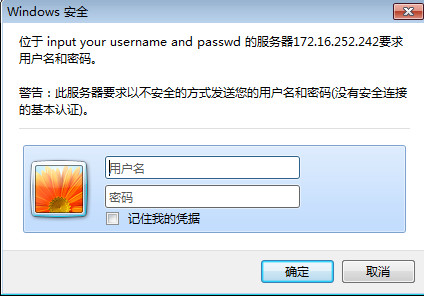
输入用户名和密码进行验证。
httpd服务相关实验的更多相关文章
- DHCP服务相关实验
一.DHCP 相关介绍 1.dhcp服务相关 软件名: dhcp #DHCP服务软件包 dhcp-common #DHCP命令软件包(默认已安装) 服务名: dhcpd #DHCP服务名 dhcrel ...
- Httpd服务进阶知识-LAMP源码编译安装
Httpd服务进阶知识-LAMP源码编译安装 作者:尹正杰 版权声明:原创作品,谢绝转载!否则将追究法律责任. 想必大家都知道,动态资源交给fastcgi程序处理,静态资源依旧由httpd服务器处理 ...
- rsync 服务介绍及相关实验
一.rsync 简介 rsync 是类 unix 系统下的数据镜像备份工具.一款支持快速完全备份和增量备份的工具,支持本 地复制,远程同步等,类似于 scp 命令:rsync 命令在同步文件之前要先登 ...
- 手动配置三台虚拟机pacemaker+corosync并添加httpd服务
创建三台虚拟机,实验环境:centos7.1,选择基础设施服务安装. 每台虚拟机两块网卡,第一块为pxe,第二块连通外网,手动为两块网卡配置IP.网关,使它们都能ping通外网并可以互相通过hostn ...
- tomcat相关实验
tomcat相关实验 1.实现LNT 同主机实现 1.安装并启动tomcat 1)OpenJDK的安装 yum install java-1.8.0-openjdk-devel.x86_64 确定JD ...
- Httpd服务进阶知识-基于FASTCGI实现的LAMP架构
Httpd服务进阶知识-基于FASTCGI实现的LAMP架构 作者:尹正杰 版权声明:原创作品,谢绝转载!否则将追究法律责任. 一.httpd+php结合的方式 module: php fastcgi ...
- Httpd服务入门知识-http协议版本,工作机制及http服务器应用扫盲篇
Httpd服务入门知识-http协议版本,工作机制及http服务器应用扫盲篇 作者:尹正杰 版权声明:原创作品,谢绝转载!否则将追究法律责任. 一.Internet与中国 Internet最早来源于美 ...
- HTTPD之二————HTTPD服务详解————httpd的配置文件常见设置
HTTPD之二----HTTPD服务详解----httpd的配置文件常见设置 HTTP服务器应用 http服务器程序 httpd apache nginx lighttpd 应用程序服务器 IIS,a ...
- 启动httpd服务:SSLCertificateFile: file '/var/www/miq/vmdb/certs/server.cer' does not exist or is empty
启动httpd服务,失败: [root@test vmdb]# service httpd restart Stopping httpd: [FAILED] Starting httpd: Synta ...
随机推荐
- python 安装protobuf
安装准备:python和protoc(编译proto到各个语言) 下载protobuf源代码(各种语言实现):https://github.com/google/protobuf 1.到Python ...
- CentOS7时间设置及ntp同步配置(转)
出处:http://www.centoscn.com/CentOS/config/2015/1105/6385.html http://www.centoscn.com/CentOS/config/2 ...
- 多媒体开发之---live555 分析客户端
live555的客服端流程:建立任务计划对象--建立环境对象--处理用户输入的参数(RTSP地址)--创建RTSPClient实例--发出DESCRIBE--发出SETUP--发出PLAY--进入Lo ...
- 再说WCF Data Contract KnownTypeAttribute
WCF 中的序列化是用DataContractSerializer,所有被[DataContract]和[DataMemeber]标记的类和属性会被DataContractSerializer序列化. ...
- ios --转载 在mac上安装让rvm及cocoa pods详解
先安装rvm: 打开终端: $ curl -L https://get.rvm.io | bash -s stable (期间可能会问你sudo管理员密码,以及自动通过homebrew安装依赖包,等待 ...
- Android中怎样控制LogCat的自己定义输出
在Android开发中,LogCat是一个非常重要的调试工具,能够输出非常多关于项目或者手机的信息. 可是正是因为LogCat功能的过于强大,输出的信息量也是极为庞大的,那么我们就须要通过一定的方式依 ...
- 九度OJ 1034:寻找大富翁 (排序)
时间限制:1 秒 内存限制:32 兆 特殊判题:否 提交:5925 解决:2375 题目描述: 浙江桐乡乌镇共有n个人,请找出该镇上的前m个大富翁. 输入: 输入包含多组测试用例. ...
- substr扩展版:支持中文字符串截取
function d_substr($str, $start=0, $length, $charset="utf-8", $suffix=true) { if(function_e ...
- Halcon下载、安装
下载地址: 官网:http://www.halcon.com/halcon/download/ Halcon学习网:http://www.ihalcon.com/read.php?tid=56 { 最 ...
- 51Nod 1084 矩阵取数问题 V2 —— 最小费用最大流 or 多线程DP
题目链接:http://www.51nod.com/onlineJudge/questionCode.html#!problemId=1084 1084 矩阵取数问题 V2 基准时间限制:2 秒 空 ...