
使用Nightwatch.js做基于浏览器的web应用自动测试
1 安装
1.1 安装Node.js
在http://nodejs.org/ 上下载适合本机系统的安装包运行安装,注意安装选项中选择npm tool以用于后续依赖包的安装。

1.2 通过npm工具安装Nightwatch
命令行运行“npm install nightwatch”,如下的提示表明安装成功。

1.3 Npm相关目录结构
所有npm安装的模块都会基于当前cmd窗口的目录,也就是说如果cmd的工作目录是在c:\根目录,则会在该目录下创建node_modules文件夹,并将安装的模块都放到该目录下,如果通过windows附件程序或者win+R启动的,则工作目录在“%USERPROFILE%\”下。
Npm安装所下载的临时文件保存在“%appdata%\npm-cache”下。
1.4 下载Selenium WebDriver server
http://selenium-release.storage.googleapis.com/index.html上下载最新版本的jar包,并将其放到NightWatch的bin目录下。
2 实例使用
2.1 nightwatch.js中增加引用
在”\node_modules\nightwatch\examples\tests\nightwatch.js”中增加引用“require('../../bin/runner.js');”
2.2 运行Selenium WebDriver server(进入jar所在目录, 我的目录是D:\nodejs\node_modules\nightwatch\bin,运行命令“java -jar 2.53.1-server.jar”
2.3 运行nightwatch.js
命令行下,cd到nightwatch所在的目录(我的目录是D:\nodejs\node_modules\nightwatch),然后运行“node ./examples/tests/nightwatch.js”
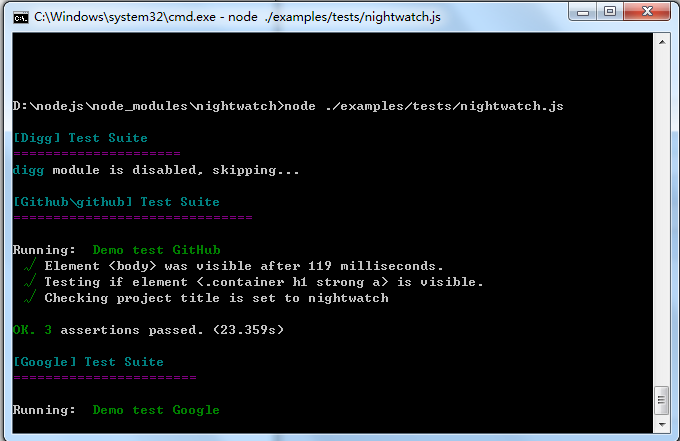
我用的chrome浏览器,我将chromedriver.exe放置在目录D:\nodejs\node_modules\nightwatch\bin下, nightwatch.json配置文件如下:
{

  "src_folders" : ["./examples/tests"],

  "output_folder" : "./examples/reports",

  "custom_commands_path" : "./examples/custom-commands",

  "page_objects_path" : "./examples/pages",

  "custom_assertions_path" : "",

  "globals_path" : "",

  "live_output" : false,

  "parallel_process_delay" : 10,

  "disable_colors": false,

  "test_workers" : false,

  "selenium" : {

    "start_process" : false,

    "server_path" : "",

    "log_path" : "",

    "host" : "127.0.0.1",

    "port" : 4444,

    "cli_args" : {

      "webdriver.chrome.driver" : "./",

      "webdriver.ie.driver" : "",

      "webdriver.firefox.profile" : ""

    }

  },

  "test_settings" : {

    "default" : {

      "launch_url" : "http://localhost",

      "selenium_host" : "127.0.0.1",

      "selenium_port" : 4444,

      "silent" : true,

      "disable_colors": false,

      "screenshots" : {

        "enabled" : false,

        "path" : ""

      },

      "desiredCapabilities" : {

        "browserName" : "chrome",

        "javascriptEnabled" : true,

        "acceptSslCerts" : true

      }

    },

	"chrome" : {

      "desiredCapabilities": {

        "browserName": "chrome"

      }

    },

    "saucelabs" : {

      "selenium_host" : "ondemand.saucelabs.com",

      "selenium_port" : 80,

      "username" : "${SAUCE_USERNAME}",

      "access_key" : "${SAUCE_ACCESS_KEY}",

      "use_ssl" : false,

      "silent" : true,

      "output" : true,

      "screenshots" : {

        "enabled" : false,

        "on_failure" : true,

        "path" : ""

      },

      "desiredCapabilities": {

        "name" : "test-example",

        "browserName": "firefox"

      },

      "globals" : {

        "myGlobal" : "some_sauce_global"

      },

      "selenium" : {

        "start_process" : false

      }

    },

    "phantomjs" : {

      "desiredCapabilities" : {

        "browserName" : "phantomjs",

        "javascriptEnabled" : true,

        "acceptSslCerts" : true,

        "phantomjs.binary.path" : "/path/to/phantomjs"

      }

    },

    "browserstack" : {

      "selenium" : {

        "start_process" : false

      },

      "selenium_host" : "hub.browserstack.com",

      "selenium_port" : 80,

      "silent" : true,

      "desiredCapabilities": {

        "name" : "test-example",

        "browserName": "firefox",

        "browserstack.user" : "...",

        "browserstack.key" : "..."

      }

    },

    "testingbot" : {

      "selenium_host" : "hub.testingbot.com",

      "selenium_port" : 80,

      "apiKey" : "${TB_KEY}",

      "apiSecret" : "${TB_SECRET}",

      "silent" : true,

      "output" : true,

      "screenshots" : {

        "enabled" : false,

        "on_failure" : true,

        "path" : ""

      },

      "desiredCapabilities": {

        "name" : "test-example",

        "browserName": "firefox"

      },

      "selenium" : {

        "start_process" : false

      }

    }

  }

}
2.3 异常处理
如果没意外,执行上述js的时候会抛类似下面的异常,不要慌张,根据异常提示,安装所需要的module即可,安装方法“npm install xxx”。

3 基本原理

4 测试套件
Nightwatch.js makes it possible to organizedyour test scripts into groups and run them as needed. To group tests togetherjust place them in the same sub-folder. The folder name is the name of thegroup.例如下面的目录结构。

5 自己的脚本
在nightwatch根目录下建一个名为test.js的文件:
require('./bin/runner.js');
var nightwatch = require('./index.js');
module.exports = {
"step one" : function (browser) {
browser
.url("http://www.google.com.hk")
.waitForElementVisible('body', 1000)
.setValue('input[type=text]', 'nightwatch')
.waitForElementVisible('button[name=btnG]', 1000)
},
"step two" : function (browser) {
browser
.click('button[name=btnG]')
.pause(1000)
.assert.containsText('#main', 'The Night Watch')
.end();
}
};
然后”node ./test.js”运行:

更多的使用参见其api文档:http://nightwatchjs.org/api
6 产品特征
Ø Simple but powerful syntax which enables you to write tests veryquickly, using only JavaScript and CSS selectors. No need to initialize otherobjects and classes, you only need to write the test specs.
Ø Built-in command-line test runner which enables you to run the testseither altogether, by group or single.
Ø Manages the Selenium server automatically; can be disabled ifSelenium runs on another machine.
Ø Continous Integration support: JUnit XML reporting is built-in soyou can integrate your tests in your build process with systems suchs as Hudsonor Teamcity.
Ø Use CSS selectors or Xpath to locate and verify elements on the pageor execute commands.
Ø Easy to extend if you need to implement your own commands specificto your application.
使用Nightwatch.js做基于浏览器的web应用自动测试的更多相关文章
- Nightwatch.js – 轻松实现浏览器的自动测试
Nightwatch.js 是一个易于使用的,基于 Node.js 平台的浏览器自动化测试解决方案.它使用强大的 Selenium WebDriver API 来在 DOM 元素上执行命令和断言. 语 ...
- 在Autodesk应用程序商店发布基于浏览器的Web应用程序
你一定已经听说过Autodesk应用程序商店了,通过Autodesk应用程序商店,你可以免费下载或购买来自全球的优秀开发者发布的应用程序,来帮助你更快更方便的完成你的工作.而且作为开发者,您也可以在A ...
- Android IOS WebRTC 音视频开发总结(七)-- 基于浏览器的开发
前面写的一系列总结都是讲webrtc如何下载,编译,开发的,有些人可能有点云里雾里了,WEBRTC不是用来搞跨浏览器开发的吗,怎么我讲的这些跟浏览器扯不上任何关系,其实看看下面这个架构图,你就明白了, ...
- SlimerJS – Web开发人员可编写 JS 控制的浏览器
SlimerJS 是一个提供给 Web 开发人员,可通过脚本编程控制的浏览器.它可以让你使用 Javascript 脚本操纵一个网页:打开一个网页,点击链接,修改的内容等,这对于做功能测试,页面自动机 ...
- Vis.js – 基于浏览器的动态 JavaScript 可视化库
Vis.js 是一个动态的,基于浏览器的可视化库.该库被设计为易于使用,能处理大量的动态数据.该库由以下几部分组成:一是数据集和数据视图,基于灵活的键/值数据集,可以添加,更新和删除项目,订阅数据集变 ...
- Breach - HTML5 时代,基于 JS 编写的浏览器
Breach 是一款属于 HTML5 时代的开源浏览器项目,,完全用 Javascript 编写的.免费.模块化.易于扩展.这个浏览器中的一切都是模块,Web 应用程序在其自己的进程运行.通过选择合适 ...
- 基于浏览器的开源“管理+开发”工具,Pivotal MySQL*Web正式上线!
基于浏览器的开源“管理+开发”工具,Pivotal MySQL*Web正式上线! https://www.sohu.com/a/168292858_747818 https://github.com/ ...
- 10款基于jquery的web前端特效及源码下载
1.jQuery时间轴插件:jQuery Timelinr 这是一款可用于展示历史和计划的时间轴插件,尤其比较适合一些网站展示发展历程.大事件等场景.该插件基于jQuery,可以滑动切换.水平和垂直滚 ...
- 通过Web Api 和 Angular.js 构建单页面的web 程序
通过Web Api 和 Angular.js 构建单页面的web 程序 在传统的web 应用程序中,浏览器端通过向服务器端发送请求,然后服务器端根据这个请求发送HTML到浏览器,这个响应将会影响整个的 ...
随机推荐
- iOS学习笔记41-Swift(一)基础部分
一.Swift语言介绍 Swift是苹果2014年推出的全新的编程语言,它继承了C语言.ObjC的特性,且克服了C语言的兼容性问题. Swift发展过程中不仅保留了ObjC很多语法特性,它也借鉴了多种 ...
- Kafka单机配置部署
摘要:上节 学习了Kafka的理论知识,这里安装单机版以便后续的测试. 首先安装jdk 一.单机部署zk 1.1安装: tar -zxf zookeeper-3.4.10.tar.gz -C /opt ...
- 【bzoj3676】[Apio2014]回文串 回文自动机
题目描述 考虑一个只包含小写拉丁字母的字符串s.我们定义s的一个子串t的“出现值”为t在s中的出现次数乘以t的长度.请你求出s的所有回文子串中的最大出现值. 输入 输入只有一行,为一个只包含小写字母( ...
- Swagger Edit自动生成代码工具
一.swagger简介 swagger是一套开源的API设计工具,包括Swagger UI和Swagger Editor等.其中swagger edit是用来编辑接口文档的小程序,非常简单易用.在官网 ...
- 【Luogu】P3047附近的牛(树形DP)
题目链接 树形DP,设f[i][j]是当前在i点,j步之内有多少牛.从相邻点to的f[to][j-1]转移而来,减去重复计算即可. #include<cstdio> #include< ...
- vue2 如何通过router传递参数
当需要router-link传递参数的时候 vue2 如何做 记录下来备忘 1.通过vue页面传递参数 <router-link :to="{ path:'./attachment', ...
- C/C++ XMPP/Jabber 客户端类库对比/点评 (转)
原文转自 http://blog.csdn.net/educast/article/details/31359835 1.gloox Ans. 老牌库,推荐 gloox是一个稳定功能完整的XMPP客户 ...
- 【dll】关于__declspec的简记,由两个单词缩写而来!(转)
关于declspec的一点说明 我遇到这个单词总觉得记不住,时间一长就忘了.今天在复习dll的时候又遇到了这个单词,我感觉应该是两个单词的缩写,但又不敢确定,特地发帖网上求助,得到两位高手的帮助.下面 ...
- uniSWF使用注意事项
美术方面,也就是使用FLASH这里的用户,请注意以下几点, 1.把相同的图案做成元件: 2.凡是补间产生的动画物体,也要做成元件: 以上便可以节省大量的空间,因为当迩把图案做成元件的话,UNISWF导 ...
- hdu 4506(数学,循环节+快速幂)
小明系列故事——师兄帮帮忙 Time Limit: 3000/1000 MS (Java/Others) Memory Limit: 65535/32768 K (Java/Others)Tot ...