
Spring属性编辑器详解
1、常见的属性的注入:int,string,list,set,map
2、什么是属性编辑器及作用?
(1)将spring配置文件中的字符串转换为相应的java对象
(2)spring内置了一些属性编辑器,也可以自定义属性编辑器
3、如果自定义属性编辑器
(1)继承propertyEditorSupport
(2)重写setAsText 方法
(3)使用 setValue 完成属性对象设置
下面通过实例来说明类属性自定义动态加载
工程截图:

工程说明:
1、Education.java 自定义属性(自定义类属性)
2、EducationPropertyEditor.java自定义属性编辑器
3、PropertyDateEditor.java 自定义日期属性编辑器
4、testPropertyEditot 单元测试类
测试结果截图:
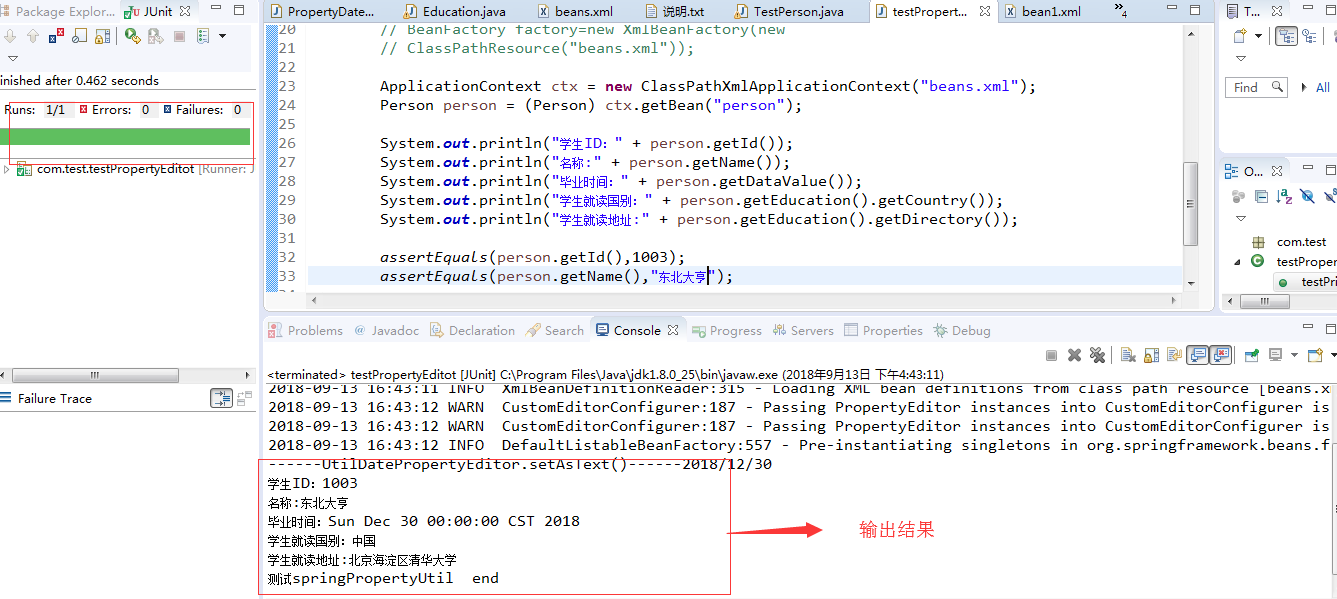
代码:
beans.xm文件
<?xml version="1.0" encoding="UTF-8"?>
<beans xmlns="http://www.springframework.org/schema/beans"
xmlns:xsi="http://www.w3.org/2001/XMLSchema-instance"
xsi:schemaLocation="http://www.springframework.org/schema/beans
http://www.springframework.org/schema/beans/spring-beans-2.5.xsd">
<bean id="PropertyEditorConfigurer1"
class="org.springframework.beans.factory.config.CustomEditorConfigurer">
<property name="customEditors">
<map>
<!-- 引用类的属性类型,本例子中对应 com.test.Person 类的 education 属性 东北大亨对应读取的学校属性 -->
<entry key="com.test.Education">
<!--对应Address的编辑器 -->
<bean class="com.test.EducationPropertyEditor" />
</entry>
</map>
</property>
</bean>
<bean id="PropertyEditorConfigurer2"
class="org.springframework.beans.factory.config.CustomEditorConfigurer">
<property name="customEditors">
<map>
<!-- 引用类的属性类型,本例子中对应 com.test.Person 类的 dataValue属性 -->
<entry key="java.util.Date">
<!--对应dataValue 属性的编辑器 -->
<bean class="com.test.PropertyDateEditor" >
<property name="dataPattern" value="yyyy/MM/dd"/>
</bean>
</entry>
</map>
</property>
</bean>
<bean id="person" class="com.test.Person">
<property name="id" value="1003" />
<property name="name" value="东北大亨" />
<property name="education" value="中国,北京海淀区清华大学" />
<property name="dataValue" value="2018/12/30" />
</bean>
</beans>
测试类 testPropertyEditot:
package com.test;
import org.springframework.context.ApplicationContext;
import org.springframework.context.support.ClassPathXmlApplicationContext;
import junit.framework.TestCase;
public class testPropertyEditot extends TestCase {
public void testPrintProperty() {
System.out.println("测试springPropertyUtil start");
// 可以同时配置多个xml配置文件,如果多个配置具有一定规则情况下可以采用匹配方式进行读取
// 例如有两个xml 文件。既:beans-1.xml,beans-2.xml,beans-3.xml
// 采用匹配方式进行读取
// ApplicationContext ctx = new
// ClassPathXmlApplicationContext("beans-*.xml");
// 废弃方法不建议使用
// BeanFactory factory=new XmlBeanFactory(new
// ClassPathResource("beans.xml"));
ApplicationContext ctx = new ClassPathXmlApplicationContext("beans.xml");
Person person = (Person) ctx.getBean("person");
System.out.println("学生ID:" + person.getId());
System.out.println("名称:" + person.getName());
System.out.println("毕业时间:" + person.getDataValue());
System.out.println("学生就读国别:" + person.getEducation().getCountry());
System.out.println("学生就读地址:" + person.getEducation().getDirectory());
assertEquals(person.getId(),1003);
assertEquals(person.getName(),"东北大亨");
System.out.println("测试springPropertyUtil end");
}
}
日期编辑器 PropertyDateEditor :
package com.test;
import java.beans.PropertyEditorSupport;
import java.text.SimpleDateFormat;
import java.util.Date;
/**
*
* @author 东北大亨
*
*/
public class PropertyDateEditor extends PropertyEditorSupport {
private String dataPattern;
/**
* Parse the value from the given text, using the SimpleDateFormat
*/
@Override
public void setAsText(String text) {
System.out.println("------UtilDatePropertyEditor.setAsText()------" + text);
try {
//SimpleDateFormat sdf = new SimpleDateFormat("yyyy-MM-dd");
SimpleDateFormat sdf = new SimpleDateFormat(dataPattern);
Date date = new Date();
date = sdf.parse(text);
this.setValue(date);
} catch (Exception e) {
e.printStackTrace();
throw new IllegalArgumentException(text);
}
}
// 只要有set方法就可以注入进来
public void setDataPattern(String pattern) {
this.dataPattern = pattern;
}
}
人员 Person pojo类:
package com.test;
import java.util.Date;
import org.apache.commons.lang.builder.ToStringBuilder;
/**
*
* @author 东北大亨
*
*/
public class Person {
private int id;
private String name;
private Education education;
private Date dataValue;
public int getId() {
return id;
}
public void setId(int id) {
this.id = id;
}
public Date getDataValue() {
return dataValue;
}
public void setDataValue(Date dataValue) {
this.dataValue = dataValue;
}
public Education getEducation() {
return education;
}
public void setEducation(Education education) {
this.education = education;
}
public String getName() {
return name;
}
public void setName(String name) {
this.name = name;
}
public String toString() {
return ToStringBuilder.reflectionToString(this);
}
}
实体类属性编辑器:
package com.test;
import java.beans.PropertyEditorSupport;
import org.springframework.util.StringUtils;
/**
* 实体类编辑器
* @author 东北大亨
*
*/
public class EducationPropertyEditor extends PropertyEditorSupport {
@Override
public void setAsText(String text) {
if (text == null || !StringUtils.hasText(text)) {
throw new IllegalArgumentException("就读住址不能为空!");
} else {
String[] StrAddressArr = StringUtils.tokenizeToStringArray(text, ",");
Education add = new Education();
add.setCountry(StrAddressArr[0]);
add.setDirectory(StrAddressArr[1]);
setValue(add);
}
}
public String getAsText() {
Education add = (Education) getValue();
return "" + add;
}
}
学校实体类:
package com.test;
import org.apache.commons.lang.builder.ToStringBuilder;
/**
* 读取学校实体类
* @author 东北大亨
*
*/
public class Education {
private String country;
private String directory;
public String getDirectory() {
return directory;
}
public void setDirectory(String directory) {
this.directory = directory;
}
public String getCountry() {
return country;
}
public void setCountry(String country) {
this.country = country;
}
}
Spring属性编辑器详解的更多相关文章
- spring事务配置详解
一.前言 好几天没有在对spring进行学习了,由于这几天在赶项目,没有什么时间闲下来继续学习,导致spring核心架构详解没有继续下去,在接下来的时间里面,会继续对spring的核心架构在继续进行学 ...
- spring注入参数详解
spring注入参数详解 在Spring配置文件中, 用户不但可以将String, int等字面值注入到Bean中, 还可以将集合, Map等类型的数据注入到Bean中, 此外还可以注入配置文件中定义 ...
- Spring的lazy-init详解
1.Spring中lazy-init详解ApplicationContext实现的默认行为就是在启动服务器时将所有singleton bean提前进行实例化(也就是依赖注入).提前实例化意味着作为初始 ...
- Spring Security Filter详解
Spring Security Filter详解 汇总 Filter 作用 DelegatingFilterProxy Spring Security基于这个Filter建立拦截机制 Abstract ...
- Spring Boot 配置文件详解
Spring Boot配置文件详解 Spring Boot提供了两种常用的配置文件,分别是properties文件和yml文件.他们的作用都是修改Spring Boot自动配置的默认值.相对于prop ...
- spring原理案例-基本项目搭建 02 spring jar包详解 spring jar包的用途
Spring4 Jar包详解 SpringJava Spring AOP: Spring的面向切面编程,提供AOP(面向切面编程)的实现 Spring Aspects: Spring提供的对Aspec ...
- (转)Spring事务管理详解
背景:之前一直在学习数据库中的相关事务,而忽略了spring中的事务配置,在阿里面试时候基本是惨败,这里做一个总结. 可能是最漂亮的Spring事务管理详解 https://github.com/Sn ...
- spring事务管理(详解和实例)
原文地址: 参考地址:https://blog.csdn.net/yuanlaishini2010/article/details/45792069 写这篇博客之前我首先读了<Spring in ...
- 可能是最漂亮的Spring事务管理详解
Java面试通关手册(Java学习指南):https://github.com/Snailclimb/Java_Guide 微信阅读地址链接:可能是最漂亮的Spring事务管理详解 事务概念回顾 什么 ...
随机推荐
- Python学习杂记_5_列表常用操作
列表操作 列表时用方括号括起来的一组元素值,是可变变量,可通过下表取值,也可以通过下表来修改值,列表中的元素是有序的,可以是不同的基本数据类型,如: names=[1, 2, 3, “abc”, “d ...
- iptables介绍iptables和netfilter
随着互联网技术的方兴未艾,各种网络应用层出不穷,网络攻击.黑客入侵也成了网民畅游互联网的心头大患,互联网安全也愈加受到了人们的重视.网络防火墙,作为一种简单高效的互联网防御手段,逐渐成为了网民畅游网络 ...
- springBoot 定时器
程序入口类中加入注解 @EnableScheduling 配置定时任务为并行 @Slf4j @Configuration public class ScheduledConfig implements ...
- Fiddler简介以及web抓包
Fiddler简介以及web抓包 版权声明:本文为博主原创文章,未经博主允许不得转载. 一.Fiddler简介简单来说,Fiddler是一个http协议调试代理工具,它能够记录并检查所有你的电脑和互联 ...
- IM即时通讯群组头像拼接.net core 解决方案
一.需求概述 多人聊天(群组,讨论组,聊天室,以下统称: “群组” )生成一个拼接头像,需要把最先加入群组的几个人(最多4个人,以下简称:头部用户,A.B.C.D)的头像拼凑成在一起. 群组创建后,A ...
- shell 实现自动备份nginx下的站点
shell 实现自动备份nginx下的站点 优点 实现自动备份ngnix下的所有运行的站点 自定义排除备份站点,支持三种排除 自动维护备份目录,防止备份目录无限扩大 备份压缩tar.gz格式 源码: ...
- Tiny4412 支持 adb reboot-bootloader
硬件版本: Tiny4412ADK + S700 4GB u-boot 版本: u-boot-2010-12 linux版本: Linux-3.0.8 版本一 支持 adb re ...
- Oracle rac配置Weblogic数据源(实例名及URL的选择)
这几天,应用程序后台一直报无法取得连数据库接池.但之前从来没有这个问题,迁移到Weblogic后才发生. 之后据了解,我们服务器上的Oracle 10G 是 RAC 的,即有两个节点. 两个节点 IP ...
- php+mysql两次左外联跨表查询
代码如下: $querySel="select * from roomsy rsy left join room ro on rsy.RoomID=ro.ID left join hotel ...
- 解决 ultraedit 菜单字体模糊
新装完ultraedit后,使用时菜单里的字体非常小,模糊不清非常不爽. 1.安装好UltraEdit后,到安装目录里,复制一份Uedit32.exe文件用于修改.2.使用UltraEdit打开复制的 ...