
vue插件开发的两种方法:以通知插件toastr为例
方法一:
1、写插件:
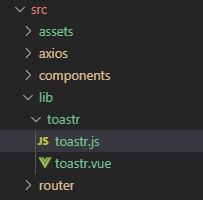
在 src 文件夹下面建 lib 文件夹用于存放插件,lib 文件夹下再建toastr文件夹,在toastr文件夹下新建 toastr.js 和 toastr.vue两个文件。整个项目目录如下所示:

toastr.vue 的内容如下:
<template>

    <div class="vue-toastr-wraper" v-show="isShow">

        {{message}}

    </div>

</template>

<script>

export default {

    name:'toastr',

    props:{

        message:{

            default:"",

            type:String

        },

        isShow:{

            default:false,

            type:Boolean

        }

    },

    mounted(){

        if(this.isShow){

            setTimeout(() => {

                this.isShow = false

            },2500);

        }

    }

}

</script>

<style scoped>

.vue-toastr-wraper{

    background: rgba(0, 0, 0, 0.6);

    color: #fff;

    font-size: 17px;

    padding: 10px;

    border-radius:12px;

    display: -webkit-box;

    -webkit-box-pack: center;

    -webkit-box-align: center;

    position: fixed;

    top: 50%;

    left: 50%;

    z-index: 2000;

    -webkit-transform: translateY(-50%);

    transform: translateY(-50%);

    -webkit-transform: translateX(-50%);

    transform: translateX(-50%);

}

</style>
toastr.vue 是做一个弹出提示,其中传入的参数有两个:message和 isShow,分别表示提示消息以及是否显示提示。
toastr.js中写install方法,内容如下:
import VueToastrPlugin from './toastr.vue'

const toastrPlugin = {

    install: function(Vue) {

        Vue.component(VueToastrPlugin.name, VueToastrPlugin)

    }

}

// global 情况下 自动安装

if (typeof window !== 'undefined' && window.Vue) {

    window.Vue.use(toastrPlugin)

}

// 导出模块

export default toastrPlugin
2. 本地测试
本插件的功能就这么多,因为我们尚未发布,所以先进行本地测试。
2.1 将 App.vue 多余代码删除。
2.2 在 main.js 中引入
import Vue from 'vue'

import App from './App.vue'

import Toastr from './lib/toastr/toastr.js'

Vue.use(Toastr)

new Vue({

  el: '#app',

  render: h => h(App)

})
2.3 在 App.vue 中使用 toastr (别忘记需要传递的参数)
<template>

  <div id="app">

    <toastr :msg = "'测试'" :isShow = "true"/>

  </div>

</template>

<script>

export default {

  name: 'app'

}

</script>

<style lang="scss">

</style>
方法二:
1、写插件:
在 src 文件夹下面建 lib 文件夹用于存放插件,lib 文件夹下再建toastr文件夹,在toastr文件夹下新建 toastr.js 和 toastr.vue两个文件。整个项目目录如下所示:
toastr.vue 的内容如下:
<template>

    <transition name="fade">

        <div class="toast" v-show="show">

            {{message}}

        </div>

    </transition>

</template>

<script>

export default {

  data() {

    return {

      show: false,

      message: ""

    };

  }

};

</script>

<style lang="scss" scoped>

.toast {

  position: fixed;

  top: 50%;

  left: 50%;

  margin-left: -100px;

  margin-top: -30px;

  padding: 2vw;

  width: 200px;

  height: 60px;

  overflow-y: auto;

  font-size: 14px;

  color: #fff;

  text-align: left;

  background-color: rgba(0, 0, 0, 0.8);

  border-radius: 3px;

  z-index: 999;

}

.fade-enter-active,

.fade-leave-active {

  transition: 0.3s ease-out;

}

.fade-enter {

  opacity: 0;

  transform: scale(1.2);

}

.fade-leave-to {

  opacity: 0;

  transform: scale(0.8);

}

</style>
toastr.js中写install方法,内容如下:
import ToastComponent from './toastr.vue'

const Toast = {};

// 注册Toast

Toast.install = function (Vue) {

    // 生成一个Vue的子类

    // 同时这个子类也就是组件

    const ToastConstructor = Vue.extend(ToastComponent)

    // 生成一个该子类的实例

    const instance = new ToastConstructor();

    // 将这个实例挂载在我创建的div上

    // 并将此div加入全局挂载点内部

    instance.$mount(document.createElement('div'))

    document.body.appendChild(instance.$el)

    // 通过Vue的原型注册一个方法

    // 让所有实例共享这个方法

    Vue.prototype.$toast = (msg, duration = 2000) => {

        instance.message = msg;

        instance.show = true;

        setTimeout(() => {

            instance.show = false;

        }, duration);

    }

}

export default Toast
2. 本地测试
2.1 在 main.js 中引入:
// The Vue build version to load with the `import` command

// (runtime-only or standalone) has been set in webpack.base.conf with an alias.

import Vue from 'vue'

import Toast from './lib/toastr/toastr.js'

Vue.use(Toast)

/* eslint-disable no-new */

new Vue({

  el: '#app',

  router,

  store,

  components: { App },

  template: '<App/>'

})
2.2 在 App.vue 中使用 toastr:
// app.vue

<template>

  <div id="app">

    <button @click="toast">显示taost弹出框</button>

  </div>

</template>

<script>

export default {

  name: "app",

  methods: {

    toast() {

      this.$toast("你好");

    }

  }

};

</script>

<style>

#app {

  font-family: "Avenir", Helvetica, Arial, sans-serif;

  -webkit-font-smoothing: antialiased;

  -moz-osx-font-smoothing: grayscale;

  text-align: center;

  color: #2c3e50;

  margin-top: 60px;

}

</style>
比较:
以上介绍了这两种不同的插件编写方法,貌似没有什么不一样啊,真的是这样么?
来看一下以上完整的main.js和app.vue两个文件发现,第一个toastr是显示的写在app.vue模板里的,而第二个toastr并没有作为一个组件写入,仅仅是通过一个方法控制显示。
vue插件开发的两种方法:以通知插件toastr为例的更多相关文章
- jQuery插件开发的两种方法及$.fn.extend的详解(转)
jQuery插件开发的两种方法及$.fn.extend的详解 jQuery插件开发分为两种:1 类级别.2 对象级别,下面为大家详细介绍下 jQuery插件开发分为两种: 1 类级别 类级别你可以 ...
- jQuery插件开发的两种方法及$.fn.extend的详解
jQuery插件开发分为两种: 1 类级别 类级别你可以理解为拓展jquery类,最明显的例子是$.ajax(...),相当于静态方法. 开发扩展其方法时使用$.extend方法,即jQuery.ex ...
- jQuery插件开发的两种方法
1 类级别 类级别你可以理解为拓展jquery类,最明显的例子是$.ajax(...),相当于静态方法. 开发扩展其方法时使用$.extend方法,即jQuery.extend(object); $. ...
- 解决vue项目eslint校验 Do not use 'new' for side effects 的两种方法
import Vue from 'vue' import App from './App.vue' import router from './router' new Vue({ el: '#app' ...
- Vue 创建组件的两种方法
地址:https://blog.csdn.net/cofecode/article/details/74634301 创建组件的两种方法 1.全局注册 2.局部注册 var child=Vue.ext ...
- 两种方法使vue实现jQuery调用
引言 如果说vue是前端工程化使用较多的骨架,那么JavaScript就是我们的前端的细胞.MVVM模式让我们体验到前端开发的便携,无需再过多的考虑DOM的操作.而vue的渐进式开发(逐步引用组件,按 ...
- vue里使用element饿了么的el-menu+vue-router实现路由跳转的两种方法
最近准备写一个echarts的可视化展示案例,首先用vue-cli3创建了一个项目(好像vue-cli4也出来,感觉变化不大,就没升级了) 然后,开始配置路由↓下面是我的router.js文件 imp ...
- vue中使用echarts的两种方法
在vue中使用echarts有两种方法一.第一种方法1.通过npm获取echarts npm install echarts --save 2.在vue项目中引入echarts 在 main.js 中 ...
- 安卓ListView操作的两种方法
举例做一个微信的中间部分(好友消息等信息通知) 第一种:BaseAdapter() package com.example.wx; import java.util.ArrayList;import ...
随机推荐
- [转帖]PostgreSQL的用户、角色和权限管理
PostgreSQL的用户.角色和权限管理 2018年05月18日 14:02:29 jerry-89 阅读数 6143 https://blog.csdn.net/eagle89/article/d ...
- 初学K3Cloud开发
1.BOS中在新建的空白对象中添加一个下推按钮 1.点击“菜单集合”属性 2.在打开的窗体中,点中“工具条”,新增一个按钮 3.将新增的按钮标题改为“下推”,并配置点击事件 列表菜单增加“下推”类似, ...
- Log4j2配置之Appender详解
Log4j2配置之Appender详解 Appender负责将日志事件传递到其目标.每个Appender都必须实现Appender接口.大多数Appender将扩展AbstractAppender,它 ...
- 题解 洛谷P1311 【选择客栈】
可能这做法是最奇葩的ST表 我们枚举k,计算每种色调的客栈各有多少种方法 我们利用一种奇怪的思想:除了不可行的,剩下的都是可行的 所以我们先求出 每种颜色的客栈随机选择两个,一共有多少种结果 接着减 ...
- 并不对劲的bzoj4538:loj2049:p3250:[HNOI2016]网络
题意 有一棵\(n\)(\(n\leq 10^5\))个点的树,\(m\)(\(m\leq 2\times 10^5\))个操作.操作有三种:1.给出\(u,v,k\),表示加入一条从\(u\)到\( ...
- Good Triple CodeForces - 1169D (等差子序列)
大意: 给定01字符串, 求有多少个区间$[l,r]$, 使得存在正整数$x,k$满足$1\le x,k\le n,l\le x<x+2k\le r,s_x=s_{x+k}=s_{x+2k}$. ...
- 项目实践 hrm项目的设计过程
人事管理系统的设计过程 一.数据库表和持久化类 1.1 进行需求分析,根据功能模块设计数据库表 1.2 设计持久化实体 面向对象分析,即根据系统需求提取出应用中的对象,将这些对象抽象成类,再抽 ...
- Scala学习六——对象
一.本章要点 用对象作为但例或存放工具的方法 类可以拥有一个同名的伴生对象 对象可以扩展类或特质 对象的apply方法通常用来构造伴生类的新实例 如果不想显示定义main方法,可以扩展App特质的对象 ...
- [C#]访问共享文件夹或者磁盘(需要用户名密码)
有项目要求使用对方本地管理员访问访问对方D盘,网上找到一段API,刚开始可以使用一段时间,升级到1903就失效了,一脸懵逼啊 using System; using System.Collection ...
- 如果你的评论被WordPress的Akismet插件屏蔽,怎么解封?
Akismet是Matt Mullenweg早期创办的一个项目,现在已经是Automattic公司的一个专注于剿杀垃圾评论的产品.在Wordpress用户中使用最多,z-blog也有用户在用,由于垃圾 ...