
个人项目WordCount基础功能
码云地址:https://gitee.com/stedylan/WordCount
1.PSP表格:
|
PSP2.1 |
PSP阶段 |
预估耗时 (分钟) |
实际耗时 (分钟) |
|
Planning |
计划 |
10 |
10 |
|
· Estimate |
· 估计这个任务需要多少时间 |
600 |
590 |
|
Development |
开发 |
500 |
560 |
|
· Analysis |
· 需求分析 (包括学习新技术) |
60 |
80 |
|
· Design Spec |
· 生成设计文档 |
20 |
0 |
|
· Design Review |
· 设计复审 (和同事审核设计文档) |
30 |
0 |
|
· Coding Standard |
· 代码规范 (为目前的开发制定合适的规范) |
30 |
20 |
|
· Design |
· 具体设计 |
30 |
10 |
|
· Coding |
· 具体编码 |
300 |
380 |
|
· Code Review |
· 代码复审 |
20 |
10 |
|
· Test |
· 测试(自我测试,修改代码,提交修改) |
110 |
160 |
|
Reporting |
报告 |
100 |
0 |
|
· Test Report |
· 测试报告 |
30 |
0 |
|
· Size Measurement |
· 计算工作量 |
35 |
0 |
|
· Postmortem & Process Improvement Plan |
· 事后总结, 并提出过程改进计划 |
35 |
30 |
|
合计 |
600 |
590 |
2.项目分析:
该项目的要求为WordCount的需求可以概括为:对程序设计语言源文件统计字符数、单词数、行数,统计结果以指定格式输出到默认文件result.txt中。-c为统计字符数,-w为统计单词数,-l为统计行数,-o + 文件名为将结果输出到指定的文件中。并要求以命令行的形式对程序进行输入和输出。
解决思路:
在这次项目中,我选择用java完成。首先需要通过流读取文件,然后通过循环一行一行的读取字符串,并对每一行字符串进行统计。当读到文章末尾时,关闭文件。然后打印结果并写入到文件中。最后打包成exe文件并上传至码云。
3.实现过程:
在设计代码时,我将项目分为两个类。一是统计所用的方法类和客户端。

在Count类中有两个方法,本别实现了统计单词数和统计字符数。
代码说明:
在这段代码中,我实现了统计单词数量的功能。该方法中的参数为每一行的字符串。从第一个字符开始遍历,当遇到字母时,然后从当前位置进行二次遍历,知道当前字符不为字母,这时单词数+1。该方法返回统计数。
public static int Words(String str) {

        int count = 0;

        for (int i = 0; i < str.length(); i++) {

            if ((str.charAt(i) >= 'a' && str.charAt(i) <= 'z') || (str.charAt(i) >= 'A' && str.charAt(i) <= 'Z')) {// 遇到字母时遍历直到出现不是字母的字符,此时单词数+1

                if (i == str.length() - 1)

                    break;

                else {

                    int j = 0;

                    for(j=i;j<str.length();j++)

                    {

                        if(!((str.charAt(j) >= 'a' && str.charAt(j) <= 'z')

                            || (str.charAt(j) >= 'A' && str.charAt(j) <= 'Z')))

                            break;

                    }

                    i = j;

                    count++;

                }

            }

        }

        return count;

    }
关于主函数,其中遇到的问题有如何通过命令行将参数传递,借鉴了该博客https://www.cnblogs.com/xy-hong/p/7197725.html。
在这段代码中,实现了可以输入多条命令来输出多项统计结果。这里我主要运用了集合中的方法,将数组当成集合,判断集合当中是否有这个元素,从而完成选择功能。
if (Arrays.asList(args).contains("-o")) {

            fw = new FileWriter(args[args.length - 1], true);

            if (Arrays.asList(args).contains("-c")) {

                fw.write(args[args.length - 3] + "," + "字符数:" + countChar+"\r\n");

                System.out.println(args[args.length - 3] + "," + "字符数:" + countChar);

            }

            if (Arrays.asList(args).contains("-w")) {

                fw.write(args[args.length - 3] + "," + "单词数:" + countWord+"\r\n");

                System.out.println(args[args.length - 3] + "," + "单词数:" + countWord);

            }

            if (Arrays.asList(args).contains("-l")) {

                fw.write(args[args.length - 3] + "," + "行数:" + countLine+"\r\n");

                System.out.println(args[args.length - 3] + "," + "行数:" + countLine);

            }

            fw.flush();

        } else {

            fw = new FileWriter("result.txt", true);

            if (Arrays.asList(args).contains("-c")) {

                fw.write(args[args.length - 1] + "," + "字符数:" + countChar+"\r\n");

                System.out.println(args[args.length - 1] + "," + "字符数:" + countChar);

            }

            if (Arrays.asList(args).contains("-w")) {

                fw.write(args[args.length - 1] + "," + "单词数:" + countWord+"\r\n");

                System.out.println(args[args.length - 1] + "," + "单词数:" + countWord);

            }

            if (Arrays.asList(args).contains("-l")) {

                fw.write(args[args.length - 1] + "," + "行数:" + countLine+"\r\n");

                System.out.println(args[args.length - 1] + "," + "行数:" + countLine);

            }

            fw.flush();

        }
其中还有遇到的问题是我读取文件时,每行首字母都会丢失。这个问题困扰了我很久。后来借鉴了该博客http://www.cnblogs.com/mybook/archive/2011/12/15/2289362.html,原因是bufferreader.read()方法会将首字母读出,这样用readline方法时便不会读取。按照博客里修改代码,最后解决了问题。
while ((s=br.readLine()) != null) {

            countChar += Count.Chars(s);

            countWord += Count.Words(s);

            countLine++;

        }
4.1测试代码:
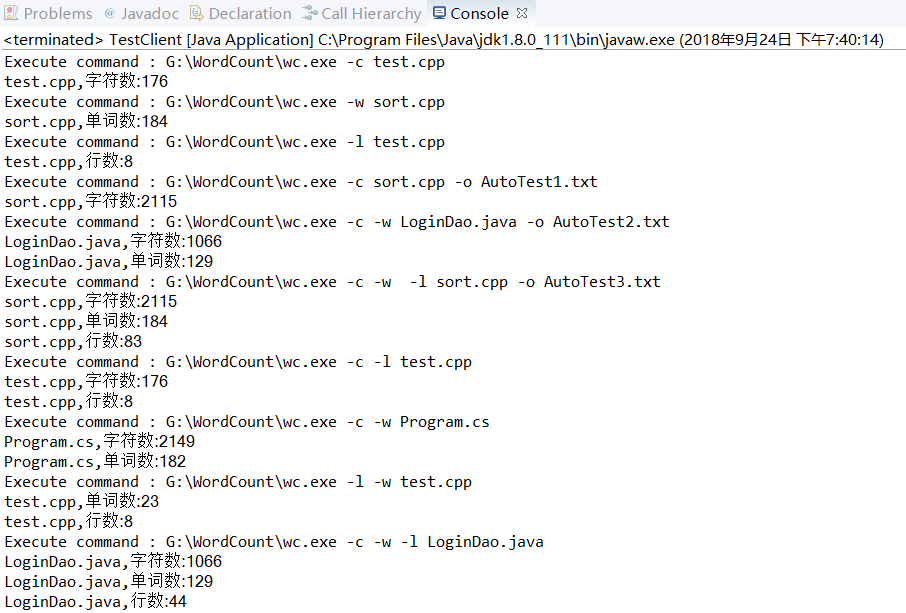
在测试中,我主要的思路是通过java调用cmd控制台,并预设置多条输入指令,并在java控制台显示出来,这样以达到多次测试的功能。
具体代码(借鉴自https://blog.csdn.net/shenxiaomo1688/article/details/79196625):
通过executeCmd方法打开命令行,并执行相应指令。其中用了两个C源代码、一个java源代码和一个C#源代码作为测试用例。
public class TestClient {

    public static String executeCmd(String command) throws IOException {

        System.out.println("Execute command : " + command);

        Runtime runtime = Runtime.getRuntime();

        Process process = runtime.exec("cmd /c " + command);

        BufferedReader br = new BufferedReader(new InputStreamReader(process.getInputStream(), Charset.forName("GBK")));

        String line = null;

        StringBuilder build = new StringBuilder();

        while ((line = br.readLine()) != null) {

            System.out.println(line);

            build.append(line);

        }

        return build.toString();

    }

    public static void main(String[] args) throws IOException {

        // TODO Auto-generated method stub

        executeCmd("G:\\WordCount\\wc.exe -c test.cpp");

        executeCmd("G:\\WordCount\\wc.exe -w sort.cpp");

        executeCmd("G:\\WordCount\\wc.exe -l test.cpp");

        executeCmd("G:\\WordCount\\wc.exe -c sort.cpp -o AutoTest1.txt");

        executeCmd("G:\\WordCount\\wc.exe -c -w LoginDao.java -o AutoTest2.txt");

        executeCmd("G:\\WordCount\\wc.exe -c -w  -l sort.cpp -o AutoTest3.txt");

        executeCmd("G:\\WordCount\\wc.exe -c -l test.cpp");

        executeCmd("G:\\WordCount\\wc.exe -c -w Program.cs");

        executeCmd("G:\\WordCount\\wc.exe -l -w test.cpp");

        executeCmd("G:\\WordCount\\wc.exe -c -w -l LoginDao.java");

    }

}
4.2测试结果:
参考文献:
https://www.cnblogs.com/xy-hong/p/7197725.html
https://www.cnblogs.com/xy-hong/p/7197725.html
http://www.cnblogs.com/mybook/archive/2011/12/15/2289362.html
---恢复内容结束---
个人项目WordCount基础功能的更多相关文章
- WordCount 基础功能
软测第一次作业 该项目在码云上的地址: https://gitee.com/zhege/WordCount 一,概述 WordCount的基础功能需求分析大致如下:对程序设计语言源文件统计字符数.单词 ...
- 项目开发-->基础功能汇总
祭奠曾经逝去的青春…… 1.基础功能汇总-->身份认证及用户登录模块 2.基础功能汇总-->一键登录功能汇总 3.堆和栈 4.变量
- wc基础功能
第一次作业 项目地址 https://gitee.com/xxlznb/WordCount PSP WordCount 预估耗时(分钟) 实际耗时 计划 20 30 预估任务需要时间 20 30 开发 ...
- WordCount基本功能
WordCount基本功能 码云地址:https://gitee.com/Joker_zou/WordCount.git 一.项目需求 WordCount的需求可以概括为:对程序设计语言源文件统计字符 ...
- 系统分析与设计结对项目——WordCount
结对项目完成WordCount 合作者:201631062507 201631062526(学号) 代码地址:https://gitee.com/WordCountMC/WordCountTeam ...
- 可在广域网部署运行的QQ高仿版 -- GG叽叽V3.0,完善基础功能(源码)
(前段时间封闭式开发完了一个项目,最近才有时间继续更新GG的后续版本,对那些关注GG的朋友来说,真的是很抱歉.)GG的前面几个版本开发了一些比较高级的功能,像视频聊天.远程桌面.文件传送.远程磁盘等, ...
- 谷歌Chrome浏览器开发者工具的基础功能
上一篇我们学习了谷歌Chrome浏览器开发者工具的基础功能,下面介绍的是Chrome开发工具中最有用的面板Sources.Sources面板几乎是最常用到的Chrome功能面板,也是解决一般问题的主要 ...
- Karaf 依赖equinox and felix,karaf 本Apache的很多项目作为基础框架
6月17日是Apache Karaf作为Apache顶级项目.Karaf是个运行时包,包含了一个OSGi框架(Equinox或Felix).一个命令shell(Felix Gogo)及默认情况下内置的 ...
- VC项目配置基础以及快捷键(收藏)
来自http://blog.csdn.net/phunxm/article/details/5082488 一.IDE基础配置 1.字体 VC6中“Tools→Options→Format→Font” ...
随机推荐
- vue-wechat-title动态修改title
在使用Vue制作项目的过程中,发现title没有变化 所以使用vue-wechat-title插件动态修改tilte 一.安装 npm vue-wechat-title --save 二.引入和使用 ...
- Spring+SpringMvc+Hibernate整合记录
Spring+SpringMvc+Hibernate+Maven整合各大配置文件记录 1.Idea新建的Maven架构 2.Maven的对象模型的内容 <project xmlns=" ...
- SpringBoot整合MyBatis完成添加用户
怎么创建项目就不说了,可以参考:https://www.cnblogs.com/braveym/p/11321559.html 打开本地的mysql数据库,创建表 CREATE TABLE `user ...
- sql server存储引擎启动错误(SQL Server could not spawn FRunCM thread)
错误信息: 中文版: 服务器无法在 'any' <ipv4> 1433 上侦听.错误: 0x277a.若要继续,请通知您的系统管理员. TDSSNIClient 初始化失败,出现错误 0x ...
- 老贾的幸福生活day03 之思维导图
思维导图 层级关系 从大范围到具体 编程语言 编译型 C C++ ...... 解释型 python php ......... python 基础语法 基础数据类 ...
- 植物大战僵尸:寻找阳光掉落Call调用
实验目标:通过遍历阳光产生的时间,寻找阳光产生的本地Call,使用代码注入器注入,自定义生成阳光 阳光CALL遍历技巧: 进入植物大战僵尸-> 当出现阳光后->马上搜索未知初始数值 返回游 ...
- Digester库
在之前所学习关于启动简单的Tomcat部分实现的代码中,我们使用一个启动类Bootstrap类 来实例化连接器.servlet容器.wrapper实例.和其他组件,然后调用各个对象的set方法将他们关 ...
- 作业5:Java编译原理
零.编译 1.编译器 (1)前端编译器:.java文件转变为.class文件Sun的javacEclipse JDT中的增量编译器(ECJ) (2)后端编译器:.class文件转变为机器码HotSpo ...
- python读写增删修改ini配置文件
一,百度百科 .ini 文件是Initialization File的缩写,即初始化文件,是windows的系统配置文件所采用的存储格式,统管windows的各项配置,一般用户就用windows提供的 ...
- JS基础_while的练习1
<!DOCTYPE html> <html> <head> <meta charset="UTF-8"> <title> ...