
OpenStack kilo版(4) Glance部署
Glance简介
- Glance-api:接受云系统镜像的构建、删除、读取请求
- Glance-Registry:云系统的镜像注册服务
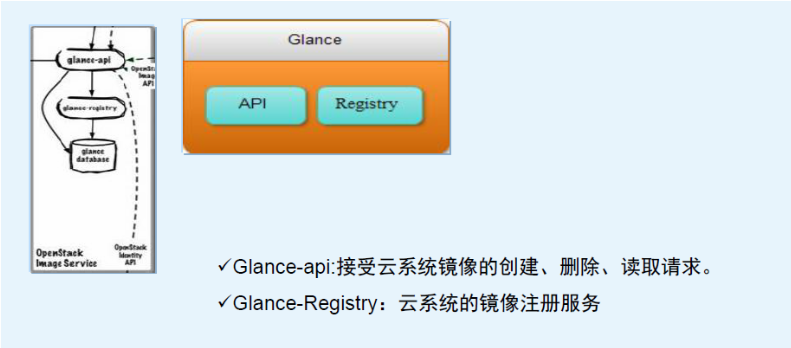

部署在controller节点
配置数据库
MariaDB [(none)]> CREATE DATABASE glance;

Query OK, 1 row affected (0.01 sec)

MariaDB [(none)]> GRANT ALL PRIVILEGES ON glance.* TO 'glance'@'%' IDENTIFIED BY 'glance';

Query OK, 0 rows affected (0.00 sec)

MariaDB [(none)]> GRANT ALL PRIVILEGES ON glance.* TO 'glance'@'localhost' IDENTIFIED BY 'glance';

Query OK, 0 rows affected (0.00 sec)

MariaDB [(none)]> flush privileges ;

Query OK, 0 rows affected (0.00 sec)
配置Glance服务认证
创建glance用户:
root@controller:~# openstack user create --password-prompt glance

User Password:glance

Repeat User Password:glance

+----------+----------------------------------+

| Field    | Value                            |

+----------+----------------------------------+

| email    | None                             |

| enabled  | True                             |

| id       | ddcbca4dd1954923b6fd62f98110242b |

| name     | glance                           |

| username | glance                           |

+----------+----------------------------------+
将admin角色添加给glance用户和service项目:
root@controller:~# openstack role add --project service --user glance admin

+-------+----------------------------------+

| Field | Value                            |

+-------+----------------------------------+

| id    | 6d814860fbae4b9eb46c5e33835ba2a1 |

| name  | admin                            |

+-------+----------------------------------+
创建glance的服务实体:
root@controller:~# openstack service create --name glance  --description "OpenStack Image service" image

+-------------+----------------------------------+

| Field       | Value                            |

+-------------+----------------------------------+

| description | OpenStack Image service          |

| enabled     | True                             |

| id          | d5665f9b2f5645f6aaed5cbf74bad662 |

| name        | glance                           |

| type        | image                            |

+-------------+----------------------------------+
创建镜像服务的API endpoint:
root@controller:~# openstack endpoint create --publicurl http://controller:9292 --internalurl http://controller:9292 --adminurl http://controller:9292 --region RegionOne image

+--------------+----------------------------------+

| Field        | Value                            |

+--------------+----------------------------------+

| adminurl     | http://controller:9292           |

| id           | b0ab3b1386174c3da615baddeb590d27 |

| internalurl  | http://controller:9292           |

| publicurl    | http://controller:9292           |

| region       | RegionOne                        |

| service_id   | d5665f9b2f5645f6aaed5cbf74bad662 |

| service_name | glance                           |

| service_type | image                            |

+--------------+----------------------------------+
安装Glance
root@controller:~# apt-get install glance python-glanceclient
配置Glance
/etc/glance/glance-api.conf :
#[DEFAULT]部分,配置noop禁用通知驱动,因为这是为telemetry测量服务保留的

[DEFAULT]

notification_driver = noop

# [database]部分,配置数据库的连接

[database]

connection = mysql://glance:glance@controller/glance

#[keystone_authtoken]部分,配置身份认证服务访问

[keystone_authtoken]

auth_uri = http://controller:5000

auth_url = http://controller:35357

auth_plugin = password

project_domain_id = default

user_domain_id = default

project_name = service

username = glance

password = glance

[paste_deploy]

flavor = keystone

# [glance_store]部分,配置镜像存储采用文件的形式,并且指定存储的路径

[glance_store]

default_store = file

filesystem_store_datadir = /var/lib/glance/images/
/etc/glance/glance-registry.conf:
[DEFAULT]

notification_driver = noop

[database]

connection = mysql://glance:glance@controller/glance

[keystone_authtoken]

auth_uri = http://controller:5000

auth_url = http://controller:35357

auth_plugin = password

project_domain_id = default

user_domain_id = default

project_name = service

username = glance

password = glance

[paste_deploy]

flavor = keystone
初始化glance数据库:
root@controller:~# su -s /bin/sh -c "glance-manage db_sync" glance
重启Glance服务:
root@controller:~# service glance-registry restart

glance-registry stop/waiting

glance-registry start/running, process 28498

root@controller:~# service glance-api restart

glance-api stop/waiting

glance-api start/running, process 28526
删除ubuntu默认创建的SQLite数据库:
root@controller:~# rm -f /var/lib/glance/glance.sqlite
制作镜像
root@controller:~# echo "export OS_IMAGE_API_VERSION=2" | tee -a admin-openrc.sh

root@controller:~# source admin-openrc.sh

root@controller:~# wget http://download.cirros-cloud.net/0.3.3/cirros-0.3.3-x86_64-disk.img
使用QCOW2的磁盘格式和bare的容器格式将镜像上传到glance镜像服务中,并且设置为对所有的项目可见:
root@controller:~# glance image-create --name "cirros-0.3.3-x86_64" --file cirros-0.3.3-x86_64-disk.img --disk-format qcow2 --container-format bare --visibility public --progress
查看镜像
root@controller:~# glance image-list

+--------------------------------------+---------------------+

| ID                                   | Name                |

+--------------------------------------+---------------------+

| 68657969-e3a0-4206-bbc8-cc15ee97daa5 | cirros-0.3.3-x86_64 |

+--------------------------------------+---------------------+

root@controller:~# glance image-show 68657969-e3a0-4206-bbc8-cc15ee97daa5

+------------------+--------------------------------------+

| Property         | Value                                |

+------------------+--------------------------------------+

| checksum         | 133eae9fb1c98f45894a4e60d8736619     |

| container_format | bare                                 |

| created_at       | 2019-08-16T09:03:58Z                 |

| disk_format      | qcow2                                |

| id               | 68657969-e3a0-4206-bbc8-cc15ee97daa5 |

| min_disk         | 0                                    |

| min_ram          | 0                                    |

| name             | cirros-0.3.3-x86_64                |

| owner            | c1d88707e8a04e889d151496421cfb92     |

| protected        | False                                |

| size             | 13200896                             |

| status           | active                               |

| tags             | []                                   |

| updated_at       | 2019-08-16T09:03:58Z                 |

| virtual_size     | None                                 |

| visibility       | public                               |

+------------------+--------------------------------------+
OpenStack kilo版(4) Glance部署的更多相关文章
- OpenStack Kilo版加CEPH部署手册
OpenStack Kilo版加CEPH部署手册 作者: yz联系方式: QQ: 949587200日期: 2015-7-13版本: Kilo 转载地址: http://mp.weixin.qq.co ...
- OpenStack kilo版(3) Nova部署
部署在controller和compute节点 配置数据库 MariaDB [(none)]> CREATE DATABASE nova; Query OK, 1 row affected ( ...
- OpenStack kilo版(5) Neutron部署
neutron简介: Neutron 通过 plugin 和 agent 提供的网络服务. plugin 位于 Neutron server,包括 core plugin 和 service plug ...
- OpenStack kilo版(2) keystone部署
部署在controller节点 配置数据库 MariaDB [(none)]> CREATE DATABASE keystone; Query OK, 1 row affected (0.00 ...
- openstack安装newton版本Glance部署(二)
一.部署Glance 1.Glance 安装 [root@linux-node1 ~]#yum install openstack-glance python-glance python-glance ...
- OpenStack kilo版(1) 部署环境
硬件 VMware workstation虚拟机 Ubuntu14.04操作系统 虚拟机网络规划 管理网络: eth0, 桥接模式 10.0.0.0/24 外部网络: eth1, nat模式(需要关闭 ...
- OpenStack kilo版(8) 部署cinder
直接将cinder服务和块设备都部署在controller节点上 在controller节点添加一块100G的块设备/dev/sdb 配置数据库 (root@localhost) [(none)]&g ...
- OpenStack kilo版(7) 部署dashboard
安装dashboard root@controller:~# apt-get install openstack-dashboard 配置 /etc/openstack-dashboard/loc ...
- OpenStack_I版 3.glance部署
存储镜像path 默认镜像不存储在本地,一般放在swift对象存储或Cinder块存储里 glance安装 拷贝配置文件到/ect下,并新建配置目录,日志目 ...
随机推荐
- Exception in thread "main" brut.androlib.AndrolibException: Could not decode arsc file at brut.androlib.res.decoder.ARSCDecoder.decode
使用ApkIDE反编译出现如下错误: Exception in thread "main" brut.androlib.AndrolibException: Could not d ...
- 利用 Postman 中 Tests 断言校验返回结果
前言 Postman目前是一款很火的接口测试工具,它有着非常强大结果判断能力.为什么说强大呢,因为Postman有自带的校验脚本,根本不需要我们去学习JS脚本语言,对于代码能力为0的各位测试小伙伴来说 ...
- 转 zabbix 优化方法 以及 后台数据库查询方法 两则
############sample 1 https://blog.51cto.com/sfzhang88/1558254 如何从Zabbix数据库中获取监控数据 sfzhang关注6人评论40627 ...
- PAT 甲级 1145 Hashing - Average Search Time (25 分)(读不懂题,也没听说过平方探测法解决哈希冲突。。。感觉题目也有点问题)
1145 Hashing - Average Search Time (25 分) The task of this problem is simple: insert a sequence of ...
- ASP.NET全球化与本地化 c#多国语言的支持 (项目支持多国语言的开发)
ASP.NET 2.0及以上的开发平台,为全球化本地化应用程序提供了工具,而且实现起来非常简单.以下内容是使用c#,按照帮助一步步做的,将为初学者提供详细的实现步骤. 一 几个必要概念 (一) 支持全 ...
- Linux 指令表
Linux简介(了解) Linux介绍 Linux是类UNIX计算机的统称 Linux操作系统的内核也是Linux Linux是由芬兰大学生Linux Torvalds于1991年编写的 Linux这 ...
- Django 之redis的应用
redis概述 redis是一种nosql数据库,他的数据是保存在内存中,同时redis可以定时把内存数据同步到磁盘,即可以将数据持久化,并且他比memcached支持更多的数据结构(string,l ...
- 仔细看参数--NGINX之tcp_nodelay
一.知识准备 ● 在nginx优化中有个经常需要设置的参数,tcp_nodelay ● 该参数最核心的功能,就是把小包组成成大包,提高带宽利用率也就是著名的nagle算法 ● tcp协议中,有一个现象 ...
- 微信小程序常用控件汇总
1.图片标签: <image src="/images/aaa.png"></image> 2.文本标签: <text>Hello</te ...
- Spring的定时任务@Scheduled(cron = "0 0 1 * * *")
指定某个方法在特定时间执行,如: cron="0 0 1 1 * ?" 即这个方法每月1号凌晨1点执行一次 关于这个注解的解释网上一大堆 但是今天遇到个问题,明明加了注解@Sche ...