
java逆向工程-mybatis-generator
题记:在快速开发的项目中有使用到,这样可以避免冗余工作
声明:参考于https://www.cnblogs.com/smileberry/p/4145872.html
环境:必须先安装maven环境,否则无法实现哦!
mybatis和mysql驱动包下载:https://pan.baidu.com/s/1fE83MJQUPMb4OSU__jm3qw
方式一(命令行执行):
1、目录结构
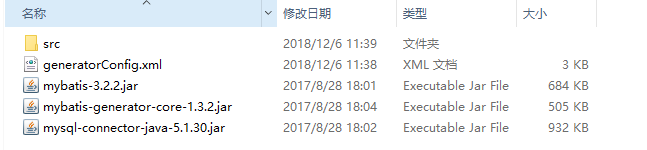
2、generatorConfig.xml内容
<?xml version="1.0" encoding="UTF-8"?>

<!DOCTYPE generatorConfiguration

  PUBLIC "-//mybatis.org//DTD MyBatis Generator Configuration 1.0//EN"

  "http://mybatis.org/dtd/mybatis-generator-config_1_0.dtd">

<generatorConfiguration>

<!-- 数据库驱动-->

    <classPathEntry  location="mysql-connector-java-5.1.30.jar"/>

    <context id="DB2Tables"  targetRuntime="MyBatis3">

        <commentGenerator>

            <property name="suppressDate" value="true"/>

            <!-- 是否去除自动生成的注释 true:是 : false:否 -->

            <property name="suppressAllComments" value="true"/>

        </commentGenerator>

        <!--数据库链接URL,用户名、密码 -->

        <jdbcConnection driverClass="com.mysql.jdbc.Driver" connectionURL="jdbc:mysql://127.0.0.1/test1" userId="root" password="yang156122">

        </jdbcConnection>

        <javaTypeResolver>

            <property name="forceBigDecimals" value="false"/>

        </javaTypeResolver>

        <!-- 生成模型的包名和位置-->

        <javaModelGenerator targetPackage="test.model" targetProject="src">

            <property name="enableSubPackages" value="true"/>

            <property name="trimStrings" value="true"/>

        </javaModelGenerator>

        <!-- 生成映射文件的包名和位置-->

        <sqlMapGenerator targetPackage="test.mapping" targetProject="src">

            <property name="enableSubPackages" value="true"/>

        </sqlMapGenerator>

        <!-- 生成DAO的包名和位置-->

        <javaClientGenerator type="XMLMAPPER" targetPackage="test.dao" targetProject="src">

            <property name="enableSubPackages" value="true"/>

        </javaClientGenerator>

        <!-- 要生成的表 tableName是数据库中的表名或视图名 domainObjectName是实体类名-->

        <table tableName="syspermission" domainObjectName="Syspermission" enableCountByExample="false" enableUpdateByExample="false" enableDeleteByExample="false" enableSelectByExample="false" selectByExampleQueryId="false"></table>

        <table tableName="sysrole" domainObjectName="Sysrole" enableCountByExample="false" enableUpdateByExample="false" enableDeleteByExample="false" enableSelectByExample="false" selectByExampleQueryId="false"></table>

        <table tableName="user_t" domainObjectName="User_t" enableCountByExample="false" enableUpdateByExample="false" enableDeleteByExample="false" enableSelectByExample="false" selectByExampleQueryId="false"></table>

    </context>

</generatorConfiguration>
很多博客有很多冗余信息,我这里就直接给出一些简单的信息了,但这些信息绝对是实用的。
3、进入到步骤1中的目录中,执行下面命令:
java -jar mybatis-generator-core-1.3.2.jar -configfile generatorConfig.xml -overwrite
这样就实现了逆向工程,可以将代码拷贝进项目中。
方式二(idea工具中实现):
1、重申:maven需要先配置。首先建立一个springboot工程,在pom.xml中添加以下配置:
  <plugin>

                <groupId>org.mybatis.generator</groupId>

                <artifactId>mybatis-generator-maven-plugin</artifactId>

                <version>1.3.2</version>

                <configuration>

                    <verbose>true</verbose>

                    <overwrite>true</overwrite>

                </configuration>

  </plugin>
2、generatorConfig.xml内容,注意,targetPackage是包名,targetProject是路径名,数据库驱动是本地的mysql数据连接驱动。
<?xml version="1.0" encoding="UTF-8"?>

<!DOCTYPE generatorConfiguration

  PUBLIC "-//mybatis.org//DTD MyBatis Generator Configuration 1.0//EN"

  "http://mybatis.org/dtd/mybatis-generator-config_1_0.dtd">

<generatorConfiguration>

<!-- 数据库驱动-->

    <classPathEntry  location="D:/21CN/Generator/mysql-connector-java-5.1.30.jar"/>

    <context id="DB2Tables"  targetRuntime="MyBatis3">

        <commentGenerator>

            <property name="suppressDate" value="true"/>

            <!-- 是否去除自动生成的注释 true:是 : false:否 -->

            <property name="suppressAllComments" value="true"/>

        </commentGenerator>

        <!--数据库链接URL,用户名、密码 -->

        <jdbcConnection driverClass="com.mysql.jdbc.Driver" connectionURL="jdbc:mysql://127.0.0.1/test1" userId="root" password="yang156122">

        </jdbcConnection>

        <javaTypeResolver>

            <property name="forceBigDecimals" value="false"/>

        </javaTypeResolver>

        <!-- 生成模型的包名和位置-->

        <javaModelGenerator targetPackage="com.test.shiro.entity" targetProject="D:/springboot-shiro2/src/main/java">

            <property name="enableSubPackages" value="true"/>

            <property name="trimStrings" value="true"/>

        </javaModelGenerator>

        <!-- 生成映射文件的包名和位置-->

        <sqlMapGenerator targetPackage="mapper" targetProject="D:/springboot-shiro2/src/main/resources">

            <property name="enableSubPackages" value="true"/>

        </sqlMapGenerator>

        <!-- 生成DAO的包名和位置-->

        <javaClientGenerator type="XMLMAPPER" targetPackage="com.test.shiro.mapper" targetProject="D:/springboot-shiro2/src/main/java">

            <property name="enableSubPackages" value="true"/>

        </javaClientGenerator>

        <!-- 要生成的表 tableName是数据库中的表名或视图名 domainObjectName是实体类名-->

        <table tableName="syspermission" domainObjectName="Syspermission" enableCountByExample="false" enableUpdateByExample="false" enableDeleteByExample="false" enableSelectByExample="false" selectByExampleQueryId="false"></table>

        <table tableName="sysrole" domainObjectName="Sysrole" enableCountByExample="false" enableUpdateByExample="false" enableDeleteByExample="false" enableSelectByExample="false" selectByExampleQueryId="false"></table>

        <table tableName="user_t" domainObjectName="User_t" enableCountByExample="false" enableUpdateByExample="false" enableDeleteByExample="false" enableSelectByExample="false" selectByExampleQueryId="false"></table>

    </context>

</generatorConfiguration>
3、idea中使用maven命令执行
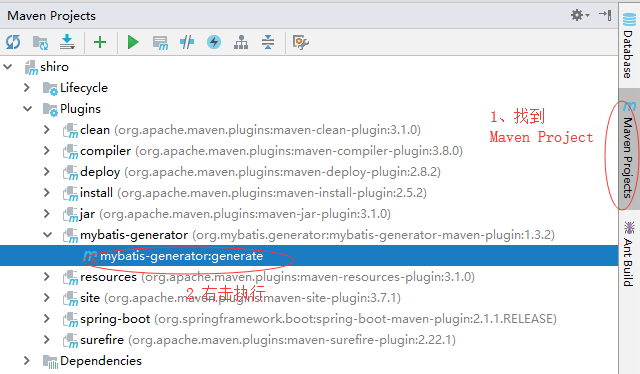
这样,在Idea中就实现了逆向工程了。
亲测有效,如果有什么问题,可以留言.
java逆向工程-mybatis-generator的更多相关文章
- 使用java启动mybatis generator
1.java工程目录结构: |src/main/java |com.leslie.mybatis.generator |MybatisGeneratorUtil.java |src/main/reso ...
- MyBatis学习---逆向工程 Mybatis Generator代码生成
[目录]
- Java逆向工程SpringBoot + Mybatis Generator + MySQL
Java逆向工程SpringBoot+ Mybatis Generator + MySQL Meven pop.xml文件添加引用: <dependency> <groupId> ...
- mybatis0212 mybatis逆向工程 (MyBatis Generator)
1mybatis逆向工程 (MyBatis Generator) .1什么是mybatis的逆向工程 mybatis官方为了提高开发效率,提高自动对单表生成sql,包括生成 :mapper.xml.m ...
- mybatis逆向工程(MyBatis Generator)
mybatis逆向工程(MyBatis Generator) 1. 什么是mybatis逆向工程 mybatis官方为了提高开发效率,提高自动对单表生成sql,包括 :mapper.xml.mappe ...
- springboot(十三):springboot结合mybatis generator逆向工程自动生成代码
错信息generate failed: Exception getting JDBC Driver: com.mysql.jdbc.Driver 上网查了一下,发现原来是generator这个插件在运 ...
- mybatis学习系列四--mybatis generator逆向工程
采用命令行方式执行逆向工程 1.配置文件generatorConfig.xml 保存在目录:D:\E\workspace\eclipse\mybatis_generator <?xmlversi ...
- 在IDEA中使用MyBatis Generator逆向工程生成代码
本文介绍一下用Maven工具如何生成Mybatis的代码及映射的文件. 一.配置Maven pom.xml 文件 在pom.xml增加以下插件: <build> <finalName ...
- SpringBoot+Mybatis+Generator 逆向工程使用(二)
Mybatis-Genarator 逆向工程使用 个人开发环境 java环境:Jdk1.8.0_60 编译器:IntelliJ IDEA 2017.1.4 mysql驱动:mysql-connecto ...
- MyBatis -- generator 逆向工程
一.引言 官网文档:http://www.mybatis.org/generator/index.html 通过使用官方提供的mapper自动生成工具,mybatis-generator-core-1 ...
随机推荐
- 初次安装虚拟机WindowsServer2016
因学习需要,安装windosServer2016,遇到了几个小坑,特地分享一下. 一.windows server 2016 登录 在登录是会出现 输入CTRL+ALT+DEL,才能响应进入用户界面, ...
- [ZOJ 3610] Yet Another Story of Rock-paper-scissors
题目链接:http://acm.zju.edu.cn/onlinejudge/showProblem.do?problemId=4713 题目很水,但是注意,越是简单的题目越应该关注细节,比如说输出上 ...
- Winform的高DPI问题
现在的屏幕大部分都是高分屏,在这样的屏幕下开发winfrom软件就需要注意高DPI问题了 1.Form和UserControl的AutoScaleMode设置为Dpi 2.为项目添加应用程序清单文件( ...
- sysbench运行autogen.sh报错
./autogen.sh: 4: autoreconf: not found是在不同版本的 tslib 下执行 autogen.sh 产生.它们产生的原因一样,是因为没有安装automake 工具, ...
- 在项目中使用Swagger接口说明
该链接写的内容非常详细: https://blog.csdn.net/xudant/article/details/82856555
- pyspark中的dataframe的观察操作
来自于:http://www.bubuko.com/infodetail-2802814.html 1.读取: sparkDF = spark.read.csv(path) sparkDF = spa ...
- sh_17_字符串的查找和替换
sh_17_字符串的查找和替换 hello_str = "hello world" # 1. 判断是否以指定字符串开始 print(hello_str.startswith(&qu ...
- Android学习_Fragment
Fragment 使用Fragment 我们可以把屏幕划分成几块,然后进行分组,进行一个模块化的管理.从而可以更加方便的在运行过程中动态地更新Activity的用户界面.另外Fragment并不能单独 ...
- 输出变量的界值(int、float、long.....)
//整型.浮点型变量表示的关键字,并给出它们各自的界值 #include<iostream> #include<climits> //包含整型数据范围的头文件 #include ...
- Travis-CI自动化测试并部署至自己的CentOS服务器
一直都想自己部署一下自动化测试部署,在了解了Travis-CI之后终于准备在这次和小伙伴一起做的一个博客类网站实验下了. 因为这是一个前后端分离的项目,所以我这里只管前端工程的自动化部署,前端主要用V ...