
Java生成压缩文件(zip、rar 格式)
jar坐标:
        <dependency>

            <groupId>org.apache.ant</groupId>

            <artifactId>ant</artifactId>

            <version>1.10.5</version>

        </dependency>
话不多说,直接上代码
package com.demo.student.util;

import org.apache.tools.zip.ZipEntry;

import org.apache.tools.zip.ZipOutputStream;

import java.io.*;

/**

 * 生成压缩文件 (zip,rar 格式)

 */

public class CompressUtil {

    /**

     * @param path   要压缩的文件路径

     * @param format 生成的格式(zip、rar)d

     */

    public static void generateFile(String path, String format) throws Exception {

        File file = new File(path);

        // 压缩文件的路径不存在

        if (!file.exists()) {

            throw new Exception("路径 " + path + " 不存在文件,无法进行压缩...");

        }

        // 用于存放压缩文件的文件夹

        String generateFile = file.getParent() + File.separator +"CompressFile";

        File compress = new File(generateFile);

        // 如果文件夹不存在,进行创建

        if( !compress.exists() ){

            compress.mkdirs();

        }

        // 目的压缩文件

        String generateFileName = compress.getAbsolutePath() + File.separator + "AAA" + file.getName() + "." + format;

        // 输入流 表示从一个源读取数据

        // 输出流 表示向一个目标写入数据

        // 输出流

        FileOutputStream outputStream = new FileOutputStream(generateFileName);

        // 压缩输出流

        ZipOutputStream zipOutputStream = new ZipOutputStream(new BufferedOutputStream(outputStream));

        generateFile(zipOutputStream,file,"");

        System.out.println("源文件位置:" + file.getAbsolutePath() + ",目的压缩文件生成位置:" + generateFileName);

        // 关闭 输出流

        zipOutputStream.close();

    }

    /**

     * @param out  输出流

     * @param file 目标文件

     * @param dir  文件夹

     * @throws Exception

     */

    private static void generateFile(ZipOutputStream out, File file, String dir) throws Exception {

        // 当前的是文件夹,则进行一步处理

        if (file.isDirectory()) {

            //得到文件列表信息

            File[] files = file.listFiles();

            //将文件夹添加到下一级打包目录

            out.putNextEntry(new ZipEntry(dir + "/"));

            dir = dir.length() == 0 ? "" : dir + "/";

            //循环将文件夹中的文件打包

            for (int i = 0; i < files.length; i++) {

                generateFile(out, files[i], dir + files[i].getName());

            }

        } else { // 当前是文件

            // 输入流

            FileInputStream inputStream = new FileInputStream(file);

            // 标记要打包的条目

            out.putNextEntry(new ZipEntry(dir));

            // 进行写操作

            int len = 0;

            byte[] bytes = new byte[1024];

            while ((len = inputStream.read(bytes)) > 0) {

                out.write(bytes, 0, len);

            }

            // 关闭输入流

            inputStream.close();

        }

    }

  // 测试

    public static void main(String[] args) {

        String path = "";

        String format = "rar";

        try {

            generateFile(path, format);

        } catch (Exception e) {

            e.printStackTrace();

            System.out.println(e.getMessage());

        }

    }

}
结果图:
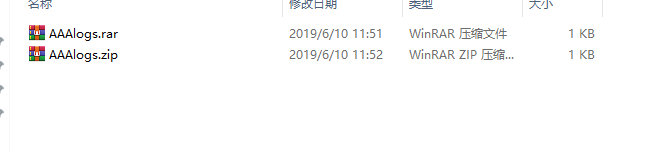
压缩整个文件
    /**

     * 递归压缩文件

     * @param output ZipOutputStream 对象流

     * @param file 压缩的目标文件流

     * @param childPath 条目目录

     */

    private static void zip(ZipOutputStream output,File file,String childPath){

        FileInputStream input = null;

        try {

            // 文件为目录

            if (file.isDirectory()) {

                // 得到当前目录里面的文件列表

                File list[] = file.listFiles();

                childPath = childPath + (childPath.length() == 0 ? "" : "/")

                        + file.getName();

                // 循环递归压缩每个文件

                for (File f : list) {

                    zip(output, f, childPath);

                }

            } else {

                // 压缩文件

                childPath = (childPath.length() == 0 ? "" : childPath + "/")

                        + file.getName();

                output.putNextEntry(new ZipEntry(childPath));

                input = new FileInputStream(file);

                int readLen = 0;

                byte[] buffer = new byte[1024 * 8];

                while ((readLen = input.read(buffer, 0, 1024 * 8)) != -1) {

                    output.write(buffer, 0, readLen);

                }

            }

        } catch (Exception ex) {

            ex.printStackTrace();

        } finally {

            // 关闭流

            if (input != null) {

                try {

                    input.close();

                } catch (IOException ex) {

                    ex.printStackTrace();

                }

            }

        }

    }

    /**

     * 压缩文件(文件夹)

     * @param path 目标文件流

     * @param format zip 格式 | rar 格式

     * @throws Exception

     */

    public static String zipFile(File path,String format) throws Exception {

        String generatePath = "";

        if( path.isDirectory() ){

            generatePath = path.getParent().endsWith("/") == false ? path.getParent() + File.separator + path.getName() + "." + format: path.getParent() + path.getName() + "." + format;

        }else {

            generatePath = path.getParent().endsWith("/") == false ? path.getParent() + File.separator : path.getParent();

            generatePath += path.getName().substring(0,path.getName().lastIndexOf(".")) + "." + format;

        }

        // 输出流

        FileOutputStream outputStream = new FileOutputStream( generatePath );

        // 压缩输出流

        ZipOutputStream out = new ZipOutputStream(new BufferedOutputStream(outputStream));

        zip(out, path,"");

        out.flush();

        out.close();

        return generatePath;

    }
使用
    // 使用例子

    public static void main(String[] args) {

        String path = "F:/test";

        String format = "zip";

        try {

            System.out.println(zipFile(new File(path),format));

        } catch (Exception e) {

            e.printStackTrace();

            System.out.println(e.getMessage());

        }

    }
解压
    /**

     *

     * @param sourceZip 待解压文件路径

     * @param destDir 解压到的路径

     */

    public static String unZip(String sourceZip, String destDir) {

        //保证文件夹路径最后是"/"或者"\"

        if( !destDir.endsWith("/") ){

            destDir += File.separator;

        }

        String newDir = "";

        File sourceFile = new File(sourceZip);

        newDir = sourceFile.getName().substring(0,sourceFile.getName().lastIndexOf("."));

        File destDirFile = new File(destDir + newDir);

        Project p = new Project();

        Expand e = new Expand();

        e.setProject(p);

        e.setSrc(sourceFile);

        e.setOverwrite(true);

        e.setDest(destDirFile);

        /*

         ant下的zip工具默认压缩编码为UTF-8编码,

         而winRAR软件压缩是用的windows默认的GBK或者GB2312编码

         所以解压缩时要制定编码格式

         */

        e.setEncoding("gbk");

        e.execute();

        return destDirFile.getAbsolutePath();

    }
Java生成压缩文件(zip、rar 格式)的更多相关文章
- java生成压缩文件
在工作过程中,需要将一个文件夹生成压缩文件,然后提供给用户下载.所以自己写了一个压缩文件的工具类.该工具类支持单个文件和文件夹压缩.放代码: import java.io.BufferedOutput ...
- ASP.NET生成压缩文件(rar打包)
首先引用ICSharpCode.SharpZipLib.dll,没有在这里下载:http://files.cnblogs.com/files/cang12138/ICSharpCode.SharpZi ...
- java上传图片到数据库,涉及压缩文件zip/rar上传等
项目中有这个需求: 1)上传文件通过公司平台的校验,校验成功后,通过接口,返回文件流: 2)我们根据这个文件流进行操作.这里,先将文件流复制文件到项目临时目录WEB-INF/temp;文件使用完毕,删 ...
- java批量解压文件夹下的所有压缩文件(.rar、.zip、.gz、.tar.gz)
// java批量解压文件夹下的所有压缩文件(.rar..zip..gz..tar.gz) 新建工具类: package com.mobile.utils; import com.github.jun ...
- POI以SAX方式解析Excel2007大文件(包含空单元格的处理) Java生成CSV文件实例详解
http://blog.csdn.net/l081307114/article/details/46009015 http://www.cnblogs.com/dreammyle/p/5458280. ...
- PHP生成压缩文件开发实例
大概需求: 每一个订单都有多个文件附件,在下载的时候希望对当前订单的文件自动打包成一个压缩包下载 细节需求:当前订单号_年月日+时间.zip 例如: 1.生成压缩文件,压缩文件名格式: 2.压缩文件 ...
- java对压缩文件进行加密,winrar和好压 直接输入解密密码来使用
<!-- https://mvnrepository.com/artifact/net.lingala.zip4j/zip4j --> <dependency> <gro ...
- Java生成CSV文件实例详解
本文实例主要讲述了Java生成CSV文件的方法,具体实现步骤如下: 1.新建CSVUtils.java文件: package com.saicfc.pmpf.internal.manage.utils ...
- 【转载】在linux下别用zip 用tar来压缩文件 zip解压后还是utf-8 window10是GBK
3.2 使用 unzip 命令解压缩 zip 文件 将 shiyanlou.zip 解压到当前目录: $ unzip shiyanlou.zip 使用安静模式,将文件解压到指定目录: $ un ...
随机推荐
- 《C专家编程》读书笔记之第1~4章
一.C:穿越时空的迷雾 1. C标准中定义了描述编译器的特点的一些术语: (1) 由编译器定义的(imprementation-defined) 由编译器设计者决定如何处理.例如:整型数右移时要不要扩 ...
- B7. Concurrent 锁的分类
[概述] 锁的分类根据不同的维度可以分为以下几种: 悲观锁和乐观锁 共享锁(S锁,读锁)和排他锁(X锁,写锁) 公平锁和非公平锁 重入锁 分段锁 [悲观锁和乐观锁] 悲观锁和乐观锁是两种处理并发冲突的 ...
- kafka producer 生产者客户端参数配置
在生产者向broker发送消息时,需要配置不同的参数来确保发送成功. acks = all #指定分区中有多少副本必须收到这条消息,生产者才认为这条消息发送成功 acks = 0 #生产者发送消息之后 ...
- spring cloud微服务docker启动
1. 背景 将系统拆分成微服务,一个系统可能拆分成十几个服务,服务太多会影响发布和管理,所以容器话之后易于管理和版本发布,鉴于此将spring cloud微服无docker容器化. 2.依赖环境 Ce ...
- Linux挂载磁盘&kuoron
1.添加磁盘 物理服务器直接插上硬盘即可,虚拟机的话给直接添加磁盘即可,不懂的可以自行百度,比较简单. 2.管理磁盘分区,fdisk命令. 在Linux系统中,管理硬盘设备最常用的方法就当属 fdis ...
- Python学习3——列表和元组
一.通用序列操作——索引.切片.相加.相乘.成员资格检查 1.索引,正序从0开始为第一个元素,逆序从-1开始,-1为最后一个元素 >>> greeting[0] 'h' >&g ...
- MySQL 并发事务问题以及事务的隔离级别
一.并发事务处理带来的问题 相对于串行处理,并发事务(InnoDB)处理能大大增加数据库资源的利用率,提高数据库系统的事务吞吐量,从而可以支持更多用户. 但并发事务处理也会带来一些问题,主要有一下几种 ...
- configure,make和make install关系
linux编译安装中configure.make和make install各自的作用 ./configure是用来检测你的安装平台的目标特征的.configure根据给定的参数和系统环境会生成Make ...
- Scala学习二十——Actor
一.本章要点 每个actor都要扩展Actor类并提供act方法 要往actor发送消息,可以用actor!message 消息发送是异步的:”发完就忘“ 要接受消息,actor可以调用receive ...
- StoneTab标签页CAD插件 3.2.1
//////////////////////////////////////////////////////////////////////////////////////////////////// ...